Gui.cs: Question: How do I add to a ListView after the ListWrapper has been initilized?
I have a use case where I would like to update the underlying datasource for my ListView. I was hoping I could simply .Add() or .Remove() from the underlying IList datasource but that doesn't seem to be the case. Is my only option to set the ListView.Source property with a new IList?
Example
```c#
private static List
public static void Main()
{
Application.Init();
var window = new Window() { Height = Dim.Fill() ,Width = Dim.Fill() };
Application.Top.Add(window);

var list1 = new ListView(source1) { Width = 8, Height = Dim.Fill() };
window.Add(list1);

var index = 1;
Application.MainLoop.AddTimeout(TimeSpan.FromSeconds(1), loop =>
{
    source1.Add($"Item {index++}"); // These are not rendered
    return true;
});

Application.Run();
}
```
 brian-pickens-web
All 11 comments
Just call list1.SetNeedsDisplay() after the source1.Add call.
 tig
on 30 Jul 2020
tig
on 30 Jul 2020
list1.MoveDown (); automatically call the SetNeedsDisplay
 BDisp
on 30 Jul 2020
BDisp
on 30 Jul 2020
list1.MoveDown ();automatically call theSetNeedsDisplay
This will work too, but will cause the list to scroll as things are added. That is not always wanted.
tig
on 30 Jul 2020
Yes is true. Thanks @tig
BDisp
on 30 Jul 2020
Thank you! In the example above, adding SetNeedsDisplay caused the ListView to update. However here is a different example with a slightly more complicated scenario. This time I have a second ListView who's Source is a Property which is derived from the values of a Dictionary. In this case, adding SetNeedsDisplay did not work.
```c#
private static Dictionary
{
{ 1, "one" },
{ 2, "two" },
{ 3, "three" }
};
private static List
private static IList source2 => dictionary.Values.ToList();
public static void Main()
{
Application.Init();
var window = new Window() { Height = Dim.Fill(), Width = Dim.Fill() };
Application.Top.Add(window);

var list1 = new ListView(source1) { Width = 8, Height = Dim.Fill() };
var list2 = new ListView(source2) { Width = 8, Height = Dim.Fill(), X = Pos.Right(list1) };
window.Add(list1);
window.Add(list2);

var index = 1;
source1.Add($"Item {index++}");
source1.Add($"Item {index++}");
source1.Add($"Item {index++}");

dictionary.Add(4, "four"); // These are not rendered
dictionary.Add(5, "five"); // These are not rendered
dictionary.Add(6, "six");  // These are not rendered
list2.SetNeedsDisplay();

Application.Run();
}
```
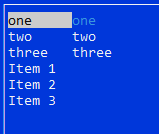
brian-pickens-web
on 30 Jul 2020
Try with List<(int, string)>
BDisp
on 30 Jul 2020
This is rendering:
class Program {
    //private static Dictionary<int, string> dictionary = new Dictionary<int, string> ()
    //{
    //    { 1, "one" },
    //    { 2, "two" },
    //    { 3, "three" }
    //};
    private static List<(int, string)> dictionary = new List<(int, string)> ()
    {
        { (1, "one") },
        { (2, "two") },
        { (3, "three") }
    };

    private static List<string> source1 = new List<string> () { "one", "two", "three" };
    //private static IList source2 => dictionary.Values.ToList ();
    private static IList source2 => dictionary;

    public static void Main ()
    {
        Application.Init ();

        var window = new Window () { Height = Dim.Fill (), Width = Dim.Fill () };
        Application.Top.Add (window);

        var list1 = new ListView (source1) { Width = 10, Height = Dim.Fill () };
        var list2 = new ListView (source2) { Width = 10, Height = Dim.Fill (), X = Pos.Right (list1) };
        window.Add (list1);
        window.Add (list2);

        var index = 1;
        source1.Add ($"Item {index++}");
        source1.Add ($"Item {index++}");
        source1.Add ($"Item {index++}");

        dictionary.Add ((4, "four")); // These are not rendered
        dictionary.Add ((5, "five")); // These are not rendered
        dictionary.Add ((6, "six"));  // These are not rendered
        list2.SetNeedsDisplay ();

        Application.Run ();
    }
}
Even without list2.SetNeedsDisplay ();
BDisp
on 30 Jul 2020
Thanks @BDisp for an attempted workaround. However I was hoping I could essentially use an expression as my IList source. To answer my own question, I realized that using a Property accessor actually calls the Get method and thus returns a temporary value. It is not a reference to the dictionary source. Here is the stackoverflow question I found talking about it.
I think what I'll do is create my own implementation of IListDatasource that takes an Expression and see if that will work for my use case.
brian-pickens-web
on 31 Jul 2020
Here a little sample:
class Program {
    public interface IValueConverter {
        object Convert (object value, object parameter = null);

    }

    public class Binding {
        public View Target { get; private set; }
        public View Source { get; private set; }

        public string SourcePropertyName { get; private set; }
        public string TargetPropertyName { get; private set; }

        private object sourceDataContext;
        private PropertyInfo sourceBindingProperty;
        private IValueConverter valueConverter;

        public Binding (View source, string sourcePropertyName, View target, string targetPropertyName, IValueConverter valueConverter = null)
        {
            Target = target;
            Source = source;
            SourcePropertyName = sourcePropertyName;
            TargetPropertyName = targetPropertyName;
            sourceDataContext = Source.GetType ().GetProperty ("DataContext").GetValue (Source);
            sourceBindingProperty = sourceDataContext.GetType ().GetProperty (SourcePropertyName);
            this.valueConverter = valueConverter;
            UpdateTarget ();

            var notifier = ((INotifyPropertyChanged)sourceDataContext);
            if (notifier != null) {
                notifier.PropertyChanged += (s, e) => {
                    if (e.PropertyName == SourcePropertyName) {
                        UpdateTarget ();
                    }
                };
            }
        }

        private void UpdateTarget ()
        {
            try {
                var sourceValue = sourceBindingProperty.GetValue (sourceDataContext);
                if (sourceValue == null) {
                    return;
                }

                var finalValue = valueConverter?.Convert (sourceValue) ?? sourceValue;

                var targetProperty = Target.GetType ().GetProperty (TargetPropertyName);
                targetProperty.SetValue (Target, finalValue);
            } catch (Exception ex) {
                Debug.WriteLine ($"Binding failed: {ex}");

                throw;
            }
        }
    }

    public class ListWrapperConverter : IValueConverter {
        public object Convert (object value, object parameter = null)
        {
            var wrapper = new ListWrapper ((IList)value);
            return wrapper;
        }
    }

    private static Dictionary<int, string> dictionary = new Dictionary<int, string> ()
    {
        { 1, "one" },
        { 2, "two" },
        { 3, "three" }
    };

    private static List<string> source1 = new List<string> () { "one", "two", "three" };
    private static IList source2 => dictionary.Values.ToList ();

    public class DictionaryData : INotifyPropertyChanged {
        public event PropertyChangedEventHandler PropertyChanged;
        private List<string> items;
        private Dictionary<int, string> database;

        public List<string> Items {
            get => items;
            set {
                if (value != items) {
                    items = value;
                    PropertyChanged?.Invoke (this, new PropertyChangedEventArgs (nameof (Items)));
                }
            }
        }

        public DictionaryData ()
        {
            database = dictionary;
            items = new List<string> ();
            foreach (var item in dictionary) {
                items.Add (item.Value);
            }
        }

        public void Add (int i, string v)
        {
            dictionary.Add (i, v);
            items.Add (v);
        }
    }

    public class DictionaryWindow : Window {
        public static DictionaryData DataContext { get; set; }

        public DictionaryWindow ()
        {
            DataContext = new DictionaryData ();

            var list1 = new ListView (source1) { Width = 10, Height = Dim.Fill () };
            var list2 = new ListView (source2) { Width = 10, Height = Dim.Fill (), X = Pos.Right (list1) };
            Add (list1);
            Add (list2);

            var index = 1;
            source1.Add ($"Item {index++}");
            source1.Add ($"Item {index++}");
            source1.Add ($"Item {index++}");

            var listWrapperConverter = new ListWrapperConverter ();
            var _ = new Binding (this, "Items", list2, "Source", listWrapperConverter);

            DataContext.Add (4, "four"); // These are not rendered
            DataContext.Add (5, "five"); // These are not rendered
            DataContext.Add (6, "six");  // These are not rendered
        }
    }

    public static void Main ()
    {
        Application.Init ();
        Application.Run (new DictionaryWindow ());
    }
}
Closing.
tig
on 28 Sep 2020
Related issues
tig
·
7Comments
tig
·
6Comments
 Mgamerz
·
6Comments
Mgamerz
·
6Comments
 0x788
·
3Comments
0x788
·
3Comments
 UnrealSecurity
·
4Comments
UnrealSecurity
·
4Comments