Seems to me that it should at least be an option for a View to clip all output.
IOW, this would be so much slicker if the sub window (a FrameView) clipped the Labels.

Note the Dim.Fills:
 tig
tig
All 10 comments
Everything that is off-limits should be clipped. Really annoying effect :-)
 BDisp
on 20 Apr 2020
BDisp
on 20 Apr 2020
I agree, it should be done. Up until now, I have been working on the assumption that all views would do the right thing, but as this shows, it is easy to forget.
 migueldeicaza
on 20 Apr 2020
migueldeicaza
on 20 Apr 2020
Even in the Window view all the off-limits should be clipped.
BDisp
on 20 Apr 2020
This should not have been automatically closed. Here's another repro:
Use MessageBoxes scenario` to reproduce:
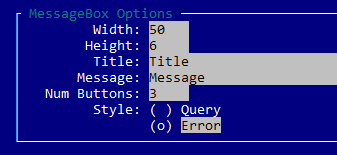
Note the code specifies Width = 5 but the control width actually requires 8 (5 + ( )).
var styleRadioGroup = new RadioGroup (new [] { "_Query", "_Error" } ) {
    X = Pos.Right (label) + 1,
    Y = Pos.Top (label),
    Width = 5, // BUGBUG: This should cause clipping!
};
frame.Add (styleRadioGroup);
Clicking in "( ) Q" or "( ) E" works. Clicking on "uery" or ("rror") does not.
This is likely a dupe of #399, but
tig
on 29 May 2020
I don't want to jinx it but I think i finally fixed ALL clipping issues. It's like pushing sand uphill.
I did it in such a way that most views will not have to think about clipping themselves. Some, like ScrollView that intentionally have child windows that are larger than this.Bounds need to take care of it, but everyone else gets it for free.
PR coming soon...
tig
on 29 May 2020
That's right. You already got there. ScrollViewis an example of this. As long as each container properly accommodates theirs childrens within its limits, the top-level has its work facilitated. Should top-levels behave like ScrollViews in order to be clipping its children around them? I think so.
BDisp
on 29 May 2020
I was wrong and my PR (#580), did not actually fix clipping correctly.
New PR coming tomorrow.
tig
on 31 May 2020
Don't forget that you also have to clipping the subviews of the containers, namely the ScrollViewand ProgressBar.
Forget I already noticed that this has already been solved with your PR #586
BDisp
on 31 May 2020
The best way would be Viewwould be responsible for calling AddRuneand AddStr. To do this, it is necessary to divert the entire call to Driver.AddRune and Driver.AddStr to View.AddRune and View.AddStr and then the View will be responsible for calling Driver.AddRune and Driver.AddStr, respectively.
I think this is no longer necessary according to PR #586
BDisp
on 31 May 2020
Fixed!
tig
on 4 Jun 2020
Related issues
 alet
·
6Comments
alet
·
6Comments
 TylerLeonhardt
·
5Comments
migueldeicaza
·
8Comments
tig
·
4Comments
TylerLeonhardt
·
5Comments
migueldeicaza
·
8Comments
tig
·
4Comments
 stevozilik
·
8Comments
stevozilik
·
8Comments