Gui.cs: TextView: Does not support \r\n (renders as \r as square box on Windows)
With the default Windows driver (default init), adding newlines to TextView renders as follows:

 kzu
kzu
All 11 comments
For me, it displays as a musical note (different font I'm assuming)
Is there an easy fix to TextView class for this? I'm currently digging around in it trying to find out how it's registering/displaying 0x13 (the newline character)
 Mashrien
on 26 Nov 2019
Mashrien
on 26 Nov 2019
Replication is very simple:
textView.Text += Environment.Newline + "text";
Repeat that a few times.. it also seems to duplicate the 0x13 char in-place any time it's rendered.
Mashrien
on 26 Nov 2019
What should be rendered ? We can trim \r and \n . It will improve the case a line ends with a newline.
But how should a multiline text be handled ? Say a text with 3 x 80 characters.
 kbilsted
on 26 Nov 2019
kbilsted
on 26 Nov 2019
I don't understand the confusion..
Newline's shouldn't render as a character- When a newline is found, just move down to the next line and continue printing characters?. I've tried trimming \r and \n, even tried Regex.Replace("\n+", "") to remove duplicates, but they (newline symbols, ♪) still appear after successive inputs.
♪
some example text♪
this isn't how to render a newline♪
lol, hope this shows the problem♪
Mashrien
on 26 Nov 2019
A temporary solution is to remove the '\r' from your newlines, and only display the '\n'
(On Windows, a newline is two characters, 0x0D 0x0A. The TextView is rendering 0x0D as a literal character, rather than treating it as a proper new line, just remove 0x0D (byte 13) from your text, leaving ONLY the 0x0A (byte 10) before sending to TextView.
string = Regex.Replace(string, "\r", "");
textView.Text = string;
Mashrien
on 26 Nov 2019
There could be a confusion when the field has a height of 1 and containing multi line content
kbilsted
on 26 Nov 2019
No.. It's a multiline box, height approximately 12 characters. Each time a line is inserted it adds another ♪ to the previous lines where a newline should be..
The code to produce the behavior seen below is simply this:
textView1.Text += textField.Text + Environment.NewLine;
If you count the number of ♪ characters displayed on the top line, you'll see they're increasing with each line added.. In interpreting the 'runes' to display, it's appending an \r to every line.
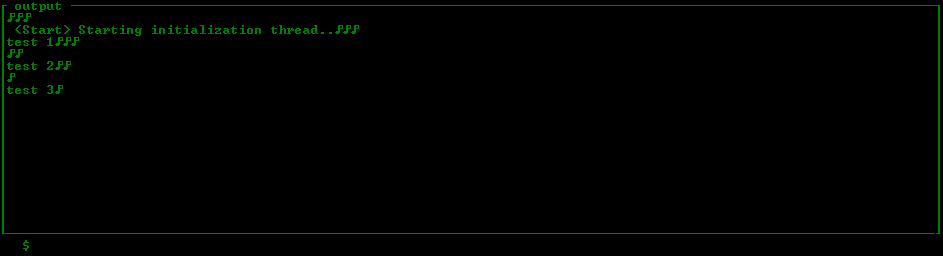
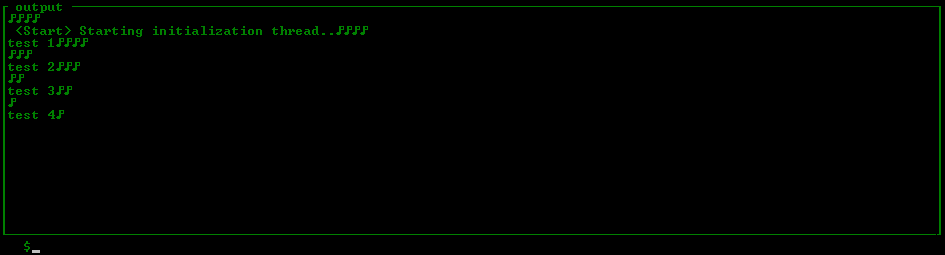
If this still doesn't properly illustrate the problem, I'll record a live video and convert it to gif showing precisely the behavior it's displaying when adding text.
Mashrien
on 27 Nov 2019
I fixed this in Label in #605
It still needs to be fixed in TextView and TextField.
 tig
on 4 Jun 2020
tig
on 4 Jun 2020
Appreciate you fixing it in Label. :)
I had cobbled together a workaround locally that produced the desired results, however it's been long enough I can't remember what I had to do to get it to work lol
Mashrien
on 6 Jun 2020
I'll get to TextView asap. Thanks.
tig
on 6 Jun 2020
Fixed by the PR #1025.
 BDisp
on 27 Dec 2020
BDisp
on 27 Dec 2020
Related issues
 stevozilik
·
8Comments
stevozilik
·
8Comments
 daltskin
·
7Comments
daltskin
·
7Comments
 0x788
·
3Comments
0x788
·
3Comments
 TylerLeonhardt
·
5Comments
tig
·
6Comments
TylerLeonhardt
·
5Comments
tig
·
6Comments
Most helpful comment
I'll get to TextView asap. Thanks.