The button for making new tabs has vanished as of the last update.... What gives? Where'd the button go?
 johnny-mac
All 11 comments
Also, can't open new tab by double-clicking on the free space of tab bar
 amezin
on 12 Dec 2018
amezin
on 12 Dec 2018
This button and the double-click behavior was literally the only reason why I was using Guake instead of, for example, tilda
amezin
on 12 Dec 2018
we can use ctrl+shift+T, but I'd still like to know why the button is gone...
johnny-mac
on 12 Dec 2018
Seems to be part of a new design or something? I'd like to see the button back though.
 Archcry
on 13 Dec 2018
Archcry
on 13 Dec 2018
same here, would like it back
 Zjemm
on 20 Dec 2018
Zjemm
on 20 Dec 2018
Sounds like you are relying on your mouse too much. I was very happy to see this ugly button removed. I never used it. It makes no sense to hit a shortcut key to activate Guake, then reach for the mouse to open a new tab, then back to the keyboard to actually use the tab. How hard is it to remember ctrl-shift-t or your own choice of shortcut key?
 hackel
on 28 Dec 2018
hackel
on 28 Dec 2018
@hackel, something that works for you doesn't necessarily work for everyone :P It would be nice to have the choice (in the settings?) to turn the button on.
EDIT: if however, this was a conscious and carefully considered decision then I'm fine with that, It's just that the "I don't like or use it and therefore it should not be there" argument isn't a real good argument in my opinion. There are a lot of ways people use computers, you can't expect everyone to use it the exact same way.
Archcry
on 28 Dec 2018
Do you also make a selection with a keyboard? I also use the keyboard for everyday work, but there are cases when the mouse is already in your hand and reach for the keyboard longer than you click.
 gserrg
on 28 Dec 2018
gserrg
on 28 Dec 2018
From @johnny-mac
we can use ctrl+shift+T, but I'd still like to know why the button is gone...
Since I was the person who removed the button here is why (+ a little bit of history):
Note: when I speak about a notebook I mean the Gtk widget.
As of Guake 0.8.x (which was the version is started contributing to Guake), Guake had a custom implementation of the Gtk's notebook-tab-bar: https://github.com/Guake/guake/blob/0.8.x/src/guake/guake_notebook.py which looked like this:


The good things about it were:
- The size of the tab-bar could be adjusted to make room for the add-tab-button on right side.
- More possibilities to set custom click listeners to add double-click-on-empty-space-to-add-tab functionally.
The negatives were:
- Reordering had to be implemented by Guake itself.
- Scrolling had to be implemented by Guake itself.
- Highlighting had to be implemented by Guake itself.
- Adding and removing new tabs had to be implemented by Guake itself.
- Menus had to be implemented by Guake itself.
- Changing tabs had to be implemented by Guake itself.
- The custom implementation was not themed to fit in to the whole Gtk3 ecosystem and bringing it to this point would have been a s* load of work.
And for all of this custom implementations they had to be reworked once in a while to stay on par with Gtk2/3/4.
As of the time when I ported Guake from Gtk2 to Gtk3 (Guake 3.0.0) I just ported the whole custom implementation so that it was part of Guake until I started working on https://github.com/Guake/guake/commit/1311cb0b6b16952ebddf766d75576146f45dc218 which was in my opinion necessary to get to a code base upon which the split-terminal (and now the per workspace) functionality could be implemented (a big need was to enable more than just one terminal per notebook page).
With the reimplementation of the notebook (https://github.com/Guake/guake/commit/1311cb0b6b16952ebddf766d75576146f45dc218) to a more on the default Gtk3 based approach a lot of code was removed from Guake, which made the code base more maintainable and future proof (see new features) (there even was this issue: https://github.com/Guake/guake/issues/1375). But this meant that some of the benefits of a custom implementation where also removed fo example the ability to place a button next to the notebook's tab bar. I my opinion moving to a default implementation brought much more benefits to Guake then we lost in the transition, so I went with it.
From @Archcry
Seems to be part of a new design or something? I'd like to see the button back though.
It wasn't so much of a design decision but more a maintainability decision, even tho by using more of Gtk's components the design got more close to the upstream design philosophy.
To address the point of bringing it back: I understand that people used the button and would like to use it again, I personally haven't used it ever, since I'm a vary keyboard driven user. I don't have an easy solution to this problem other than bringing back a custom implementation (which I don't think anyone would want to maintain). Edit: Turns out this is quite easy to do and Gtk supports it out of the box. Thanks @amezin #1482
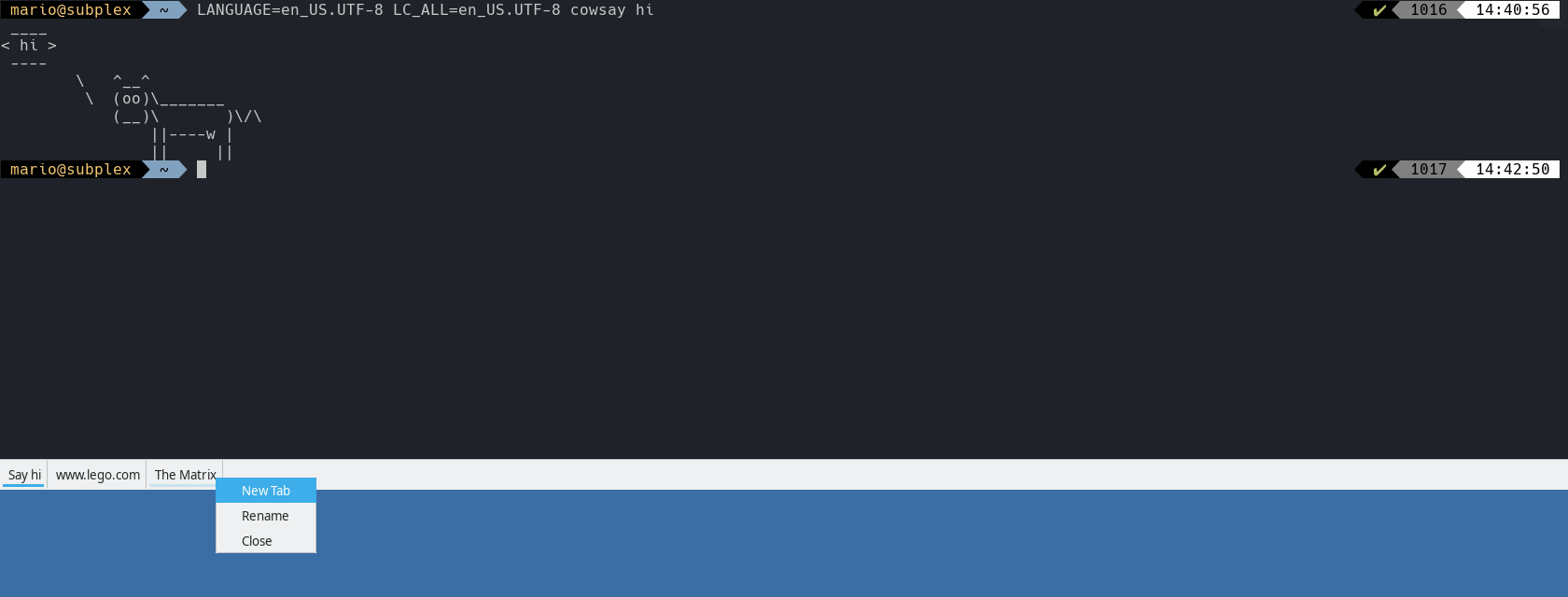
Currently there are two ways to open a new tab one would be hitting the keys ctrl+shift+t (which you can change to what ever you want) or to right-click on to an open tab and choose "New Tab" from there, which is just one little right-click more than the button was PLUS the target is now bigger since you can right click on any tab.
 aichingm
on 4 Jan 2019
aichingm
on 4 Jan 2019
i am ok for adding the + button. thanks for this contribution !
 gsemet
on 8 Jan 2019
gsemet
on 8 Jan 2019
fixed on head
gsemet
on 8 Jan 2019
Related issues
 azzar1
·
5Comments
azzar1
·
5Comments
 machineghost
·
6Comments
machineghost
·
6Comments
 ludovicaelbrecht
·
5Comments
ludovicaelbrecht
·
5Comments
 varemenos
·
3Comments
varemenos
·
3Comments
 Legionof7
·
3Comments
Legionof7
·
3Comments