Guake: [gtk3] Shortcuts: Modifiers not shown
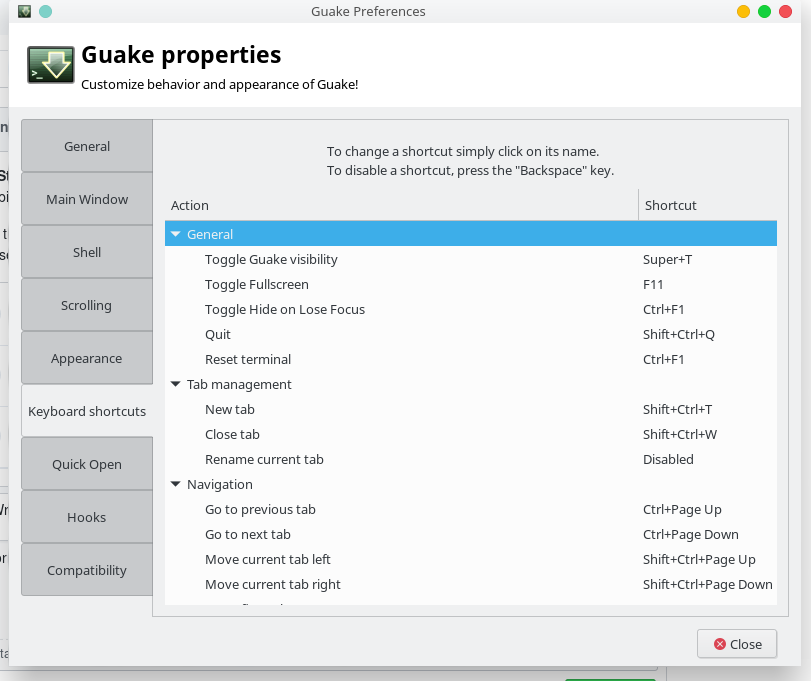
Preferences -> Keyboard shortcuts looks like:
Toggle Guake visibility    F12
Toggle Fullscreen          F11
Toggle Hide on Lose Focus  F1
Quit                       Q
etc.
These should be Control+F1, Ctrl+Shift+Q or such.
Just a wild guess: in guake/data/org.guake.gschema.xml these are specified as e.g. <Control>F1, maybe HTML markup parsing is enabled for the column and that's why <Control> is swallowed as an invalid HTML tag??
 egmontkob
All 19 comments
Probably related: as you mouseover, tons of these are printed to stderr:
Traceback (most recent call last):
  File "/usr/lib/python3/dist-packages/guake/prefs.py", line 1228, in cell_data_func
    renderer.set_property('accel-mods', obj.mask)
NotImplementedError: Setting properties of type 'GdkModifierType' is not implemented
i tried to debug it, i don't know that much why this line fails
renderer.set_property('accel-mods', obj.mask)
it should do what it reported in this issue, add the modifier to the cell and such show "
@aichingm Maybe you know it better than me
 gsemet
on 17 Jan 2018
gsemet
on 17 Jan 2018
Seems to me that Guake is doing everything fine here, and does pretty much what gnome-terminal also does.
A get_property('accel-mods') works as expected, and even its return value cannot be fed back to set_property, it fails with NotImplementedError.
There's hardly any search results for this error on the net, most of them eventually point to a similar problem with gnome-sudoku: https://bugzilla.gnome.org/show_bug.cgi?id=693736, although I can't see how their patch could be applied for us, I can't see any dedicated add_accel_mods or similar method.
Looks like it's a bug in Gtk's Python bindings which makes it impossible to properly use CellRendererAccel.
I guess the issue should be escalated to the guys doing the python integration, Gir, whatever; whoever they are.
I'm really not a Python guy so I might easily be missing something.
egmontkob
on 17 Jan 2018
Take a look at what Terminator does, and see if you can do the same in Guake :-) The shortcuts show up as expected in its preferences. It's written in python (python2, but that's probably irrelevant) and manages to avoid calling set_property('accel-mods', ...) on the cell renderer.
Apparently it does so by assigning the TreeViewColumn's accel-key and accel-mods _attributes_ (not _properties_) to two separate columns of the underlying model in preferences.glade, and later on only changes the data in the model.
egmontkob
on 17 Jan 2018
Hi there, I never have even used Guake, but happened to be alerted to this thread. Having extensive experience in Gtk3 / Python3, I decided to see if I can help.
I created a little mockup using a Treeview / Liststore / GtkCellRendererAccel which used the accel-mods property and it works. I am guessing the obj.mask is the issue. But without a better understanding of what you are trying to do, I can't really help a lot.
 benreu
on 18 Jan 2018
benreu
on 18 Jan 2018
that's an old code that we are dealing with. I can only work spare time on guake, and the preference window by itself given me headaches to deal with.
Feel free to give a try, we only need a way to show the accelerators and allow user to update them. The model/treestore is to my opinion a complex gtk way of storing internally the accelerators with modifier
gsemet
on 19 Jan 2018
@benreu
which used the accel-mods property and it works
Do you mean your code contains a set_property('accel-mods', ...) call in particular?
I am guessing the obj.mask is the issue
As stated above, for me even passing back the value I got from a previous get_property('accel-mods') in lieu of obj.mask resulted in the error, or passing an integer also fails, so it's not some problem of obj.mask itself, rather – as the error message also states – setting this property isn't implemented.
Or if you do _not_ have an explicit set_property('accel-mods', ...) then I guess you're probably doing it the way Terminator also does.
Could you please share your mockup code with us? I'd love to take a quick look. Thanks!
egmontkob
on 19 Jan 2018
By the way, I have imported a similar panel in https://github.com/Guake/guake/blob/master/test.py
It seems to work the way we want the preference panel to work
gsemet
on 19 Jan 2018
Here is some code that works for me:
#!/usr/bin/env python3

from gi.repository import Gtk, Gdk
import os, sys


class GUI:
    def __init__(self):

        self.store = Gtk.ListStore(Gdk.ModifierType, int)
        self.store.append([Gdk.ModifierType.SHIFT_MASK, 85])
        self.store.append([Gdk.ModifierType.CONTROL_MASK, 76])
        treeview = Gtk.TreeView()
        treeview.set_model(self.store)
        renderer_1 = Gtk.CellRendererAccel()
        renderer_1.set_property("editable",True)
        renderer_1.connect("accel-edited", self.on_accel_edited)
        renderer_1.connect("accel-cleared", self.on_accel_cleared)
        column1 = Gtk.TreeViewColumn("Accelerator")
        column1.pack_start(renderer_1, True)
        column1.add_attribute(renderer_1, "accel-mods", 0)
        column1.add_attribute(renderer_1, "accel-key", 1)
        treeview.append_column(column1)
        window = Gtk.Window()
        window.add(treeview)


        window.show_all()


    def on_accel_edited(self, cellrendereraccel, path, key, mods, hwcode):
        accelerator = Gtk.accelerator_name(key, mods)
        self.store[path][0] = mods
        self.store[path][1] = key

    def on_accel_cleared(self, cellrendereraccel, path):
        self.liststore[path][1] = "None"

    def on_window_destroy(self, window):
        Gtk.main_quit()

def main():
    app = GUI()
    Gtk.main()

if __name__ == "__main__":
    sys.exit(main())
@Stibbons \nitpicking You're telling me there is something hard about Gtk-Python combination? \end-nitpicking
By the way, I created a rough draft in the excellent Anjuta, and then made Python code for my example based on Google and your test.py.
benreu
on 19 Jan 2018
@Stibbons Sorry the notification about this slipped through the cracks. Is this still an issue?
This is how it looks to me:
 aichingm
on 21 Jan 2018
aichingm
on 21 Jan 2018
on ubuntu/debian it still does not work. i don't an easy way to install archlinux with gnome and all preconfigured so i cannot test it
gsemet
on 21 Jan 2018
The "not implemented" error is pretty explicit about the feature, well, not being implemented. Whereas on @aichingm's screenshot it obviously works (it that the Arch Linux?) This, combined with Arch's freshness and rolling release nature, pretty much suggests that the missing feature has most likely been implemented lately, and has already arrived at Arch, although is still missing from Ubuntu Artful.
@Stibbons What Ubuntu / Debian were you testing? I'm wondering if there's any chance the feature has already arrived / will arrive soon to Debian Testing and Ubuntu Bionic in time? I don't know.
In case we could get a positive confirmation from someone in time that it's already working in Testing and Bionic, there would be no need for further action – for those distros at least.
Or maybe one could do some digging in changelogs of possibly relevant pieces of software to find where and when this was fixed, and then... then what...
But these approaches are probably not good use of our time.
Terminator, @Stibbons's test.py, and @benreu's demo all seem to use a probably newer and cleaner approach which doesn't depend on the missing feature, whereas current Guake (and gnome-terminal too, but that's not python) seems to use an older approach. I believe the most robust approach Guake could take right now is to migrate to this newer way of populating the shortcuts treeview. Then we could be sure that it works everywhere, and users could update to Guake 3 even on older distros. (And for this, having access to a fresh Arch and being able to test there is irrelevant :-))
egmontkob
on 21 Jan 2018
i am rewriting this part. hope to have a fully working hotkey panel soon
gsemet
on 21 Jan 2018
Thumbs up + fingers crossed at the same time :)
egmontkob
on 21 Jan 2018
@egmontkob yes it is arch
aichingm
on 21 Jan 2018
Just FYI: In #1098 I've mentioned that some shortcuts show up as "Invalid". A quick peek into gtk+'s source suggests that this happens on really invalid shortcuts such as a single arrow key without modifiers. That is, that's also a side effect of the modifiers going missing, and as such, the fix to this bug will automagically fix that, too.
egmontkob
on 21 Jan 2018
if you guys can give a try to this fix, i'll be happy to fix remaining issues :)
gsemet
on 21 Jan 2018
Works for me, thanks!!!!! :)
egmontkob
on 21 Jan 2018
Related issues
 UnsolvedCypher
·
27Comments
UnsolvedCypher
·
27Comments
 jonathanballs
·
19Comments
jonathanballs
·
19Comments
 kikecalpe
·
21Comments
kikecalpe
·
40Comments
kikecalpe
·
21Comments
kikecalpe
·
40Comments
 XaF
·
42Comments
XaF
·
42Comments
Most helpful comment
i am rewriting this part. hope to have a fully working hotkey panel soon