Guake: Terminal doesn't stretch across screen
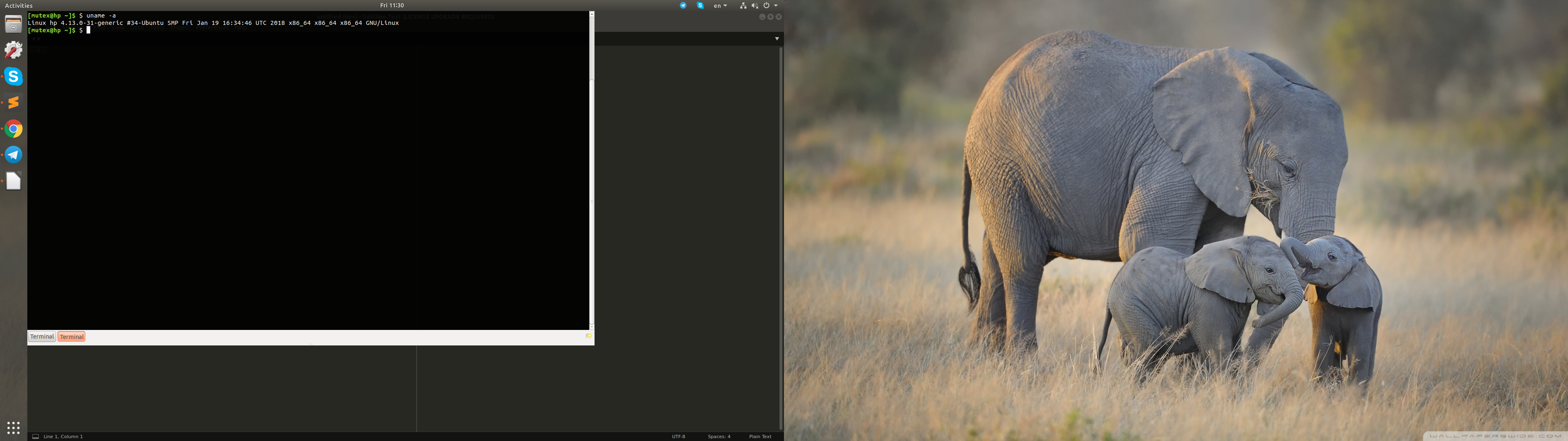
Since last update guake terminal stopped stretching across the whole screen. Main window width is set to max but still it stops before it reaches the far right of screen area.

 logileifs
All 27 comments
Coincidentally, the amount it is short is exactly the same width of the launcher. I would guess that the new ability to re-position the launcher to the bottom has broken a bit of hard coding in the width calculation.
 Richard-Payne
on 4 Oct 2016
Richard-Payne
on 4 Oct 2016
which linux do you have?
 gsemet
on 4 Oct 2016
gsemet
on 4 Oct 2016
I saw it on Ubuntu 16.04. You don't normally notice because guake fits perfects with the launcher in its default position to the left of the screen. However, if you switch the launcher to the bottom of the screen then you see what logileifs screenshot shows.
Richard-Payne
on 4 Oct 2016
I have this configuration and not this issue. Can you start guake from a command line and copy paste the logging text when you display the terminal? It should print information about screen size
gsemet
on 4 Oct 2016
It's happening for me on Ubuntu 14.04 with gnome classic (no unity panel)
logileifs
on 4 Oct 2016
Isn't this identical to #565?
 m3adow
on 1 Nov 2016
m3adow
on 1 Nov 2016
@m3adow seems like the same issue but it only appeared for me in the last update, hadn't been affecting me since 2015 like in #565
logileifs
on 1 Nov 2016
I assume this has something to do with Ubuntu, as I've recently encountered a similar problem with Tilda.
m3adow
on 1 Nov 2016
okay after reading a little bit about the issue I found a workaround, I set the behavior of the Unity launcher to auto-hide = true. With that setting on, guake now fills _almost_ entire screen

logileifs
on 1 Nov 2016
Same on Fedora 25 with Xorg

 ziflex
on 6 Feb 2017
ziflex
on 6 Feb 2017
But when add a new tab the width gets fixed until I reopen the terminal.
ziflex
on 6 Feb 2017
@ziflex Same here. Guake doesn't fill the whole screen width, but as soon as I open a new terminal tab, it resizes to full width and also stays that way even when switching between terminal tabs.
(Guake 0.8.8 on Gnome 3.24.1 on Xorg 1.19.3 on Archlinux, 2 Monitors, Hotkey: SHIFT+^) @
 ziermmar
on 1 Jun 2017
ziermmar
on 1 Jun 2017
I have the same issue as @ziflex and @ziermmar, is there any solution for this?
 alexanderczigler
on 6 Oct 2017
alexanderczigler
on 6 Oct 2017
I have the same bug after upgrading to 17.10. I have two displays.
 pensnarik
on 26 Jan 2018
pensnarik
on 26 Jan 2018
Here is a little patch (guake_app.py) for those who uses Ubuntu 17.10:
983c983,984
<             if os.environ.get('XDG_CURRENT_DESKTOP', '').lower() == "unity".lower():
---
>             if os.environ.get('XDG_CURRENT_DESKTOP', '').lower() == "unity".lower() or \
>                os.environ.get('DESKTOP_SESSION', '').lower() == "ubuntu".lower():
1037a1039,1040
>                     if float(platform.linux_distribution()[1]) + 0.01 >= 17.10:
>                         unity_dock += 24
For me it helped.
pensnarik
on 29 Jan 2018
I don't see a distinction for users without 2 screens, won't it affect eve users that only have 1 screen
gsemet
on 29 Jan 2018
I think the problem is that method is_using_unity() does not recognize unity in Ubuntu 17.10 because $DESKTOP_SESSION variable == ubuntu, not unity.
pensnarik
on 29 Jan 2018
weird, I don't have this issue on mine
gsemet
on 29 Jan 2018
@gsemet could you please show the values of $DESKTOP_SESSION and $XDG_CURRENT_DESKTOP variables?
pensnarik
on 29 Jan 2018
on ubuntu 16.04:
$DESKTOP_SESSION = "ubuntu"
$XDG_CURRENT_DESKTOP="Unity"
For 17.04, 17.10 and 18.04, you'll have to wait this evening I go back to house :)
gsemet
on 29 Jan 2018
On Ubuntu 17.10:
$DESKTOP_SESSION = "ubuntu"
$XDG_CURRENT_DESKTOP = "ubuntu:Gnome"
I think, that is the point.
pensnarik
on 29 Jan 2018
I have this problem on Fedora 26 and 27 as well
 patriczek
on 6 Feb 2018
patriczek
on 6 Feb 2018
Hello,
I was able to solve this issue following the next steps:
locate guake_app.py- Open that file with an editor, in my case:
sudo vim /usr/lib/python2.7/dist-packages/guake/guake_app.py - Comment the if block that follows
# launcher_hide_mode = 1 => autohide
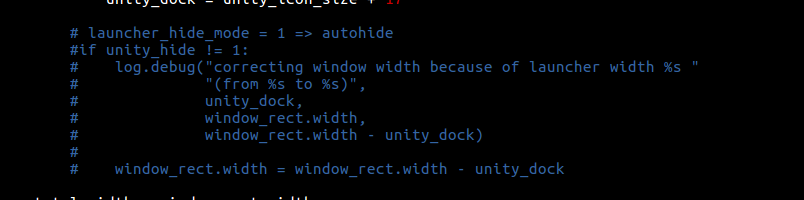
- Kill guake process, or logout from your session.
- Init guake again
That solved the issue for me. Let me know if you need something else.
Thanks @logileifs for pointing me in the right direction.
 OBellon
on 18 Feb 2018
OBellon
on 18 Feb 2018
hello. I would need a way to conditionalize this code section in your system. something like
if do_i_need_to_spread_accross_two_screens(...):
  ...
Could you give me a background to know what is the problem?
Isn't self.window.get_screen().get_n_monitors() enough to know if there are two screens?
OBellon
on 18 Feb 2018
yes but i don't always want guake to span accross 2 screens.
gsemet
on 18 Feb 2018
I have Ubuntu 17.10. Guake was looking good until i plugged another screen.
I solved it changing 17.10 instead of 12.10 in the file guake_app.py, line 1030
line 1030:
if float(platform.linux_distribution()[1]) + 0.01 >= 17.10:
 ivancarlosnieva
on 1 Aug 2018
ivancarlosnieva
on 1 Aug 2018
Related issues
 XaF
·
42Comments
XaF
·
42Comments
 kikecalpe
·
26Comments
kikecalpe
·
26Comments
 JasonDictos
·
28Comments
JasonDictos
·
28Comments
 jonathanballs
·
19Comments
jonathanballs
·
19Comments
 andreicristianpetcu
·
82Comments
andreicristianpetcu
·
82Comments
Most helpful comment
But when add a new tab the width gets fixed until I reopen the terminal.