Grpc: Unable to compile with .NET Native tool chain (UWP project)
What version of gRPC and what language are you using?
gRPC 1.19.0, C#
What operating system (Linux, Windows,...) and version?
Windows 10 1803 (17134.590)
What runtime / compiler are you using (e.g. python version or version of gcc)
Visual Studio Professional 2017 (15.9.6)
What did you do?
- Created a new UWP project that references a new .NET Standard 2.0 library.
- Add the Grpc.Auth (1.19.0) nuget to the .NET Standard library.
- Build with .NET Native tool chain enabled.
What did you expect to see?
A successful build
What did you see instead?
1> C:\Program Files (x86)\Microsoft SDKs\UWPNuGetPackages\microsoft.net.native.compiler\2.2.1\tools\Microsoft.NetNative.targets(792,5): error : ILT0014: Failed to compile interop source code. See the build log for error details.
More specifically:
1>  Compiling interop code
1>  Compiling generated source code: C:\Program Files (x86)\Microsoft SDKs\UWPNuGetPackages\microsoft.net.native.compiler\2.2.1\tools\csc\csc.exe /noconfig @"<path>\ReproGrpc\ReproGrpc\obj\x86\Debug\ilc\intermediate\ReproGrpc.McgInterop.rsp"
1>  obj\x86\Debug\ilc\intermediate\ReproGrpc.McgInterop\ImplTypes.g.cs(630,14): error CS1593: Delegate 'NativeMethods_Delegates_grpcsharp_batch_context_create_delegate__Grpc_Core' does not take 1 arguments
1>  obj\x86\Debug\ilc\intermediate\ReproGrpc.McgInterop\ImplTypes.g.cs(1421,14): error CS1593: Delegate 'NativeMethods_Delegates_grpcsharp_request_call_context_create_delegate__Grpc_Core' does not take 1 arguments
1>  obj\x86\Debug\ilc\intermediate\ReproGrpc.McgInterop\ImplTypes.g.cs(1502,14): error CS1593: Delegate 'NativeMethods_Delegates_grpcsharp_request_call_context_call_delegate__Grpc_Core' does not take 2 arguments
1>  obj\x86\Debug\ilc\intermediate\ReproGrpc.McgInterop\ImplTypes.g.cs(2069,14): error CS1593: Delegate 'NativeMethods_Delegates_grpcsharp_composite_call_credentials_create_delegate__Grpc_Core' does not take 3 arguments
1>  obj\x86\Debug\ilc\intermediate\ReproGrpc.McgInterop\ImplTypes.g.cs(3950,14): error CS1593: Delegate 'NativeMethods_Delegates_grpcsharp_call_get_peer_delegate__Grpc_Core' does not take 2 arguments
1>  obj\x86\Debug\ilc\intermediate\ReproGrpc.McgInterop\ImplTypes.g.cs(4088,14): error CS1593: Delegate 'NativeMethods_Delegates_grpcsharp_channel_args_create_delegate__Grpc_Core' does not take 2 arguments
1>  obj\x86\Debug\ilc\intermediate\ReproGrpc.McgInterop\ImplTypes.g.cs(4548,14): error CS1593: Delegate 'NativeMethods_Delegates_grpcsharp_ssl_credentials_create_delegate__Grpc_Core' does not take 4 arguments
1>  obj\x86\Debug\ilc\intermediate\ReproGrpc.McgInterop\ImplTypes.g.cs(4658,14): error CS1593: Delegate 'NativeMethods_Delegates_grpcsharp_composite_channel_credentials_create_delegate__Grpc_Core' does not take 3 arguments
1>  obj\x86\Debug\ilc\intermediate\ReproGrpc.McgInterop\ImplTypes.g.cs(4827,14): error CS1593: Delegate 'NativeMethods_Delegates_grpcsharp_insecure_channel_create_delegate__Grpc_Core' does not take 3 arguments
1>  obj\x86\Debug\ilc\intermediate\ReproGrpc.McgInterop\ImplTypes.g.cs(4948,14): error CS1593: Delegate 'NativeMethods_Delegates_grpcsharp_secure_channel_create_delegate__Grpc_Core' does not take 4 arguments
1>  obj\x86\Debug\ilc\intermediate\ReproGrpc.McgInterop\ImplTypes.g.cs(5099,14): error CS1593: Delegate 'NativeMethods_Delegates_grpcsharp_channel_create_call_delegate__Grpc_Core' does not take 8 arguments
1>  obj\x86\Debug\ilc\intermediate\ReproGrpc.McgInterop\ImplTypes.g.cs(5422,14): error CS1593: Delegate 'NativeMethods_Delegates_grpcsharp_channel_get_target_delegate__Grpc_Core' does not take 2 arguments
1>  obj\x86\Debug\ilc\intermediate\ReproGrpc.McgInterop\ImplTypes.g.cs(5617,14): error CS1593: Delegate 'NativeMethods_Delegates_grpcsharp_completion_queue_create_async_delegate__Grpc_Core' does not take 1 arguments
1>  obj\x86\Debug\ilc\intermediate\ReproGrpc.McgInterop\ImplTypes.g.cs(5688,14): error CS1593: Delegate 'NativeMethods_Delegates_grpcsharp_completion_queue_create_sync_delegate__Grpc_Core' does not take 1 arguments
1>  obj\x86\Debug\ilc\intermediate\ReproGrpc.McgInterop\ImplTypes.g.cs(6109,14): error CS1593: Delegate 'NativeMethods_Delegates_grpcsharp_metadata_array_create_delegate__Grpc_Core' does not take 2 arguments
1>  obj\x86\Debug\ilc\intermediate\ReproGrpc.McgInterop\ImplTypes.g.cs(6732,14): error CS1593: Delegate 'NativeMethods_Delegates_grpcsharp_metadata_credentials_create_from_plugin_delegate__Grpc_Core' does not take 2 arguments
1>  obj\x86\Debug\ilc\intermediate\ReproGrpc.McgInterop\ImplTypes.g.cs(7023,14): error CS1593: Delegate 'NativeMethods_Delegates_grpcsharp_ssl_server_credentials_create_delegate__Grpc_Core' does not take 6 arguments
1>  obj\x86\Debug\ilc\intermediate\ReproGrpc.McgInterop\ImplTypes.g.cs(7206,14): error CS1593: Delegate 'NativeMethods_Delegates_grpcsharp_server_create_delegate__Grpc_Core' does not take 2 arguments
1>  obj\x86\Debug\ilc\intermediate\ReproGrpc.McgInterop\ImplTypes.g.cs(8020,14): error CS1593: Delegate 'NativeMethods_Delegates_grpcsharp_call_auth_context_delegate__Grpc_Core' does not take 2 arguments
1>C:\Program Files (x86)\Microsoft SDKs\UWPNuGetPackages\microsoft.net.native.compiler\2.2.1\tools\Microsoft.NetNative.targets(792,5): error : ILT0014: Failed to compile interop source code. See the build log for error details.
1>
1>Build FAILED.
Anything else we should know about your project / environment?
I actually get a different error in ImplTypes.g.cs with my actual project (I think because we use version 2.0.3 of the .NET Native compiler, but the repro project is using 2.2.1)
The errors were:
2>  <path>\ilc\intermediate\Snap.WindowsUWP.Full.McgInterop\ImplTypes.g.cs(12976,9): error CS0165: Use of unassigned local variable 'metadataArray'
2>  <path>\ilc\intermediate\Snap.WindowsUWP.Full.McgInterop\ImplTypes.g.cs(13006,9): error CS0165: Use of unassigned local variable 'metadataArray'
2>  <path>\ilc\intermediate\Snap.WindowsUWP.Full.McgInterop\ImplTypes.g.cs(10955,9): error CS0165: Use of unassigned local variable 'channelArgs'
2>  <path>\ilc\intermediate\Snap.WindowsUWP.Full.McgInterop\ImplTypes.g.cs(10984,9): error CS0165: Use of unassigned local variable 'channelArgs'
Let me know if this should instead be reported against the ilc. Build log and repro project attached.
 tylersouthard
All 59 comments
Looking at this further, it appears that the .NET Native compiler is choking on generating the code for the delegates that use types descending from SafeHandle. I emailed the .NET Native team.
tylersouthard
on 27 Feb 2019
@tylersouthard Have you gotten any response of them?
 MaartenBrandemann
on 22 Mar 2019
MaartenBrandemann
on 22 Mar 2019
I have a Microsoft Premier Support ticket active with them. The latest response is that they have an issue filed with the project team. I'm not holding my breath.
tylersouthard
on 22 Mar 2019
I'm running into this issue now... might just port my API to something else.
 daltonks
on 31 Mar 2019
daltonks
on 31 Mar 2019
@daltonks I work around this issue by using a full trust component, and only referencing the gRPC nuget from that side. See https://docs.microsoft.com/en-us/uwp/api/windows.applicationmodel.fulltrustprocesslauncher and https://stefanwick.com/2018/04/06/uwp-with-desktop-extension-part-1/.
Obviously, in order to use that capability, you'd have to get special dispensation from Microsoft before releasing on the store.
tylersouthard
on 31 Mar 2019
I have run into this issue as well. Given this warning:
X:\Program Files (x86)\Microsoft SDKs\UWPNuGetPackages\microsoft.net.native.compiler\2.2.3\tools\Microsoft.NetNative.targets(801,5): warning : ILTransform : warning ILT0028: Found native library 'X:xxx\objx86\Release\ilc\in\grpc_csharp_ext.x64.dll' with unexpected CPU architecture 'amd64', while the current build target architecture is set to 'x86'. Your application may fail to launch. Please make sure to build your application with the matching CPU architecture.
The core of the problem seems to be the selection of the wrong architecture for the build target selected. It is inverted, grpc_csharp_ext.x64.dll is selected for x86 target and grpc_csharp_ext.x86.dll is selected for x64 target. This eventually leads to a dyanlink resolution failure because the wrong DLLs are selected.
It seems that this problem could be resolved by having the correct DLL selected for the given build target (fix the inversion). I'm not able to find where/how this selection mechanism is put in place. I'm assuming Debug works because it resolves the dynalink at runtime, thus it doesn't need to resolve the dynalink during build.
 Noemata
on 18 Apr 2019
Noemata
on 18 Apr 2019
I was able to work around the nuget package issue related to the wrong grpc_csharp_ext DLL being selected. Unfortunately, that did not resolve the many "MCG0007: Unresolved P/Invoke method" warnings which cause the build to ultimately fail with a "ILT0014: Failed to compile interop source code." error.
It appears this form of DllImport is a problem for a UWP build (example):
        [DllImport(ImportName)]
        public static extern void grpcsharp_shutdown();
The latest update from Microsoft regarding the original issue (.NET Native compiler issue) is that they will have a release of their Microsoft.NETCore.UniversalWindowsPlatform nuget that fixes the issue in the next 3-4 months. I will update when I hear more.
tylersouthard
on 22 Apr 2019
Given the latest OS release has broken our Microsoft Store released build (WTF) and other apps such as Microsoft's own Galaxy Explorer on the HoloLens, 3 to 4 months is not really acceptable anymore. We're suffering through too many problems not of our making as it is. Testing seems to be a big problem at Microsoft at the moment.
Noemata
on 22 Apr 2019
Thanks for the update. I'm surprised they're not prioritizing this more, especially with the work being done over at https://github.com/grpc/grpc-dotnet.
@JamesNK, do you think the managed GRPC client will fix these issues?
Doesn't give me much faith in UWP.
daltonks
on 22 Apr 2019
@JamesNK Grpc version would be most welcome on the UWP side of things, but I worry his focus is ASP.Net Core. If someone can provide me with a working VS2017 solution for building Grpc, I could fix the dynalink import problem. I just don't have the time to muck with all the bits needed to create a buildable UWP version of Grpc (Python, CMake, etc., etc.,). I'm game to work through part of this with you @daltonks.
Noemata
on 22 Apr 2019
@Noemata Ah man, I wouldn't know where to start on that, hah 😅
It looks like the C# repo has information on how to build it, have you come across this already? https://github.com/grpc/grpc/tree/master/src/csharp
daltonks
on 22 Apr 2019
@Noemata I wonder if yours is a separate issue? I've been able to use gRPC in a UWP project just fine, except for when it comes to compiling with .NET Native (for Store builds). Debug builds where we don't use the .NET Native toolchain work fine. This issue was entered to essentially track Microsoft's progress in addressing a bug with how their .NET Native compiler processes certain types that happen to be used in gRPC.
tylersouthard
on 22 Apr 2019
It is precisely the use of .Net Native that is required in our case (for Store builds). I have stated elsewhere that Debug works ("Debug builds are correct." https://github.com/grpc/grpc/issues/18789). For a commercial application, the fact that Debug builds work is largely irrelevant once you get closer to deploying to the Store. It's also been a problem, because the .Net Native toolchain tends to get ignored because Debug builds are somehow deemed sufficient?? So yes, this thread and Microsoft's tracking of it is critical to getting the Release build issue resolved. That said, changing the way dynalink imports are declared is another possible solution.
Noemata
on 22 Apr 2019
@Noemata I wonder if yours is a separate issue? I've been able to use gRPC in a UWP project just fine, except for when it comes to compiling with .NET Native (for Store builds). Debug builds where we don't use the .NET Native toolchain work fine. This issue was entered to essentially track Microsoft's progress in addressing a bug with how their .NET Native compiler processes certain types that happen to be used in gRPC.
I second @Noemata on this. We are not planing to release to store but create a LOB enterprise application which is side-loaded. Never the less, Release is still compiled with .Net Native Tool.
And it fails.
It might also get more confusing with Microsoft's focus on .net 5.0 with those unified concepts. They aim to support ASP.Net Core with gRCP in future, nothing is directly said about UWP.
 Seikilos
on 15 May 2019
Seikilos
on 15 May 2019
My intention with that comment was not to say @Noemata 's issue was not an issue, or that it wasn't related. I just wasn't sure if it actually pointed to the same underlying cause. I'm certain that the cause of the original issue was simply the fact that the .NET Native compiler has trouble processing certain types present in gRPC. I only bring it up because I've noted that my particular issue is blocked pending a .NET Native compiler update, and I wasn't sure if @Noemata 's issue was investigated to the same degree and shown with any certainty to be a .NET Native compiler bug.
tylersouthard
on 15 May 2019
@tylersouthard, the ILT0014 error when compiling gRPC is a .Net Native compiler bug. Given Microsoft is now recommending gRPC as a replacement for WCF (this was stated a few times at Build 2019), one would think this issue should be a high priority item. Unfortunately, the very limited stage time given to UWP during build 2019 suggests there are now other priorities within Microsoft. Hopefully Microsoft realizes this time around that the development community is expecting another Silverlight scenario, consequently the current optics for UWP will be dramatically improved. Microsoft exec Richard Lander said: "After .NET Core 3.0 we will not port any more features from .NET Framework. If you are a Web Forms developer and want to build a new application on .NET Core, we would recommend Blazor which provides the closest programming model. If you are a remoting or WCF developer and want to build a new application on .NET Core, we would recommend either ASP.NET Core Web APIs or gRPC (Google RPC, which provides cross platform and cross programming language contract based RPCs)."
Some of us were sold on UWP, and promptly let go of WPF. Going back to WPF is a non-starter for us! Please get the messaging right this time around. Silverlight still casts a long and dark shadow.
Noemata
on 28 May 2019
It's nice that gRPC is finding its way into Microsoft documentation and is obviously a high priority item for the Azure side of Microsoft initiatives: https://docs.microsoft.com/en-us/aspnet/core/grpc/basics?view=aspnetcore-3.0
Please don't forget about .Net Native and UWP.
Noemata
on 3 Jun 2019
It's nice that gRPC is finding its way into Microsoft documentation and is obviously a high priority item for the Azure side of Microsoft initiatives: https://docs.microsoft.com/en-us/aspnet/core/grpc/basics?view=aspnetcore-3.0
Please don't forget about .Net Native and UWP.
Except it is likely to be dead in 5.0 and merged with the Win32 binaries.
Seikilos
on 3 Jun 2019
@Seikilos, I hope you are wrong about UWP's standing, but reading the tea leaves and having previous exposure to how things work at Microsoft, I'm less hopeful.
I have tried to communicate to the .Net Compiler folks that the compiler has become less stable over the last few releases. I am starting to think there is no regression testing at all of late. Here's a really good example, this is an MSDN article published in 2016. This code used to compile for Release:
https://msdn.microsoft.com/en-us/magazine/mt742869.aspx
The above sample still compiles under debug, but exhibits similar Release build issues that gRPC has when building for Release.
Really, how is it possible to miss this sort of thing? When old MSDN article code doesn't compile anymore, code that we as developers regard as gospel, how are we supposed to have confidence in either the tooling or direction.
I expect old API's and code constructs to get more stable, not less.
The .Net Native compiler team needs to be exposed to a week long Linus Torvalds rant. Then they might have some sense of the pain we get to feel as a result of their work.
Noemata
on 5 Jun 2019
..the ILT0014 error when compiling gRPC is a .Net Native compiler bug...
Thank you for your feedback. The issue is now fixed and will be shipping in a future UWP update. We are deeply appreciative for your commitment to help us build better products, and we hope this fix improves your experience with our tools and technologies. UWP release notes are published here: https://github.com/microsoft/dotnet/blob/master/releases/UWP/net-native2.2/README.md, and we will include this issue in the notes when we release the update.
 tommcdon
on 6 Jun 2019
tommcdon
on 6 Jun 2019
I'm running into this issue now.. Does anyone know when the fix will be released?
I love UWP, but it need for a greater improvements-alignment-stability from Microsoft!
 SimoneBWS
on 28 Jun 2019
SimoneBWS
on 28 Jun 2019
We've been waiting for this fix for awhile. Please provide some ETA information.
Noemata
on 29 Jun 2019
I'm running into this issue now.. Does anyone know when the fix will be released?
We've been waiting for this fix for awhile. Please provide some ETA information.
@SimoneBWS @Noemata We do not yet have a published release schedule. Please stay tuned and we will have more info.
I love UWP, but it need for a greater improvements-alignment-stability from Microsoft!
@SimoneBWS Are you running into other issues that we are not aware of? If so, please email us directly at [email protected] with an ILCRepro (see https://github.com/dotnet/core/blob/master/Documentation/ilcRepro.md for instructions).
tommcdon
on 29 Jun 2019
Any updates on this?
Noemata
on 18 Jul 2019
Same issue here... @tommcdon ?
 andygikling
on 27 Jul 2019
andygikling
on 27 Jul 2019
@andygikling @Noemata we are working with the store team to finalize our release date.
tommcdon
on 29 Jul 2019
@tommcdon thanks for the response.
Per @Noemata 's comments, it's literally unbelievable to me that Microsoft is now using Github as a main source of quality control for many of their flagship products. They used to do this in house, now they just push nonsense software and ask me to waste my afternoon fighting their bugs and poor quality! Oh, but I'm a part of the "community" on Github and I get to work on open source projects - no, I'm doing your damn job Microsoft and I'm sick of it!
Microsoft, your software quality has been on a downhill slide for the past 5 years! It has become so brutally obvious. Stop trying to make more money with a million idiot products nobody wants or needs. Instead, polish the stuff you have and quite wasting my time... god these problems are endless in C# / UWP land! I used to enjoy C# / WPF... what a train wreck UWP has been. I'm very, very frustrated...
andygikling
on 5 Aug 2019
@andygikling @Noemata we are working with the store team to finalize our release date.
@tommcdon
What do I need to update once you guys are done? should I upgrade IDE? is community edition supported?
 noypi
on 10 Aug 2019
noypi
on 10 Aug 2019
@andygikling @Noemata Just a quick update - the release mechanics are in motion and we are working with the store team to finialize our release date.
@noypi I suggest using the latest version of Visual Studio 2017 or 2019. The Community edition of Visual Studio is supported with UWP. Please see https://docs.microsoft.com/en-us/nuget/quickstart/install-and-use-a-package-in-visual-studio for instructions on how to upgrade/install nuget packages. Once the next version of UWP 6.2 releases, you will see a blue arrow next to "Microsoft.NetCore.UniversalWindowsPlatform" in the nuget package manager for your solution:

To upgrade, click the "Update" button to download and upgrade the project to the new version of UWP. Note that if you have more than one UWP project in your solution, I suggest upgrading all of the projects by right clicking on the solution and choosing "Manage NuGet packages for Solution":

tommcdon
on 13 Aug 2019
6.2.9 is now available on Nuget. Certainly let us know how it goes.
Release notes: https://github.com/microsoft/dotnet/tree/master/releases/UWP/net-native2.2
 MattWhilden
on 24 Aug 2019
MattWhilden
on 24 Aug 2019
6.2.9 is now available on Nuget. Certainly let us know how it goes.
Release notes: https://github.com/microsoft/dotnet/tree/master/releases/UWP/net-native2.2
I can now build a release for UWP. But there are exceptions that are very difficult to understand.
My overall comment, compiling to native is making it hard for development. What is working in debug mode is no longer the same on release mode. Yes it is frustrating, from the 3rd world country - the registration fee is quite high - and then I ended up not publishing my app to store.
noypi
on 30 Aug 2019
@noypi Sorry to hear it's still causing you trouble. If you can describe your issues in a bit more detail it's possible I can help you get unblocked. A way for me to reproduce the error locally is ideal but even exception messages and stacks go a long way.
I presume the maintainers of this repo don't mind us chatting here but I'm also reachable at [email protected].
MattWhilden
on 30 Aug 2019
Another user just reached out to the .NET Native team and I now have an app that I can run locally. This is now a grpc bug.
The app is hitting an exception at this stack:
    FirestoreUwpTestApp.dll!$14_Grpc::Core::Internal::NativeExtension.LoadUnmanagedLibrary() Line 93    Unknown
    FirestoreUwpTestApp.dll!$14_Grpc::Core::Internal::NativeExtension.LoadNativeMethods() Line 120  Unknown
    FirestoreUwpTestApp.dll!$14_Grpc::Core::Internal::NativeExtension..ctor() Line 40   Unknown
    FirestoreUwpTestApp.dll!$14_Grpc::Core::Internal::NativeExtension.Get() Line 65 Unknown
>   [Inline Frame] FirestoreUwpTestApp.dll!$14_Grpc::Core::Internal::NativeMethods::Get() Line 48   Unknown
    FirestoreUwpTestApp.dll!$14_Grpc::Core::GrpcEnvironment.GrpcNativeInit() Line 373   Unknown
    FirestoreUwpTestApp.dll!$14_Grpc::Core::GrpcEnvironment..ctor() Line 303    Unknown
    FirestoreUwpTestApp.dll!$14_Grpc::Core::GrpcEnvironment.AddRef() Line 78    Unknown
    FirestoreUwpTestApp.dll!$14_Grpc::Core::Channel..ctor(System::String & target, $14_Grpc::Core::ChannelCredentials & credentials, System::Collections::Generic::IEnumerable$1<$14_Grpc::Core::ChannelOption> & options) Line 72  Unknown
    FirestoreUwpTestApp.dll!$14_Grpc::Core::Channel..ctor(System::String & host, int port, $14_Grpc::Core::ChannelCredentials & credentials, System::Collections::Generic::IEnumerable$1<$14_Grpc::Core::ChannelOption> & options) Line 109 Unknown
    FirestoreUwpTestApp.dll!$3_Google::Api::Gax::Grpc::ClientBuilderBase$1<System::__Canon>.CreateChannel($3_Google::Api::Gax::Grpc::ServiceEndpoint & endpoint, $14_Grpc::Core::ChannelCredentials & credentials) Line 293 Unknown
    FirestoreUwpTestApp.dll!$3_Google::Api::Gax::Grpc::ClientBuilderBase$1<System::__Canon>.CreateCallInvoker() Line 165    Unknown
    FirestoreUwpTestApp.dll!$9_Google::Cloud::Firestore::V1::FirestoreClientBuilder.Build() Line 521    Unknown
    FirestoreUwpTestApp.dll!$0_FirestoreUwpTestApp::MainPage.TestButton_Click(System::Object &) Line 23 Unknown
The problem is this code in grpc:
GetAssemblyPath is trying to get a path to an assembly. .NET Native compiles code into a single EXE and the original assemblies don't exist anymore - there's no path to return. Assembly.Location returns the documented value for this (an empty string) that grpc doesn't handle.
I would suggest grpc to use another mechanism to get to the path of the app (either AppContext.BaseDirectory or AppDomain.CurrentDomain.BaseDirectory). Getting a location of the assembly will also be problematic for the single-exe scenarios that are coming to .NET 5 (fixing it for UWP now will avoid hitting the problem in .NET Core next year).
The next problem after this is going to be the p/invoke into LoadLibrary that grpc does. LoadLibrary API is not available to UWP apps. UWP apps have to call LoadPackagedLibrary - and this API doesn't take an absolute path anyway.
 MichalStrehovsky
on 16 Oct 2019
MichalStrehovsky
on 16 Oct 2019
I implemented quick & dirty fixes locally following @MichalStrehovsky 's tips and got it almost working. I can build and run my app in release mode successfully, but WACK tests fail still.
I made changes on top of the branch 1.22.x to avoid breaking other 3rd party packages that depend on that version in my app. Summary of the changes I made (remember these are quick&dirty changes to get it working in UWP desktop only and need modifications for final fixes):
- NativeExtension.GetAssemblyPath():
Actually I think the path returned by this method is not needed in UWP at all currently, but I changed it to use AppDomain.CurrentDomain.BaseDirectory for NETSTANDARD2_0.
- UnmanagedLibrary.cs
Add imports for UWP:
```c#
private static class Uwp
{
[DllImport("API-MS-WIN-CORE-LIBRARYLOADER-L2-1-0.DLL", SetLastError = true)]
internal static extern IntPtr LoadPackagedLibrary([MarshalAs(UnmanagedType.LPWStr)]string libraryName, int reserved = 0);
[DllImport("api-ms-win-core-libraryloader-l1-2-0.dll", SetLastError = true)]
internal static extern IntPtr GetProcAddress(IntPtr hModule, [MarshalAs(UnmanagedType.LPWStr)]string name);
}
I managed to load a library using `LoadPackagedLibrary` only if I added it to the project as Content file. So I copied from the nuget package _grpc.core_ the native libraries _grpc_csharp_ext.x64.dll_ and _grpc_csharp_ext.x86.dll_ to the root folder of my project (names must be different to avoid conflict with the same files in the nuget package so I renamed them as _*.2.dll_). This is of course not optimal solution. Hopefully there is some easier way to do this.

To load the library in UWP use only file name (name of the Content file without path):
```c#
this.libraryPath = Path.GetFileName(fullPath).Replace(".dll", ".2.dll");
...
if (PlatformApis.IsUwp)
{
    return Uwp.LoadPackagedLibrary(libraryPath, 0);
}
So there is one issue left: WACK tests fail due to native library referencing wsock32 which is considered as an obsolete library. This prevents publishing app to Store. I already got some tips from Michal how to fix it so I will try that next.
 kinex
on 18 Oct 2019
kinex
on 18 Oct 2019
I was able to fix the remaining issues with these additional changes:
- I removed wsock32 from _templates/CMakeLists.txt.template_ and from _CMakeLists.txt_:
  if(WIN32 AND MSVC)
    set(_gRPC_BASELIB_LIBRARIES ws2_32)
  endif()
I noticed also the component _third_party/cares_ is referencing wsock32 but changing it was not required.
- Store rejects the app if a x86 package contains x64 binaries. Nuget package should be configured so that only the required binaries are included (currently both _grpc_csharp_ext.x86.dll_ and _grpc_csharp_ext.x64.dll_ are included always). To fix this for my app I restructured nuget folders are follows:
runtimes/win10-x64/native/grpc_csharp_ext.x64.dll
runtimes/win10-x86/native/grpc_csharp_ext.x86.dll
More info about the available ids here: https://docs.microsoft.com/en-us/dotnet/core/rid-catalog
- WACK tests fail to Binary analyzer errors:
File grpc_csharp_ext.x64.dll has failed the AppContainerCheck check.
File grpc_csharp_ext.x86.dll has failed the AppContainerCheck check.
- Impact if not fixed: If the app doesn’t use the available Windows protections, it can increase the vulnerability of the customer's computer to malware.
- How to fix: Apply the required linker options - SAFESEH, DYNAMICBASE, NXCOMPAT, and APPCONTAINER - when you link the app. See links below for more information:
I guess proper fix is to modify cmake scripts to include the required linker options, but for simplicity I used the following command line (execute in Developer Command Prompt for VS2017):
editbin /dynamicbase /nxcompat /appcontainer grpc_csharp_ext.x64.dll
editbin /dynamicbase /nxcompat /appcontainer grpc_csharp_ext.x86.dll
With all these changes my app finally passed Store certification and it is now available in the Store. And what is best it seems to work too.
I hope these findings help implementing the final official fixes. Thanks to Michal from .NET Native team for helpful comments.
kinex
on 22 Oct 2019
Hi, I guess we had some similar problems. That's our solution structure:
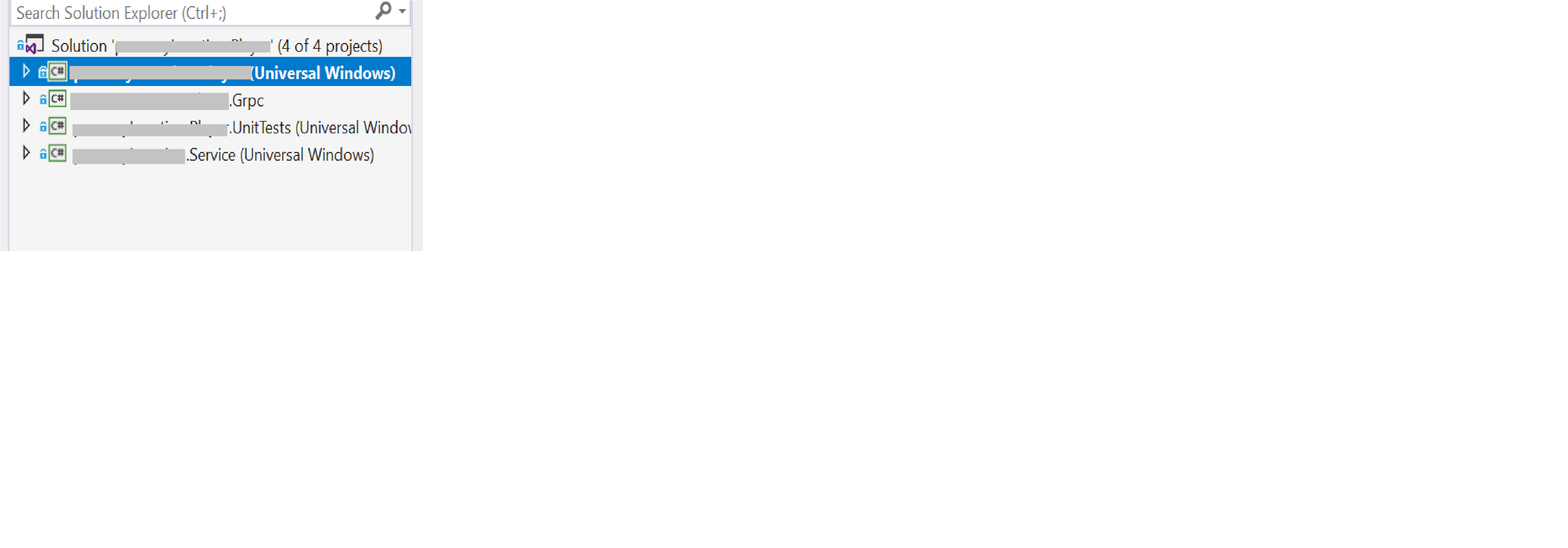
UWP that uses .Net Standard 2.0. (which has GRPC).
Everything was good unless we started building package for appcenter.ms. We wanted to send an install package to the customer and it was crashing somewhere in GRPC code.
So the solution, that we've found was to disable .Net toolchain in the UWP project for release configuration.
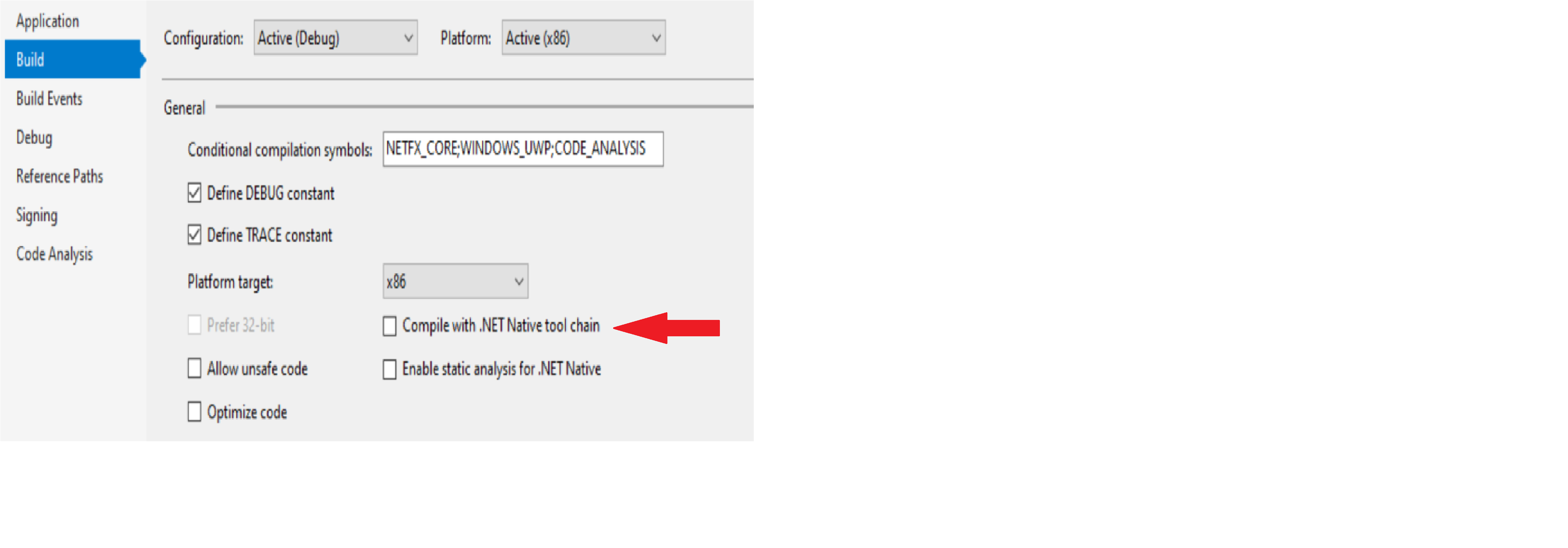
DISCLAIMER: I have no idea if it's a good solution, but it worked for us. Maybe this comment will help someone.
 aosyatnik
on 11 Nov 2019
aosyatnik
on 11 Nov 2019
@aosyatnik That solution works great if you can control your deployments and environment (sounds like it's working well for you!). However, packages shipped and managed through the Microsoft Store currently have ".NET Native" as a shipping requirement.
MattWhilden
on 2 Dec 2019
Hi, I guess we had some similar problems. That's our solution structure:
UWP that uses .Net Standard 2.0. (which has GRPC).
Everything was good unless we started building package for appcenter.ms. We wanted to send an install package to the customer and it was crashing somewhere in GRPC code.
So the solution, that we've found was to disable .Net toolchain in the UWP project for release configuration.DISCLAIMER: I have no idea if it's a good solution, but it worked for us. Maybe this comment will help someone.
The msbuild parameter for "Compile with .NET Native Tool Chain" is UseDotNetNativeToolchain.
in csproj
  <PropertyGroup>
    <UseDotNetNativeToolchain>false</UseDotNetNativeToolchain>
  </PropertyGroup>
 N7K4
on 19 Dec 2019
N7K4
on 19 Dec 2019
@kinex has the right idea to fix this, but I think there needs to be a separate UWP track for loading the native libs. UWP should not attempt to load like .NET desktop does, and instead rely on the DLL existing with the given DllImport name. That is, grcp_csharp_ext.x86.dll gets copied as grpc_csharp_ext.dll for x86 builds, and the x64 variant gets copied as the same name for x64 builds. UWP has to specify an architecture anyway so it will not be choosing which to load at runtime.
Here is the targets file I made as a reference for the UWP native library loading in my company's project. It has served me well for over a year of production now.
EDIT This removes the need for doing any unmanaged library loading at runtime at all. All UWP needs is simply new NativeMethods(new NativeMethods.DllImportsFromSharedLib());
 borrrden
on 29 Dec 2019
borrrden
on 29 Dec 2019
A further note is that the way the library is natively compiled is dangerous for UWP. I suspect you might run into some issues at some point. For example, here is a list of all the API that is not available on UWP but is used anyway (some by this repo itself, but most by third_party code especially c-ares):
- PMIB_IPFORWARD_ROW2 (ares_library_init.h)
- MIB_IPFORWARD_ROW2 (ares_init.c)
- RegGetValueA (check_gcp_environment_windows.cc)
- RtlGenRandom (windows.c in crypto)
- LoadLibraryW (ares_library_init.c)
- RegQueryValueExA (ares_init.c, ares_gethostbyaddr.c, ares_gethostbyname.c)
- RegEnumKeyExA (ares_init.c, ares_gethostbyaddr.c, ares_gethostbyname.c)
- RegOpenKeyExA (ares_init.c, ares_gethostbyaddr.c, ares_gethostbyname.c)
- RegCloseKey (ares_init.c, ares_gethostbyaddr.c, ares_gethostbyname.c)
- GetWindowsDirectoryA (ares_gethostbyaddr.c)
- Various dynamically loaded API from ares_init.c
CMake has the ability to generate UWP C++ projects, and once I did that these issues all became immediately clear at compile time (though some of the calls are guarded by "pre Windows Vista", etc logic). I have solutions for most of them (90% of it is just compiling out the bits in question with a macro designed to tell the difference between desktop and UWP)
Furthermore, this will eliminate the issue with /dynamicbase since that is included by default when making a UWP C++ project. It might solve some other unforseen issues as well with consuming WinRT metadata, etc. Let me know if I can assist in some way.
borrrden
on 30 Dec 2019
Using vcpkg should resolve UWP related issues when building grpc. Has anyone gotten to a clean release build that passes WACK using grpc? We're now into months and months on this issue! Microsoft pushed grpc during its Build conference. Please make it work if you're going to say it's the way forward!!!
Disabling the native toolchain is a non-starter unless you like to release your source code to the world, which is what you are doing when you do so in addition to compromising performance in a big way.
Noemata
on 7 Feb 2020
One further note. Now that Microsoft has opted to hand over the reigns to Google for many critical infrastructure components Microsoft either has to double down on supporting that tech directly or can safely assume supporting Windows will be a low priority concern for Google and so Windows will languish further. Edge (chromium) will only be as good as Microsoft makes it. UWP is already behind because the WebView2 control is nowhere in site. Just like gRPC here, UWP flounders in the hands of its creator because of a lack of investment.
Noemata
on 7 Feb 2020
Note: This is 1 full year after this was first reported.
I finally had some time to dig into the details of this. The problem is still the .Net Native compiler. Here's just one place where the managed C# layer of gRPC gets corrupted by the .Net Native compiler.
This bit of code in the Grpc.Core module of NativeExtension.cs:
        private static string GetAssemblyPath()
        {
            var assembly = typeof(NativeExtension).GetTypeInfo().Assembly;
#if NETSTANDARD1_5 || NETSTANDARD2_0
            // Assembly.EscapedCodeBase does not exist under CoreCLR, but assemblies imported from a nuget package
            // don't seem to be shadowed by DNX-based projects at all.
            return assembly.Location;
#else
            // If assembly is shadowed (e.g. in a webapp), EscapedCodeBase is pointing
            // to the original location of the assembly, and Location is pointing
            // to the shadow copy. We care about the original location because
            // the native dlls don't get shadowed.

            var escapedCodeBase = assembly.EscapedCodeBase;
            if (IsFileUri(escapedCodeBase))
            {
                return new Uri(escapedCodeBase).LocalPath;
            }
            return assembly.Location;
#endif
        }
Crashes at this line:
var assembly = typeof(NativeExtension).GetTypeInfo().Assembly;
Because the namespace "NativeExtension" does not get resolved correctly for a Release build. This crash is happening before gRPC fires up as it is still trying to load the C++ native DLLS at this stage and won't be able to build the path for where the native assemblies are located.
As for ARM builds of gRPC, the problems are worse, so it's going to be impossible to get certain categories of UWP apps built for Windows ARM devices, like the HoloLens 2. Not sure how that will work out for the DOD? Or the Surface X??
What's frustrating about this is that it took less than a couple hours to get to a working build of gRPC once I got past the reticence of building all the C++ bits. So one has to wonder what resources, if any, Microsoft is putting toward these sorts of issues?
It's disappointing that Microsoft keeps pointing the finger elsewhere (@MichalStrehovsky), when the problem is with Microsoft tooling. We are months and months into this, when it really could have been resolved in a few hours of serious digging. Handing off the gRPC layer to Google is yet another curiosity? Even with .Net Native compiler issues, Microsoft could easily correct gRPC managed layer design choices that could break the .Net Native compiler.
And now, rather than doubling down on fixing core issues like this, Microsoft is onto yet another course correction with WinUI and a new AOT compiler implementation at the expense of making UWP look stupid. Please, just finish one framework all the way. Forget xplatform, or .Net 5, or rejuvenating WPF. Fix Windows 10 UWP first or have the decency to tell us we're stupid to think this might happen.
Lastly, if it builds and works in Debug, Release should be better, given you can only push a Release build into the Microsoft store. Always make Microsoft staff build for Release and this problem will go away.
Noemata
on 11 Mar 2020
You said it "got resolved" but what was the resolution? The way I got it to build (but not run) was by not using native library lookup and load, but just using plain old P/Invoke. Would that get around some of the nonsense you listed above?
borrrden
on 11 Mar 2020
Given the following code:
namespace GetTypeofFailureInReleaseBuild
{
    public static class GetThisAssembly
    {
        public static readonly string Name;

        // Next variable is here to assist with debugging in a Release build.
        public static readonly string n1;

        static GetThisAssembly()
        {
            Assembly[] assemblies = AppDomain.CurrentDomain.GetAssemblies();

            if (assemblies != null)
            {
                var a1 = assemblies[0];

                if (a1 != null)
                {
                    n1 = a1.FullName;
                }
            }

            var thistype = typeof(GetThisAssembly);

            // Why is this null in Release build?  Though the VS IDE says it's null, it's actually not?
            if (thistype != null)
            {
                var assembly = thistype.GetTypeInfo().Assembly;
                Name = assembly.FullName;
            }
        }
    }
}
"Name" is as expected in Debug, and null in Release. Please provide a workaround for such issues for a Release build, or sort out a better journaling mechanism to catch simple cases of reflection and handle them correctly during compile. Saying it's supposed to work this way for a Release build with .Net Native is not a good answer. This sort of code pattern is used in a lot of .Net Standard 2.0 libraries and is thus unusable in UWP when building for Release. So the mystery of why there are so few large apps in the Microsoft store is solved. It's very hard to build a complex app with the C# tooling provided.
Noemata
on 11 Mar 2020
@borrrden, I needed to make changes to the gRPC managed layer:
https://github.com/grpc/grpc/tree/master/src/csharp
It's working for my purposes, but I only qualified the code paths that I'm using. There may be things I've missed in my set of changes.
Here's just one example of the sorts of changes I made:
In NativeExtensions.cs
...
    internal sealed class NativeExtension
    {
        static readonly ILogger Logger = GrpcEnvironment.Logger.ForType<NativeExtension>();
        static readonly object staticLock = new object();
        static volatile NativeExtension instance;

        readonly NativeMethods nativeMethods;

        // MP! Added:
        /// <summary>
        /// Allow for alternate specification of native assembly file location.
        /// </summary>
        public static string AssemblyLocation = null;
        private static UnmanagedLibrary LoadUnmanagedLibrary()
        {
            // TODO: allow customizing path to native extension (possibly through exposing a GrpcEnvironment property).
            // See https://github.com/grpc/grpc/pull/7303 for one option.

            // MP! Added support for directly specifying assembly location.
            string assemblyDirectory = AssemblyLocation;

            if (assemblyDirectory == null)
                assemblyDirectory = Path.GetDirectoryName(GetAssemblyPath());
In PlatformApis.cs
        public static void GetPlatformPaths(string platformpath = null)
        {
            string classicPath = null;
            string assemblyDirectory = platformpath;

            // MP! Added: support for specifying alternate path.
            if (assemblyDirectory == null)
                assemblyDirectory = Path.GetDirectoryName(GetAssemblyPath());

            if (n1 != null && n2 != null)
                classicPath = Path.Combine(assemblyDirectory, GetNativeLibraryFilename());

            string runtimesDirectory = string.Format("runtimes/{0}/native", GetPlatformString());
            var netCorePublishedAppStylePath = Path.Combine(assemblyDirectory, runtimesDirectory, GetNativeLibraryFilename());
            var netCoreAppStylePath = Path.Combine(assemblyDirectory, "../..", runtimesDirectory, GetNativeLibraryFilename());
            string[] paths = new[] { classicPath, netCorePublishedAppStylePath, netCoreAppStylePath };
        }
And so forth. The changes above address just the path problem issue, but get you started toward fixing the other issues that might affect you. You'll problably need to do a couple hours of slogging correcting crashes as you hit them in Release to get to a working state for the way you are using gRPC.
The biggest challenge will be coping with the way Release build traverses the code. I had to bounce back and forth between Release and Debug to figure out what was supposed to happen where crashes were happening.
Noemata
on 11 Mar 2020
To create a working build of the C++ DLLs, I used two approaches. The easy way, extract the needed DLLs from the Nuget package (but no symbols to work with that way). Or the hard way, using VCPKG and mucking with make files because the VCPKG folks can't get gRPC to build (more curiosities). The latter allows you to debug everything.
Noemata
on 11 Mar 2020
@Noemata I tried pasting your code into a blank UWP app template and it's working as expected (nothing is null). Could you provide more details so that I can repro it?
The problem as far as I understand it is that once GRPC obtains a valid/non-null Assembly object, it goes ahead and accesses the Location property which has been documented to return an empty string since ~.NET Framework 1.0. GRPC doesn't handle the empty string that is returned from Location and passes it to Path APIs that eventually lead to an exception.
MichalStrehovsky
on 11 Mar 2020
Here's a complete breaking code sample as a UWP console app built for Release:
using GetTypeofFailureInReleaseBuild;
using System;
using System.IO;
using System.Reflection;

// This example code shows how you could implement the required main function for a
// Console UWP Application. You can replace all the code inside Main with your own custom code.

// You should also change the Alias value in the AppExecutionAlias Extension in the
// Package.appxmanifest to a value that you define. To edit this file manually, right-click
// it in Solution Explorer and select View Code, or open it with the XML Editor.

namespace GetTypeofFailureInReleaseBuild
{
    public static class GetThisAssembly
    {
        public static readonly string BadPath;

        // Next variable is here to assist with debugging in a Release build.
        public static readonly string n1;

        static GetThisAssembly()
        {
            Assembly[] assemblies = AppDomain.CurrentDomain.GetAssemblies();

            if (assemblies != null)
            {
                var a1 = assemblies[0];

                if (a1 != null)
                {
                    n1 = a1.FullName;
                }
            }


            var thistype = typeof(GetThisAssembly);

            // Why is this null in Release build?  Though the VS IDE says it's null, it's actually not?
            if (thistype != null)
            {
                var assembly = thistype.GetTypeInfo().Assembly;
                BadPath = assembly.Location;
                // Should crash here, like in gRPC, but the BadPath string is empty?
                var buildpath = Path.Combine(BadPath, "\\root");
            }
        }
    }
}

namespace BadPath
{
    class Program
    {
        static void Main(string[] args)
        {
            var pathlike_gRPC = GetThisAssembly.BadPath;

            var n2 = pathlike_gRPC;

            if (n2 == null)
            {
                Console.WriteLine($"Null path.");
            }
            else if (n2 == string.Empty)
            {
                Console.WriteLine($"Empty path.");
            }

            Console.WriteLine($"-------- Bad Path {pathlike_gRPC}");

            Console.ReadLine();
        }
    }
}
Notice in the Autos window the VS IDE shows thistype as being "null":
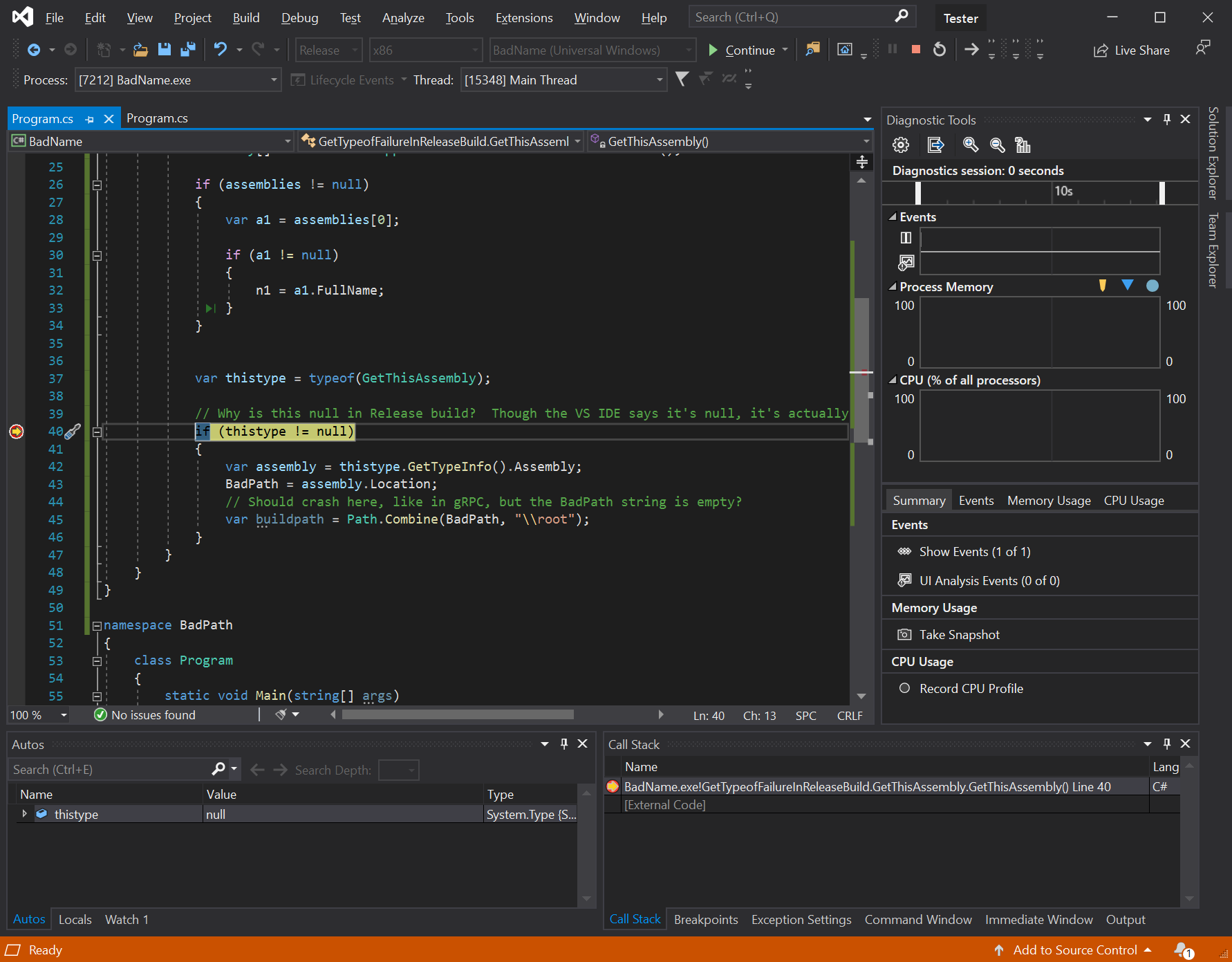
That said, you are right @MichalStrehovsky, in this case BadPath acquires an empty string, so the Path.Combin() call succeeds. Not that this is correct. I disagree with the premise that this is as it should be. I suppose the IDE is wrong in showing thistype as null at the breakpoint above.
Yet, in the grpc code you get:
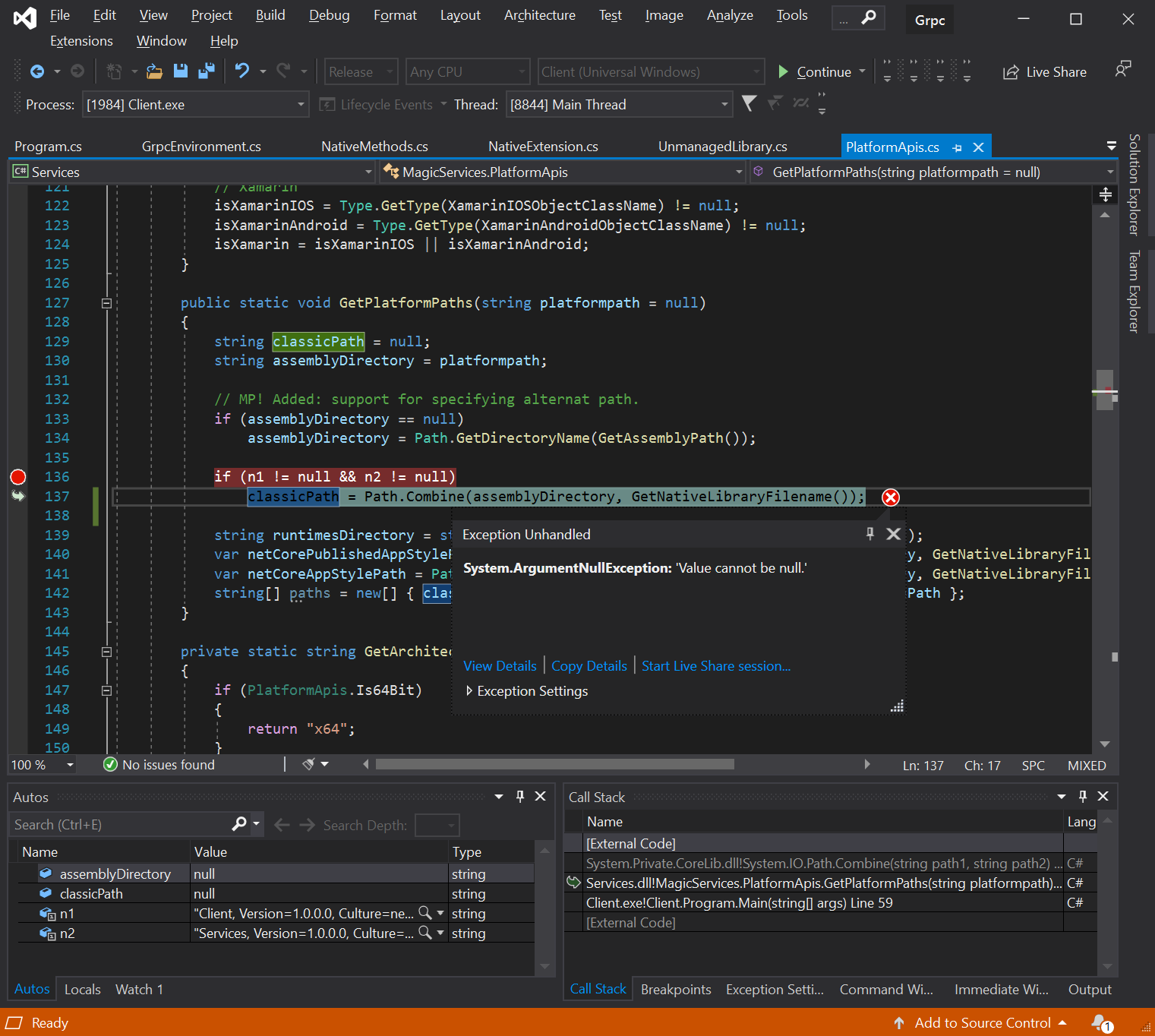
I can't explain the difference, since "Location" in one case returns an empty string, and null in the other. Frankly I'm running out of steam on this back and forth. In Microsoft land everything is as it should be I suppose. Out here in the real world our apps are crashing because of the way the .Net Native compiler generates code. We're a year out from when this was first reported and now I'm patching Microsoft endorsed tech choices to work around problems. The good news, Microsoft is going Open Source, so at least we can help ourselves.
Noemata
on 11 Mar 2020
For anyone else winding up here, with the above changes to path handling in the gRPC managed layer, gRPC will work correctly for a Release build. I had made a couple needless changes to the way cancellation tokens were being dealt with in other parts of the gRPC managed code (since removed) due to incorrect code I had elsewhere in my client side layer. Extracting DLLs from the 1.28 nuget package and building the gRPC managed layer from the 1.28 branch with path handling changes gets you to a working state.
Noemata
on 15 Mar 2020
Here's what the Greeter sample looks like as a UWP console app:
        static void Main(string[] args)
        {
            GrpcEnvironment.AssemblyLocation = AppContext.BaseDirectory;

            if (!System.Net.NetworkInformation.NetworkInterface.GetIsNetworkAvailable())
            {
                Console.WriteLine("No network connection available.");
                return;
            }

            GrpcEnvironment.SetLogger(new Grpc.Core.Logging.ConsoleLogger());

            // standard gRPC channel
            string localIpAddress = GetLocalIPv4(NetworkInterfaceType.Ethernet);
            //string localIpAddress = GetLocalIPv4(NetworkInterfaceType.Wireless80211);

            Console.WriteLine($"IP Address -- {localIpAddress}");

            var channel = new Channel(localIpAddress, 5000, ChannelCredentials.Insecure);

            var client = new Greeter.GreeterClient(channel);
            String user = "you";

            var reply = client.SayHello(new HelloRequest { Name = user });
            Console.WriteLine("Greeting: " + reply.Message);

            channel.ShutdownAsync().Wait();
            Console.WriteLine("Cancelling...");
            Console.ReadLine();
        }
Almost the same as the .Net Core version.
Noemata
on 15 Mar 2020
It's insane to me that Microsoft has locked the above thread.
Will someone fix this issue. How in the world can Microsoft say that GRPC is an alternative to WCF if it cannot be submitted to the Windows Store in a UWP application.
Everyone knows Microsoft is to blame here. Their quality control of their products is getting worse every year.
@tommcdon What is the status here? We lost ya bud.
You know what, I'm going to try this again, months later, with a blank slate and see if fixes posted by @Noemata work.
andygikling
on 24 Mar 2020
This issue/PR has been automatically marked as stale because it has not had any update (including commits, comments, labels, milestones, etc) for 30 days. It will be closed automatically if no further update occurs in 7 day. Thank you for your contributions!
![stale[bot] picture](https://avatars3.githubusercontent.com/in/1724?v=4&s=40) stale[bot]
on 6 May 2020
stale[bot]
on 6 May 2020
Still broken Stale Bot.
 rubberduck203
on 6 May 2020
rubberduck203
on 6 May 2020
My colleague and I are actively pursuing this. We report findings here as soon as we can.
andygikling
on 6 May 2020
Path handling changes to correct the issue are outlined above. It's working for me with those changes in place.
Noemata
on 6 May 2020
Is there any update on this ? as I have observed this issue with the compilation of UWP based project that has reference to grpc.core.
As expected the app crashes at runtime, due to these warnings.
Warning MCG : warning MCG0007: Unresolved P/Invoke method 'grpc_csharp_ext!grpcsharp_call_cancel' for method 'Grpc.Core.Internal.CallError Grpc.Core.Internal.NativeMethods.DllImportsFromSharedLib.grpcsharp_call_cancel(Grpc.Core.Internal.CallSafeHandle)'. Calling this method would throw exception at runtime. Please make sure the P/Invoke either points to a Windows API allowed in UWP applications, or a native DLL that is part of the package. If for some reason your P/Invoke does not satisfy those requirements, please use [DllImport(ExactSpelling=true) to indicate that you understand the implications of using non-UWP APIs.
 GauravTiwarii
on 24 Sep 2020
GauravTiwarii
on 24 Sep 2020
I am going ahead with the build without the .NET native tool, as sideloading was an option. Will watch out here, for any resolution, so that we don't lose the performance benefits of build with .NET native tool.
GauravTiwarii
on 28 Sep 2020
Related issues
 Anorionil
·
3Comments
Anorionil
·
3Comments
 hadisinaee
·
3Comments
hadisinaee
·
3Comments
 GoldwinLeong
·
3Comments
GoldwinLeong
·
3Comments
 mlstudies
·
3Comments
mlstudies
·
3Comments
 noahdav
·
3Comments
noahdav
·
3Comments
Most helpful comment
It's insane to me that Microsoft has locked the above thread.
Will someone fix this issue. How in the world can Microsoft say that GRPC is an alternative to WCF if it cannot be submitted to the Windows Store in a UWP application.
Everyone knows Microsoft is to blame here. Their quality control of their products is getting worse every year.
@tommcdon What is the status here? We lost ya bud.
You know what, I'm going to try this again, months later, with a blank slate and see if fixes posted by @Noemata work.