Grpc-web: Problem with cors after the last release 1.0.4
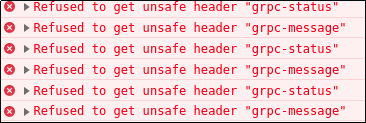
golang app
func allowCors(w http.ResponseWriter, req *http.Request) {
    w.Header().Set("Access-Control-Allow-Origin", "http://localhost:3000")
    w.Header().Set("Access-Control-Allow-Methods", "POST, GET, OPTIONS, PUT, DELETE")
    w.Header().Set("Access-Control-Expose-Headers", "grpc-status, grpc-message")
    w.Header().Set("Access-Control-Allow-Headers", "Accept, Content-Type, Content-Length, Accept-Encoding, X-CSRF-Token, Authorization, XMLHttpRequest, x-user-agent, x-grpc-web, grpc-status, grpc-message")
}
the problem only happens with chrome... the version that I'm using is Version 73.0.3683.75 (Official Build) (64-bit) It seems this new release sends this two extra headers "grpc-status, grpc-message" even though I have this specified in my golang above, this is still throwing this errors in my react app
 maurodelazeri
All 11 comments
Are you deploying Envoy as your proxy?
 stanley-cheung
on 25 Mar 2019
stanley-cheung
on 25 Mar 2019
@stanley-cheung no, in this case the communication is directly from the app to the server (react->go) with no proxy... it seems a problem only with chrome
maurodelazeri
on 25 Mar 2019
This is strange, the grpc-status and grpc-message headers are not new, certainly not just introduced in 1.0.4. Are you sure it worked with 1.0.3 before?
stanley-cheung
on 25 Mar 2019
@stanley-cheung I was using 1.0.3 and right after the release I updated to 1.0.4 and this problem started... I ll make a hello world example to reproduce it....
maurodelazeri
on 25 Mar 2019
@stanley-cheung you can check the console here http://76.9.21.100:3001/
and here is the code https://github.com/maurodelazeri/grpcweb
I was thinking and I do not recall grpc-status and grpc-message in previous releases
maurodelazeri
on 25 Mar 2019
It's way back from the 0.2.0 release :) https://github.com/grpc/grpc-web/blob/0.2.0/javascript/net/grpc/web/grpcwebclientreadablestream.js#L48
stanley-cheung
on 25 Mar 2019
:joy: yeah... saw that after my last comment...
I was testing in different browsers, still only chrome behaves this way
maurodelazeri
on 25 Mar 2019
just an update... I added envoy to proxy pass and it solves the problem
maurodelazeri
on 28 Mar 2019
going to close this
maurodelazeri
on 28 Mar 2019
Don't know if it makes sense to re-open this issue but I got the same issue. After downgrading to version 1.0.3 everything works fine.
I'm using the server from here -> https://github.com/improbable-eng/grpc-web/tree/master/go/grpcweb
The thing is, both headers grpc-status and grpc-message are only included in the HTTP response header if a GRPC error returns. If a protobuf message will be returned both headers are missing.
Working request with error response:
OPTIONS:
Access-Control-Allow-Credentials: true
Access-Control-Allow-Headers: Content-Type, X-Grpc-Web, X-User-Agent
Access-Control-Allow-Methods: POST
Access-Control-Allow-Origin: http://127.0.0.1:8080
Access-Control-Max-Age: 600
Content-Length: 0
Date: Wed, 03 Apr 2019 16:00:08 GMT
Vary: Origin, Access-Control-Request-Method, Access-Control-Request-Headers
POST:
Access-Control-Allow-Credentials: true
Access-Control-Allow-Origin: http://127.0.0.1:8080
Access-Control-Expose-Headers: Vary, Access-Control-Allow-Origin, Access-Control-Allow-Credentials, Grpc-Status, Grpc-Message, Date, Content-Type
Content-Type: application/grpc-web-text
Grpc-Message: user has not been found
Grpc-Status: 5
Transfer-Encoding: chunked
Vary: Origin
Non working request with protobuf response:
OPTIONS:
Access-Control-Allow-Credentials: true
Access-Control-Allow-Headers: Content-Type, X-Grpc-Web, X-User-Agent
Access-Control-Allow-Methods: POST
Access-Control-Allow-Origin: http://127.0.0.1:8080
Access-Control-Max-Age: 600
Content-Length: 0
Date: Wed, 03 Apr 2019 16:01:23 GMT
Vary: Origin, Access-Control-Request-Method, Access-Control-Request-Headers
POST:
Access-Control-Allow-Credentials: true
Access-Control-Allow-Origin: http://127.0.0.1:8080
Access-Control-Expose-Headers: Vary, Access-Control-Allow-Origin, Access-Control-Allow-Credentials, Date, Content-Type
Content-Type: application/grpc-web-text
Transfer-Encoding: chunked
Vary: Origin
Not sure if its defined by GRPC if both headers are required or not but I think one of the project (client or server) does it in the wrong way.
 BirknerAlex
on 3 Apr 2019
BirknerAlex
on 3 Apr 2019
@BirknerAlex instead of wrapping the grpc server with http you can use tcp and connect to it using a proxy, for instance here is an example with envoy-proxy... it will solve the problem and I think would be a better solution
https://github.com/maurodelazeri/grpcweb/tree/master/envoy-proxy
maurodelazeri
on 3 Apr 2019
Related issues
 ivan-sysoi
·
5Comments
ivan-sysoi
·
5Comments
 smnbbrv
·
4Comments
smnbbrv
·
4Comments
 joaomlneto
·
4Comments
joaomlneto
·
4Comments
 barrymichaeldoyle
·
4Comments
barrymichaeldoyle
·
4Comments
 rwlincoln
·
6Comments
rwlincoln
·
6Comments
Most helpful comment
@BirknerAlex instead of wrapping the grpc server with http you can use tcp and connect to it using a proxy, for instance here is an example with envoy-proxy... it will solve the problem and I think would be a better solution
https://github.com/maurodelazeri/grpcweb/tree/master/envoy-proxy