Grpc-web: Error callback never invoked for some classes of server response.
I have a grpc-web server that is returning 200 OK, and grpc-status / grpc-message, but the client javascript is failing to parse it. The observed behavior is that client requests never receive a completion callback from the library. See the request/response sample below.
The case below is likely related to: https://github.com/google/closure-library/issues/946 , however a quick review of the code suggests there may be more cases like this; unexpected server responses aren't correctly handled.
Request URL: http://localhost:8090/derp.EchoService/Echo
Request Method: POST
Status Code: 200 OK
Remote Address: 127.0.0.1:8090
Referrer Policy: no-referrer-when-downgrade

Response Headers:
access-control-allow-credentials: true
access-control-allow-origin: null
content-length: 0
content-type: application/grpc-web+proto
date: Thu, 20 Dec 2018 19:25:32 GMT
grpc-message: upstream connect error or disconnect/reset before headers
grpc-status: 14
server: envoy
Provisional headers are shown
Content-Type: application/grpc-web+proto
grpc-timeout: 999m
Origin: null
User-Agent: Mozilla/5.0 (X11; Linux x86_64) AppleWebKit/537.36 (KHTML, like Gecko) Chrome/71.0.3578.98 Safari/537.36
X-Grpc-Web: 1
X-User-Agent: grpc-web-javascript/0.1
 y3llowcake
All 17 comments
Hi @y3llowcake !
I don't kown if my problem is in the scope of this issue but here is the explanation:
I have a gRPC server written in Go, my proxy is envoy, and I use the JS client of grpc-web in this mode: import_style=commonjs,mode=grpcwebtext.
If my server resturns a gRPC error, the JS Client don't handle the error. For example, this call returns a valid GRPC error in headers:

but my client don't handle it:
const signUpCall = accountClient.signUp(accountRequest, {}, (err, res) => {
    if (err) {
        console.error(err);
    }
    console.log(res);
});

signUpCall.on('status', status => console.log('status', status));
signUpCall.on('data', d => console.log('data', d));
signUpCall.on('end', d => console.log('end', d));
signUpCall.on('error', d => console.log('error', d));
(In this case, none of my console.log was called...)
What do you think ? :)
Thanks !
 QuentinBrosse
on 22 Dec 2018
QuentinBrosse
on 22 Dec 2018
I'm running into the same issue while I'm debugging my implementation of a grpc-web server. If I return an incorrectly encoded response, the grpc-web Javascript client just drops it. Instead, I would expect to get a gRPC error response with code INTERNAL probably? I can provide a more detailed reproduction if that would be useful.
 evanj
on 22 Dec 2018
evanj
on 22 Dec 2018
Are you using CORS? You will need to add the grpc-status headers to the exposed headers in that case
 RXminuS
on 11 Apr 2019
RXminuS
on 11 Apr 2019
Hi everyone, I have the same problem with it.
I have a server running with gRPC for Java and my client is running with Javascript with grpc-web.
I don't sure if exist a error but debugging the server the calling never is requested for then.
Have you a solution for it?
Best regards
 yamelsenih
on 2 Oct 2019
yamelsenih
on 2 Oct 2019
I have the same issue. CORS is allowed and all headers are exposed.
And here is my envoy.yaml:
admin:
  access_log_path: /tmp/admin_access.log
  address:
    socket_address: { address: 0.0.0.0, port_value: 9901 }

static_resources:
  listeners:
  - name: listener_0
    address:
      socket_address: { address: 0.0.0.0, port_value: 8080 }

    filter_chains:
      filters:
        - name: envoy.http_connection_manager
          config:
            codec_type: auto
            stat_prefix: ingress_http
            route_config:
              name: local_route
              virtual_hosts:
              - name: local_service
                domains: ["*"]
                routes:
                - match: { prefix: "/" }
                  route:
                    cluster: echo_service
                    max_grpc_timeout: 0s
                cors:
                  allow_origin:
                  - "*"
                  allow_methods: GET, PUT, DELETE, POST, OPTIONS
                  allow_headers: "*"
                  max_age: "1728000"
                  expose_headers: "*"
            http_filters:
            - name: envoy.grpc_web
            - name: envoy.cors
            - name: envoy.router
      tls_context:
        common_tls_context:
          tls_certificates:
            - certificate_chain:
                filename: "/cert/localhost.crt"
              private_key:
                filename: "/cert/localhost.key"
  clusters:
  - name: echo_service
    connect_timeout: 0.25s
    type: logical_dns
    http2_protocol_options: {}
    lb_policy: round_robin
    hosts: [{ socket_address: { address: template-svc-grpc, port_value: 9090 }}]
Have you got a solution?
 skyjia
on 22 Nov 2019
skyjia
on 22 Nov 2019
@skyjia do you see any Javascript error in the browser console?
Take into account that wildcards are not always allowed for the Access-Control-Expose-Headers header as stated in https://developer.mozilla.org/en-US/docs/Web/HTTP/Headers/Access-Control-Expose-Headers.
The value "*" only counts as a special wildcard value for requests without credentials (requests without HTTP cookies or HTTP authentication information). In requests with credentials, it is treated as the literal header name "*" without special semantics.
Note that the Authorization header can't be wildcarded and always needs to be listed explicitly.
It is always a good idea to avoid wildcards for this kind of settings anyway... I would try to set them explicitly and see if that makes any difference. You can use the echo demo as a reference.
 aberasarte
on 22 Nov 2019
aberasarte
on 22 Nov 2019
@aberasarte I changed the expose headers and restarted the envoy, this error callback is still never invoked.
expose_headers: grpc-status,grpc-message
package.json:
 "dependencies": {
    "google-protobuf": "^3.10.0",
    "grpc-web": "^1.0.7",
  },
   getUserProfile (accessToken, ouid) {
    const request = new ProtoUserAPI.GetUserProfileRequest()
    request.setOuid(ouid)
    request.setAccessToken(accessToken)

    const metadata = null

    const that = this

    return new Promise((resolve, reject) => {
      that.client.getUserProfile(request, metadata, (err, response) => {
        // #1 never go here when there is an error

        if (err) {
          reject(err.message)
        } else {
          // #2 go here when successful
          resolve(response)
        }
      })
    })
  }
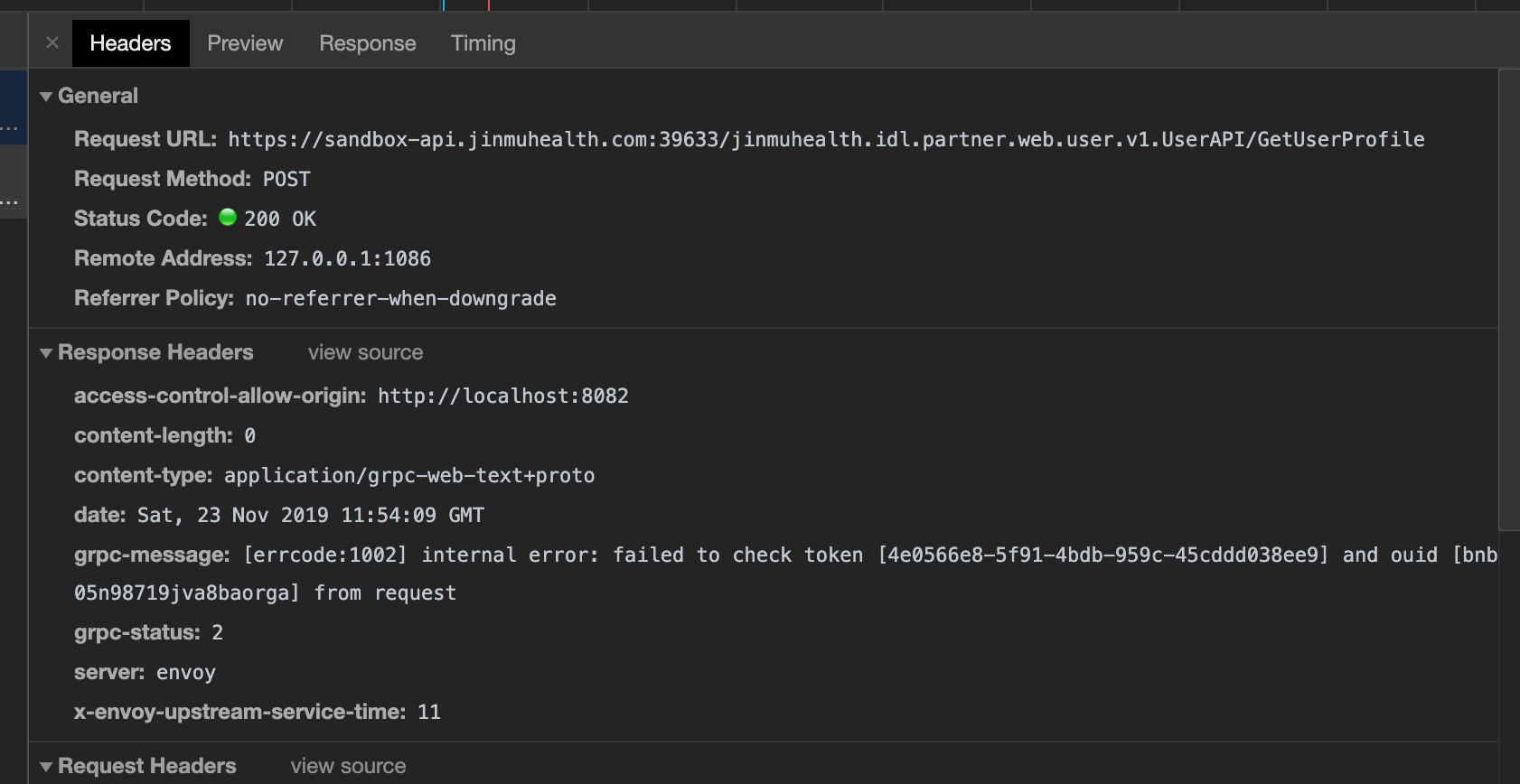
The code never goes to #1 when there is an error reported from underlying gRPC service. I can see the grpc-status and grpc-message headers in HTTP response in Chrome devtool.
However, the code can go to #2 when the RPC call is successful.
skyjia
on 23 Nov 2019
Just to confirm that your problem is not related to CORS, do you see any javascript error in the browser console?
I guess that you are using a recent version of Envoy but just in case, be sure that your version includes this fix.
aberasarte
on 23 Nov 2019
@aberasarte I don't see any JS error in console. I have updated the envoy image to the latest one.
$ docker pull envoyproxy/envoy
Using default tag: latest
latest: Pulling from envoyproxy/envoy
Digest: sha256:c485247f63de16331fbe56aec8e9d8a83da76ca0fa8dc872691a09b8d99a314f
Status: Image is up to date for envoyproxy/envoy:latest
docker.io/envoyproxy/envoy:latest
$ envoy --version
envoy  version: 44f8c365a1f1798f0af776f6aa64279dc68f5666/1.12.1/Clean/RELEASE/BoringSSL
skyjia
on 23 Nov 2019
@aberasarte we have figured out the issue. It's due to an incorrect configuration in our API gateway.
skyjia
on 23 Nov 2019
@skyjia Could you let me know what exactly the incorrect configuration was?
We have been stuck with this same problem in our app and seem to have a similar environment as you do.
Thanks in advance!
 smoorsausje
on 20 Feb 2020
smoorsausje
on 20 Feb 2020
Had a similar issue with grpc-web application in asp.net core 3.1. Could solve it by adding expose headers to cords policy.
app.UseCors(
options => options.SetIsOriginAllowed(x => _ = true).AllowAnyMethod().AllowAnyHeader()
.AllowCredentials()
.WithExposedHeaders("X-User-Agent", "X-Grpc-Web", "content-type", "x-grpc-web", "x-user-agent",
"grpc-status", "grpc-message")
.Build()
);
 vs102000
on 7 Apr 2020
vs102000
on 7 Apr 2020
the last two fields "grpc-status", "grpc-message" (I did not have them before) made the trick
vs102000
on 7 Apr 2020
Had a similar issue with grpc-web application in asp.net core 3.1. Could solve it by adding expose headers to cords policy.
app.UseCors(
options => options.SetIsOriginAllowed(x => _ = true).AllowAnyMethod().AllowAnyHeader()
.AllowCredentials()
.WithExposedHeaders("X-User-Agent", "X-Grpc-Web", "content-type", "x-grpc-web", "x-user-agent",
"grpc-status", "grpc-message")
.Build()
);
where should this code be? do you have a repo where i can check it out?
Many thanks
 elstr
on 8 Jun 2020
elstr
on 8 Jun 2020
@smoorsausje
I fixed it with the following cors configuration:
              cors:
                allow_origin_string_match:
                - prefix: "*"
                allow_methods: GET, PUT, DELETE, POST, OPTIONS
                allow_headers: "keep-alive,user-agent,cache-control,content-type,content-transfer-encoding,x-accept-content-transfer-encoding,x-accept-response-streaming,x-user-agent,x-grpc-web,grpc-timeout"
                expose_headers: grpc-status,grpc-message
                max_age: "1728000"
EDIT:
Nevermind, I take it back. I had assumed that since I had the grpc-status and grpc-message headers in my response that my CORS was working correctly. For the sake of being thorough I went ahead and added them with the expose headers CORS options and now it's working as expected.
ORIGINAL:
I'm having the same issue. I'm using an Ambassador API gateway with grpc-web enabled.
Sample response:
access-control-allow-origin: http://localhost:8080
content-length: 0
content-type: application/grpc-web+proto
date: Mon, 15 Jun 2020 22:45:51 GMT
grpc-message: jwt is not valid
grpc-status: 16
server: NotYours
status: 200
vary: Origin
x-envoy-upstream-service-time: 1
The client code looks like:
console.log('This gets logged')
let call = directoryService.getStatus(request, metadata, (err, res) => {
    console.log('This never gets logged')
    if (err) {
      console.log('This never gets logged')
      ...
    } else {
      console.log('This never gets logged')
      ...
    }
  })

  call.on('status', status => {
    console.log('This never gets logged')
    ...
  })
In this example I did not pass a header that the back-end was expecting. If I do pass a valid value in the header, then the callback function runs.
 TechnoChimp
on 16 Jun 2020
TechnoChimp
on 16 Jun 2020
This should be fixed recently. Here's a unit test for it. A 200 response plus a non-OK grpc-status in the response header should trigger the err part of the main callback. For streaming, it should trigger the .on('error', ...) event.
 stanley-cheung
on 18 Jul 2020
stanley-cheung
on 18 Jul 2020
Related issues
 clovis818
·
4Comments
clovis818
·
4Comments
 developerlaoz
·
3Comments
developerlaoz
·
3Comments
 sirudog
·
3Comments
sirudog
·
3Comments
 jmzwcn
·
6Comments
jmzwcn
·
6Comments
 smnbbrv
·
4Comments
smnbbrv
·
4Comments
Most helpful comment
Hi @y3llowcake !
I don't kown if my problem is in the scope of this issue but here is the explanation:
I have a gRPC server written in Go, my proxy is
envoy, and I use the JS client ofgrpc-webin this mode:import_style=commonjs,mode=grpcwebtext.If my server resturns a gRPC error, the JS Client don't handle the error. For example, this call returns a valid GRPC error in headers:

but my client don't handle it:
(In this case, none of my
console.logwas called...)What do you think ? :)
Thanks !