Grpc-dotnet: gRPC-web stops communicating after the first communication of a large string submission
What version of gRPC and what language are you using?
C#
Server's configuration:
    <PackageReference Include="Grpc.AspNetCore" Version="2.30.0" />
    <PackageReference Include="Grpc.AspNetCore.Web" Version="2.30.0" />
Client's configuration:
  <ItemGroup>
    <PackageReference Include="Google.Protobuf" Version="3.12.3" />
    <PackageReference Include="Grpc.Net.Client" Version="2.30.0" />
    <PackageReference Include="Grpc.Net.Client.Web" Version="2.30.0" />
    <PackageReference Include="Grpc.Tools" Version="2.30.0">
      <PrivateAssets>all</PrivateAssets>
      <IncludeAssets>runtime; build; native; contentfiles; analyzers; buildtransitive</IncludeAssets>
    </PackageReference>
  </ItemGroup>
What operating system (Linux, Windows,...) and version?
Azure App Services (Windows)
Development environment: Windows 10, Visual Studio 2019
What runtime / compiler are you using (e.g. .NET Core SDK version dotnet --info)
.net core info:
C:\Temp>dotnet --info
.NET Core SDK (reflecting any global.json):
Version: 3.1.302
Commit: 41faccf259
Runtime Environment:
OS Name: Windows
OS Version: 10.0.17763
OS Platform: Windows
RID: win10-x64
Base Path: C:\Program Files\dotnet\sdk\3.1.302\
Host (useful for support):
Version: 3.1.6
Commit: 3acd9b0cd1
.NET Core SDKs installed:
3.1.102 [C:\Program Files\dotnet\sdk]
3.1.202 [C:\Program Files\dotnet\sdk]
3.1.302 [C:\Program Files\dotnet\sdk]
.NET Core runtimes installed:
Microsoft.AspNetCore.All 2.1.0 [C:\Program Files\dotnet\shared\Microsoft.AspNetCore.All]
Microsoft.AspNetCore.All 2.1.1 [C:\Program Files\dotnet\shared\Microsoft.AspNetCore.All]
Microsoft.AspNetCore.All 2.1.2 [C:\Program Files\dotnet\shared\Microsoft.AspNetCore.All]
Microsoft.AspNetCore.All 2.1.20 [C:\Program Files\dotnet\shared\Microsoft.AspNetCore.All]
Microsoft.AspNetCore.App 2.1.0 [C:\Program Files\dotnet\shared\Microsoft.AspNetCore.App]
Microsoft.AspNetCore.App 2.1.1 [C:\Program Files\dotnet\shared\Microsoft.AspNetCore.App]
Microsoft.AspNetCore.App 2.1.2 [C:\Program Files\dotnet\shared\Microsoft.AspNetCore.App]
Microsoft.AspNetCore.App 2.1.20 [C:\Program Files\dotnet\shared\Microsoft.AspNetCore.App]
Microsoft.AspNetCore.App 3.1.2 [C:\Program Files\dotnet\shared\Microsoft.AspNetCore.App]
Microsoft.AspNetCore.App 3.1.4 [C:\Program Files\dotnet\shared\Microsoft.AspNetCore.App]
Microsoft.AspNetCore.App 3.1.6 [C:\Program Files\dotnet\shared\Microsoft.AspNetCore.App]
Microsoft.NETCore.App 2.1.20 [C:\Program Files\dotnet\shared\Microsoft.NETCore.App]
Microsoft.NETCore.App 3.1.2 [C:\Program Files\dotnet\shared\Microsoft.NETCore.App]
Microsoft.NETCore.App 3.1.4 [C:\Program Files\dotnet\shared\Microsoft.NETCore.App]
Microsoft.NETCore.App 3.1.6 [C:\Program Files\dotnet\shared\Microsoft.NETCore.App]
Microsoft.WindowsDesktop.App 3.1.2 [C:\Program Files\dotnet\shared\Microsoft.WindowsDesktop.App]
Microsoft.WindowsDesktop.App 3.1.4 [C:\Program Files\dotnet\shared\Microsoft.WindowsDesktop.App]
Microsoft.WindowsDesktop.App 3.1.6 [C:\Program Files\dotnet\shared\Microsoft.WindowsDesktop.App]
What did you do?
We followed the same pattern as the Browser App suggests to setup a gRPC-web service. The client code which is a C# code prepares and submits a 2,937,558 bytes string to the gRPC-web application. Submitting the string to the gRPC-web app on development machine is consistently successful. Getting the same string submitted to the same app hosted on Azure results into success ONLY in the first call and all subsequent calls consistently fail. To recover from this situation, we have to restart the App Service on Azure. We also scaled up the service to P3V2 plan but that did not lead to a success.
What did you expect to see?
The gRPC-web app hosted on Azure should not fail in the subsequent calls.
What did you see instead?
Failure and exception in the client application per the following stack trace:
dbug: Grpc.Net.Client.Internal.GrpcCall[1]
Starting gRPC call. Method type: 'Unary', URI: 'https://MASKED1234.azurewebsites.net/MASKED1234.PayloadSubmission/Submit'.
dbug: Grpc.Net.Client.Internal.GrpcCall[18]
Sending message.
fail: Grpc.Net.Client.Internal.GrpcCall[20]
Error sending message.
System.IO.IOException: Unable to read data from the transport connection: The I/O operation has been aborted because of either a thread exit or an application request..
---> System.Net.Sockets.SocketException (995): The I/O operation has been aborted because of either a thread exit or an application request.
--- End of inner exception stack trace ---
at System.Net.Sockets.Socket.AwaitableSocketAsyncEventArgs.ThrowException(SocketError error, CancellationToken cancellationToken)
at System.Net.Sockets.Socket.AwaitableSocketAsyncEventArgs.System.Threading.Tasks.Sources.IValueTaskSource.GetResult(Int16 token)
at System.Net.Security.SslStream.g__CompleteAsync|210_1TWriteAdapter
at System.Net.Security.SslStream.WriteAsyncInternalTWriteAdapter
at System.Net.Http.HttpConnection.ChunkedEncodingWriteStream.g__WriteChunkAsync|2_0(HttpConnection connection, ReadOnlyMemory 1 buffer) at Grpc.Net.Client.Web.Internal.Base64RequestStream.WriteAsync(ReadOnlyMemory1 data, CancellationToken cancellationToken)
at Grpc.Net.Client.StreamExtensions.WriteMessageAsyncTMessage
at System.Net.Http.HttpConnection.WriteAsync(ReadOnlyMemory1 source) at System.Net.Http.HttpConnection.ChunkedEncodingWriteStream.<WriteAsync>g__WriteChunkAsync|2_0(HttpConnection connection, ReadOnlyMemory1 buffer)
at Grpc.Net.Client.Web.Internal.Base64RequestStream.WriteAsync(ReadOnlyMemory1 data, CancellationToken cancellationToken) at Grpc.Net.Client.StreamExtensions.WriteMessageAsync[TMessage](Stream stream, ILogger logger, TMessage message, Action2 serializer, String grpcEncoding, Nullable1 maximumMessageSize, Dictionary2 compressionProviders, CallOptions callOptions)
at Grpc.Net.Client.Internal.PushUnaryContent`2.WriteMessageCore(ValueTask writeMessageTask)
at System.Net.Http.HttpContent.CopyToAsyncCore(ValueTask copyTask)
--- End of inner exception stack trace ---
at System.Net.Http.HttpContent.CopyToAsyncCore(ValueTask copyTask)
at Grpc.Net.Client.Web.Internal.GrpcWebRequestContent.SerializeTextToStreamAsync(Stream stream)
at System.Net.Http.HttpContent.CopyToAsyncCore(ValueTask copyTask)
at System.Net.Http.HttpConnection.SendRequestContentAsync(HttpRequestMessage request, HttpContentWriteStream stre
Anything else we should know about your project / environment?
The gRPC-web application was deployed as a self-contained application to Azure. The server does not log any failures or exceptions.
 Arash-Sabet
All 31 comments
I haven't seen this before. You said it always works on your development machine but fails when deployed to Azure, which tends to indicate it is an issue with the Azure environment. I'm not an Azure expert so I don't know how you would debug from here.
 JamesNK
on 24 Jul 2020
JamesNK
on 24 Jul 2020
@JamesNK not sure who is the right person who can look into this problem at Azure team. Bottom line the issue I described is happening.
Arash-Sabet
on 24 Jul 2020
@JamesNK I realized the following exceptions on Azure Server after making a slight change in the code. The large string which was a JSON string is now transmitted by a google.protobuf.Struct object.
Grpc.Core.RpcException:
at Grpc.AspNetCore.Server.Internal.PipeExtensions.TryReadMessage (Grpc.AspNetCore.Server, Version=2.0.0.0, Culture=neutral, PublicKeyToken=d754f35622e28bad)
at Grpc.AspNetCore.Server.Internal.PipeExtensions+d__13`1.MoveNext (Grpc.AspNetCore.Server, Version=2.0.0.0, Culture=neutral, PublicKeyToken=d754f35622e28bad)
And this one:
Grpc.Core.RpcException:
at Grpc.AspNetCore.Server.Internal.PipeExtensions.TryReadMessage (Grpc.AspNetCore.Server, Version=2.0.0.0, Culture=neutral, PublicKeyToken=d754f35622e28bad)
at Grpc.AspNetCore.Server.Internal.PipeExtensions+d__13 1.MoveNext (Grpc.AspNetCore.Server, Version=2.0.0.0, Culture=neutral, PublicKeyToken=d754f35622e28bad) at System.Runtime.ExceptionServices.ExceptionDispatchInfo.Throw (System.Private.CoreLib, Version=4.0.0.0, Culture=neutral, PublicKeyToken=7cec85d7bea7798e) at System.Runtime.CompilerServices.TaskAwaiter.ThrowForNonSuccess (System.Private.CoreLib, Version=4.0.0.0, Culture=neutral, PublicKeyToken=7cec85d7bea7798e) at System.Runtime.CompilerServices.TaskAwaiter.HandleNonSuccessAndDebuggerNotification (System.Private.CoreLib, Version=4.0.0.0, Culture=neutral, PublicKeyToken=7cec85d7bea7798e) at System.Threading.Tasks.ValueTask1.get_Result (System.Private.CoreLib, Version=4.0.0.0, Culture=neutral, PublicKeyToken=7cec85d7bea7798e)
at System.Runtime.CompilerServices.ValueTaskAwaiter1.GetResult (System.Private.CoreLib, Version=4.0.0.0, Culture=neutral, PublicKeyToken=7cec85d7bea7798e) at Grpc.AspNetCore.Server.Internal.CallHandlers.UnaryServerCallHandler3+d__2.MoveNext (Grpc.AspNetCore.Server, Version=2.0.0.0, Culture=neutral, PublicKeyToken=d754f35622e28bad)
at System.Runtime.ExceptionServices.ExceptionDispatchInfo.Throw (System.Private.CoreLib, Version=4.0.0.0, Culture=neutral, PublicKeyToken=7cec85d7bea7798e)
at System.Runtime.CompilerServices.TaskAwaiter.ThrowForNonSuccess (System.Private.CoreLib, Version=4.0.0.0, Culture=neutral, PublicKeyToken=7cec85d7bea7798e)
at System.Runtime.CompilerServices.TaskAwaiter.HandleNonSuccessAndDebuggerNotification (System.Private.CoreLib, Version=4.0.0.0, Culture=neutral, PublicKeyToken=7cec85d7bea7798e)
at Grpc.AspNetCore.Server.Internal.CallHandlers.ServerCallHandlerBase`3+<g__AwaitHandleCall|8_0>d.MoveNext (Grpc.AspNetCore.Server, Version=2.0.0.0, Culture=neutral, PublicKeyToken=d754f35622e28bad)
Also this one:
Microsoft.AspNetCore.Connections.ConnectionResetException:
at Microsoft.AspNetCore.Server.IIS.Core.IO.AsyncIOOperation.GetResult (Microsoft.AspNetCore.Server.IIS, Version=3.1.6.0, Culture=neutral, PublicKeyToken=adb9793829ddae60)
at Microsoft.AspNetCore.Server.IIS.Core.IISHttpContext+d__337.MoveNext (Microsoft.AspNetCore.Server.IIS, Version=3.1.6.0, Culture=neutral, PublicKeyToken=adb9793829ddae60)
at System.Runtime.ExceptionServices.ExceptionDispatchInfo.Throw (System.Private.CoreLib, Version=4.0.0.0, Culture=neutral, PublicKeyToken=7cec85d7bea7798e)
at System.IO.Pipelines.PipeCompletion.ThrowLatchedException (System.IO.Pipelines, Version=4.0.2.1, Culture=neutral, PublicKeyToken=cc7b13ffcd2ddd51)
at System.IO.Pipelines.Pipe.GetReadResult (System.IO.Pipelines, Version=4.0.2.1, Culture=neutral, PublicKeyToken=cc7b13ffcd2ddd51)
at System.IO.Pipelines.Pipe.GetReadAsyncResult (System.IO.Pipelines, Version=4.0.2.1, Culture=neutral, PublicKeyToken=cc7b13ffcd2ddd51)
at System.IO.Pipelines.Pipe+DefaultPipeReader.GetResult (System.IO.Pipelines, Version=4.0.2.1, Culture=neutral, PublicKeyToken=cc7b13ffcd2ddd51)
at Microsoft.AspNetCore.Server.IIS.Core.IISHttpContext+d__334.MoveNext (Microsoft.AspNetCore.Server.IIS, Version=3.1.6.0, Culture=neutral, PublicKeyToken=adb9793829ddae60)
at System.Runtime.ExceptionServices.ExceptionDispatchInfo.Throw (System.Private.CoreLib, Version=4.0.0.0, Culture=neutral, PublicKeyToken=7cec85d7bea7798e)
at System.Runtime.CompilerServices.TaskAwaiter.ThrowForNonSuccess (System.Private.CoreLib, Version=4.0.0.0, Culture=neutral, PublicKeyToken=7cec85d7bea7798e)
at System.Runtime.CompilerServices.TaskAwaiter.HandleNonSuccessAndDebuggerNotification (System.Private.CoreLib, Version=4.0.0.0, Culture=neutral, PublicKeyToken=7cec85d7bea7798e)
at Microsoft.AspNetCore.Server.IIS.Core.HttpRequestStream+d__11.MoveNext (Microsoft.AspNetCore.Server.IIS, Version=3.1.6.0, Culture=neutral, PublicKeyToken=adb9793829ddae60)
at System.Runtime.ExceptionServices.ExceptionDispatchInfo.Throw (System.Private.CoreLib, Version=4.0.0.0, Culture=neutral, PublicKeyToken=7cec85d7bea7798e)
at System.Runtime.CompilerServices.TaskAwaiter.ThrowForNonSuccess (System.Private.CoreLib, Version=4.0.0.0, Culture=neutral, PublicKeyToken=7cec85d7bea7798e)
at System.Runtime.CompilerServices.TaskAwaiter.HandleNonSuccessAndDebuggerNotification (System.Private.CoreLib, Version=4.0.0.0, Culture=neutral, PublicKeyToken=7cec85d7bea7798e)
at System.IO.Pipelines.StreamPipeReader+d__27.MoveNext (System.IO.Pipelines, Version=4.0.2.1, Culture=neutral, PublicKeyToken=cc7b13ffcd2ddd51)
at System.Runtime.ExceptionServices.ExceptionDispatchInfo.Throw (System.Private.CoreLib, Version=4.0.0.0, Culture=neutral, PublicKeyToken=7cec85d7bea7798e)
at System.Runtime.CompilerServices.TaskAwaiter.ThrowForNonSuccess (System.Private.CoreLib, Version=4.0.0.0, Culture=neutral, PublicKeyToken=7cec85d7bea7798e)
at System.Runtime.CompilerServices.TaskAwaiter.HandleNonSuccessAndDebuggerNotification (System.Private.CoreLib, Version=4.0.0.0, Culture=neutral, PublicKeyToken=7cec85d7bea7798e)
at Grpc.AspNetCore.Web.Internal.Base64PipeReader+d__11.MoveNext (Grpc.AspNetCore.Web, Version=2.0.0.0, Culture=neutral, PublicKeyToken=d754f35622e28bad)
at System.Runtime.ExceptionServices.ExceptionDispatchInfo.Throw (System.Private.CoreLib, Version=4.0.0.0, Culture=neutral, PublicKeyToken=7cec85d7bea7798e)
at System.Runtime.CompilerServices.TaskAwaiter.ThrowForNonSuccess (System.Private.CoreLib, Version=4.0.0.0, Culture=neutral, PublicKeyToken=7cec85d7bea7798e)
at Grpc.AspNetCore.Server.Internal.PipeExtensions+d__13`1.MoveNext (Grpc.AspNetCore.Server, Version=2.0.0.0, Culture=neutral, PublicKeyToken=d754f35622e28bad)
Inner exception System.Runtime.InteropServices.COMException handled at Microsoft.AspNetCore.Server.IIS.Core.IO.AsyncIOOperation.GetResult:
Arash-Sabet
on 24 Jul 2020
This test app is able to successfully call a test gRPC-Web website that is hosted in Azure. I believe it is hosted in Azure Linux so it isn't an exact reproduction.
To test whether it is an IIS issue I also ran the app locally calling a gRPC server hosted in IIS Express. That also worked successfully.
I don't know what the problem is, but it doesn't seem like an issue in gRPC.
JamesNK
on 25 Jul 2020
@JamesNK is your server side using the same dotnet core version as what I outlined before?
Arash-Sabet
on 26 Jul 2020
@Arash-Sabet have you tried setting MaxReceiveMessageSize (https://docs.microsoft.com/en-us/aspnet/core/grpc/configuration?view=aspnetcore-3.1)?
I don't think it should matter as you're below the default 4MB but it's about the only thing that springs to mind at the moment
 Harkole
on 27 Jul 2020
Harkole
on 27 Jul 2020
@JamesNK is your server side using the same dotnet core version as what I outlined before?
I tested with .NET Core 3.1
JamesNK
on 27 Jul 2020
@Harkole I set MaxReceiveMessageSize explicitly to 5 MB and it did not help.
Arash-Sabet
on 27 Jul 2020
@JamesNK
The following settings are my server's configurations:
Version: 3.1.302 (.net core)
Commit: 41faccf259
    <PackageReference Include="Grpc.AspNetCore" Version="2.30.0" />
    <PackageReference Include="Grpc.AspNetCore.Web" Version="2.30.0" />
@Arash-Sabet is it possible that it's a timeout that's occurring when working the data?
I can't find the information at the moment but seem to recall there is a default timeout on gRPC operations of 30 seconds, I'm wondering if the error is a little misleading and it's not the payload but the process that's simply timing out? This may explain why @JamesNK is seeing a success when testing it...
Harkole
on 27 Jul 2020
@Harkole I ran the test (client code) that @JamesNK shared and it was fine in my end too. My protobuf file is a bit different from "Greeting application's" and it has a few extra fields but they shouldn't matter. The issue gets more complicated when the development machine exhibits a different behavior from Azure App. The gRPC communication on the development machine gives up after 50+ successful communications but the cloud's fails right after the first one. It will be great if James could tell us a bit about his server's configuration e.g. the exact .net core version, commit#, nuget packages' versions, etc.
Arash-Sabet
on 27 Jul 2020
@Arash-Sabet that certainly rules out what I was initially thinking!
There was an application I worked on, which when set up which was streaming file data over gRPC and caused a few issues with hosting inside IIS but when configured to use Kestrel it runs fine. This was on a VM (Server 2016 Standard) though and not in Azure Application Services
This test app is able to successfully call a test gRPC-Web website that is hosted in Azure. I believe it is hosted in Azure Linux so it isn't an exact reproduction.
To test whether it is an IIS issue I also ran the app locally calling a gRPC server hosted in IIS Express. That also worked successfully.
I don't know what the problem is, but it doesn't seem like an issue in gRPC.
Is it possible to test against a Kestrel configuration instead of IIS? The reply from @JamesNK above suggests it probably won't make a difference, however it never hurts to test these things out fully!
Harkole
on 27 Jul 2020
@Harkole Yes, I will give that a try and let you know the results, hopefully by the end of this week or mid next week.
Arash-Sabet
on 27 Jul 2020
@Harkole I ran the test against a Kestrel configuration on a VM hosted in premises and did not experience the issue that I initially reported. So, apparently IIS is the root cause of the problem.
/cc @JamesNK
Arash-Sabet
on 31 Jul 2020
Sorry I don't know what else to suggest, at this stage it is either the grpc-web has a limitation or bug or that IIS has a configuration issue but I don't know how to test either solution properly. My only thought would be a clean IIS installation with no configuration changes except those required to run this one app?
Harkole
on 31 Jul 2020
If I am correct at the moment iis does not support it => https://docs.microsoft.com/en-us/aspnet/core/grpc/?view=aspnetcore-3.1
 daanflore
on 31 Jul 2020
daanflore
on 31 Jul 2020
If I am correct at the moment iis does not support it => https://docs.microsoft.com/en-us/aspnet/core/grpc/?view=aspnetcore-3.1
gRPC-web is supposed to address the problem for time being. @daanflore
Arash-Sabet
on 31 Jul 2020
@Arash-Sabet Can you provide a repro app since we can't seem to repro (ConsoleApp51.zip works)
 BrennanConroy
on 31 Jul 2020
BrennanConroy
on 31 Jul 2020
@BrennanConroy Is the server application serving ConsoleApp51.zip hosted as a Kestrel on a VM? My server application was hosted on Azure App Services and also IIS Express locally that both exhibited the issue. After running the server application as a Kestrel app on a VM, the issue disappeared.
Arash-Sabet
on 31 Jul 2020
I couldn't recreate the gRPC-Web issue in either App service, or in Kestrel - https://github.com/grpc/grpc-dotnet/issues/997#issuecomment-663807873
And this issue only shows up in App service, which indicates it isn't a problem with the grpc-dotnet library.
I'm going to close this unless there are any other suggestions.
JamesNK
on 1 Sep 2020
@JamesNK it only seems to affect IIS, I have seen it on Windows Server 2016 and on Application service plan running Windows as the host
Anything using Kestrel is fine as far as I have managed to test
Is there something that needs configured under IIS to enable support of the gRPC-web?
Harkole
on 1 Sep 2020
I wasn't able to reproduce it with the greeter client+server modified to send a large string. I tested both with IIS Express on my local machine.
Can you create a simple reproduction of this issue? I don't know whether there is a problem specific to these clients/services, or the type of IIS host.
JamesNK
on 2 Sep 2020
Sorry @JamesNK was on holiday last week and spending some time with the family
I can't share the code for this as it's a unique system for a client but I'll try get a generic system that recreates the issue for you over the next few days if that's OK?
Harkole
on 8 Sep 2020
@JamesNK I have recreated the issue with the dotnet new grpc command hosting on:
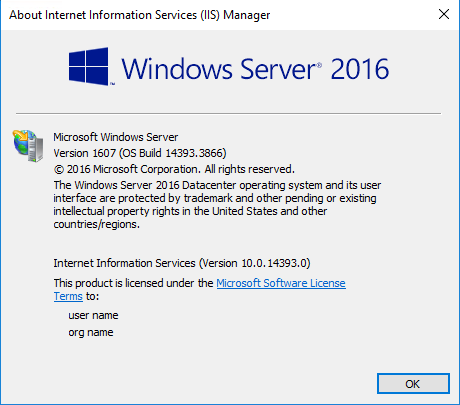
I've used the specified versions in the above error logs and not the newer ones just yet, no changes were made to the Server generated host file other than to add in the gRPC-Web middleware:
namespace HostTest
{
    public class Startup
    {
        // This method gets called by the runtime. Use this method to add services to the container.
        // For more information on how to configure your application, visit https://go.microsoft.com/fwlink/?LinkID=398940
        public void ConfigureServices(IServiceCollection services)
        {
            services.AddGrpc();
        }

        // This method gets called by the runtime. Use this method to configure the HTTP request pipeline.
        public void Configure(IApplicationBuilder app, IWebHostEnvironment env)
        {
            if (env.IsDevelopment())
            {
                app.UseDeveloperExceptionPage();
            }

            app.UseRouting();

            app.UseGrpcWeb();

            app.UseEndpoints(endpoints =>
            {
                endpoints.MapGrpcService<GreeterService>().EnableGrpcWeb();

                endpoints.MapGet("/", async context =>
                {
                    await context.Response.WriteAsync("Communication with gRPC endpoints must be made through a gRPC client. To learn how to create a client, visit: https://go.microsoft.com/fwlink/?linkid=2086909");
                });
            });
        }
    }
}
Now, I'm not actually getting the exact same error but it's running fine on Kestrel (dotnet run) and IIS Express (hosted on Windows 10 Pro build 2004 in Visual Studio 2019 16.7.2) but the moment I deploy to IIS the client returns a 500 error message.
The code is actually failing with any string length, the exception is a Bad gRPC response which makes me think it's been a while since I did this and I'm missing something! However, the fact the code runs fine in the other hosting environment makes me think I have done this right...
The client code that failed is as follows:
        static async Task ShortLivedClient()
        {
            Console.WriteLine("Short Lived, Short reply");
            Console.WriteLine();

            for (int i = 0; i < 10; i++)
            {
                using var channel = GrpcChannel.ForAddress(_hostUri, new GrpcChannelOptions { HttpHandler = new GrpcWebHandler(new HttpClientHandler()) });
                var client = new Greeter.GreeterClient(channel);
                var reply = await client.SayHelloAsync(new HelloRequest { Name = "Will" });
                Console.WriteLine(reply.Message);
            }
        }
Let me know if you want more information or if you think a remote session might help
Harkole
on 8 Sep 2020
"Bad gRPC response" doesn't give any information about what is going on in the server. Did the website fail to start? Was there an exception while processing the gRPC call.
What is logged in the server? https://docs.microsoft.com/en-us/aspnet/core/grpc/diagnostics?view=aspnetcore-3.1#grpc-services-logging
Were errors written to the Windows event log?
JamesNK
on 9 Sep 2020
In the original client code that this bug was found in, were you using GrpcWebMode.GrpcWebText or GrpcWebMode.GrpcWeb? (GrpcWeb is the default if the mode isn't set on GrpcWebHandler)
I've found a bug when GrpcWebMode.GrpcWebText is combined with very large request messages that can cause poor performance.
JamesNK
on 9 Sep 2020
Morning @JamesNK I tried both configurations in the Client code, both times it errors in the same location (where the connection is attempted):
                // var handler = new GrpcWebHandler(GrpcWebMode.GrpcWebText, new HttpClientHandler());
                var handler = new GrpcWebHandler(GrpcWebMode.GrpcWeb, new HttpClientHandler());
                using var channel = GrpcChannel.ForAddress(_hostUri, new GrpcChannelOptions { HttpClient = new HttpClient(handler) });

                var client = new Greeter.GreeterClient(channel);
                var reply = await client.SayHelloAsync(new HelloRequest { Name = "Will" }); // Error thrown here

                Console.WriteLine(reply.Message);
I need to look at the host code as it's not generating any logs despite following the instructions linked above but have ran out of time for now so will do this as soon as I can. I did turn the IIS site off and re-ran the test, this resulted in a Bad gRPC Response again, but with the error code being 503 which would be correct. This at least tells me that the IIS hosted site is running, albeit badly for whatever reason
Harkole
on 10 Sep 2020
A 503 error indicates the IIS app pool for the website isn't working. I'm pretty sure whatever problem you have is different from what was originally reported.
JamesNK
on 16 Sep 2020
@JamesNK I think you may have misread the last post, the 503 error was expected as I tested the application was accepting connections through the IIS configured site.
At this stage I'm inclined to believe that IIS is still an issue when trying to host anything reliant on HTTP/2. Is there anywhere we can apply presure to Microsoft to update the http.sys file and resolve this natively?
Harkole
on 17 Sep 2020
IIS and HttpSys support enough HTTP/2 for gRPC-Web.
Look, if there is an issue here, no progress is going to be made unless you either supply a reproduction of the issue, or you give diagnostics of what is going on. A 503 response code doesn't tell me anything other than the server had an error, not why.
I have successfully sent a large string with gRPC-Web in many scenarios:
- In Azure App Service with a Linux host
- In Azure App Service with a Windows host
- Locally on my computer with IIS Express
The only issue I noticed was poor performance when grpc-web-text encoding was used, which I fixed here.
JamesNK
on 19 Sep 2020
I'm going to close this issue. If you have more information it can be reopened later.
JamesNK
on 28 Sep 2020
Related issues
 dariogriffo
·
5Comments
dariogriffo
·
5Comments
 JunTaoLuo
·
5Comments
JunTaoLuo
·
5Comments
 nphmuller
·
5Comments
JamesNK
·
4Comments
nphmuller
·
5Comments
JamesNK
·
4Comments
 davidfowl
·
6Comments
davidfowl
·
6Comments