Gridsome: How to use tailwind with the official plugin?
I am trying to follow official doc to use tailwind css using the premade plugin
https://gridsome.org/plugins/gridsome-plugin-tailwindcss
I added the plugin to my project using yarn
yarn add gridsome-plugin-tailwindcss --dev
Then I modified my gridsome.config.js and now it containt only
module.exports = {
  siteName: "...",
  plugins: [
    {
      use: "gridsome-plugin-tailwindcss",
      options: {
        tailwindConfig: "./tailwind.config.js",
        purgeConfig: {},
        presetEnvConfig: {},
        shouldPurge: true,
        shouldImport: true,
        shouldTimeTravel: true,
        shouldPurgeUnusedKeyframes: true
      }
    }
  ]
}
From the doc, it looks like there is NOTHING more to do
I cannot understood these statements:
I've gone ahead and automatically imported the default tailwind.css file from the Tailwind npm package. It's just add a CSS file that includes:
@tailwind base;
@tailwind components;
@tailwind utilities;
I understood that your official plugin automatically create a tailwind.css file but it's not true.
Please, fix the doc to explain how and where add this file and then how to import the css in our projec.
Must I follow the istrunctions to add tailwind manually after installing the plugin? If yes, from which point on?
I tried to manually add /src/tailwind.css with the above three lines.
Nothing changes
I tried to import 'tailwind.css in the main.js file but nothing changes
I actually resolved the problem positioning the css as /src/main.css and the importing in main.js using
import '~/main.css';
Anyway this resolves only partitally the problem, because when i run
gridsome build
and the deploy the dist folder, some css are NOT applied. For the precision, given the starter file
@tailwind base;
@tailwind components;
@tailwind utilities;
If I add some css to override body and p globally, I can see all working in development but, for example, I am not able to see this in production
h2 {
  @apply my-3 text-lg font-medium text-blue-800;
}
This produces what follows, in development mode
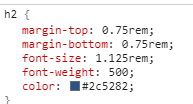
But this in production
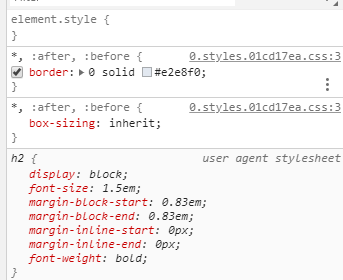
Styles totally ignored, in this case.
But I've some global styles for a specific paragraph class that is 100% respected in production.
The is some tweak must we do to postcss or purgecss?
So, please, clarify the docs. Your documentations is already great but in this specific case it's unprecise for me. I cannot suggest how to modify, for now, because I'm here with a problem asking how to solve
 realtebo
All 3 comments
I understood that your official plugin automatically create a tailwind.css file but it's not true.
First things first, this is not an official plugin.
Then I modified my
gridsome.config.jsand now it containt onlymodule.exports = { siteName: "...", plugins: [ { use: "gridsome-plugin-tailwindcss", options: { tailwindConfig: "./tailwind.config.js", purgeConfig: {}, presetEnvConfig: {}, shouldPurge: true, shouldImport: true, shouldTimeTravel: true, shouldPurgeUnusedKeyframes: true } } ] }From the doc, it looks like there is NOTHING more to do
That's correct. Only thing you need to add is this (unless you need to configure or override defaults):
// gridsome.config.js
module.exports = {
  plugins: [
    { use: 'gridsome-plugin-tailwindcss' },
  ],
}
Everything else you've done is unnecessary. Either you do that or you use the plugin. Try adding it again without doing any of the other steps you mentioned.
If that still doesn't work for you I'd recommend sharing a link to a repo where we can reproduce the issue. Also maybe open that issue on the plugin's repo instead of here because this is probably not a core issue 👍
 hacknug
on 7 Oct 2019
hacknug
on 7 Oct 2019
Closing this issue, as this is not an official plugin.
@hacknug has provided an answer (which hopefully covers it). Any further issue should be handled on the plugin's repo: https://github.com/brandonpittman/gridsome-plugin-tailwindcss
 sanscheese
on 14 Oct 2019
sanscheese
on 14 Oct 2019
You don't even need to add anything to make it work…
 brandonpittman
on 5 Nov 2019
brandonpittman
on 5 Nov 2019
Related issues
 renestalder
·
3Comments
renestalder
·
3Comments
 tomtev
·
3Comments
tomtev
·
3Comments
 maximelebreton
·
3Comments
maximelebreton
·
3Comments
 NickStees
·
3Comments
NickStees
·
3Comments
 ghost
·
3Comments
ghost
·
3Comments