Greenlight: Role who only see Shared Rooms
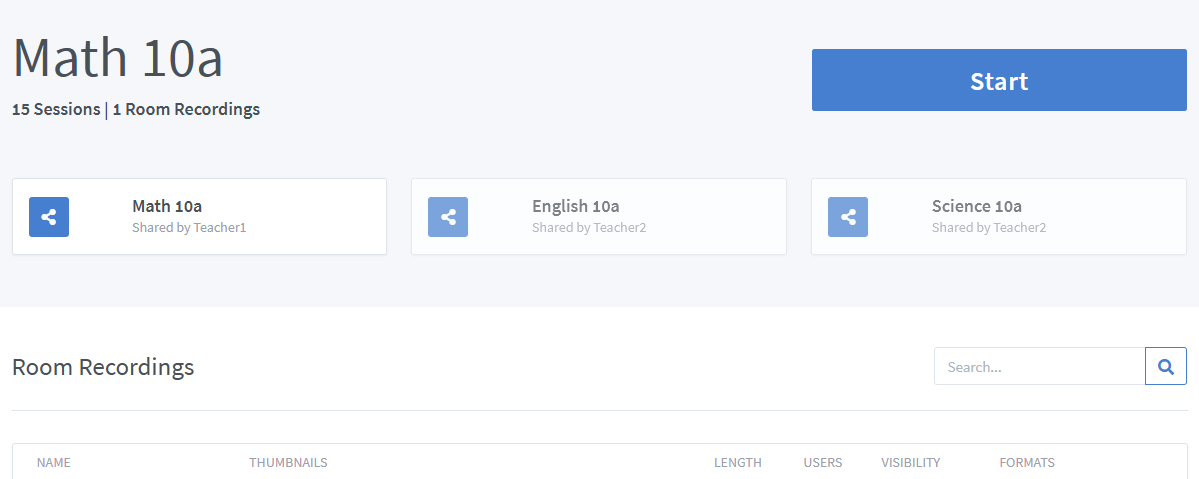
We are planning the release of BBB /Greenlight at several schools in Germany. But we don't like the way the students get the rooms (via a link in an e-mail written separately by each teacher). A role that also sees shared rooms would be great. Or replace "can't create rooms" completely (So you don't have to adjust the share menu for a room). Roles that can create rooms also have no input for room URL or ID, so if the Student has not been assigned a room, they can see an input field. #1186
What the role should not have.
- no own room #1278
- just no possibility to create rooms
Nice to have: - cannot see the link to share (of course, it's still in the address bar)
- cannot delete a shared room
 mrkeksi
All 5 comments
I actually really like this idea. The more I think of it, the more it makes sense to to do this.
 farhatahmad
on 14 Apr 2020
farhatahmad
on 14 Apr 2020
I'm searching this feature too!
Totally agree with you.
 gabrielestella
on 14 Apr 2020
gabrielestella
on 14 Apr 2020
Why can a user without "room creator" rights not access a shared room? Where is the query for this?
mrkeksi
on 19 Apr 2020
Found exactly same problem today. If you have limited user role (in my case for students), which is (role) only capable to be part of "room sharing" and without any other privileges set, this role can't see rooms shared with it.
After student logs in, it shows only default login/landing page, where he can see previously connected rooms, connect to room via code but not rooms shared with him.
This functionality is (imho) crucial, to have limited users/role which are capable only "using" created rooms by lets say teachers and see them in an easy way.
They can connect to the rooms if teacher send them direct link/code via email of course, but it is not as elegant as it should be - and teacher must know all students emails and it is little bit sub-optimal to have room sharing in greenlight but not possibility to show them to limited users.
Or is there some hidden config/template/whatever to achieve mentioned behaviour?
Anyway superb piece of software!
 wociscz
on 21 Apr 2020
wociscz
on 21 Apr 2020
Fixed in v2.6
farhatahmad
on 27 May 2020
Related issues
 bvdlingen
·
3Comments
bvdlingen
·
3Comments
 lakano
·
4Comments
lakano
·
4Comments
 ffdixon
·
4Comments
ffdixon
·
4Comments
 Sea444
·
4Comments
Sea444
·
4Comments
 cstojeng
·
3Comments
cstojeng
·
3Comments
Most helpful comment
I actually really like this idea. The more I think of it, the more it makes sense to to do this.