Graylog2-server: Terminal view
Hello,
In some situation, i think it may be useful to print log entries in a terminal like view (specially coupled when you are doing auto refresh/aka tail -f).
This mean, only display message field line by line from top to bottom.
This can probably be done with the new web plugin but i'm convinced it can be useful for all and so ship in standard bundle.
Maybe useful: http://terminal.jcubic.pl/
++
 pdepaepe
All 18 comments
Hey @pdepaepe, thanks for reporting this. What could be the use case for that, that you could not solve with the live update we have in 2.0?
 dennisoelkers
on 14 Jul 2016
dennisoelkers
on 14 Jul 2016
Live update is great, but still display messages in a "graylog" aspect, i mean
Date
Message
To gain visibility and having the feeling to be in face of my terminal doing a tail -f over my log files, i expect:
message
message
...
Maybe i missed something ?
pdepaepe
on 14 Jul 2016
@pdepaepe Log messages and especially structured log message tailored for a tool like Graylog can contain valuable information in other fields than message and also contain multiline fields (e. g. stack traces) which would break the view you're suggesting.
In other words, the view you're suggesting (one message per line) is quite archaic. 😉
 joschi
on 14 Jul 2016
joschi
on 14 Jul 2016
Of course, it should remains a pure facultative display option, but it's something asked by our users in some situation.
pdepaepe
on 14 Jul 2016
To summary, it's like your https://github.com/Graylog2/cli-dashboard (message block) but in graylog webui.
pdepaepe
on 14 Jul 2016
I agree that this would be a very useful feature, and could help migrate users from other platforms like loggly or papertrail.
There are times when the structured data simply gets in the way of quickly ascertaining what the server is doing. In those times I just want to see all messages, either for the entire server or per-app, in a tail -f-style view.
It appears that https://github.com/Graylog2/cli-dashboard is unfortunately broken. I will see if I can get it going again.
 STRML
on 31 Oct 2016
STRML
on 31 Oct 2016
@joschi I think calling it archaic is a little overstated. Papertrail is hugely successful and has built their entire platform around such a view. Adding a view like this to Graylog would for me increase its value 100x, and it can be accomplished with little more than hiding "Search result" and "Histogram", and collapsing the message onto the log line row (so that messages appear back to back, as programs output them). Now you have a Papertrail view and almost all we did was hide a couple of divs! This seems like a trivially easy win.
 frankamp
on 3 Feb 2017
frankamp
on 3 Feb 2017
I agree 100%. Best of all, Graylog is open source - we should contribute
this back.
On Feb 2, 2017 6:32 PM, "frankamp" notifications@github.com wrote:
@joschi https://github.com/joschi I think calling it archaic is a
little overstated. Papertrail is hugely successful and has built their
entire platform around such a view. Adding a view like this to Graylog
would for me increase its value 100x, and it can be accomplished with
little more than hiding "Search result" and "Histogram", and collapsing the
message onto the log line row (so that messages appear back to back, as
programs output them). Now you have a Papertrail view and almost all we did
was hide a couple of divs! This seems like a trivially easy win.—
You are receiving this because you commented.
Reply to this email directly, view it on GitHub
https://github.com/Graylog2/graylog2-server/issues/2479#issuecomment-277130103,
or mute the thread
https://github.com/notifications/unsubscribe-auth/ABJFP6JGJD_DILN8GQOkMKBptxzU8oJ6ks5rYnWlgaJpZM4JMRcj
.
STRML
on 3 Feb 2017
+1
The lack of a view like this has been a sticking point for me as we are attempting to adopt Graylog. I don't deny the usefulness of the existing "Messages" view, but I feel strongly that having a view that resembles "tail -f" on a text log file would add lots of value. This is how we're used to seeing information not only in our development environments, but also in other tools that display application logs (e.g., Atlassian Bamboo).
 chadshowalter
on 5 Apr 2017
chadshowalter
on 5 Apr 2017
+1 This is the biggest annoyance to me. I find it difficult to read a set of logs in the current UI. I often find the culprit server in GrayLog then ssh to use conventional command line techniques! Even putting the messages onto a single line when you only have timestamp + message would be good:
<timestamp> <message>
<timestamp> <message>
rather than:
<timestamp>
<message>
<timestamp>
<message>
 dannycranmer
on 11 Apr 2017
dannycranmer
on 11 Apr 2017
If any of you start working on it, please post here so the community doesn't duplicate work.
STRML
on 11 Apr 2017
Here's a tampermonkey script that toggles between raw log view and the normal log view:
// ==UserScript==
// @name         GrayLogs
// @namespace    http://tampermonkey.net/
// @version      0.1
// @description  Toggle between raw log view and gray log view by pressing CTRL + L
// @author       Darwayne
// @match        http://*/streams/*
// @grant        none
// ==/UserScript==

(() => {
    'use strict';

    let addStyle = () => {
        let el = document.createElement('style');
        el.id = 'dar-log-preview';
        el.innerHTML = `
  .fields-row { display: none }
  tr.message-row td {padding-bottom: 0 !important;}
  .message-wrapper:after { display: none; }
`;
        document.head.appendChild(el);
    };

    document.addEventListener("keyup", (e) => {
        if(e.key == 'l' && e.ctrlKey){
            let el = document.querySelector('#dar-log-preview');
            console.log('toggle detected', el ? 'Removing' : 'Adding');
            if(el){
                el.remove();
            } else {
                addStyle();
            }
        }
    });
})();
If I get some time I can perhaps convert this script into an actual PR; in the meantime .. this has come in handy for me when needing to look at sequential logs.
 darwayne
on 7 Dec 2017
darwayne
on 7 Dec 2017
That's helpful and quite simple. Should be easy enough for us to add a toggle to that display that adds a class for this and save the pref to localStorage. I'd also add a small border between lines, word-break: break-word, & text to white on black or the like - or at least make it customizable.
STRML
on 7 Dec 2017
A workaround I have found is to define a Format String decorator that contains just the ${message} field. Then it's possible to deselect the message field and only this new decorator and get a compact and imo more readable format.
Only downside with this is that it ends up in a non-monospace font, but with some inspiration from the tampermonkey script above this should be easily fixed.
 albgus
on 1 Aug 2018
albgus
on 1 Aug 2018
Hey everyone!
This was a feature I was wanting in Graylog2. I have some slight experience with the Kibana UI and I really like their "Logs" view in it. I didn't realize @STRML was already working on a terminal view so I started working on a UI plugin inspired by the Kibana screen. It's not very complicated, just lays out the "message" field in a log file like format. I use ace editor to display it so you can select different highlighting formats like json, xml, etc.
The newest messages are displayed at the bottom then it has infinite scroll up to get older messages.
Here's a screen shot.
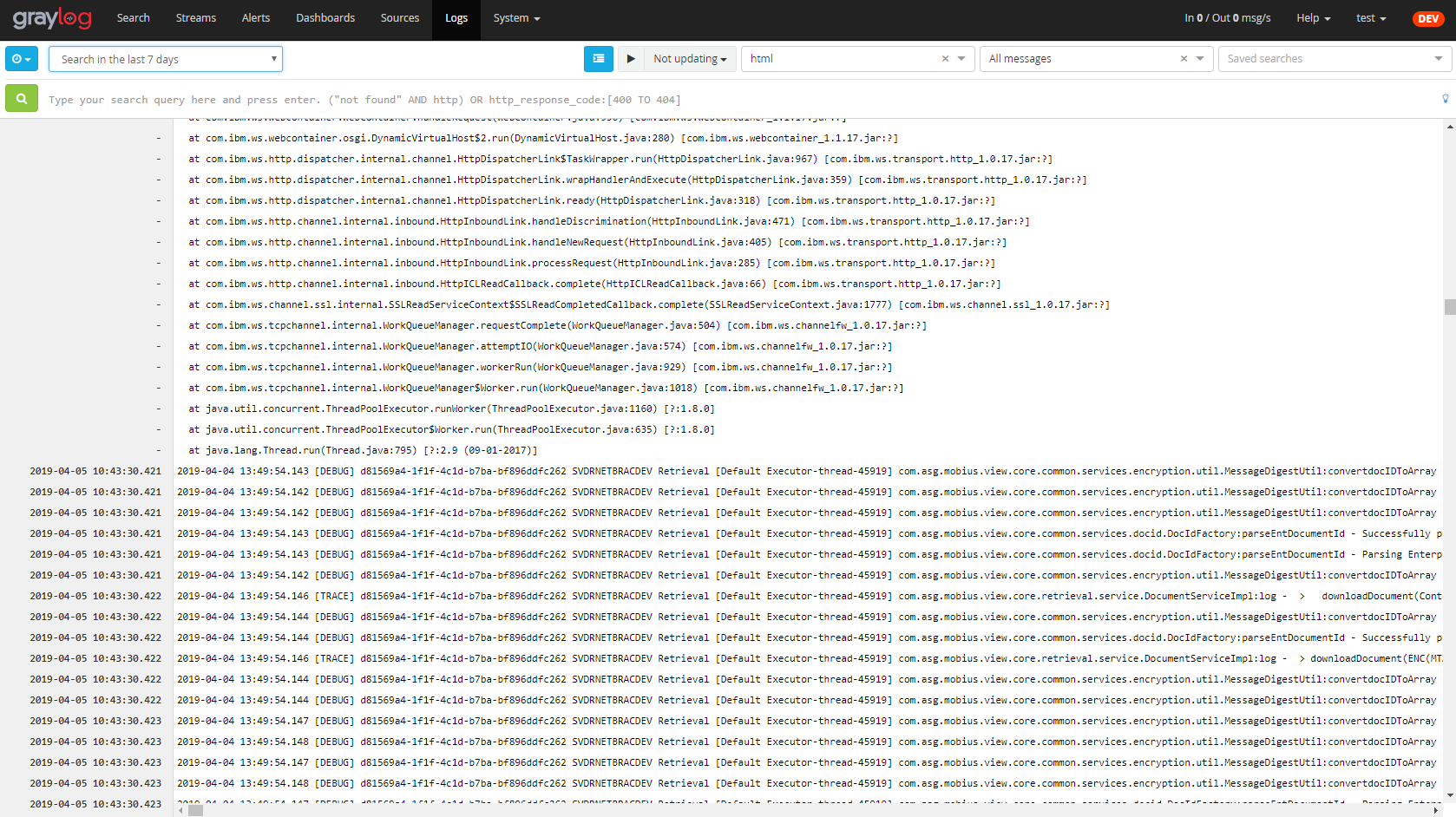
I should be ready to upload it to the marketplace soon. It might be an okay alternative until #4970 gets merged.
Cody
 cpmoore
on 10 Apr 2019
cpmoore
on 10 Apr 2019
@cpmoore did you ever wind up uploading it to the marketplace? Looking at the screenshot I'd love to use it
 bigbellyburger
on 13 Jun 2019
bigbellyburger
on 13 Jun 2019
Hi @cpmoore ,
I know this topic is already a bit older.
But have you thought about uploading it to the marketplace? This Feature would be really cool to have in Graylog.
 Espe0n
on 14 May 2020
Espe0n
on 14 May 2020
True, @Espe0n !
The job seems to be almost done. @cpmoore , sorry to be annoying.
 h4wkmoon
on 7 Sep 2020
h4wkmoon
on 7 Sep 2020
Related issues
 bpbp-boop
·
4Comments
bpbp-boop
·
4Comments
 lennartkoopmann
·
4Comments
lennartkoopmann
·
4Comments
 jalogisch
·
3Comments
jalogisch
·
3Comments
 jozefbarcin
·
3Comments
jozefbarcin
·
3Comments
 1tft
·
3Comments
1tft
·
3Comments
Most helpful comment
Hey everyone!
This was a feature I was wanting in Graylog2. I have some slight experience with the Kibana UI and I really like their "Logs" view in it. I didn't realize @STRML was already working on a terminal view so I started working on a UI plugin inspired by the Kibana screen. It's not very complicated, just lays out the "message" field in a log file like format. I use ace editor to display it so you can select different highlighting formats like json, xml, etc.

The newest messages are displayed at the bottom then it has infinite scroll up to get older messages.
Here's a screen shot.
I should be ready to upload it to the marketplace soon. It might be an okay alternative until #4970 gets merged.
Cody