Grav: Getting modular pages + children into a normal page
Hello,
I am new to Grav and I have searched all over the place for a solution about it. Not sure if i missed it somewhere though.
Basically I have a page structure with modular children like this:
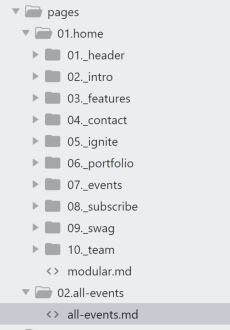
02.all-events page in that structure is a normal page with a twig template for it named all-events.html.twig
As you can see, it's a one pager template that includes a menu on top which is working fine by using this code within the home page template
{% for module in page.collection() %}
However, I want that menu to work also on the new 02.all-events page but it's not.
I also want that all-events page is populated by the children of 07._events modular page.
For the menu I have already tried putting
menu:
    items:
    '@page.modular': /home/
in all-events.md and calling it with {% for module in page.collection('menu') %} from the page template but that did not work :( ... so I'm confused now.
Any help would be greatly appreciated!
Thanks.
 adrianschembri
All 3 comments
I have managed to overcome this issue by simply using {% for item in page.find('/home/_events').collection %} for all the children in modular page and {% for item in page.find('/home').collection %} for all the children under home.
Hope this helps someone else who just started using Grav.
adrianschembri
on 12 Apr 2018
FYI, because a modular page is 'self-contained' with content already rendered by it's associated twig template, including a modular block (say an author block) already pre-rendered with HTML is as simple as:
{{ page.find('/modular_pages/_author').content() }}
Where you have your _author modular page contained in a parent modular_pages folder.
 rhukster
on 12 Apr 2018
rhukster
on 12 Apr 2018
awesome.. thanks rhukster!.... while we are at it, do you know if there is some kind of an Admin review plugin so that content is reviewed before being published?
adrianschembri
on 12 Apr 2018
Related issues
 tdulieu
·
3Comments
tdulieu
·
3Comments
 Gong-Bao-Chicken
·
5Comments
Gong-Bao-Chicken
·
5Comments
 superDuperCyberTechno
·
3Comments
superDuperCyberTechno
·
3Comments
 jimblue
·
4Comments
jimblue
·
4Comments
 flaviocopes
·
5Comments
flaviocopes
·
5Comments
Most helpful comment
FYI, because a modular page is 'self-contained' with content already rendered by it's associated twig template, including a modular block (say an author block) already pre-rendered with HTML is as simple as:
Where you have your
_authormodular page contained in a parentmodular_pagesfolder.