Grav: Inline twig function stops working after upgrade to 1.4
Hello!
Perhaps I'm missing something in the 1.4 changelog, but with 1.3 the following construction is worked:
Feel free to **[contact us](mailto:{{"[email protected]"|safe_email}})**
This construction throws Grav 1.4 to 500 error with text "Unexpected character "&"".
Sorry for bad English.
P.S. it is a modular page
 Magalex2x14
All 9 comments
think this relates to an update in Parsedown to address XSS vulnerabilities: https://github.com/erusev/parsedown/releases/tag/1.7.0
This escapes & in markdown causing an error. twig_first: true doesn't help either as that will output the & which markdown then proceeds to escape again.
 rhukster
on 11 Mar 2018
rhukster
on 11 Mar 2018
I think the only way around this new markdown security fix, is to explicity use the twig with HTML:
<strong><a href="mailto:{{"[email protected]"|safe_email}}">contact us</a></strong>
Interestingly if you render the variable first it doesn't render the markdown at all:
{% set safemail = "[email protected]"|safe_email %}

**[contact us](mailto:{{ safemail }})**

<strong><a href="mailto:{{ safemail }}">contact us</a></strong>
@rhukster After updating from 1.3.10 to 1.4.7 I get another error:
Unknown "safe_email" filter in "__string_template__
35c8104ef025a6fba0efdb87648d33021c0690da522173a2de55b1bee351a5b7" at line 1.
Screen:
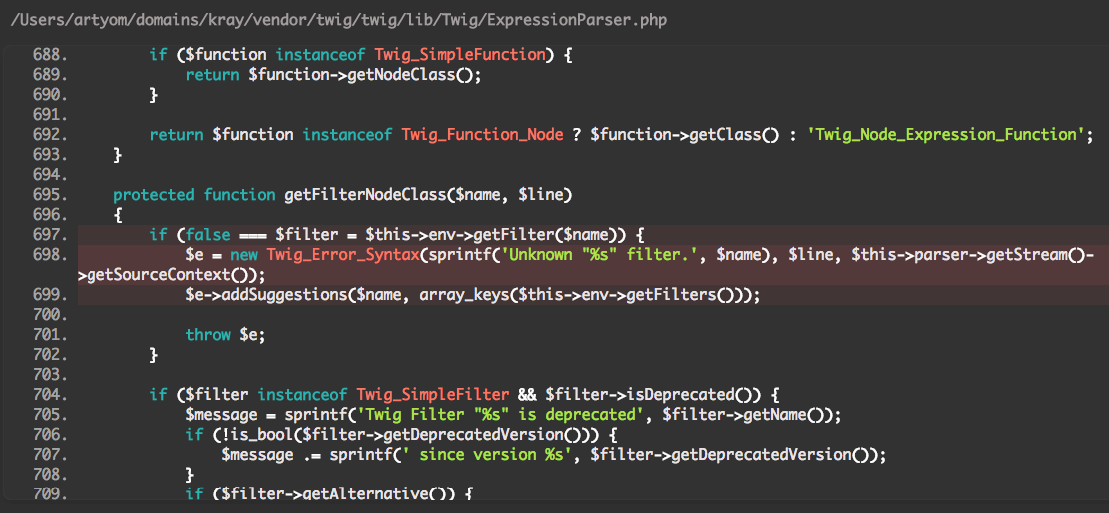
I use this filter with process: twig: true in lines:
text: '{{''[email protected]''|safe_email}}'
icon: envelope-o
link: '{{''mailto:[email protected]''|safe_email}}'
 Sogl
on 24 Jul 2018
rhukster
on 20 Aug 2018
Sogl
on 24 Jul 2018
rhukster
on 20 Aug 2018
Does this imply that it is now impossible to use twig with markdown?
 ikogan
on 19 Feb 2020
ikogan
on 19 Feb 2020
Nope, they work just fine, you just need to use the correct syntax.
 mahagr
on 19 Feb 2020
mahagr
on 19 Feb 2020
Apologies, I discovered that my problem is a result of an interaction with the smartypants plugin.
ikogan
on 20 Feb 2020
If it's still an issue, please file a bug report here: https://github.com/getgrav/grav-plugin-smartypants/issues
mahagr
on 24 Feb 2020
Related issues
 tdulieu
·
3Comments
tdulieu
·
3Comments
 philipisik
·
4Comments
philipisik
·
4Comments
 Corwin7
·
4Comments
Corwin7
·
4Comments
 fvsch
·
3Comments
fvsch
·
3Comments
 jnncks
·
3Comments
jnncks
·
3Comments
Most helpful comment
I think the only way around this new markdown security fix, is to explicity use the twig with HTML: