Grav-plugin-admin: ACL system is broken
Latest fresh Grav 1.7.6 + Admin ZIP package installed
I think there's something wrong with ACL system. I have a group with these permissions:
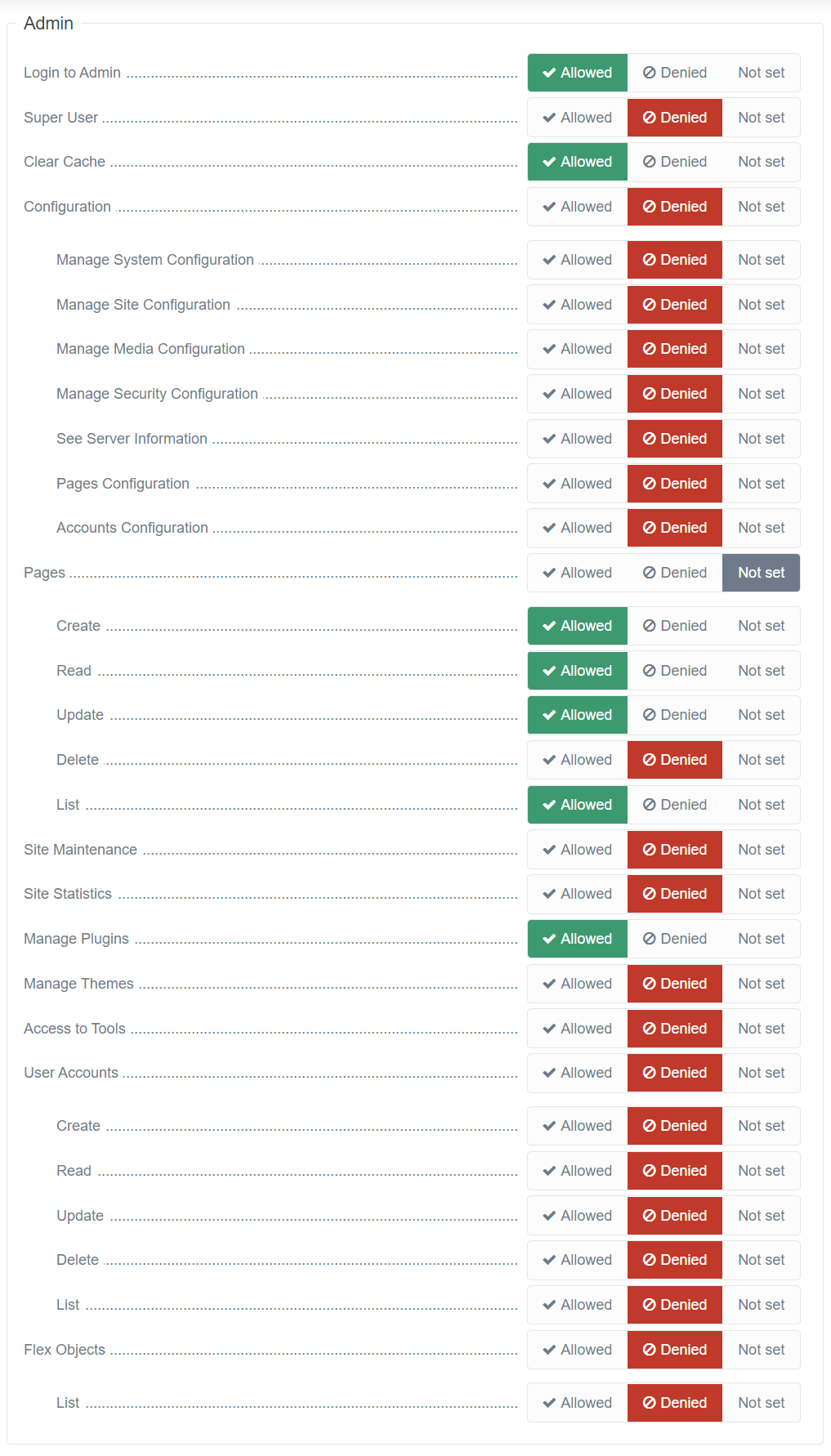
And when I login with user (with this group assigned) and go to _Pages_, I get 404 page does not exist. If I mark _Allowed_ on all _Pages_ section in a group permissions, then _Pages_ link in left sidebar menu completely disappears
If I mark at least one, but not all permissions under _Pages_, then menu item appears with label of 0 pages. Even it has these 2 default pages (which I see with my main admin user)
Same behavior with _User Accounts_ permission section. If all enabled, menu link disappears. If at least one permission disabled, menu is there with label 0 and navigating to it gives a 404 error
Same happens when permissions assigned directly to an account and not via a group
Tried changing Flex Objects permissions, but didn't help
With _Super User_ enabled I can access everything then
Seems like it's broken only with flex objects (pages, accounts)
IMO this should be addressed ASAP
 Karmalakas
All 9 comments
You are denying Flex Objects and deny always wins if you have both Allow and Deny. Please do not use deny rules unless if the goal is to always prevent the user from accessing an asset.
 mahagr
on 18 Feb 2021
mahagr
on 18 Feb 2021
As I said, I've tried with Flex Objects enabled, but same thing. And yes, I want that group to not be able to access other places except for Pages and Plugins. Also marking whole section (Pages or Accounts) as enabled, completely removes them from menu - that doesn't make much sense
Karmalakas
on 18 Feb 2021
Can you pass the access section from the config/groups.yaml for that group? Also with the main level set.
mahagr
on 18 Feb 2021
Now I have everything _Not set_ except what I want for user to access. Still same behavior
Editor:
  access:
    admin:
      login: true
      cache: true
      pages:
        create: true
        read: true
        update: true
        list: true
      plugins: true
  enabled: true
Access looks good. I tried to reproduce:
- install grav+admin 1.7.6
- create admin / Password1
- create group publisher with above ACL rules (tried with and without deny, both work)
- create user publisher and assign group
- logout / login as publisher
Everything seems to work for me.
mahagr
on 18 Feb 2021
Confirmed the issue with a user named Editor.
mahagr
on 18 Feb 2021
@Karmalakas Fixed!
mahagr
on 18 Feb 2021
Literally 5 minutes ago updated Admin :D Fix isn't there :) How do I force an update? Or just overwrite the files?
Karmalakas
on 18 Feb 2021
To test, you need to manually update the changed files. The release will come likely today.
mahagr
on 18 Feb 2021
Related issues
 CoDanny
·
3Comments
CoDanny
·
3Comments
 ghost
·
6Comments
ghost
·
6Comments
 orasik
·
6Comments
orasik
·
6Comments
 maciejmatu
·
3Comments
maciejmatu
·
3Comments
 WilliamMiceli
·
4Comments
WilliamMiceli
·
4Comments