Grav-plugin-admin: The appearance style of the Admin Plugin is incomplete after the upgrade
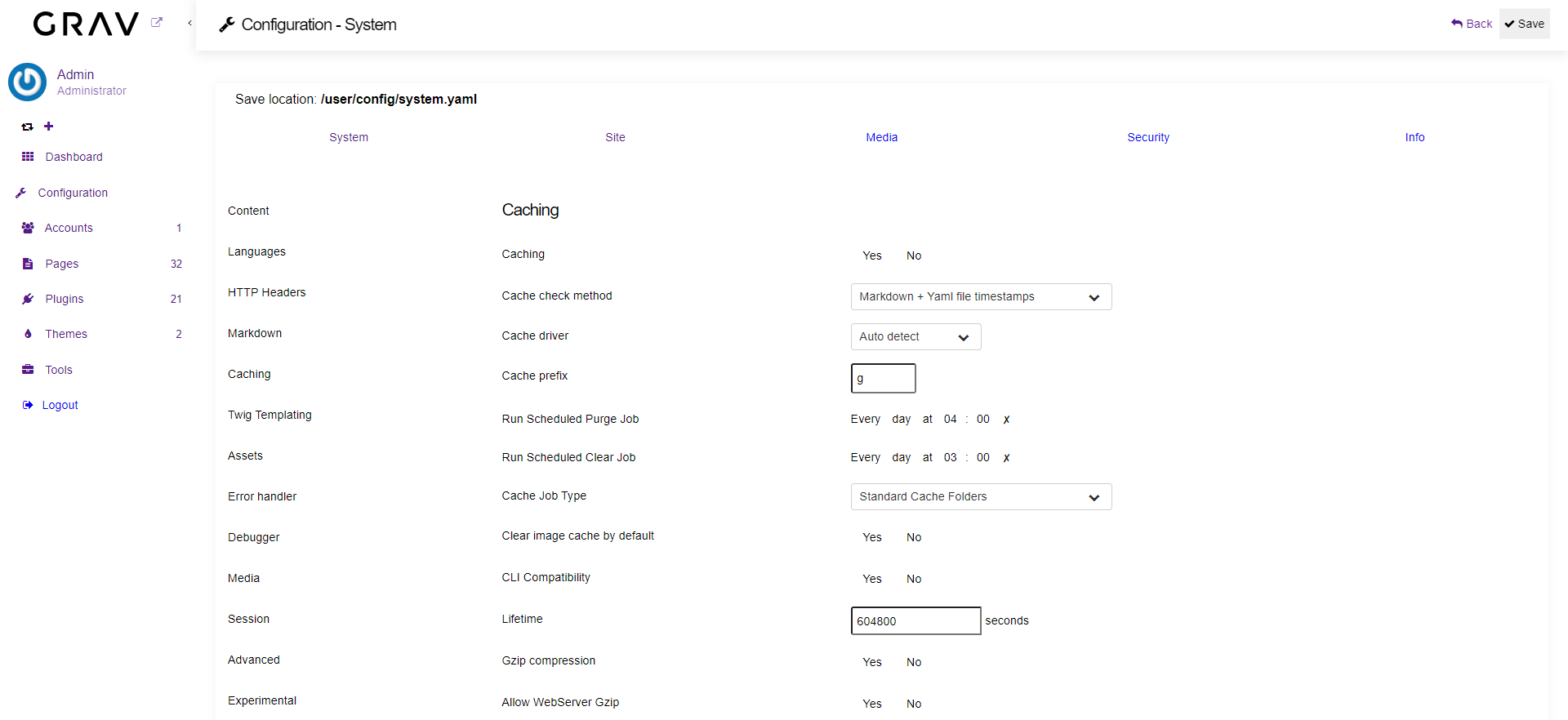
The appearance style of the Admin Plugin is incomplete after the upgrade (bookmarks, buttons and other form elements are not displayed correctly).
So far, I have upgraded 2 sites, one went smoothly (from Grav v1.6.28), but the other (Grav v1.6.31) does not display the Admin Plugin correctly.
Grav v1.7.3 - Admin v1.10.2
 petira
All 19 comments
Could you please provide a screenshot ?
 rhukster
on 22 Jan 2021
rhukster
on 22 Jan 2021
Of course:
petira
on 22 Jan 2021
Does this install happen to have any other admin ui type plugins?
Also what happens if you go to plugins and admin and hit recompile ?
rhukster
on 22 Jan 2021
Installed plugins:
- Admin Panel v1.10.2
- Admin Power Tools v0.1.17 (Disabled)
- Archives v2.0.2
- Breadcrumbs v1.6.1
- Core Service Manager v1.1.4 (Disabled)
- Editor v0.1.12 (Disabled)
- Email v3.1.0
- Error v1.7.1
- Flex Objects v1.0.1
- Form v4.3.0
- Imagecreate v0.2.0
- Login v3.3.8
- Markdown Notices v1.1.0
- Pagination v1.4.2
- Problems v2.0.3
- Random v1.5.0
- Related Pages v1.2.2
- Shortcode Core v5.0.3
- Sitemap v2.0.2
- Stamp v1.0.1
- Taxonomy List v1.3.5
Recompile:
- No changes after Recompile.
petira
on 22 Jan 2021
Can you try disabling the non-core plugins (eg imagecreate and stamp). I don't know what they do. Also have you tried another browser in case it's browser cache thing?
rhukster
on 22 Jan 2021
I disabled plugins (Imagecreate and Stamp), but to no avail. I tried different browsers (even on different computers), but also to no avail. Of course, I also tried to delete the browser cache.
petira
on 22 Jan 2021
It is also interesting that if it loads after the login as the first Dashboard (or any other admin page), it will be displayed normally. But once I switch to another section, everything falls apart.
If I press Preview in the Admin Panel, the style will be loaded, but only temporarily before switching elsewhere.
petira
on 22 Jan 2021
@rhukster I checked the source code of the same page when it is displayed correctly and when it is displayed incorrectly, and they are completely identical. The only difference is in the '?id' parts, for example:
...
<link href="/user/plugins/admin/themes/grav/css/iconpicker.css?XXX" type="text/css" rel="stylesheet">
...
<script src="/system/assets/jquery/jquery-2.x.min.js?XXX"></script>
...
<input type="hidden" name="admin-nonce" value="YYY" />
...
I also noticed that when loading pages, there is a kind of loop that prevents the page from applying styles, at least I think so.
I think the problem is somehow related to this style: /assets/admin-preset.css. Is it possible? If you confirm this, we can find out the details (file does not exist, insufficient permissions, etc.).
petira
on 23 Jan 2021
@rhukster Following the previous.
The problem is really related to style /assets/admin-preset.css, because it is deleted uncontrollably every time you switch to another section.
Re-creation occurs when you log out of the system (after the subsequent login, the first page is displayed correctly) or Recompile button is pressed (style is only created but does not affect the display) or Preview button is pressed (style is created and the current page Admin Panel is displayed correctly).
The question remains why this happens on this site, when on another site that has the same settings, everything is fine?
petira
on 24 Jan 2021
Are you sure the file is being deleted in those instances? When it's not displaying, can you check the filesystem and see if that file exists. More likely it's not being included for whatever reason. I've not seen this before and it's definitely not widespread so not sure how to recreate it. Perhaps you can zip up your site and make it available for me to download?
rhukster
on 24 Jan 2021
Yes, I checked it via a URL first, and then verified the above behavior on FTP.
The permissions on both sites are the same. On the first site is the original css file after installation, on the second the file disappears and reappears with a new date.
If I subsequently sent you a website, do you want it complete, or just a specific part?
petira
on 24 Jan 2021
The entire user/ folder should be fine.
rhukster
on 24 Jan 2021
@rhukster, @iusvar I found out the cause of the problem. This is caused by the Imagecreate plugin. Disable is not enough, but it must be completely removed.
petira
on 26 Jan 2021
Added to the docs. Thanks https://learn.getgrav.org/17/advanced/grav-development/grav-17-upgrade-guide#missing-css-styling-in-admin
rhukster
on 26 Jan 2021
@rhukster As I wrote, disable the plugin is not enough, but the plugin must be completely removed.
@iusvar Can you update the Imagecreate plugin to be compatible with Admin plugin 1.10, please? The frontend is fully compatible with Grav 1.7 now.
petira
on 26 Jan 2021
I will update my learn entry to reflect that @petira .
rhukster
on 26 Jan 2021
For now i'm going to have to recommend completely removing the plugin. When the plugin is updated to support Admin 1.10 I'll adjust the docs to just recommend updating.
rhukster
on 26 Jan 2021
Hi,
I have the same issue with grav 1.7 and grav-admin v1.10.3, but I don't have any installed plugin like imagecreate.
I updated plugins one by one. Everything was OK until I updated the plugin admin (in last).
I tested the interface on Firefox and Chrome (with refreshing the cache). With no result. Some styles are missing, I guess. And it seems that the viewport is fixed to 100vh, so everything is beyond is hidden (no scroll).
If it can help, here the full list on my plugins :
- Admin Panel - v1.10.3
- DevTools - v1.4.2
- Email - v3.1.1
- Error - v1.7.1
- Flex Objects v1.0.2
- Form v4.3.1
- Login v3.4.0
- Problems v2.0.3
Any idea ?
Thanks !
 AwebsomeFr
on 4 Feb 2021
AwebsomeFr
on 4 Feb 2021
First I suggest opening a new issue. Then include a screenshot, it might indicate something.
rhukster
on 4 Feb 2021
Related issues
 amadeusp
·
3Comments
amadeusp
·
3Comments
 artofthesmart
·
4Comments
artofthesmart
·
4Comments
 Sommerregen
·
3Comments
Sommerregen
·
3Comments
 maciejmatu
·
3Comments
maciejmatu
·
3Comments
 danzinger
·
5Comments
danzinger
·
5Comments