Grav-plugin-admin: Multiple Images in pagemediaselect returns 'array'
header.section.planning.images:
                    type: pagemediaselect
                    multiple: true
                    label: Choose media
I have multiple fieldsets each containing a pagemediaselect.
In each fieldset the user is allowed to add up to X images from the page media pool.
Selecting works fine but when saving the page, all I get is 'array'

what am I missing?
 garytube
All 11 comments
Seems there's a few 'media' related issues been posted over the holidays. I'll try to dig into them all at the same time when I get caught up with everything.
 rhukster
on 7 Jan 2019
rhukster
on 7 Jan 2019
Can you please provide the full example of your blueprint where the field is defined.
rhukster
on 15 Jan 2019
Hi @rhukster , I'm having the same issue. Reproduced in both Grav v1.5.7/Admin v1.8.16, and v1.6.0-beta.8/Admin v1.9.0-beta.8. PHP 7.1.19.
Steps to reproduce:
- Create a new page blueprint with a pagemediaselect field and mutiple: true specified
- Edit that page in Grav admin, select one or multiple images in the new field
- Save page
- Observe that both in Grav Admin, as well as the page markdown file, the field contains just the word "Array" rather than a list of files as expected.
Blueprint:
home.yaml.txt
Field before saving page:
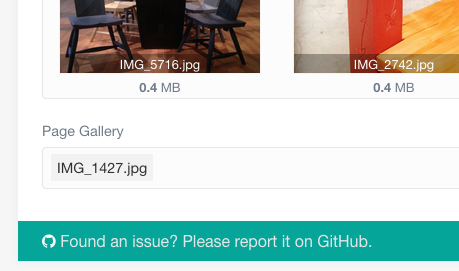
Field after saving page:
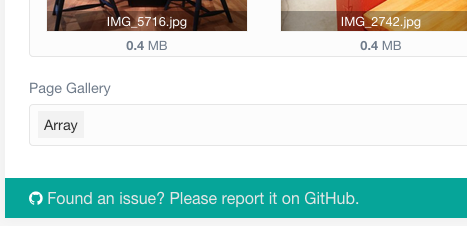
Markdown after saving page:

Thank you!
 justusthane
on 29 Jan 2019
justusthane
on 29 Jan 2019
Can you try adding
array: true
to the pagemediaselect field?
If it works, I can easily fix this issue so you don't need to add it manually.
 mahagr
on 15 Feb 2019
mahagr
on 15 Feb 2019
Hey @mahagr
Thanks for the response. Unfortunately no change in behavior after adding array: true
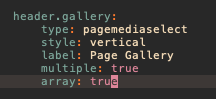
There's nothing else I would have to do to get that to "take effect", correct? I did restart the PHP server just in case.
justusthane
on 23 Feb 2019
No, that should be all good. I'm starting to think that the field doesn't support multiple, can you send me the resulting yaml file for the data?
mahagr
on 25 Feb 2019
Please help how to display multiple images in html twig file
 code9dev
on 28 May 2019
code9dev
on 28 May 2019
Works just fine for me in Admin 1.9.12. Please reopen if it is still an issue.
mahagr
on 13 Dec 2019
Actually I was wrong.
- Create page type with:
extends@: default

form:
  fields:
    tabs:
      fields:
        image:
          type: tab
          title: Image
          fields:
            header.gallery:
                type: pagemediaselect
                style: vertical
                label: Page Gallery
                multiple: true
- Create page of this type and add few images
- Save
- Add all images to the field
- Save
Resulting page header:
title: filepicker
media_order: 'file1.png,file2.png,file3.png'
gallery: ''
This works if field has array: true together with multiple: true
mahagr
on 1 Dec 2020
Parent field filepicker supports only a single value.
mahagr
on 1 Dec 2020
Related issues
 simonlayfield
·
3Comments
simonlayfield
·
3Comments
 dimayakovlev
·
5Comments
dimayakovlev
·
5Comments
 illycz
·
5Comments
illycz
·
5Comments
 Sommerregen
·
3Comments
Sommerregen
·
3Comments
 orasik
·
6Comments
orasik
·
6Comments