Graphqlbundle: Problem when using XDebug during a query
| Q | A
| ---------------- | -----
| Bug report? | yes
| Feature request? | no
| BC Break report? | yes/no
| RFC? | no
| Version/Branch | 0.11.13
When I try to run a query while using XDebug I get the following error and I could not fix it so far:
Symfony\Component\Finder\Exception\DirectoryNotFoundException: The "vendor\symfony\framework-bundle/GraphQL" directory does not exist.
Here are my config and the types and resolver: https://gist.github.com/felyx/b2638d147170133efbf8e769849a8c7d
 hblaise
All 15 comments
try replacing these lines by
        App\GraphQL\:
            resource: ../src/GraphQL
then
bin/console c:c and retry please
 mcg-web
on 11 Jul 2019
mcg-web
on 11 Jul 2019
I tried that, I even tried to remove that graphql config file altogether and then manually deleting the cache dir also to avoid not properly clearing the cache but the problem still remains the same.
hblaise
on 11 Jul 2019
I have also tried this way:
App\GraphQL\:
resource: '%kernel.project_dir%/src/GraphQL'
The error is the same still.
hblaise
on 11 Jul 2019
I also tried a completely clean install just to see if it is an issue with the previous install. I only installed symfony skeleton, doctrine orm pack, and the overblog graphql bundle v0.11.13. I almost left everything as it is in the default install except setting up the database connection and the type definitions and resolver. I was able to reproduce the bug on the clean install as well.
...SymfonySkeleton\vendor\symfony\framework-bundle/GraphQL" directory does not exist. in ...SymfonySkeleton\vendor\symfony\finder\Finder.php:601
hblaise
on 11 Jul 2019
@felyx Did you solve your issue?
 murtukov
on 18 Jul 2019
murtukov
on 18 Jul 2019
@murtukov Nope, I am on the Symfony slack overblog channel and talked to @mcg-web about it, he told me he is going to look into the issue this week so I am hoping he will be able to find the issue because we really miss the ability to use XDebug.
hblaise
on 18 Jul 2019
@felyx I am using XDebug and have no problem with it. I don't think it has something to do with this bundle. You said that you have this issue even with clean install, right? Could you publish this clean project somewhere, so that i could install it and check my myself?
murtukov
on 18 Jul 2019
@murtukov I will invite you shortly to the repo I shared with @mcg-web which has that skeleton app I mentioned, he tried it and he also said that it must be something about our configuration, not the bundle itself.
hblaise
on 18 Jul 2019
@felyx Installed your repository and it works perfectly.
Here is a screenshot with activated XDebug:
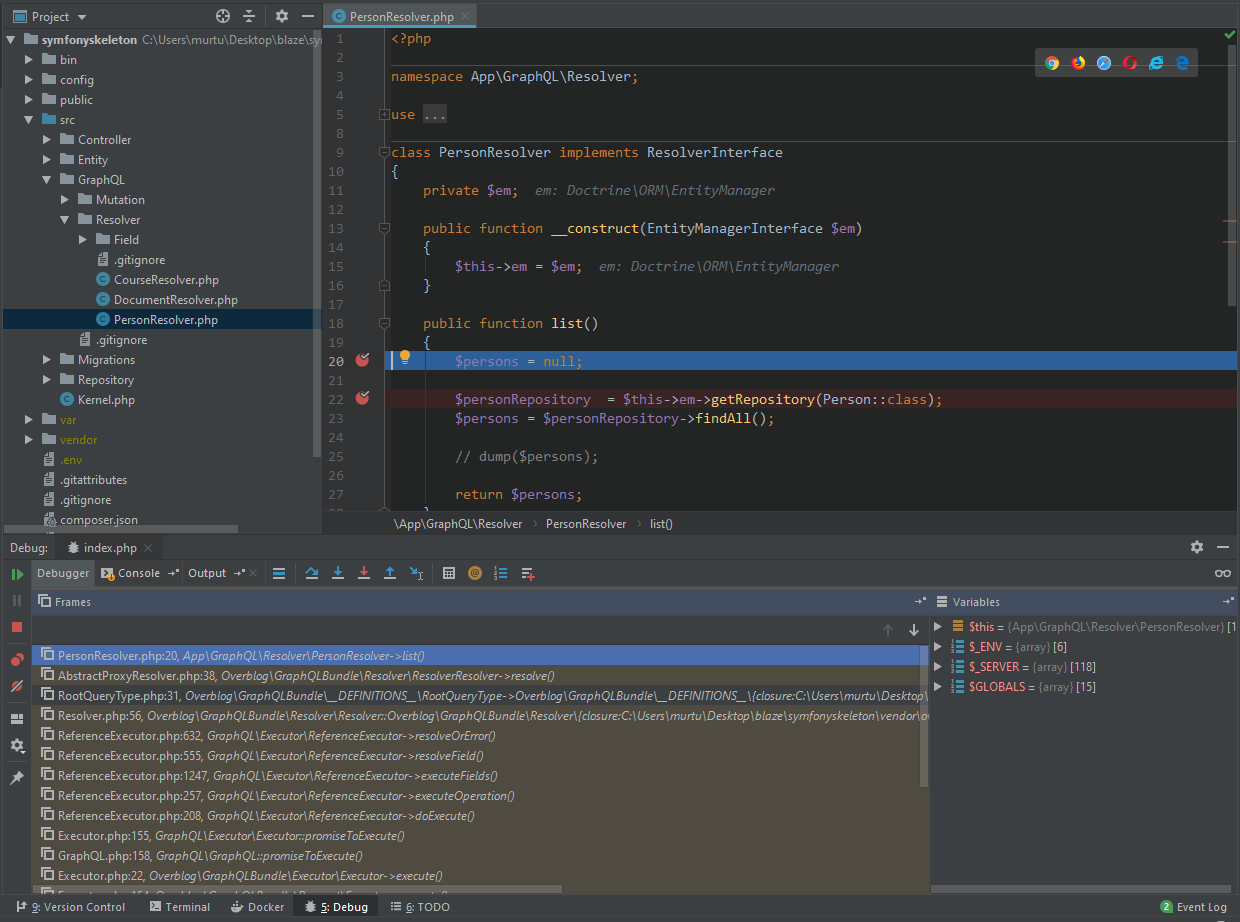
Hope there is no private data on the screenshot. If so, let me know.
I think you have an issues with your Composer or Xdebug config.
murtukov
on 18 Jul 2019
@murtukov Interesting. With Laravel projects, it works fine so I would not think it is something related to the XDebug config, composer might be tho no idea why or what or it could be Visual Studio Code (we use vscode to dev) or something about access rights... Again, since everything works fine in non-symfony projects I did not think it could be anything else. I will check again tomorrow when I am back at work. Thank you for the effort you made trying to help me!
hblaise
on 18 Jul 2019
@felyx Try to provide more information, like logs, your OS, your XDebug configs for your project and more detailed exception message (trace etc.)
Try to clear the composer cache.
murtukov
on 18 Jul 2019
@murtukov Tomorrow I will check it again and provide more detailed information about the issue.
hblaise
on 18 Jul 2019
So @murtukov
OS: Windows 10 x64
Visual Studio Code: latest
PHP: v7.3.3
XDebug conf and version:
[XDebug]
xdebug.remote_enable = 1
xdebug.remote_autostart = 1
zend_extension=php_xdebug-2.7.1-7.3-vc15-nts-x86_64.dll
When I first try to run the debugger I get the following Exception:
var\cache\dev\pools\0flXA1BYf+\C\R\iI7euN4OxW-zn9IcjAug): failed to open stream: No such file or directory
Then I delete the var\cache dir and this exception doesn't show (until I run the app without XDebug again, after then the same happens) but I get an other exception:
Exception has occurred.
Symfony\Component\Finder\Exception\DirectoryNotFoundException: The "vendor\symfony\framework-bundle/GraphQL" directory does not exist.
And this is the one I could not do anything about.
I tried everything, removing the cache via command, dumping the autoload files, removing the cache by hand, nothing helps. If I run the app without XDebug, everything works fine, no exceptions, no errors what so ever.
hblaise
on 19 Jul 2019
@murtukov Well I took the time to test it in PHPStorm as well and I do not get those exceptions in there only when I debug with Visual Studio Code. :/ Though in PHPStorm it keeps stopping at public/index.php first and only after that does it break at the actual breakpoint but at least it works...
hblaise
on 19 Jul 2019
@felyx Hmm, maybe a clean install of your VSC would help. You can test the fresh install in the Windows Sandbox or create a new windows profile and test it there.
In PHPStorm you should diasble the option "Break at first line in PHPscripts" in Settings > Languages & Frameworks > PHP > Debug to stop it from breaking at first line in the public/index.php
I am closing this issue as it's not relevant to the bundle.
murtukov
on 19 Jul 2019
Related issues
 cinamo
·
3Comments
cinamo
·
3Comments
 AliceMakk
·
4Comments
AliceMakk
·
4Comments
 ruudk
·
5Comments
ruudk
·
5Comments
 Alsciende
·
5Comments
Alsciende
·
5Comments
 Vincz
·
3Comments
Vincz
·
3Comments
Most helpful comment
@felyx Hmm, maybe a clean install of your VSC would help. You can test the fresh install in the Windows Sandbox or create a new windows profile and test it there.
In PHPStorm you should diasble the option "Break at first line in PHPscripts" in Settings > Languages & Frameworks > PHP > Debug to stop it from breaking at first line in the
public/index.phpI am closing this issue as it's not relevant to the bundle.