Graphql-tools: Stitcher does not work in [email protected]
Issue:
I'm trying to stitch multiple remote schemas together, but it does not work with [email protected]. It seems that Introspection request query is not formed properly. It gives 400 Bad request. This works for [email protected]
 getIntrospectSchema: async (uri) => {

        // Fetch schema
        try {
            const fetcher = createApolloFetch({uri});
            fetcher.use(({request, options}, next) => {
                if (!options.headers) {
                    options.headers = {};
                }
                next();
            });

            return makeRemoteExecutableSchema({
                schema: await introspectSchema(fetcher),
                fetcher,
            });

        } catch (e) {
            console.error(`[getIntrospectSchema] Introspection failed for ${uri} \n Stackstrace: ${e}`);
            return Promise.resolve();
        }
    }
const endpoints = ["http://localhost:3000/graphql"];
const remoteSchema = await Promise.all(endpoints.map(ep => introspection.getIntrospectSchema(ep)));
const mergedSchema = mergeSchemas({schemas: remoteSchema});


const server = new ApolloServer({schema: mergedSchema});
registerServer({server, app});

// normal ApolloServer listen call but url will contain /graphql
server.listen().then(({url}) => {
   Logger.info("Node app is running on port", app.get("port"));
});
Package used:-
"apollo-fetch": "^0.7.0",
"apollo-server": "^2.0.0-beta.1",
"apollo-server-express": "^2.0.0-beta.0",
"express": "~4.16.0",
"graphql": "^0.13.2",
"graphql-tools": "3.0.1"
Repo link - Graphql Stitcher
 abhishek199-dhn
All 10 comments
I've also been trying to get it to work, but not even the Launchpad example is working.
Update: Was a problem with my project, got it to work.
 luandro
on 11 May 2018
luandro
on 11 May 2018
Not working for me either, Launch Pad example not working either.
 matthew-gordon
on 17 May 2018
matthew-gordon
on 17 May 2018
I'm fairly sure you can solve it by just adding an empty resolver-object. mergeSchemas doesn't seem to work without a resolver-object:
https://launchpad.graphql.com/zrl387xpv7
 RobertStigsson
on 17 May 2018
RobertStigsson
on 17 May 2018
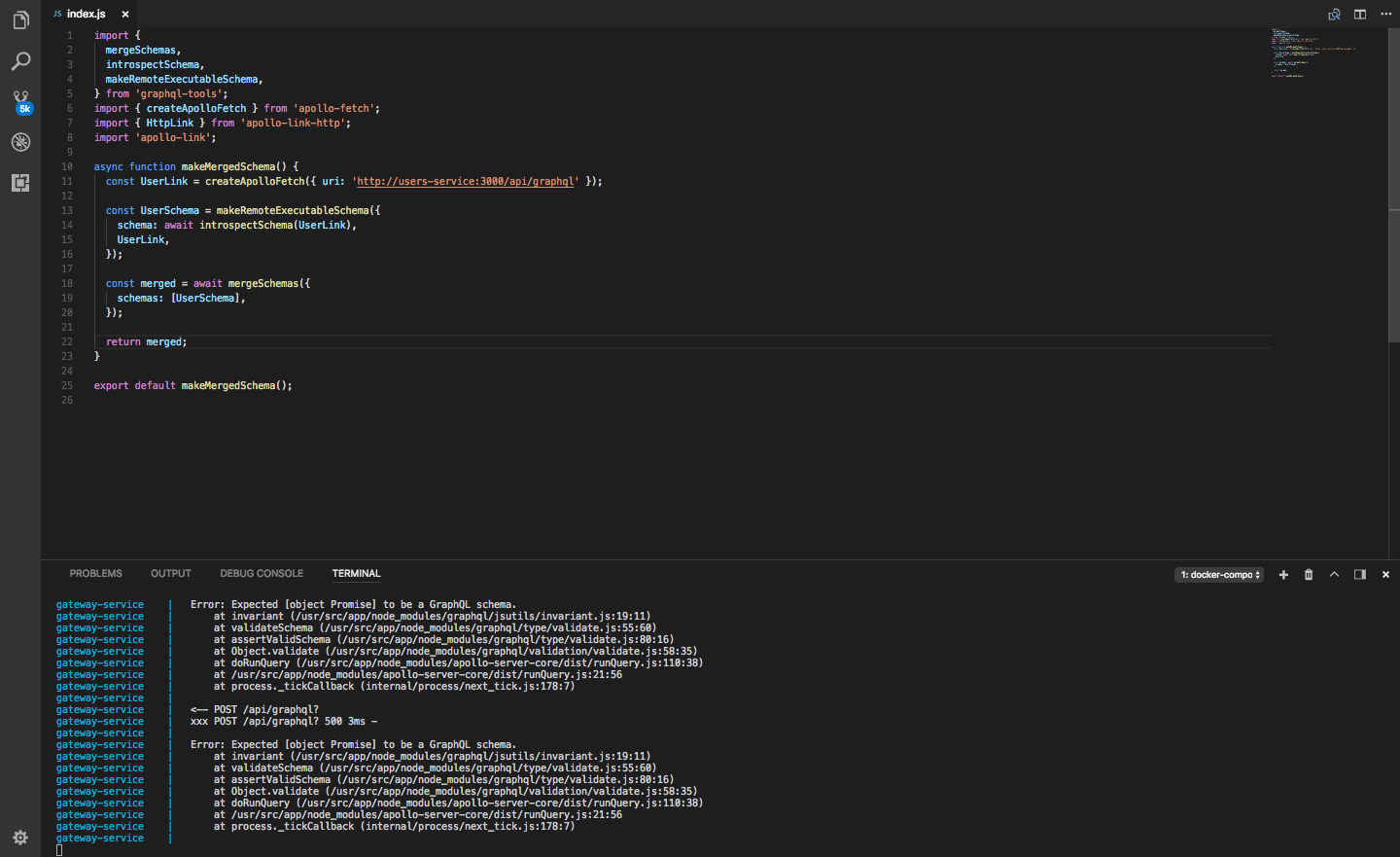
Thanks @RobertStigsson, I gave that a go, still no luck, just receiving an internal server error and still getting the same "Expected [object Promise] to be a GraphQL schema. Updated code...
import {
mergeSchemas,
introspectSchema,
makeRemoteExecutableSchema,
} from 'graphql-tools';
import { createApolloFetch } from 'apollo-fetch';
// import { HttpLink } from 'apollo-link-http';
// import fetch from 'node-fetch';
async function makeMergedSchema() {
const createRemoteSchema = async (uri) => {
const fetcher = createApolloFetch({ uri });
return makeRemoteExecutableSchema({
schema: await introspectSchema(fetcher),
fetcher,
});
};
const UserSchema = await createRemoteSchema('http://users-service:3000/api/graphql');
const MoviesSchema = await createRemoteSchema('http://movies-service:3000/api/graphql');
const schema = mergeSchemas({
schemas: [UserSchema, MoviesSchema],
resolvers: {},
});
return schema;
}
const schema = makeMergedSchema();
export default schema;
matthew-gordon, the whole empty resolver thing seems to be a thing of the past. It makes launchpads work with 2.x, but with 3.x it works without the resolver functions.
I don't know why your solution doesn't work with apollo-fetch, but maybe it isn't updated to work with 3.x (or maybe, since I've never used apollo-fetch, I'm just not good enough at it to understand the issue)?
My suggestion is, at least for now, use HttpLink instead, which I see that you've already tried once. Here is an example with your code (other remoteSchemas) and HttpLink:
RobertStigsson
on 17 May 2018
Thanks again @RobertStigsson, but still a no go, must be something with the way I have Docker configured.. found an article here ARTICLE that I'll try to implement.
matthew-gordon
on 17 May 2018
@RobertStigsson thanks.!!
Using HttpLink instead of createApolloFetch works well with [email protected]. But I have to find a way to set custom headers.
const fetcher = new HttpLink({uri: url, fetch});
return makeRemoteExecutableSchema({
schema: await introspectSchema(fetcher),
link: fetcher,
});
Alright, I solved my issue, it indeed was a networking issue with Docker.
here's my working implementation following along with this Article
import Koa from 'koa';
import Router from 'koa-router';
import bodyParser from 'koa-bodyparser';
import logger from 'koa-logger';
import { graphqlKoa, graphiqlKoa } from 'apollo-server-koa';
import { mergeSchemas } from 'graphql-tools';
import { getIntrospectSchema } from './introspection';
const app = new Koa();
const router = new Router();
const HOST = '0.0.0.0';
const PORT = process.env.PORT || 3000;
// our graphql endpoints
const endpoints = [
'http://users-service:3000/graphql',
'http://movies-service:3000/graphql',
];
app.use(logger());
app.use(bodyParser());
router.get('/', (ctx) => {
ctx.body = {
message: 'Gateway Service',
};
});
(async function () {
try {
// promise.all to grab all remote schemas at the same time
const allSchemas = await Promise.all(endpoints.map(ep => getIntrospectSchema(ep)));
// create function for /graphql endpoint and merge all the schemas
router.get('/graphql', graphqlKoa(() => ({
schema: mergeSchemas({ schemas: allSchemas }),
})));
router.get('/graphiql', graphiqlKoa({
endpointURL: '/graphql',
}));
router.post('/graphql', graphqlKoa(() => ({
schema: mergeSchemas({ schemas: allSchemas }),
})));
// start up a graphql endpoint for our main server
} catch (error) {
console.log('ERROR: Failed to grab introspection queries', error);
}
}());
app.use(router.routes());
app.use(router.allowedMethods());
app.listen(PORT, HOST);
console.log(`Listening on http://${HOST}:${PORT}...`);
introspection.js
const fetch = require('node-fetch');
const { makeRemoteExecutableSchema, introspectSchema } = require('graphql-tools');
const { createHttpLink } = require('apollo-link-http');
module.exports = {
getIntrospectSchema: async (url) => {
// Create a link to a GraphQL instance by passing fetch instance and url
const makeDatabaseServiceLink = () => createHttpLink({
uri: url,
fetch,
});
// Fetch our schema
const databaseServiceSchemaDefinition = await introspectSchema(makeDatabaseServiceLink());
// make an executable schema
return makeRemoteExecutableSchema({
schema: databaseServiceSchemaDefinition,
link: makeDatabaseServiceLink(),
});
},
};
docker-compose.yml
version: "3"
services:
users-service:
build: ./services/users
ports:
- 3000:3000
movies-service:
build: ./services/movies
ports:
- 3001:3000
depends_on:
- users-service
gateway-service:
build: ./services/gateway
ports:
- 3002:3000
depends_on:
- users-service
- movies-service
links:
- users-service
- movies-service
@abhishek199-dhn no problems, glad to be able to help.
In order to set customer headers, use setContext from apollo-link-context:
const { setContext } = require('apollo-link-context')

const fetcher = new HttpLink({uri: url, fetch});

const fetcherWithContext = setContext((request, previousContext) => ({
    headers: {
      Authentication: `Bearer ${previousContext.bearerToken}`
    }
  })).concat(fetcher)
@RobertStigsson thanks!!
abhishek199-dhn
on 21 May 2018
Related issues
 Adherentman
·
4Comments
Adherentman
·
4Comments
 flippidippi
·
3Comments
flippidippi
·
3Comments
 proehlen
·
4Comments
proehlen
·
4Comments
 ghost
·
3Comments
ghost
·
3Comments
 tonyxiao
·
4Comments
tonyxiao
·
4Comments
Most helpful comment
@abhishek199-dhn no problems, glad to be able to help.
In order to set customer headers, use setContext from apollo-link-context: