Graphql-playground: Cookies are not being sent in Playground Express
This issue pertains to the following package(s):
- [x] GraphQL Playground Express Middleware
What OS and OS version are you experiencing the issue(s) on?
Ubuntu 16.04.4 LTS xenial
What version of graphql-playground(-electron/-middleware) are you experiencing the issue(s) on?
1.7.0
What is the expected behavior?
It should send browser cookies along with the GraphQL request.
What is the actual behavior?
The cookies are absent in the request originating from Playground.
What steps may we take to reproduce the behavior?
You can reproduce it with a demo app on glitch
- Open the app to land at
/, a cookie is set - Navigate to
/graphqland run a query{ hello } - Observe the browser console and/or glitch console
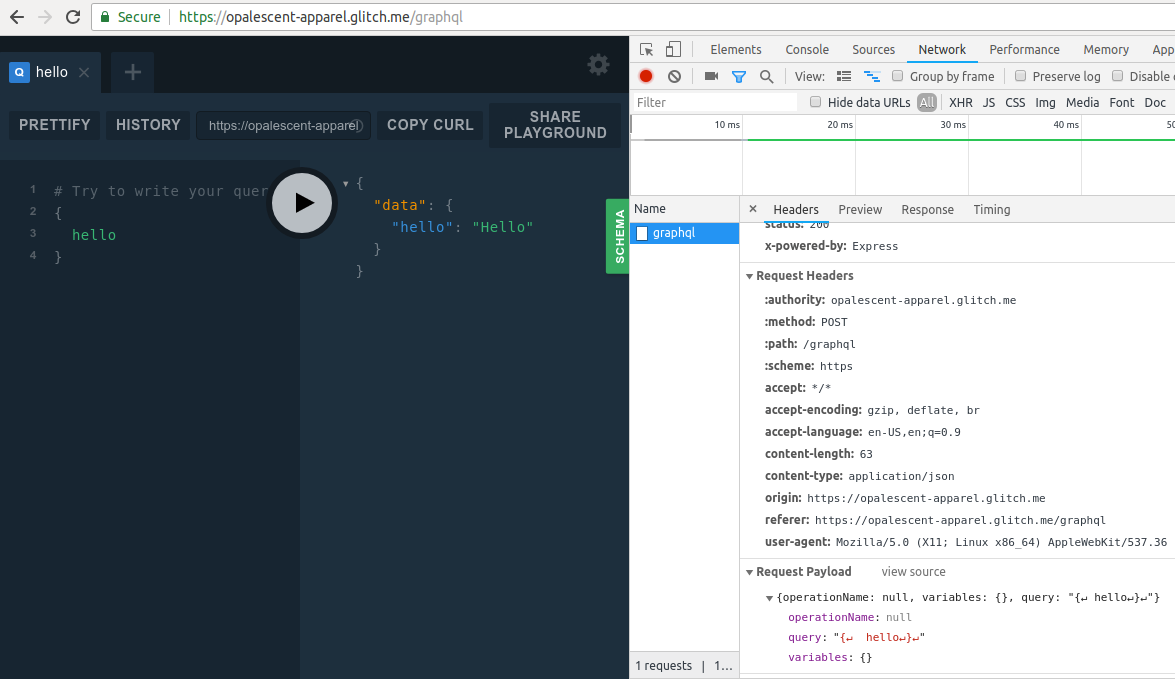
You can see that Cookie is missing from Request Headers even though it is set in the browser
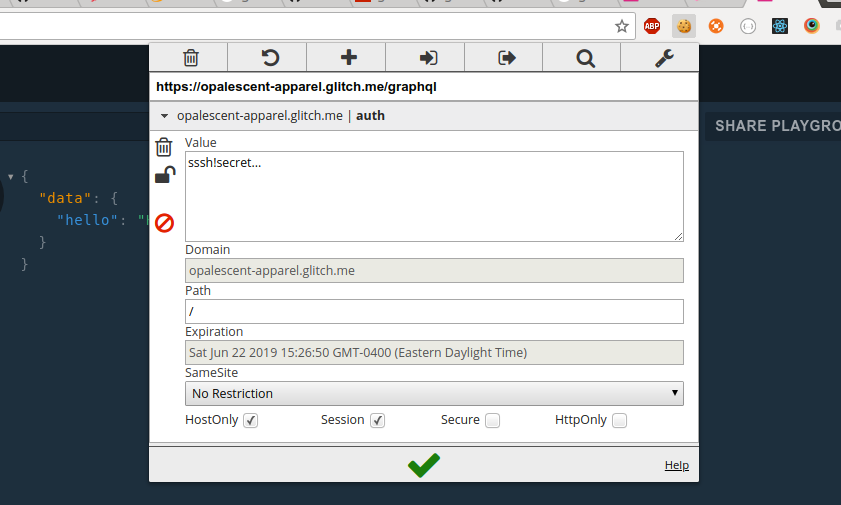
The cookie is hence not sent over to express
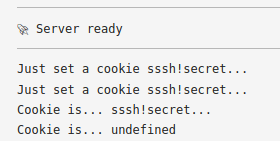
Note that the demo app runs on Apollo Server v2 which uses apollo-server-express version 1.7.0 under the hood. I took the following screenshot from twitch terminal, inside node_modules

 alex996
All 15 comments
With further searching, I found that the cookies can be turned on in settings. But is there a way to pass those options in Node? It's also complicated by the fact that I am using the playground behind Apollo Server.
alex996
on 22 Jun 2018
I have the same problem.
I've tried this but it is not working.
app.get('/graphiql', expressGraphqlPlayground({
endpoint: '/graphql',
settings: {
'request.credentials': 'include',
},
}));
If you have an idea !
Thanks !
 oxyno-zeta
on 26 Jun 2018
oxyno-zeta
on 26 Jun 2018
Also using playground behind Apollo Server and having the same issue.
 gustavlrsn
on 28 Jun 2018
gustavlrsn
on 28 Jun 2018
Yes, I confirmed that this is still an issue.
 tanekim77
on 5 Aug 2018
tanekim77
on 5 Aug 2018
Yes, still an issue today, with apollo-server I'm using this without success:
const serverApollo = new ApolloServer({
typeDefs,
resolvers,
context: ({ req }) => {
return {...code...};
}
playground: {
settings: {
"request.credentials": "include"
}
}
});
It doesn't work!
 frederikhors
on 11 Aug 2018
frederikhors
on 11 Aug 2018
I am using this:
playground: {
settings: {
'request.credentials': 'same-origin'
}
}
It still doesn't work. The same as @frederikhors
 Josaber
on 13 Aug 2018
Josaber
on 13 Aug 2018
And, I tried 'request.credentials': 'include', too. It doesn't work either.
Josaber
on 13 Aug 2018
I am using
'request.credentials': 'same-origin',
But still, the issue is there. Cookies are not being set.
 vladanpaunovic
on 13 Aug 2018
vladanpaunovic
on 13 Aug 2018
Here is what I found as a workaround:
- Go to your GraphQl Playground
In the top right corner click on the gear icon (settings)
Change the following
{
-  "request.credentials": "omit",
+  "request.credentials": "same-origin",
}
Somehow, the client is not using the server settings, therefore it consumes request.credentials: "omit" instead of "same-origin"
vladanpaunovic
on 13 Aug 2018
@vladanpaunovic Yes, we use this too.
Josaber
on 14 Aug 2018
That's not so much a workaround as the actual bug - the default user settings are always "omit" instead of the serverside defined default.
 curry684
on 14 Aug 2018
curry684
on 14 Aug 2018
I am trying to collect all these 'settings' issues in one place; I think it's beneficial that all of them are taken into consideration at once, lest we end up with partial fixes or fixes that break other stuff.
Here's the place: https://github.com/prisma/graphql-playground/issues/826
Could you all have a look and confirm the problem in this present issue has been captured in the one above?
 vincenzo
on 28 Aug 2018
vincenzo
on 28 Aug 2018
Is 'include' linked to boolean value false? Seems like because in my case both of the code works
playground: {
    settings: {
      'request.credentials': false,
    }
  }
playground: {
    settings: {
      'request.credentials': 'include',
    }
  }
Seems like the way it works is my access token is in cookie, So if I login from app, cookie is set
That cookie is sent to playground requests as well. And so the app and graphql end point is in sync
 manjula91
on 7 Feb 2019
manjula91
on 7 Feb 2019
Oh my god, I wasted so much time on this problem! @vladanpaunovic answer helped
 Fxlr8
on 7 Jun 2019
Fxlr8
on 7 Jun 2019
I was having what seemed like CORS issues with apollo-server behind OIDC authentication (Okta), and this was _killing_ me. Thank you @vladanpaunovic !!!
For anyone seeing Server cannot be reached in the playgroung, this was the only solution that worked for me.
 mcouthon
on 25 Dec 2019
mcouthon
on 25 Dec 2019
Related issues
 Deepaknathtiwari
·
11Comments
Deepaknathtiwari
·
11Comments
 schickling
·
52Comments
schickling
·
52Comments
 freddy311082
·
14Comments
freddy311082
·
14Comments
 tlvenn
·
15Comments
tlvenn
·
15Comments
 michalkvasnicak
·
14Comments
michalkvasnicak
·
14Comments
Most helpful comment
Here is what I found as a workaround:
In the top right corner click on the gear icon (settings)
Change the following
Somehow, the client is not using the server settings, therefore it consumes
request.credentials: "omit"instead of"same-origin"