Graphql-playground: Opening from endpoint does not work with workspaces?
This issue pertains to the following package(s):
- [x] GraphQL Playground - Electron App
What OS and OS version are you experiencing the issue(s) on?
Windows 10 x64
What version of graphql-playground(-electron/-middleware) are you experiencing the issue(s) on?
1.5.6
What is the expected behavior?
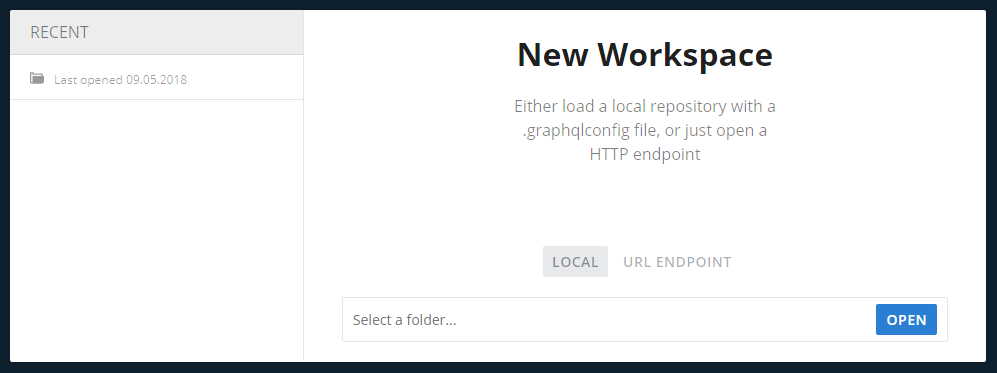
To remember the workspace so I don't need to enter the endpoint URL every time.
What is the actual behavior?
I can enter endpoint and open the playground, everything works. When I close it and reopen later, the "recent" list is empty and I have to enter the endpoint URL again. However, it does reopen tabs correctly. I tried using Close workspace menu item instead of quit, but with a same result.
Furthermore when I click Workspace -> Save file menu item, nothing happens, but in dev console I can see this error. I assume it's missing a filepath simply because I opened from the endpoint and not the .graphqlconfig file.
Uncaught (in promise) TypeError: path must be a string or Buffer
    at Object.fs.openSync (fs.js:652:18)
    at Object.module.(anonymous function) [as openSync] (ELECTRON_ASAR.js:173:20)
    at Object.fs.writeFileSync (fs.js:1311:33)
    at Object.App._this.saveConfig [as onSaveConfig]
 FredyC
All 8 comments
I'm experiencing this as well, exactly the same. I'm on Mac OS 10.13.4 with GraphQL Playground 1.5.7.
 robbyemmert
on 16 May 2018
robbyemmert
on 16 May 2018
Same issue with GQLPG Version 1.6.2 (1.6.2.3788) on OS 10.13.6.
 zedd45
on 26 Jul 2018
zedd45
on 26 Jul 2018
Same issue with GQLPG Version 1.6.2 (1.6.2.3788) on OS 10.13.3
 mcdongWang
on 22 Aug 2018
mcdongWang
on 22 Aug 2018
I have also the same issue on MacOS 10.13.6 prisma/1.14.2 (darwin-x64) node-v10.8.
 mohamedaldahoul
on 23 Aug 2018
mohamedaldahoul
on 23 Aug 2018
Just want to note here, that I basically have given up on this functionality. It's super easy to create .graphqlconfig file either manually or with graphql-cli. That file can be in a project folder if you have some other use for it or you can keep them separate. With this approach, the workspace is always visible in the recent list.
FredyC
on 23 Aug 2018
@FredyC Thanks for the tip! I'll give this a try.
zedd45
on 23 Aug 2018
Why is this still an issue over 2 years later... sigh
 TravisBallard
on 6 Nov 2020
TravisBallard
on 6 Nov 2020
Maybe we should put in a PR? I haven't looked into what this would take (honestly I haven't used this tool in ~2 years...)
zedd45
on 11 Nov 2020
Related issues
 marktani
·
13Comments
marktani
·
13Comments
 barbosa
·
12Comments
barbosa
·
12Comments
 grahamb
·
20Comments
grahamb
·
20Comments
 gajus
·
19Comments
gajus
·
19Comments
 acao
·
14Comments
acao
·
14Comments
Most helpful comment
I'm experiencing this as well, exactly the same. I'm on Mac OS 10.13.4 with GraphQL Playground 1.5.7.