Graphql-playground: Playground (v1.5.6) application goes blank in Windows 10 pro
This issue pertains to the following package(s):
- [* ] GraphQL Playground - Electron App
What OS and OS version are you experiencing the issue(s) on?
Windows 10 pro 64-bit (version 1803)
What version of graphql-playground(-electron/-middleware) are you experiencing the issue(s) on?
graphql-playground-electron-setup-1.5.6.exe
What is the expected behavior?
Installed for the first time.
Selected online movie database URL, the query window opened successfully.
After that, I clicked on some history link (i do not remember and can not reproduce as not able to use the app thereafter) and the screen went blank, with only Navigation on top. Can not go to the query screen again. Clicking any item in the navigation, the below screen remains blank. I closed and opened the app again, selected movie database url again, the blank screen with navigation appears.
After application re-installation also (used Wise uninstaller to remove any residual config files), the same blank screen appears with navigation, making application impossible to use.
The screencapture gif is attached.
What is the actual behavior?
See above detail
What steps may we take to reproduce the behavior?
See above detail
Please provide a gif or image of the issue for a quicker response/fix._

 ajit555
All 8 comments
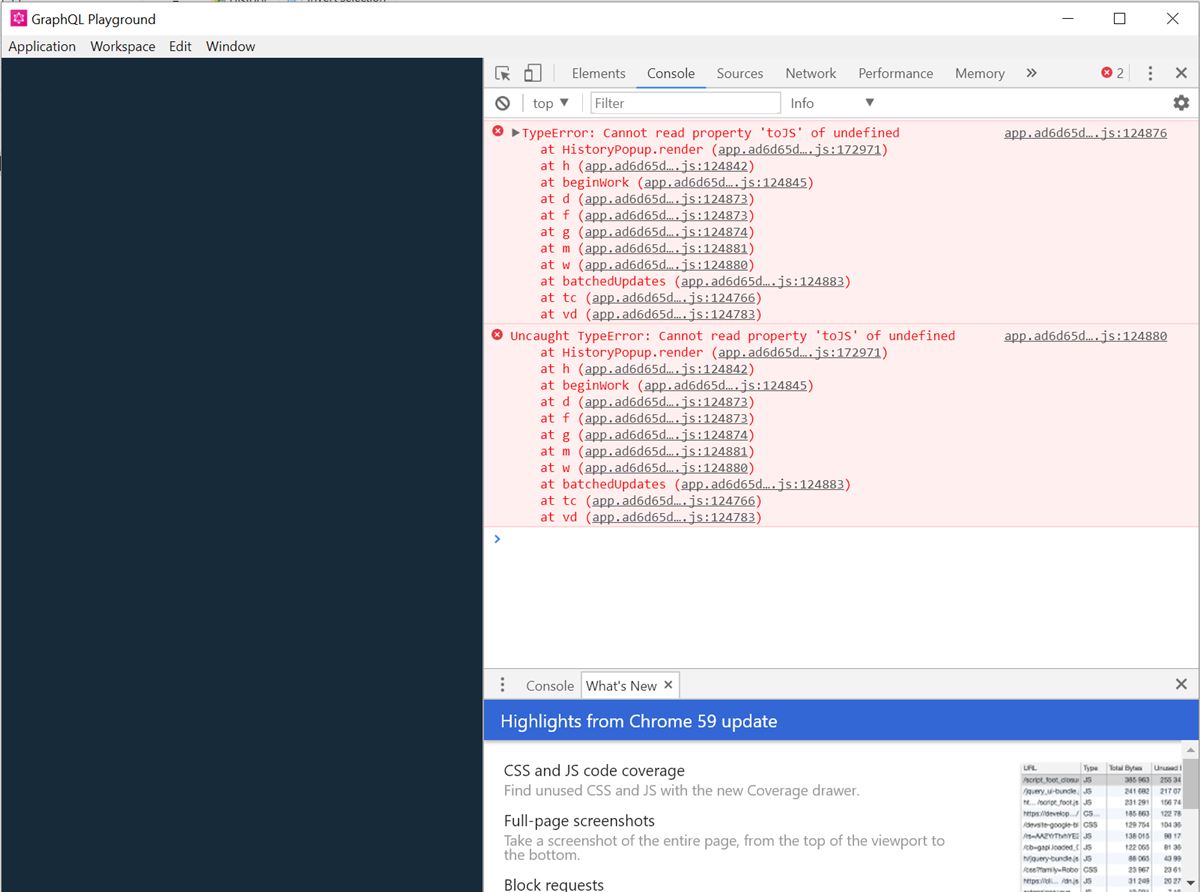
Can you please provide console output from developer tools?
 huv1k
on 6 May 2018
huv1k
on 6 May 2018
Console output from developer tools:
-1525661829494.log
-1525661852125.log
-1525661829494.log
app.ad6d65daf42880101cd1.js:124876 TypeError: Cannot read property 'toJS' of undefined
at HistoryPopup.render (app.ad6d65daf42880101cd1.js:172971)
at h (app.ad6d65daf42880101cd1.js:124842)
at beginWork (app.ad6d65daf42880101cd1.js:124845)
at d (app.ad6d65daf42880101cd1.js:124873)
at f (app.ad6d65daf42880101cd1.js:124873)
at g (app.ad6d65daf42880101cd1.js:124874)
at m (app.ad6d65daf42880101cd1.js:124881)
at w (app.ad6d65daf42880101cd1.js:124880)
at batchedUpdates (app.ad6d65daf42880101cd1.js:124883)
at tc (app.ad6d65daf42880101cd1.js:124766)
at vd (app.ad6d65daf42880101cd1.js:124783)
h @ app.ad6d65daf42880101cd1.js:124876
app.ad6d65daf42880101cd1.js:124880 Uncaught TypeError: Cannot read property 'toJS' of undefined
at HistoryPopup.render (app.ad6d65daf42880101cd1.js:172971)
at h (app.ad6d65daf42880101cd1.js:124842)
at beginWork (app.ad6d65daf42880101cd1.js:124845)
at d (app.ad6d65daf42880101cd1.js:124873)
at f (app.ad6d65daf42880101cd1.js:124873)
at g (app.ad6d65daf42880101cd1.js:124874)
at m (app.ad6d65daf42880101cd1.js:124881)
at w (app.ad6d65daf42880101cd1.js:124880)
at batchedUpdates (app.ad6d65daf42880101cd1.js:124883)
at tc (app.ad6d65daf42880101cd1.js:124766)
at vd (app.ad6d65daf42880101cd1.js:124783)
-1525661852125.log
app.ad6d65daf42880101cd1.js:124876 TypeError: Cannot read property 'toJS' of undefined
at HistoryPopup.render (app.ad6d65daf42880101cd1.js:172971)
at h (app.ad6d65daf42880101cd1.js:124842)
at beginWork (app.ad6d65daf42880101cd1.js:124845)
at d (app.ad6d65daf42880101cd1.js:124873)
at f (app.ad6d65daf42880101cd1.js:124873)
at g (app.ad6d65daf42880101cd1.js:124874)
at m (app.ad6d65daf42880101cd1.js:124881)
at w (app.ad6d65daf42880101cd1.js:124880)
at batchedUpdates (app.ad6d65daf42880101cd1.js:124883)
at tc (app.ad6d65daf42880101cd1.js:124766)
at vd (app.ad6d65daf42880101cd1.js:124783)
h @ app.ad6d65daf42880101cd1.js:124876
app.ad6d65daf42880101cd1.js:124880 Uncaught TypeError: Cannot read property 'toJS' of undefined
at HistoryPopup.render (app.ad6d65daf42880101cd1.js:172971)
at h (app.ad6d65daf42880101cd1.js:124842)
at beginWork (app.ad6d65daf42880101cd1.js:124845)
at d (app.ad6d65daf42880101cd1.js:124873)
at f (app.ad6d65daf42880101cd1.js:124873)
at g (app.ad6d65daf42880101cd1.js:124874)
at m (app.ad6d65daf42880101cd1.js:124881)
at w (app.ad6d65daf42880101cd1.js:124880)
at batchedUpdates (app.ad6d65daf42880101cd1.js:124883)
at tc (app.ad6d65daf42880101cd1.js:124766)
at vd (app.ad6d65daf42880101cd1.js:124783)
ajit555
on 7 May 2018
@ajit555 I run into that same issue on my mac. Clearing my graphql playground local storage and graphql playground cache fixed it for me. You could try that as a workaround for now, until this bug is fixed.
 operolim
on 7 May 2018
operolim
on 7 May 2018
@operolim I would try that and reply if it fixed. Sorry for late reply as got busy in other work.
ajit555
on 19 May 2018
I had the same issue on Mac with v1.5.6, though seems fixed in v1.5.8. Can anyone else confirm?
 jpwilliams
on 21 May 2018
jpwilliams
on 21 May 2018
Yes, the issue is fixed on Windows 10 after installing v1.5.8 (graphql-playground-electron-setup-1.5.8.exe).
However, in application>settings, it is showing version as "1.6.6"
ajit555
on 22 May 2018
@ajit555 You can read more about it https://github.com/prismagraphql/graphql-playground/issues/662
huv1k
on 22 May 2018
It seems that this is fixed in the latest version. Please let me know if this is still a problem for you, then we reopen this issue.
 timsuchanek
on 29 May 2018
timsuchanek
on 29 May 2018
Related issues
 tuurbo
·
13Comments
tuurbo
·
13Comments
 marktani
·
13Comments
marktani
·
13Comments
 barbosa
·
12Comments
barbosa
·
12Comments
 tpage99
·
21Comments
tpage99
·
21Comments
 heymartinadams
·
26Comments
heymartinadams
·
26Comments
Most helpful comment
@ajit555 I run into that same issue on my mac. Clearing my graphql playground local storage and graphql playground cache fixed it for me. You could try that as a workaround for now, until this bug is fixed.