Graphql-playground: Playground POSTs to the wrong URI
While using express middleware after #139
const playground = require('graphql-playground/middleware').express
app.use('/playground', playground({ endpointUrl: '/graphql' }))
Playground will issue graphql queries to /playground instead of /graphql.
Playground is issuing the following request for the schema
curl 'http://localhost:8080/playground'
-H 'Pragma: no-cache' -H 'Origin: http://localhost:8080' -H 'Accept-Encoding: gzip, deflate, br' -H 'Accept-Language: en-US,en;q=0.8' -H 'Content-Type: application/json' -H 'Accept: */*' -H 'User-Agent: Mozilla/5.0 (Macintosh; Intel Mac OS X 10_12_6) AppleWebKit/537.36 (KHTML, like Gecko) Chrome/61.0.3163.100 Safari/537.36' -H 'Cache-Control: no-cache' -H 'Referer: http://localhost:8080/playground' -H 'Connection: keep-alive' -H 'x-graphcool-source: console:playground' --data-binary '{"query":"\n query IntrospectionQuery {\n __schema {\n queryType { name }\n mutationType { name }\n subscriptionType { name }\n types {\n ...FullType\n }\n directives {\n name\n description\n locations\n args {\n ...InputValue\n }\n }\n }\n }\n\n fragment FullType on __Type {\n kind\n name\n description\n fields(includeDeprecated: true) {\n name\n description\n args {\n ...InputValue\n }\n type {\n ...TypeRef\n }\n isDeprecated\n deprecationReason\n }\n inputFields {\n ...InputValue\n }\n interfaces {\n ...TypeRef\n }\n enumValues(includeDeprecated: true) {\n name\n description\n isDeprecated\n deprecationReason\n }\n possibleTypes {\n ...TypeRef\n }\n }\n\n fragment InputValue on __InputValue {\n name\n description\n type { ...TypeRef }\n defaultValue\n }\n\n fragment TypeRef on __Type {\n kind\n name\n ofType {\n kind\n name\n ofType {\n kind\n name\n ofType {\n kind\n name\n ofType {\n kind\n name\n ofType {\n kind\n name\n ofType {\n kind\n name\n ofType {\n kind\n name\n }\n }\n }\n }\n }\n }\n }\n }\n"}' --compressed
Should be curl 'http://localhost:8080/graphql'
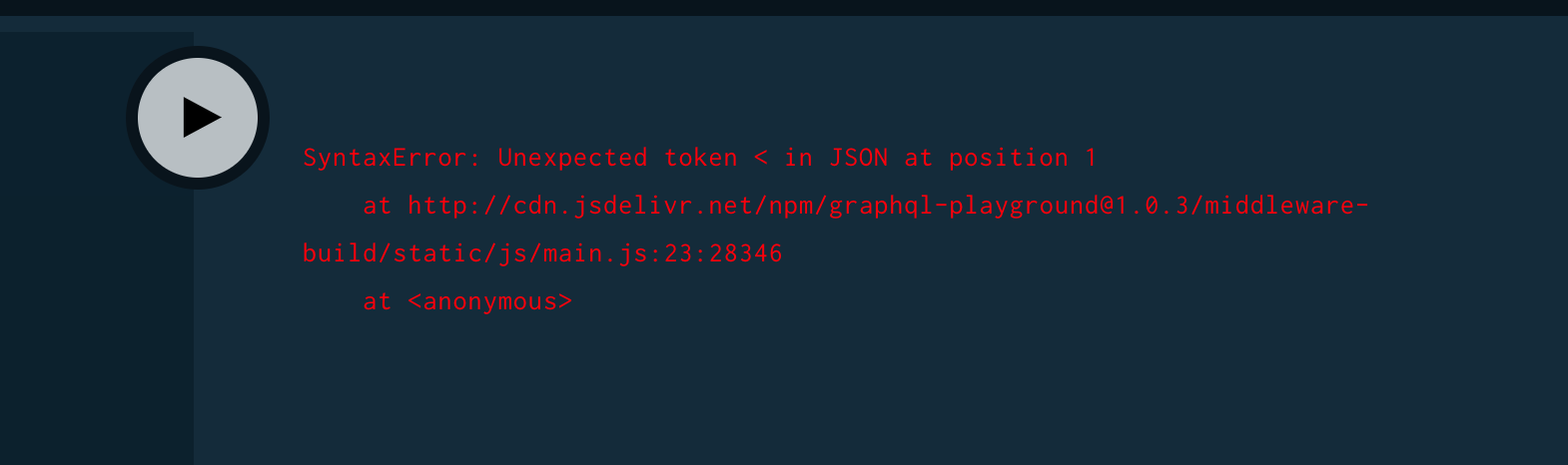
The UI reports the following error
SyntaxError: Unexpected token < in JSON at position 1
    at http://cdn.jsdelivr.net/npm/[email protected]/middleware-build/static/js/main.js:23:28346
    at <anonymous>
 curtisallen
All 9 comments
seeing this as well with hapi middleware using v1.0.3
config:
{
  register: playground,
  options: {
    path: '/playground',
    endpointUrl: '/graphql',
  },
},

 kkemple
on 28 Sep 2017
kkemple
on 28 Sep 2017
Sorry for the confusion, we updated the endpoint to endpoint. Can you check if it's fixed when renaming the option to endpoint?
 timsuchanek
on 29 Sep 2017
timsuchanek
on 29 Sep 2017
@timsuchanek it looks like https://github.com/graphcool/graphql-playground/commit/ed5551696f65f7df4232116d4224d177da9f2de0 didn't update https://github.com/graphcool/graphql-playground/blob/master/packages/graphql-playground/src/middleware/render-playground-page.ts#L56
 ecwyne
on 29 Sep 2017
ecwyne
on 29 Sep 2017
@timsuchanek yeah using endpoint didn't work
app.use('/playground', playground({ endpoint: '/graphql' }))
Still posting to /playground
curtisallen
on 29 Sep 2017
It seems the problem is that the endpoint prop isn't getting passed down to the <App> component. I think we just need to use the <Route>'s render prop and pass down the endpoint prop to fix this. Not sure if there's an easy way for me to test this since the build is hosted on a CDN.

With the React Developer Tools extension I was able to edit the endpoint prop and it works temporarily.
 overra
on 30 Sep 2017
overra
on 30 Sep 2017
After a few fixes I was able to run this in development mode locally. Then I modified public/index.html so that it provided an endpoint option to GraphQLPlayground.init. I've made the changes I mentioned above and now it points to the custom endpoint.
overra
on 30 Sep 2017
This is disappointing. I was hoping to try out GraphQL Playground today and replace GraphiQL. Sounds like Playground is still unstable and I should wait a little longer.
Playground looks great at https://www.graphqlbin.com! Keep up the awesome work. Hopefully a usable build will be released soon! 🎆
For reference, I am also using:
const app = express();
app.use("/playground", playground({ endpoint: "/graphql" }));
with
"graphql-playground": "1.0.4",
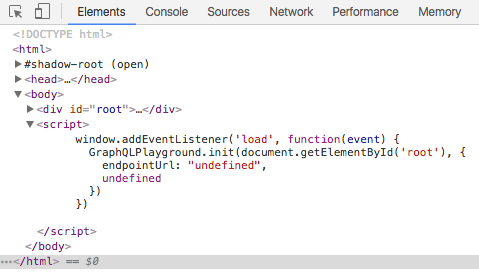
Edit: This is what the generated script within the page looks like:
 Glavin001
on 2 Oct 2017
Glavin001
on 2 Oct 2017
It's now fixed in 1.0.8
timsuchanek
on 5 Oct 2017
awesome works for me now thanks!
curtisallen
on 5 Oct 2017
Related issues
 DarkLite1
·
3Comments
DarkLite1
·
3Comments
 miketmoore
·
4Comments
miketmoore
·
4Comments
 nikcorg
·
3Comments
nikcorg
·
3Comments
 nuttikung
·
4Comments
nuttikung
·
4Comments
 stevecaldwell77
·
3Comments
stevecaldwell77
·
3Comments
Most helpful comment
@timsuchanek yeah using
endpointdidn't workStill posting to
/playground