Graphql-engine: Metadata API is slow
I have a big data model (171 tables), which I want to handle via Hasura.
To customize the graphql API Hasura exposes I use https://github.com/dsd-sztaki-hu/hasuraconf on my model to generate a bulk Hasura metadata API JSON. This JSON file is 17.000 lines long.
Now, when I try to load this into Hasura it takes up to 30-40 minutes for this to finish (postgresql + Hasura runs in Docker on macOs on my laptop).
While I understand that metadata API JSON execution time is about linear with the JSON size, this load still seems very slow.
I can provide my database schema and the JSON file in private if it helps.
 beepsoft
All 8 comments
The bulk API could be really slow with lots of metadata requests. We have the replace_metadata API which takes the entire metadata spec (result of export_metadata) which is orders of magnitude faster for large metadata. Have you tried replace_metadata ?
 tirumaraiselvan
on 19 Nov 2020
tirumaraiselvan
on 19 Nov 2020
Thanks @tirumaraiselvan! I've been thinking about it, but couldn't find official documentation on it (https://github.com/hasura/graphql-engine/issues/6209) Now looking around in version 1.3.3 I found this:
Is this now the official schema? If so, could you somehow put it also into the official documentation at (https://hasura.io/docs/1.0/graphql/core/api-reference/schema-metadata-api/index.html)?
beepsoft
on 19 Nov 2020
I just added support for the new metadata JSON format in HasuraConfigurator and loading it via replace_metadata is indeed a LOT faster: the load time went down from 30 minutes to 2 seconds!
https://github.com/dsd-sztaki-hu/hasuraconf/releases/tag/0.5.0
beepsoft
on 19 Nov 2020
Glad you got it sorted, will take up adding a reference to this in the docs.
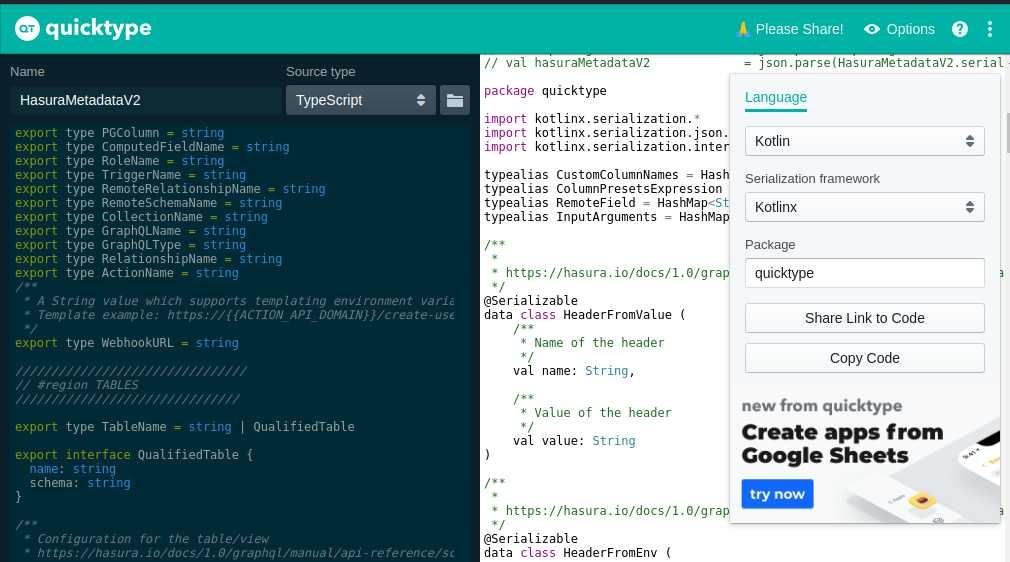
Also @beepsoft, you may also find the auto-generated Kotlin dataclasses/types that match the Metadata schema + have built-in JSON serialization useful in your project (I really enjoyed your HasuraCon talk!)
https://gist.github.com/GavinRay97/20b68f6a6a33dd6b1a7452fe2be9cf38
You can generate these yourself by taking either the Typescript or JSON Schema source definitions, and putting them into https://app.quicktype.io where you can configure the serialization library (I have kotlinx used here):
 GavinRay97
on 19 Nov 2020
GavinRay97
on 19 Nov 2020
Thanks, Gavin! I was looking for generating Kotlin classes from your model but couldn't find the tool (I tried this one, but it failed: https://github.com/wuseal/JsonToKotlinClass/issues/314#issuecomment-729510937) I didn't know about quicktype.io, thanks for the tip!
beepsoft
on 19 Nov 2020
@beepsoft Ah, yeah so the SDK is basically a wrapper over Quicktype's JS packages, it's a small Node script that has a YAML config.
There's a section here, which talks about how you can generate other languages:
https://github.com/hasura/graphql-engine/tree/master/contrib/metadata-types#generator-config-file-options
# Accepts "TypeScript" or "JsonSchema"
# Override this with --TypeScript or --jsonschema from CLI
selected_input_language: TypeScript

# Glob patterns for the target input files of selected language
# Only the matching SELECTED INPUT LANGUAGE file expression will be used
input_files:
  # Paths can be either a string, or an array of strings
  JsonSchema: "./src/types/**.schema.json"
  TypeScript: ["./src/types/**.ts", "./src/otherfolder/**.ts"]

# Output file directory
output_directory: "./generated"

# Quicktype config per-language
# Config is an object of type "rendererOptions"
# See: https://github.com/quicktype/quicktype/blob/master/src/quicktype-core/language/TypeScriptFlow.ts#L20
quicktype_config:
  kotlin:
    framework: kotlinx
    package: org.mypackage
So it would look something like this, and then you would do a yarn install or npm install from that directory to setup dependencies, then yarn generate-types or npm run generate-types to autogenerate the Kotlin definitions :+1:
Though this is a bit of a process, and it is usually quicker just to copy-paste the source files from the Github repo into the app.quicktype.io web app :sweat_smile:
GavinRay97
on 19 Nov 2020
Oh, I see, I didn't know about this either. I thought your tool was just for generating TS/JS from the JSON Schema. I saw the mentions of Kotlin, etc. i the config file, but I thought these would be future additions. 😄 Very cool, Gavin, thanks!
beepsoft
on 19 Nov 2020
Ahh, good feedback. Will add a YAML comment above the languages section like:
# UNCOMMENT ANY LANGUAGE BELOW TO ENABLE GENERATING SDK FOR IT
Related issues
 Fortidude
·
3Comments
Fortidude
·
3Comments
 coco98
·
3Comments
coco98
·
3Comments
 bogdansoare
·
3Comments
bogdansoare
·
3Comments
 marionschleifer
·
3Comments
marionschleifer
·
3Comments
 revskill10
·
3Comments
revskill10
·
3Comments