Graphql-engine: Permission rule error for an array in AWS Cognito stringfied JWT token
Environment:
- Hasura 1.3.0 with Relay end-point.
- AWS Cognito as auth service, I use Amplify
The problematic permission rule for insertion:
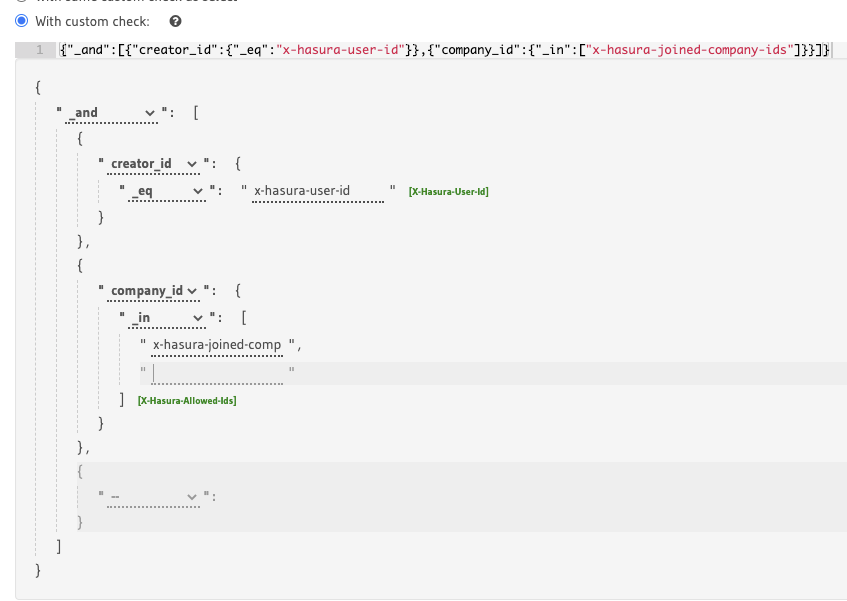
I have a permission rule for insertion like this:
I want to make sure when user insert this entity, I want to ensure that the company_id from the GraphQL variables must be included in the x-hasura-joined-company-ids array of JWT claims. I use AWS Cognito, so the https://hasura.io/jwt/claims is JSON.stringify().
The error
When I send the GraphQL mutation.
I receive an error:
{
   "errors":[
      {
         "extensions":{
            "path":"$.selectionSet.insert_task_one.args.object",
            "code":"permission-error"
         },
         "message":"Check constraint violation. insert check constraint failed"
      }
   ]
}
What's the expected result
If I remove the check for company_id, the insertion will pass.
And yes, the company_id I insert is the in that array.
What does your JWT look like
This is my JWT:
eyJraWQiOiJpNlZxSTNJTEdONDFiekJibU5wdkY0TDM2VitJSDRjRUFQY3o5czNPMUJjPSIsImFsZyI6IlJTMjU2In0.eyJzdWIiOiI1ZWU5YTUzOC0zNzdjLTQ2YWItOTAxMi04ODFlYmNjMTM3NDAiLCJlbWFpbF92ZXJpZmllZCI6dHJ1ZSwiaHR0cHM6XC9cL2hhc3VyYS5pb1wvand0XC9jbGFpbXMiOiJ7XCJ4LWhhc3VyYS1hbGxvd2VkLXJvbGVzXCI6W1widXNlclwiXSxcIngtaGFzdXJhLWRlZmF1bHQtcm9sZVwiOlwidXNlclwiLFwieC1oYXN1cmEtdXNlci1pZFwiOlwiNWVlOWE1MzgtMzc3Yy00NmFiLTkwMTItODgxZWJjYzEzNzQwXCIsXCJ4LWhhc3VyYS1vd25lZC1jb21wYW55LWlkc1wiOlwie1xcXCJjb21wYW55X2NrYWt2MHRkaDAwMDEwOG1xMmJwczUxb2FcXFwifVwiLFwieC1oYXN1cmEtam9pbmVkLWNvbXBhbnktaWRzXCI6XCJ7XFxcImNvbXBhbnlfY2tha3YwdGRoMDAwMTA4bXEyYnBzNTFvYVxcXCJ9XCJ9IiwiaXNzIjoiaHR0cHM6XC9cL2NvZ25pdG8taWRwLnVzLWVhc3QtMS5hbWF6b25hd3MuY29tXC91cy1lYXN0LTFfd2x5TE5EbDVkIiwiY29nbml0bzp1c2VybmFtZSI6IjVlZTlhNTM4LTM3N2MtNDZhYi05MDEyLTg4MWViY2MxMzc0MCIsImN1c3RvbTpvd25lZENvbXBhbnlJZHMiOiJbXCJjb21wYW55X2NrYWt2MHRkaDAwMDEwOG1xMmJwczUxb2FcIl0iLCJhdWQiOiI0MmV1azZmc2toZnJrdGNsdHYyZHZpbmxsaCIsImV2ZW50X2lkIjoiYzdkM2JlZDctOGFkNi00ZmI3LTgyZjUtYzI4NTZiM2RjYThjIiwidG9rZW5fdXNlIjoiaWQiLCJhdXRoX3RpbWUiOjE1OTcyMzQwNjksIm5hbWUiOiJhbGJlcnRnYW9oeSIsImN1c3RvbTpqb2luZWRDb21wYW55SWRzIjoiW1wiY29tcGFueV9ja2FrdjB0ZGgwMDAxMDhtcTJicHM1MW9hXCJdIiwiZXhwIjoxNTk3MjM3NjY5LCJpYXQiOjE1OTcyMzQwNjksImVtYWlsIjoiYWxiZXJ0Z2FvaHlAZ21haWwuY29tIn0.KhIiRhwffyyLka1lUD6YqgN-zwfor2vqxIM9E4WF48UwdofmTu_K7gaHTIHq0J3BPCIDSg8hX4F9rCtVkKLIoE8W2GCVz5kO1npha2XbhNhR6Rz1Au0g9fxzzi2B9YPM6q8Z8PFBmdqthkdJrGiodLscNLadTBdjKrw1O_iwkweynsRxOxB84N7oEc4h3EuPZSJTy8Z71927zelAAVv5Oz4rd-ZzFp1jO1JY4xTbTNE3x-vLvEbixxAFRrpJwpKD6KpulvAnD5ngo2ValD_NyyWCPgt1TOL0WplxZUp8o36DFdgzmNKdk1ICxea-mkc1AT8EzBmNHTdGLVMZtkom7g
Highlight
As you can see, I already converted my array to pgArray:
"x-hasura-owned-company-ids":"{"company_ckakv0tdh000108mq2bps51oa"}"
What am I missing here?
 Albert-Gao
All 14 comments
is this related?
https://github.com/hasura/graphql-engine/issues/1902
Or #1902 is for normal JWT? In my case, since I use AWS Cognito, the claims have to be a json string and the fact that we have to covert the array into a pg array, which might make it not work?
Albert-Gao
on 13 Aug 2020
Hey @Albert-Gao is x-hasura-user-id recognised well?
We use cognito but not like that anymore (we use the auth webhook now for different reasons). However, when we used it like that, it looks like we did what you described. Here's our jwt enrichment hook lambda if that helps for reference:
```let { request, gql } = require('../helpers/graphql.js');
let unique = require('../helpers/unique.js');
let logger = require('../helpers/logger');
module.exports.handler = async function handler(event) {
try {
let { users, company_users } = await request(
QUERY_GET_USER_DATA_BY_COGNITO_ID,
{ cognito_id: event.request.userAttributes.sub }
);
let user = users[0];
let claims = { 'x-hasura-user-id': user.id };

let allowed_roles = unique(company_users.map(item => item.role));
if (allowed_roles.length === 0) {
  allowed_roles = [COMPANY_ADMIN];
}

if (user.subscriber) {
  allowed_roles.push(SUBSCRIBER);
  claims['x-hasura-subscriber-id'] = user.subscriber.id;
}

let default_role = getDefaultRole(allowed_roles);
let admin_companies = getCompaniesWithRole(company_users, COMPANY_ADMIN);
let user_companies = getCompaniesWithRole(company_users, COMPANY_USER);

claims['x-hasura-allowed-roles'] = allowed_roles;
claims['x-hasura-default-role'] = default_role;
claims['x-hasura-admin-companies'] = admin_companies;
claims['x-hasura-user-companies'] = user_companies;

event.response = {
  claimsOverrideDetails: {
    claimsToSuppress: ['name', 'family_name'],
    claimsToAddOrOverride: {
      'https://hasura.io/jwt/claims': JSON.stringify(claims),
    },
  },
};

return event;
} catch (e) {
logger.error(e);
throw e;
}
};
let QUERY_GET_USER_DATA_BY_COGNITO_ID = gql
  query getUserByCognitoId($cognito_id: String!) {
    users(limit: 1, where: { cognito_id: { _eq: $cognito_id } }) {
      id
      subscriber {
        id
      }
    }
    company_users(where: { user: { cognito_id: { _eq: $cognito_id } } }) {
      company_id
      role
    }
  }
;
let COMPANY_ADMIN = 'company-admin';
let COMPANY_USER = 'company-user';
let SUBSCRIBER = 'subscriber';
let ROLES_BY_IMPORTANCE = [COMPANY_ADMIN, COMPANY_USER, SUBSCRIBER];
let asPostgresArray = list => {${list.map(item =>"${item}").join(',')}};
let getCompaniesWithRole = (company_users, role) =>
asPostgresArray(
unique(
company_users
.filter(item => item.role === role)
.map(item => item.company_id)
)
);
let getDefaultRole = allowed_roles =>
ROLES_BY_IMPORTANCE.find(role => allowed_roles.includes(role));
Just to be on the safe side, are you setting the `HASURA_GRAPHQL_JWT_SECRET` env var to set the `claims_format` to `stringified_json`? https://hasura.io/docs/1.0/graphql/manual/auth/authentication/jwt.html#claims-format https://github.com/hasura/graphql-engine/issues/1176. I think we used something like this env var at the time (in docker compose and farget in our case):
HASURA_GRAPHQL_JWT_SECRET: '{ "type": "HS256", "key": "...", "claims_format": "stringified_json" }'
```
 dariocravero
on 13 Aug 2020
dariocravero
on 13 Aug 2020
Thanks for the reply!
Yes, I checked, it's set up like this:
{"type":"RS256","jwk_url":"https://cognito-idp.us-east-1.amazonaws.com/us-east-URL/.well-known/jwks.json","claims_format":"stringified_json"}
I inspected your code, the way we handle it is just the same,
import { triggerLambdaWrapper } from "../utils/triggerLambdaWrapper";
import { PlainObject } from "@teamingcloud/common";

function toPgArray(arr: any[]) {
  const m = arr.map((e) => `"${e}"`).join(",");
  return `{${m}}`;
}

function getUserArrayAttribute(
  key: string,
  defaultValue: any,
  event: any
): string {
  const isKeyExist =
    event.request &&
    event.request.userAttributes &&
    event.request.userAttributes[key];

  if (!isKeyExist) {
    return toPgArray(defaultValue);
  }

  return toPgArray(JSON.parse(event.request.userAttributes[key]));
}

export const handler = triggerLambdaWrapper<{
  userName: string;
  response: PlainObject;
}>((event, _, callback) => {
  const joinedCompanyIds = getUserArrayAttribute(
    "custom:joinedCompanyIds",
    [],
    event
  );
  const ownedCompanyIds = getUserArrayAttribute(
    "custom:ownedCompanyIds",
    [],
    event
  );

  const claims = {
    "x-hasura-allowed-roles": ["user"],
    "x-hasura-default-role": "user",
    "x-hasura-user-id": event.userName,
    "x-hasura-owned-company-ids": ownedCompanyIds,
    "x-hasura-joined-company-ids": joinedCompanyIds,
  };

  event.response = {
    claimsOverrideDetails: {
      claimsToAddOrOverride: {
        "https://hasura.io/jwt/claims": JSON.stringify(claims),
      },
      claimsToSuppress: ["attribute_key3"],
    },
  };

  // Return to Amazon Cognito
  callback(null, event);
});
Any way I can check a more detailed error message on the Hasura side? Thanks
Albert-Gao
on 13 Aug 2020
Found an interesting fact, the JWT token needs to be stringified, and the PGArray is not valid JSON array, so we have to stringify it first, which means after parse the JSON, it is something like this:
const jwt = {
  "text": "{\"x-hasura-allowed-roles\":[\"user\"],\"x-hasura-default-role\":\"user\",\"x-hasura-user-id\":\"5ee9a538-377c-46ab-9012-881ebcc13740\",\"x-hasura-owned-company-ids\":\"{\\\"company_ckakv0tdh000108mq2bps51oa\\\"}\",\"x-hasura-joined-company-ids\":\"{\\\"company_ckakv0tdh000108mq2bps51oa\\\"}\"}",
}
And when you pass the value directly to PQ, it is like this:
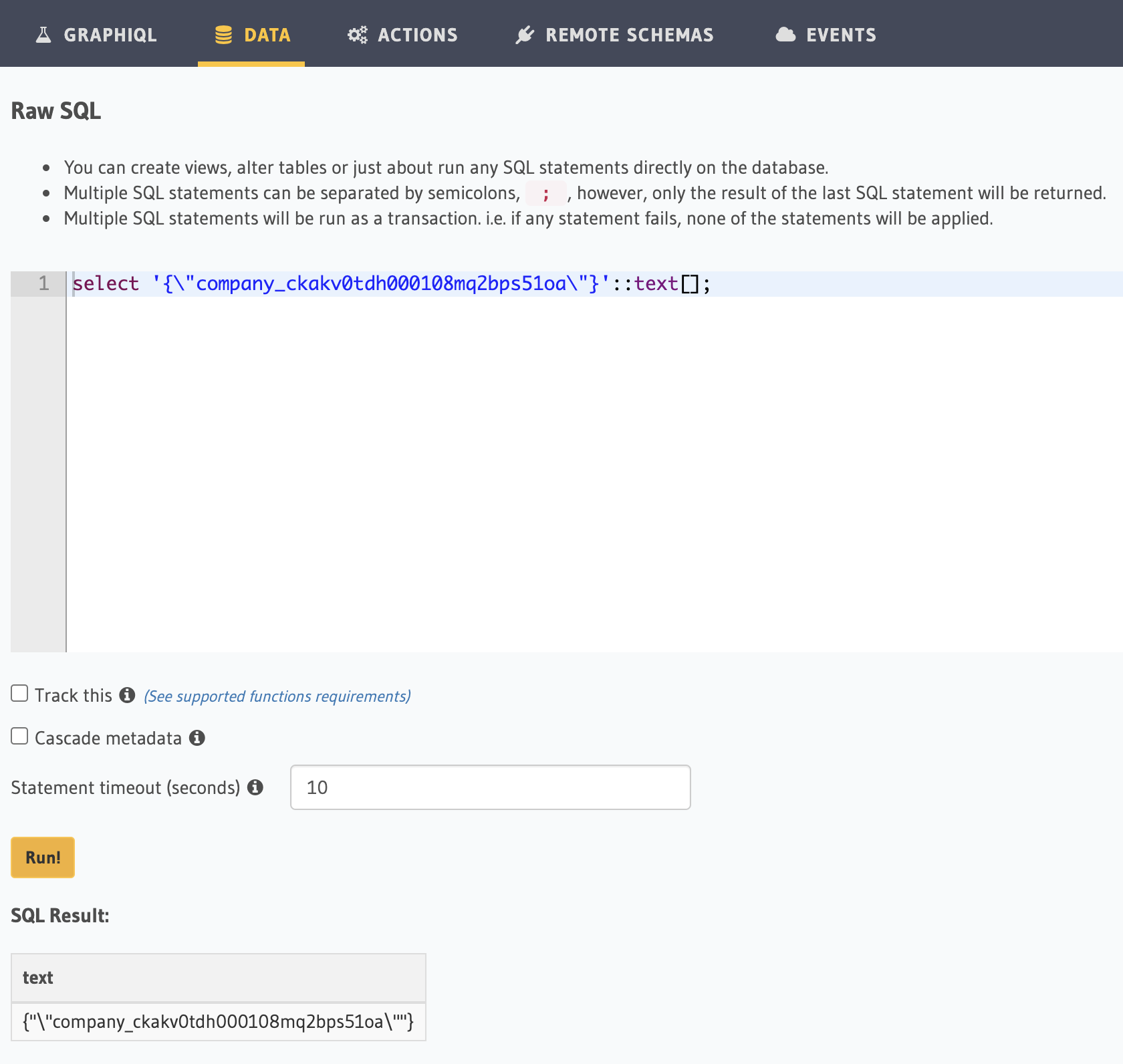
Will a value like {"\"company_ckakv0tdh000108mq2bps51oa\""} get correctly evaluated during runtime? Could this cause the problem? Thanks
Albert-Gao
on 13 Aug 2020
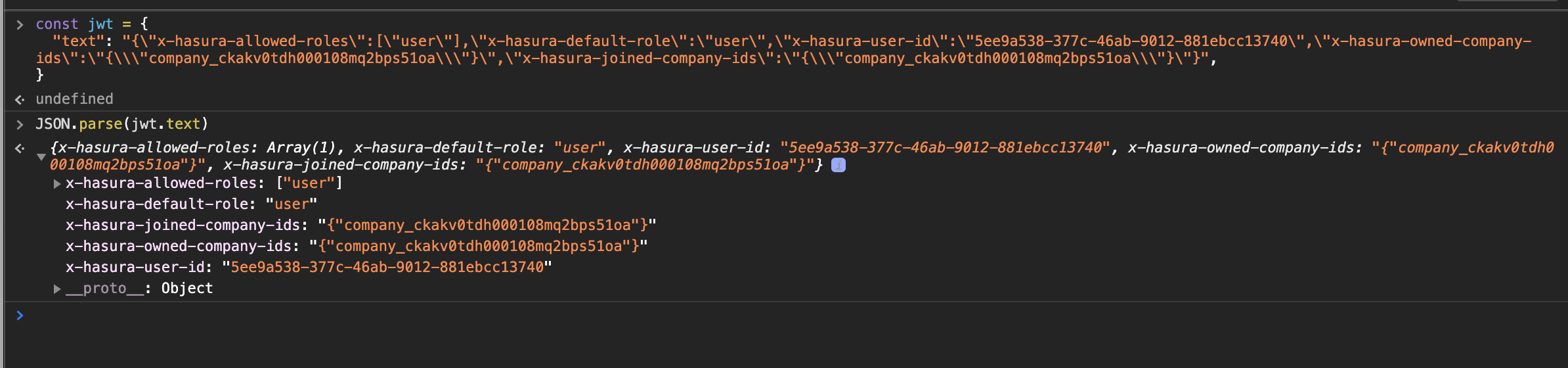
Weird. When I try parsing the JSON you shared above on:
const jwt = {
  "text": "{\"x-hasura-allowed-roles\":[\"user\"],\"x-hasura-default-role\":\"user\",\"x-hasura-user-id\":\"5ee9a538-377c-46ab-9012-881ebcc13740\",\"x-hasura-owned-company-ids\":\"{\\\"company_ckakv0tdh000108mq2bps51oa\\\"}\",\"x-hasura-joined-company-ids\":\"{\\\"company_ckakv0tdh000108mq2bps51oa\\\"}\"}",
}
it results in a string without the \ character escaping the ":
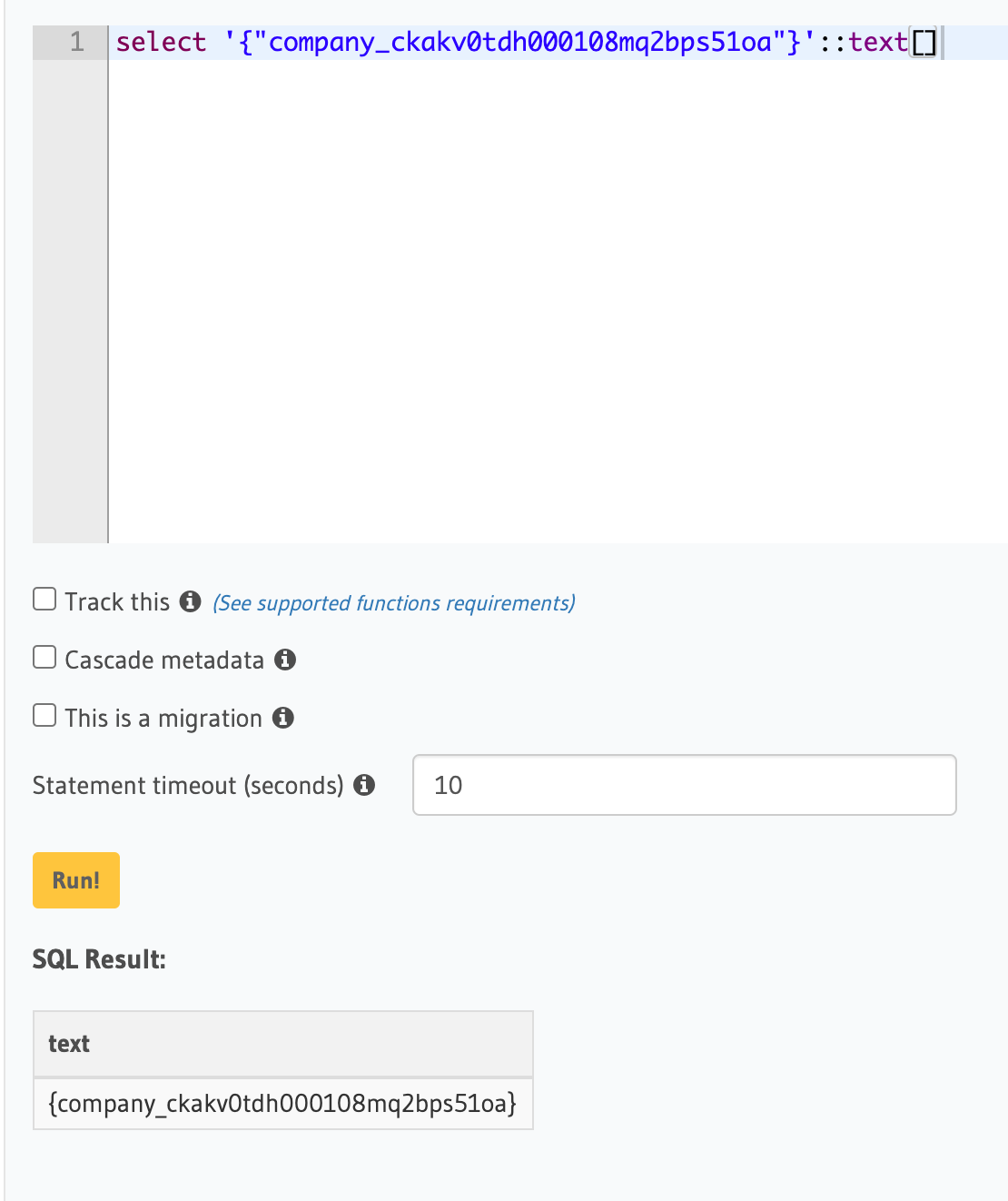
Which in turn seems to be giving the list you were after:
What does event.request.userAttributes look like in your case?
dariocravero
on 14 Aug 2020
This is the event object:
{
  version: '1',
  triggerSource: 'TokenGeneration_RefreshTokens',
  region: 'us-east-1',
  userPoolId: 'us-east-abcdefg',
  userName: '1234-377c-46ab-9012-abcde'',
  callerContext: {
    awsSdkVersion: 'aws-sdk-unknown-unknown',
    clientId: 'abcde'
  },
  request: {
    userAttributes: {
      'custom:ownedCompanyIds': '["company_ckakv0tdh000108mq2bps51oa"]',
      sub: '1234-377c-46ab-9012-abcde',
      email_verified: 'true',
      'cognito:user_status': 'CONFIRMED',
      'cognito:email_alias': '[email protected]',
      name: 'albertgaohy',
      'custom:joinedCompanyIds': '["company_ckakv0tdh000108mq2bps51oa"]',
      email: '[email protected]'
    },
    groupConfiguration: {
      groupsToOverride: [],
      iamRolesToOverride: [],
      preferredRole: null
    }
  },
  response: { claimsOverrideDetails: null }
}
Just wondering, what kind of error can trigger this error: Check constraint violation. insert check constraint failed and what constraint did it check? The JWT I posted is executed from that code, looks valid to me. Don't know what I am missing here.
Albert-Gao
on 14 Aug 2020
@Albert-Gao I realised I overlooked your permission check.
I see that the editor is trying to use a list of values for x-hasura-joined-companies-ids:
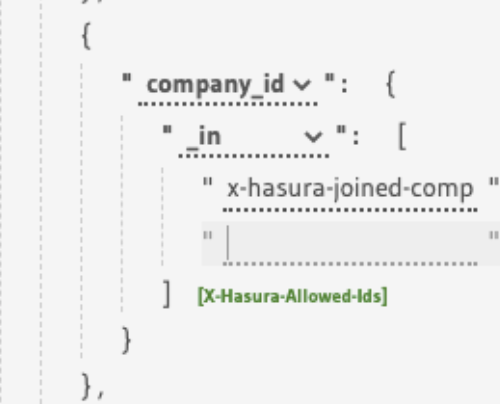
This check:
_in: ["x-hasura-joined-companies-ids"]
should actually be:
_in: "x-hasura-joined-companies-ids"
Otherwise my guess is that Hasura is checking against the value as it being present in a list with one element which happens to be "x-hasura-joined-companies-ids", or it could be expanding it though to the variable's value, not sure tbh.
dariocravero
on 14 Aug 2020
Thanks. So is it a bug?
In the doc, it is a string rather than array. https://hasura.io/docs/1.0/graphql/manual/auth/authorization/roles-variables.html

But the hasura portal makes it array by default
Albert-Gao
on 14 Aug 2020
No, the docs are fine. What happens is that the roles editor is probably setup to pick up x-hasura-user-id only as a variable it won't expand. Since the check you're making is an _in I guess that the editor expects you to give it a bunch of values to compare against in a list and that's when it put the [] around your variable.
[edit]
In the doc, it is a string rather than array
☝️ is because Hasura expands the variable in place, so it doesn't need an array of values to compile, it expects the value you provide on the variable to be a postgres array already
dariocravero
on 14 Aug 2020
Thanks. Actually, that was my idea as well. The JSON in doc makes sense. So, Is this a bug? Should I raise a new ticket?
Albert-Gao
on 15 Aug 2020
Figured it out, you can actually edit that row...
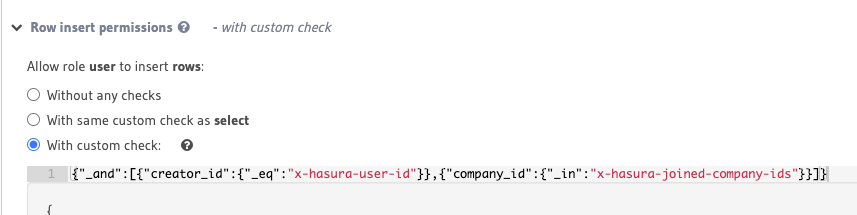
now the code works like a charm, maybe I should submit a PR for the doc to let people know this...
I thought it is generated and can not be edit
Albert-Gao
on 15 Aug 2020
Thank you so much for your help! You lead me to the solution!
Albert-Gao
on 15 Aug 2020
Yeah sorry, I should've been more clear where the confusion was coming from @Albert-Gao. It's the way the editor prompts you to add a list to begin with when you choose the _in operator for the role. The editor lets you swap between a list with values and a variable that has the list in postgres format when you press on the green button next to it that in the editor reads [X-Hasura-Allowed-Ids]. See this:
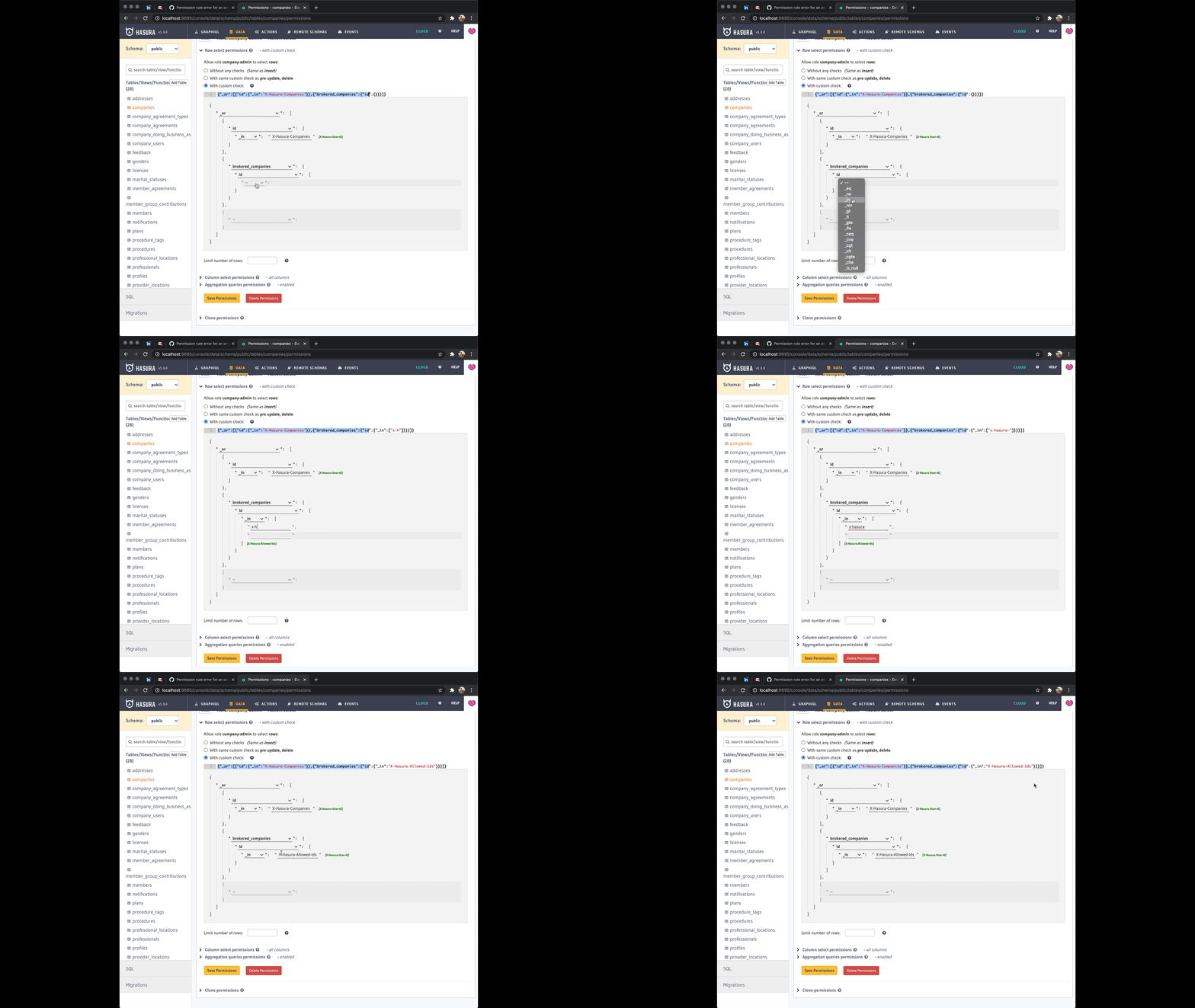
I think you're right that this could use a clarification in the docs though and ideally a fix in the editor to make what's going on more clear. It'll be great if you could send a PR to address that! 🥇 Thanks!
dariocravero
on 15 Aug 2020
submitted https://github.com/hasura/graphql-engine/pull/5595 :) Thanks
Albert-Gao
on 15 Aug 2020
Related issues
 bogdansoare
·
3Comments
bogdansoare
·
3Comments
 revskill10
·
3Comments
revskill10
·
3Comments
 sachaarbonel
·
3Comments
sachaarbonel
·
3Comments
 tirumaraiselvan
·
3Comments
tirumaraiselvan
·
3Comments
 codepunkt
·
3Comments
codepunkt
·
3Comments