Graphql-engine: ConnectionFailure Network.Socket.connect: <socket: 42>: does not exist when i try to access action from graphiql
hello I've followed tutorial for creating a action (hasura 1.2. beta 3) and ive get following error when i try to call it from graphiql:
{
  "errors": [
    {
      "extensions": {
        "internal": {
          "type": "http_exception",
          "message": "ConnectionFailure Network.Socket.connect: <socket: 42>: does not exist (Connection refused)"
        },
        "path": "$",
        "code": "unexpected"
      },
      "message": "http exception when calling webhook"
    }
  ]
}
if i call directly api it works as expected.
here is defined action in console:
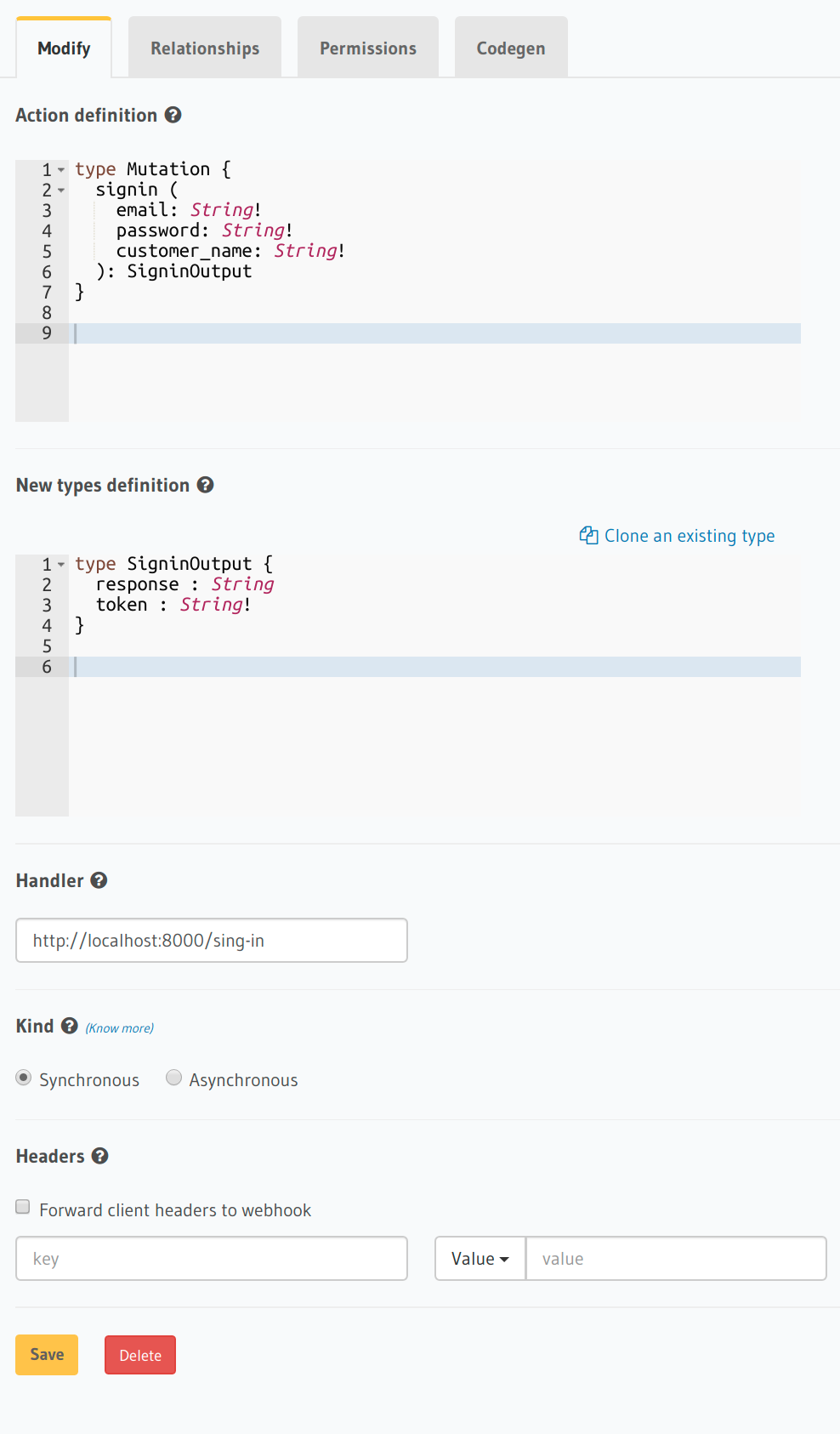
here is my code on express js:
//@ts-check
import fetch from "node-fetch";
import express from "express";
import bodyParser from "body-parser";
import { HASURA_FIND_USER } from './queries/find_user.query'
import { HASURA_OPERATION } from "./queries/authenticate_log.mutation"

const app = express();

const PORT = process.env.PORT || 8000;

app.use(bodyParser.json());

app.post('/hello', async (req, res) => {
  return res.json({
    hello: "world"
  });
});

// Request Handler
app.post('/sign-in', async (req, res) => {

  // get request input
  const { email, password, customer_name } = req.body.input;

try{
    // run some business logic
    let result = await execute({email, password, customer_name},HASURA_FIND_USER)

    console.log("test")

    if(result.errors){
      return res.status(400).json(result.errors[0])
    }
    const { users } = result.data

    if(users.length !==1) return res.status(400).json({message:"wrong credentials please try again!"})
    console.log(users[0].customer_users.customer)
    const {
      id:user_id,
      customer_users
    } = users[0]
    if(customer_users.length!==1) return res.status(400).json({message:"wrong credentials pleas try again!"})

    const {
      brukerBrukerNavn,
      brukerRegion,
      customer:{
        accessible_services,
        id:customer_id
      }
    }= customer_users[0]

    console.log('console log result after firs request: ', user_id, brukerBrukerNavn,brukerRegion, accessible_services,customer_id );


    // execute the Hasura operation
    let { data, errors } = await execute({ user_id: user_id, customer_id: customer_id  },HASURA_OPERATION);

    // if Hasura operation errors, then throw error
    if (errors) {
      return res.status(400).json(errors[0])
    }

    // success
    return res.json({
      ...data.insert_authentication_logs
    })
}catch(e){

  return res.status(500).json(`${e}`)
}
});

app.listen(PORT);


// execute the parent operation in Hasura
const execute = async (variables:any, operation:string) => {


  const fetchResponse = await fetch(
    "http://localhost:7000/v1/graphql",
    {
      method: 'POST',
      headers:{
        "x-hasura-admin-secret":"customersservice"
      },
      body: JSON.stringify({
        query: operation,
        variables: variables
      })
    })
  const data = await fetchResponse.json();
  console.log('DEBUG: ', JSON.stringify(data));
  return data;
};
 Relaxe111
All 4 comments
Since Hasura runs inside a container, it has a different network than the host network so localhost generally doesn't work (unless your container is configured to use the host network)
Anyway, you can reach the host using a fixed IP that is OS dependent:
With Docker for Mac/Windows: Use http://host.docker.internal:8000/hello
On Linux: Typically 172.17.0.1 i.e the IP address of docker0 interface. use ip addr show docker0
 tirumaraiselvan
on 9 Apr 2020
tirumaraiselvan
on 9 Apr 2020
Hello and thank-you for answer.
I am on Linux.
I've checked ip address of docker0 interface and it is as you wrote here:

After I added this IP address to URL I've got following:
{
  "errors": [
    {
      "extensions": {
        "internal": "content type of response is \"text/html\"",
        "path": "$",
        "code": "unexpected"
      },
      "message": "not a valid json response from webhook"
    }
  ]
}
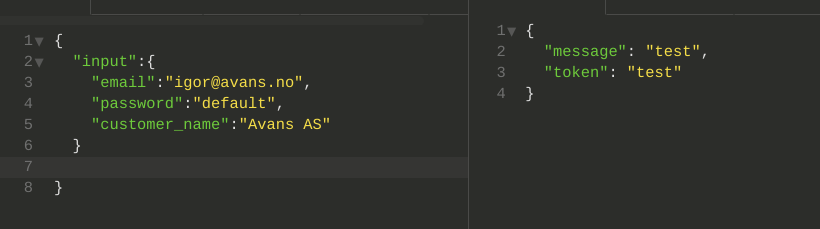
when i call from insomnia i get :
Relaxe111
on 9 Apr 2020
Update: Its not hits action server when i call from graphiql
Relaxe111
on 9 Apr 2020
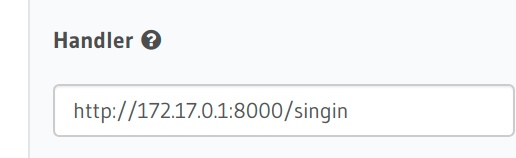
I found the issue. It is because i used wrong adress in the handler input. For linux It should look like:
Relaxe111
on 10 Apr 2020
Related issues
 coco98
·
3Comments
coco98
·
3Comments
 rikinsk-zz
·
3Comments
rikinsk-zz
·
3Comments
 sachaarbonel
·
3Comments
sachaarbonel
·
3Comments
 Fortidude
·
3Comments
Fortidude
·
3Comments
 EmrysMyrddin
·
3Comments
EmrysMyrddin
·
3Comments
Most helpful comment
Since Hasura runs inside a container, it has a different network than the host network so
localhostgenerally doesn't work (unless your container is configured to use thehostnetwork)Anyway, you can reach the host using a fixed IP that is OS dependent:
With Docker for Mac/Windows: Use
http://host.docker.internal:8000/helloOn Linux: Typically
172.17.0.1i.e the IP address of docker0 interface. useip addr show docker0