Graphql-engine: accesing hasura session from custom function fails
I tried to follow the steps to create a custom function and access the hasura session variables from here and there are 2 issues
1- if you track the function from the console, when you execute the query it complains about not having the arguments variable
2- in order to get the session variables, I tracked the function through the API and then I get this error
{
  "errors": [
    {
      "extensions": {
        "internal": {
          "statement": "WITH \"public_get_session_role__result\" AS (SELECT  *  FROM \"public\".\"get_session_role\"()       ) SELECT  coalesce(json_agg(\"root\" ), '[]' ) AS \"root\" FROM  (SELECT  row_to_json((SELECT  \"_1_e\"  FROM  (SELECT  \"_0_root.base\".\"result\" AS \"result\"       ) AS \"_1_e\"      ) ) AS \"root\" FROM  (SELECT  *  FROM \"public_get_session_role__result\" WHERE ('true')     ) AS \"_0_root.base\"      ) AS \"_2_root\"      ",
          "prepared": true,
          "error": {
            "exec_status": "FatalError",
            "hint": "No function matches the given name and argument types. You might need to add explicit type casts.",
            "message": "function public.get_session_role() does not exist",
            "status_code": "42883",
            "description": null
          },
          "arguments": [
            "(Oid 114,Just (\"{\\\"x-hasura-role\\\":\\\"admin\\\",\\\"x-hasura-user-id\\\":\\\"15169bf8-294a-49cb-9d48-13a39a8c016e\\\"}\",Binary))"
          ]
        },
        "path": "$",
        "code": "unexpected"
      },
      "message": "postgres query error"
    }
  ]
}
I'm using hasura v1.0.0
 tafelito
All 13 comments
@tafelito Please give the following details to reproduce the issue.
- The
get_session_rolefunction definition - The payload of the request you made to track the table.
 rakeshkky
on 23 Dec 2019
rakeshkky
on 23 Dec 2019
I copied the wrong function name. The name is me and this is the function definition
OR REPLACE FUNCTION public.me(hasura_session json) RETURNS SETOF "user" LANGUAGE sql STABLE AS $ function $
SELECT
*
FROM
"user"
WHERE
id = (hasura_session ->> 'x-hasura-user-id') :: uuid $ function $
and this is how I called the API track function
{
"type": "track_function",
"version": 2,
"args": {
"function": {
"schema": "public",
"name": "me"
},
"configuration": {
"session_argument": "hasura_session"
}
}
}
@tafelito Thank you for reporting the issue.
I'm able to reproduce and confirmed it as a bug. The relevant fix is present in https://github.com/hasura/graphql-engine/pull/3585. Please try out the PR preview app and confirm the bug is fixed.
rakeshkky
on 24 Dec 2019
@rakeshkky How can I test the PR if I use graphql-engine-heroku?
tafelito
on 24 Dec 2019
I was able to reproduce here too.
@tafelito fyi looking at the PR I realized a quick fix for the meantime. Just add a second argument to your function and to your queries.
CREATE OR REPLACE FUNCTION public.me(
  hasura_session json
+  , dummyarg text
) RETURNS SETOF "user" LANGUAGE sql STABLE AS $ function $
SELECT * FROM "user" WHERE   id = (hasura_session ->> 'x-hasura-user-id') :: uuid $ function $
{
  me(args: {dummyarg: ""}) {
    id
  }
}
@rakeshkky, getting information about the user currently logged in seems common enough that you might want to add this specific use-case to Hasura's documentation.
@rakeshkky, also, would love to have the v2 of the track_function function available through the console/GUI—although this is probably already on your radar.
Thanks a bunch.
 gunar
on 24 Dec 2019
gunar
on 24 Dec 2019
@rakeshkky How can I test the PR if I use graphql-engine-heroku?
@tafelito Somehow Heroku app is not deployed. We manually triggered the deployment. You can find the preview app here https://github.com/hasura/graphql-engine/pull/3585#issuecomment-568832462.
rakeshkky
on 25 Dec 2019
@rakeshkky that commits fixes the issue, thanks! Any ETA when is going to be published?
Is it possible to get the session var on a delete mutation? without having to create a custom function for that ? same as we can actually do now for insert, update and select queries
tafelito
on 26 Dec 2019
Not sure if it's related to the specific version, but i just run into this error
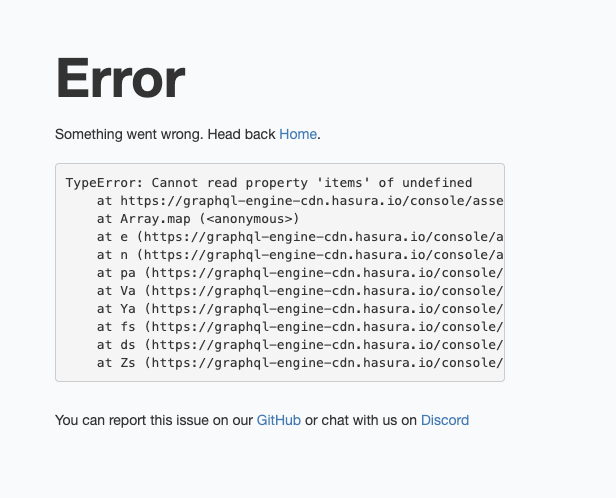
TypeError: Cannot read property 'items' of undefined
    at https://graphql-engine-cdn.hasura.io/console/assets/versioned/pull3585-5ad88982/main.js.gz:1:3183533
    at Array.map (<anonymous>)
    at e (https://graphql-engine-cdn.hasura.io/console/assets/versioned/pull3585-5ad88982/main.js.gz:1:3183487)
    at n (https://graphql-engine-cdn.hasura.io/console/assets/versioned/pull3585-5ad88982/main.js.gz:1:3187502)
    at pa (https://graphql-engine-cdn.hasura.io/console/assets/versioned/pull3585-5ad88982/vendor.js.gz:1:2629778)
    at Va (https://graphql-engine-cdn.hasura.io/console/assets/versioned/pull3585-5ad88982/vendor.js.gz:1:2636656)
    at Ya (https://graphql-engine-cdn.hasura.io/console/assets/versioned/pull3585-5ad88982/vendor.js.gz:1:2643006)
    at fs (https://graphql-engine-cdn.hasura.io/console/assets/versioned/pull3585-5ad88982/vendor.js.gz:1:2665500)
    at ds (https://graphql-engine-cdn.hasura.io/console/assets/versioned/pull3585-5ad88982/vendor.js.gz:1:2665890)
    at Zs (https://graphql-engine-cdn.hasura.io/console/assets/versioned/pull3585-5ad88982/vendor.js.gz:1:2673066)
I can open a different issue if not related
tafelito
on 26 Dec 2019
Was this supposed to be fixed? I'm using v1.1.0-beta.2 and I'm still seeing the exact same behavior as the OP.
{
  "errors": [
    {
      "extensions": {
        "path": "$.selectionSet.my_function.args.args",
        "code": "not-supported"
      },
      "message": "Non default arguments cannot be omitted"
    }
  ]
}
And my query:
query MyQuery {
  players_nearby_me2(args: {}) { <-- client is forcing me to put in empty args
    id
    name
  }
}
and my function:
CREATE OR REPLACE FUNCTION public.my_function(hasura_session json, distance_kms integer DEFAULT 50)
 RETURNS SETOF users
 LANGUAGE sql
 STABLE
AS $function$
SELECT
    *
FROM
    users
WHERE
    id NOT IN ((hasura_session->>'x-hasura-user-id')::int)
    AND ST_DistanceSphere (users."location", (
            SELECT
                u."location"
            FROM
                users as u
            WHERE
                id = (hasura_session->>'x-hasura-user-id')::int)) < distance_kms * 1000;
$function$
```
 greatwitenorth
on 23 Jan 2020
greatwitenorth
on 23 Jan 2020
@rakeshkky, could you weigh in on the above?
 lexi-lambda
on 24 Jan 2020
lexi-lambda
on 24 Jan 2020
There's no way to access session data from computed fields, right?
 dminkovsky
on 29 Jan 2020
dminkovsky
on 29 Jan 2020
@greatwitenorth
May I know how you tracked the SQL function? via console?
Also please give us the minimal schema to reproduce the issue.
rakeshkky
on 5 Feb 2020
Yes the function was tracked via console. Here's my schema and function definition I'm currently using:
CREATE
OR REPLACE FUNCTION public.players_nearby_me(
  hasura_session json,
  distance_kms integer DEFAULT 50
) RETURNS SETOF users LANGUAGE sql STABLE AS $ function $
SELECT
  *
FROM
  users
WHERE
  id NOT IN ((hasura_session ->> 'x-hasura-user-id') :: int)
  AND ST_DistanceSphere (
    users."location",
    (
      SELECT
        u."location"
      FROM
        users as u
      WHERE
        id = (hasura_session ->> 'x-hasura-user-id') :: int
    )
  ) < distance_kms * 1000;$ function $
users table:
-- Sequence and defined type
CREATE SEQUENCE IF NOT EXISTS users_id_seq;

-- Table Definition
CREATE TABLE "public"."users" (
    "id" int8 NOT NULL DEFAULT nextval('users_id_seq'::regclass),
    "name" varchar(255) NOT NULL,
    "email" varchar(255) NOT NULL,
    "email_verified_at" timestamp(0),
    "password" varchar(255) NOT NULL,
    "remember_token" varchar(100),
    "created_at" timestamp(0),
    "updated_at" timestamp(0),
    "location" geometry,
    PRIMARY KEY ("id")
);
Let me know if you need anything else.
greatwitenorth
on 7 Feb 2020
Related issues
 stereobooster
·
3Comments
stereobooster
·
3Comments
 hooopo
·
3Comments
hooopo
·
3Comments
 rikinsk-zz
·
3Comments
rikinsk-zz
·
3Comments
 bogdansoare
·
3Comments
bogdansoare
·
3Comments
 tirumaraiselvan
·
3Comments
tirumaraiselvan
·
3Comments
Most helpful comment
I was able to reproduce here too.
@tafelito fyi looking at the PR I realized a quick fix for the meantime. Just add a second argument to your function and to your queries.
@rakeshkky, getting information about the user currently logged in seems common enough that you might want to add this specific use-case to Hasura's documentation.
@rakeshkky, also, would love to have the v2 of the
track_functionfunction available through the console/GUI—although this is probably already on your radar.Thanks a bunch.