Graphql-engine: Allow overriding the request role via a GraphQL directive
As mentioned on Discord, it isn’t possible to change the role used by an existing websocket connection, since X-Hasura-Role is sent as a header when opening the connection. @0x777 suggests allowing a special @hasura(role:) directive on a GraphQL operation definition, like this:
subscription s @hasura(role: "new-role") {
  vote_count {
    article_id
    count
  }
}
This would override the role that would otherwise be used for that particular request.
 lexi-lambda
All 5 comments
An outstanding question I have: what use case does this support, exactly? Presumably each websocket connection is opened by an authenticated user, and the authentication token specifies a particular role. Since this doesn’t re-authenticate, how can switching between roles be useful?
lexi-lambda
on 18 Dec 2019
A user can have multiple roles and each role could have different permissions on different tables, in such cases, you would want to make a query by specifying the appropriate role (since we don't support multiple roles). On http, you can set x-hasura-role to the appropriate role and make the request but this feature is lacking on the ws transport as the role gets set when the connection is initialized.
 0x777
on 19 Dec 2019
0x777
on 19 Dec 2019
After speaking with Tiru and some experimentation, you can over-ride the payload values in WS subscriptions that have been seen on connection in a sort of hacky way:
Normally, these values are only set during connection_init and remain for the duration (you can see authorization as an example header):
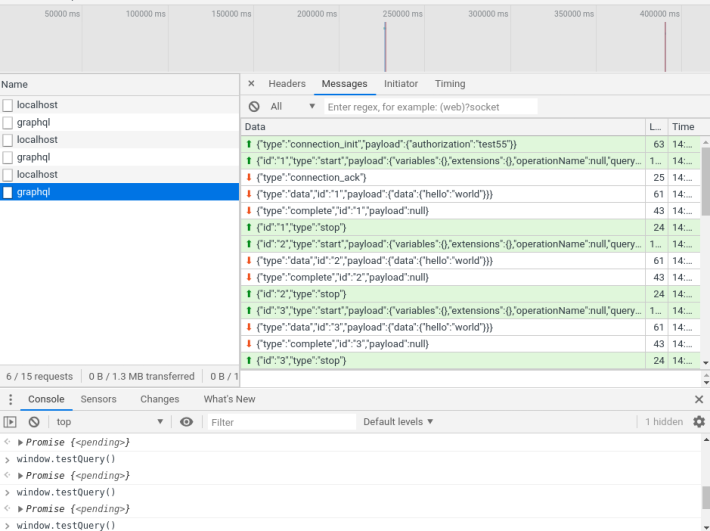
You can use applyMiddleware on the subscriptionClient object of WebsocketLink to hook into requests and modify them on-the-fly:
import { ApolloClient } from 'apollo-client'
import { WebSocketLink } from 'apollo-link-ws'
import { InMemoryCache } from 'apollo-cache-inmemory'
import gql from 'graphql-tag'

const GRAPHQL_ENDPOINT = 'ws://localhost:4000/graphql'


const subscriptionMiddleware = {
  applyMiddleware: function (options, next) {
    const token = localStorage.getItem('token')
    console.log('token', token)
    options.authorization = token
    next()
  },
}

const wsLink = new WebSocketLink({
  uri: GRAPHQL_ENDPOINT,
  webSocketImpl: WebSocket,
  options: {
    reconnect: true,
  },
})

wsLink.subscriptionClient.use([subscriptionMiddleware])

const defaultOptions = {
  watchQuery: {
    fetchPolicy: 'no-cache',
    errorPolicy: 'ignore',
  },
  query: {
    fetchPolicy: 'no-cache',
    errorPolicy: 'all',
  },
}

const client = new ApolloClient({
  link: wsLink2,
  cache: new InMemoryCache(),
  defaultOptions,
})

const testQuery = () =>
  apolloClient.query({
    query: gql`
      {
        hello
      }
    `,
  })

window.apolloClient = client
window.testQuery = testQuery
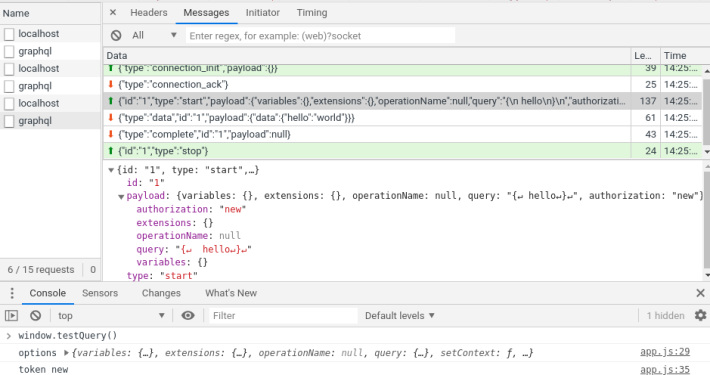

Here, I change localStorage.token in between requests and dynamically swap it in the payload, basically just watching the WS Inspector in Networking tab while running window.testQuery() and localStorage.setItem('token', 'new value') back and forth to see whats happening, seems like it's working.
I don't know if there are limitations that header values can only be checked on connection_init type, though.
If this can't work due to technical limitations (IE must be connection_init type), the only other approach I've seen is by doing a "swap" of the connection and transferring the data:
 GavinRay97
on 6 Apr 2020
GavinRay97
on 6 Apr 2020
That's a nice trick @GavinRay97 but I think this would require server side change (as you mentioned in the final part of your post) to check headers (or auth token) for every message which would be different from the current backend implementation.
I used this blogpost to create multiple links (one per role) which can be used with a single client. This would mean we would be creating size(roles) websocket connections (not as ideal as one connection but not too bad either):
import ApolloClient from "apollo-client";
import { WebSocketLink } from "apollo-link-ws";
import { InMemoryCache } from "apollo-cache-inmemory";
import { ApolloProvider } from "@apollo/react-hooks";
import { ApolloLink } from "apollo-link";

// Create admin role link
const adminRoleLink = new WebSocketLink({
    uri: "ws://localhost:8080/v1/graphql",
    options: {
        reconnect: true,
        connectionParams: {
            headers: {"x-hasura-role": "admin"} // add headers here
        }
    }
});

// Create user role link
const userRoleLink = new WebSocketLink({
    uri: "ws://localhost:8080/v1/graphql",
    options: {
        reconnect: true,
        connectionParams: {
            headers: {"x-hasura-role": "user"} // add headers here
        }
    }
});

// we will split the link based on the supplied dummy role variable,
// we could have ideally used `context` object but unfortunately that is not available for subscriptions.
const client = new ApolloClient({
    link: ApolloLink.split(
        operation => {
            var role = operation.variables["dummy-role-variable"];
            delete operation.variables["dummy-role-variable"];
            return role === "user"; // Routes the query to the proper client
        },
        userRoleLink,
        adminRoleLink
    ),
    cache: new InMemoryCache()
});
Now, the links are switched based on a dummy role variable that is passed during the operation (ideally, it should have been the context object but it is unfortunately not available in useSubscriptions) like this:
import { useSubscription } from "@apollo/react-hooks";

const { loading, error, data } = useSubscription(GET_USERS_QUERY, {
    variables: {"dummy-role-variable": "user"} // define a dummy variable, will be deleted later
});
For more than 2 roles, we can use the trick from the blogpost which basically chains links together 2 at a time:
// Create First Link
const firstRoleLink = new WebSocketLink(...);

// Create Second Link
const secondRoleLink = new WebSocketLink(...);

// Create Third Link
const thirdRoleLink = new WebSocketLink(...);

const otherRoleLinks = ApolloLink.split(
  operation => operation.getContext().role === "second", // Routes the query to the proper client
  secondLink,
  thirdLink
);

const client = new ApolloClient({
    link: ApolloLink.split(
        operation => operation.getContext().role === "first", // Routes the query to the proper client
        firstRoleLink,
        otherRoleLinks
    ),
    cache: new InMemoryCache()
});
PS:
Ofcourse, we could initiated different clients all-together(for each role) and passed it to useSubscription as a parameter but I am not sure how it would affect the cache, etc
 tirumaraiselvan
on 7 Apr 2020
tirumaraiselvan
on 7 Apr 2020
The last bit you posted is great, because the function/data structure is recursive. So we can generate it like this:
const makeRoleLink = (role) =>
  new WebSocketLink({
    uri: 'ws://localhost:8080/v1/graphql',
    options: {
      reconnect: true,
      connectionParams: {
        headers: { 'x-hasura-role': role },
      },
    },
  })

const composeRoleLinks = (head, ...tail) => {
  const [newHead, ...newTail] = [...tail].flat()

  return ApolloLink.split(
    (operation) => operation.getContext().role === head,
    /* ? */ makeRoleLink(head),
    /* : */ newTail.length > 0
      ? composeRoleLinks(newHead, newTail)
      : makeRoleLink(newHead)
  )
}

// Or, more likely coming from `X-Hasura-Allowed-Roles`
const roleLinks = composeRoleLinks('first', 'second', 'third', 'etc.')

const client = new ApolloClient({
  link: roleLinks,
  cache: new InMemoryCache(),
})
Related issues
 EmrysMyrddin
·
3Comments
EmrysMyrddin
·
3Comments
 bogdansoare
·
3Comments
bogdansoare
·
3Comments
 revskill10
·
3Comments
revskill10
·
3Comments
 jjangga0214
·
3Comments
jjangga0214
·
3Comments
 codepunkt
·
3Comments
codepunkt
·
3Comments
Most helpful comment
A user can have multiple roles and each role could have different permissions on different tables, in such cases, you would want to make a query by specifying the appropriate role (since we don't support multiple roles). On http, you can set
x-hasura-roleto the appropriate role and make the request but this feature is lacking on the ws transport as the role gets set when the connection is initialized.