Graphql-engine: Hasura on Google Cloud Run
Does anyone have experience using Hasura on Cloud Run? Pros and cons? Currently, existing limitations in WebSockets support for subscriptions, but seems WS has support with Cloud Run on GKE.
Cold start reported with near 2 seconds latency (maybe more), it's ok for me.
 pronevich
All 20 comments
@pronevich Thank you for your question. We've been discussing this and decided that we will probably write a blogpost about how to deploy Hasura on Google Cloud Run 🙂will update here when it's done.
 marionschleifer
on 8 Jul 2019
marionschleifer
on 8 Jul 2019
Hi @pronevich — Have you learned anything about this? I've started playing around with this since it's much simpler than the Kubernetes setup.
 danoc
on 14 Aug 2019
danoc
on 14 Aug 2019
Hey guys! I just published a blog post about deploying Hasura on CloudRun - hope it helps
 geoff448
on 10 Sep 2019
geoff448
on 10 Sep 2019
@geoff448 this is amazing, thank you so much for writing this blogpost 🙏 we'll add it to the community wiki ❤️
marionschleifer
on 11 Sep 2019
Great blog post @geoff448 . Is it subscriptions supported in your setup?
pronevich
on 12 Sep 2019
@geoff448 also maybe you have some numbers about cold start for hasura engine. Thank you.
pronevich
on 12 Sep 2019
@pronevich
Here's a timed curl hitting the next app from a 100% cold start meaning both the
Next application and GraphQL server had to start their processes from scratch.
Neither service had received a request in approximately a week and both are are daisy chained serverless applications. One app would have had to start up and ping the next which would then have to start up and return a response.
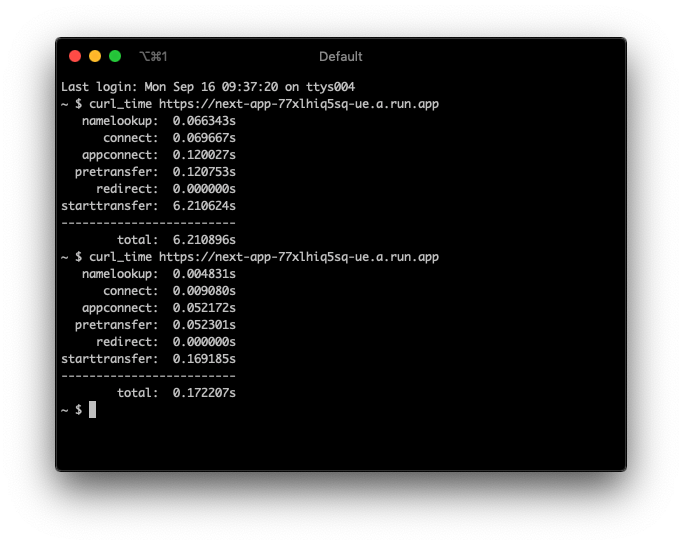
Usually if the service has been hit within the past day or two it will have a "warm start" where it can unfreeze instead of start from scratch and it responds very quickly. If the app has been hit within the past several hours it will usually be around the 0.15s mark. In theory you could also have something like a google cloud task ping your service every day to keep it "warm" if you wanted.
I haven't tried the subscription in the CloudRun deployment, but I don't see why it wouldn't work as long as things fallback to polling and have the ability to reconnect. When I have some free time i'll look into it and report back.
geoff448
on 16 Sep 2019
@geoff448 thanks for your detailed answer
pronevich
on 16 Sep 2019
Inbound WebSockets not currently supported for Cloud Run https://cloud.google.com/run/docs/issues#grpc_websocket
 abelaska
on 17 Sep 2019
abelaska
on 17 Sep 2019
@abelaska the CloudRun docs says:
Inbound WebSockets and gRPC are not currently supported for Cloud Run (fully managed). Those protocols do work outbound, however.
A client's browser connecting to a socket from the GraphQL server would be an outbound socket. Still not something i've had a chance to try but outbound sockets are supposed to work in theory, if the CloudRun instance were to freeze the client could easily reconnect.
geoff448
on 17 Sep 2019
@danoc @abelaska @geoff448 currently my project on Cloud Run and want to report you that yes - websockets doesn't work. In the overall great experience in work with GR.
pronevich
on 3 Oct 2019
Cloud Run is now in GA and it seems like they're looking to support HTTP streaming:
https://twitter.com/ahmetb/status/1195200258877186049
Is that the same as WebSockets?
danoc
on 18 Nov 2019
@geoff448 To my test, subscription does not work. May I ask if this happens on your sides as well?
 jjangga0214
on 9 Dec 2019
jjangga0214
on 9 Dec 2019
I’ve gotten it up and running on Cloud Run. Event triggers are unreliable, however, and will sit in pending for a long time.
 rccoe
on 4 Jan 2020
rccoe
on 4 Jan 2020
I’ve gotten it up and running on Cloud Run. Event triggers are unreliable, however, and will sit in pending for a long time.
Is that a bug of gcloud run or is it expected behavior?
Wondering if I should setup a new instance using run or the old kubernetes way
 John0x
on 13 Jan 2020
John0x
on 13 Jan 2020
@John0x By serverless characteristic, it will be frozen. So async operations like event handling might not be executed as well. That's a property of Cloud Run, rather than a bug, as Cloud Run does not know if Hasura has events undeliverd or not.
jjangga0214
on 13 Jan 2020
@jjangga0214 It makes sense, that's expected behavior and Hasura needs some tweaks to work properly on Pay-as-you-go serverless environments
For this kind of scenario, we'll need two new options to be implemented:
1- Hasura sends the event trigger request and waits for its response before sending the mutation response to the client, handling the error as it already does.
2- Hasura sends the event trigger request and doesn't wait for its response (Optimistic handling will be required).
- Inbound HTTP request
- Cloud Run wakes up process! 🚀
- Mutation inserts something on a table
- The response is sent back to the client
- Cloud Run takes the process to sleep 💤
- Event trigger (Webhook) is fired and waits for a response ❓
- Writes something to a table❓
 kevinrodriguez-io
on 17 Mar 2020
kevinrodriguez-io
on 17 Mar 2020
@davidoliveira recently posted a guide on dev.to: https://dev.to/davidoliveira/setup-hasura-at-google-cloud-run-42i8
Code proposition to add it to the community wiki:
[Setup Hasura at Google Cloud Run](https://dev.to/davidoliveira/setup-hasura-at-google-cloud-run-42i8) by [
David Oliveira](https://github.com/davidoliveira)
 oliverpool
on 7 Jul 2020
oliverpool
on 7 Jul 2020
Most up-to-date and easiest way is to use Deploy button (or manual way) from this repository: https://github.com/n3n/hasura-cloud-run
This method doesn't require SQL proxy.
 qqgg231
on 21 Jul 2020
qqgg231
on 21 Jul 2020
This is all great but it doesn't change the fact that Hasura web sockets (wss:// endpoint) doesn't work on cloud run, so it's not really a viable deployment target for real-time applications (unless you use Anthos cluster) :(
 littlepea
on 21 Jul 2020
littlepea
on 21 Jul 2020
Related issues
 egislook
·
3Comments
egislook
·
3Comments
 sachaarbonel
·
3Comments
sachaarbonel
·
3Comments
 codepunkt
·
3Comments
codepunkt
·
3Comments
 coco98
·
3Comments
coco98
·
3Comments
 leoalves
·
3Comments
leoalves
·
3Comments
Most helpful comment
@pronevich Thank you for your question. We've been discussing this and decided that we will probably write a blogpost about how to deploy Hasura on Google Cloud Run 🙂will update here when it's done.