Graphql-engine: firebase2graphql : error on presence of json objects
I've been giving a try to your firebase2graphql tool. I've created the heroku app successfully and exporting the firebase json as well.
However, when trying to import that json into the graphQL DB, I get an error :
npx firebase2graphql https://<myApp>.herokuapp.com --db=/home/francis/<myJson>.json --normalize
I get :
Verifying URL... Done!
Processing Firebase JSON... Error!
Message: invalid data type given for column equipements: object
For information, my firebase RTDB look like this :
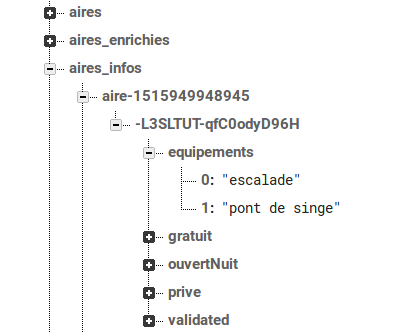
It this a bug or am I doing something wrong ?
Thanks
 fchabouis
All 12 comments
Tagging @wawhal for expert help :)
 coco98
on 20 Mar 2019
coco98
on 20 Mar 2019
Is there any update to support json Array ?
i am also getting :Eror:
Verifying URL... Done!
Processing Firebase JSON... Error!

Message: invalid data type given for column bestSolutions: object
due to json array
 rasheedk
on 28 Mar 2019
rasheedk
on 28 Mar 2019
I have been trying to use firebase2graphql for migrating the data from firebase to Hazura. Our firebase database includes array structure. whenever we doing this, it displays "Message: invalid JSON provided for node". As per our understanding, this is because of the array structure in firebase JSON data.
Here is our structure
{
  "appointment": {
    "-LMlfYiyfmR7RxODd2lF": {
      "appointment-notes": {
        "images": [
          "https://firebasestorage.googleapis.comd2e34932caf"
        ],
        "notes-content": "testing........"
      },
      "created-time": 1537358052,
      "work-request-id": "-LMlf80ePhwjG4Rkh8tY"
    }
  }
}
We would appreciate it if you do something to solve the problem now.
 chinnumv
on 28 Mar 2019
chinnumv
on 28 Mar 2019
Looking into it people.
 wawhal
on 28 Mar 2019
wawhal
on 28 Mar 2019
Hey people @chinnumv @fchabouis @rasheedk
I have added support for arrays in #1900
I have tried to test it with example firebase DBs with arrays in it. However, if you have some sample databases, it'll be really helpful if you send it over to me so that I can test thoroughly against all kinds of array usages.
Thanks for reporting and contributing anyway :)
wawhal
on 28 Mar 2019
@wawhal
Attaching one sample json content with Array. Please find it
{
  "users": {
    "-LMlfYiyfmR7RxODd2lF": {
      "user-notes": {
        "images": [
          "https://firebasestorage.google5b-b0f9-bd2e34932caf",
          "https://firebasestorage.google5b-b0f9-bd2e34932caf"
        ],
        "content": "testing........"
      },
      "created-time": 1537358052,
      "data-id": "-LMlf80ePhwjG4Rkh8tY"
    },
    "-LMlfYiyfmsss": {
      "user-notes": {
        "images": [
          "https://firebasestorage.google5b-b0f9-bd2e34932caf",
          "https://firebasestorage.google5b-b0f9-bd2e34932caf"
        ],
        "content": "testing......ss.."
      },
      "created-time": 1537358053,
      "data-id": "-LMlf80ePhgwjG4Rkh8tY"
    }
  },
  "fuel": {
    "-Km0TX6ssYYOSoswJOSu_a": {
      "fuel": "fuel1"
    },
    "-KnnenhI1ssWrbQ3HGbFgT": {
      "fuel": "fuel2"
    },
    "-Kr-ezrgssnfVvHHcLIBhC": {
      "fuel": "fuel3"
    }
  },
  "messages": {
    "-Km0TX6YYOSoswJOSu_asdx": {
      "alert": "",
      "description": "Messages",
      "duration": "11am to 12 pm",
      "from": "-Km0TX6YYOSoswJOSu123",
      "notes": "",
      "status": "",
      "title": "message test",
      "to": "-Km0TX6ssYYOSoswJOSu_a",
      "type": "offer"
    }
  },
  "payment": {
    "-Km0TX6YYOSoswJOSu_p1": {
      "cost": "1000",
      "date": "12/2/2018",
      "status": "paiid",
      "user": "-Km0TX6YYOSoswJOSu123",
      "work-request": "-Km0TX6ssYYOSoswJOSu_a"
    }
  }
}
Same JSON data available in this link
https://api.myjson.com/bins/1ai8ci
Thanks.
chinnumv
on 29 Mar 2019
@chinnumv @rasheedk @fchabouis Arrays work in v0.0.2
wawhal
on 3 Apr 2019
@wawhal, Tried with the latest version (v1.0.0-alpha42) and seems it not fixed.
Waiting for your reply
Thanks.
chinnumv
on 9 Apr 2019
Mee too tried with latest v1.0.0-alpha42 .
Issue not fixed.
Verifying URL... Done!
Processing Firebase JSON... Error!
Message: invalid data type given for column xxxxxxx: object
rasheedk
on 10 Apr 2019
@chinnumv @rasheedk there was a problem with publishing the package last time. It has been published now. You can try it out :)
wawhal
on 10 Apr 2019
fine, it worked
Thank you :)
rasheedk
on 12 Apr 2019
Not working on my database json file
{
    "0gjmVHgCUGfgQKOkn": {
        "credentials": "{\"email\":\"[email protected]\",\"password\":\"password\"}"
    },
    "1W4P373ihUOnlTX165MN": {
        "apps": {
            "HW-ff6da07993": {
                "fcm-token": "c94vDOZDXX4:APA91bFXkioj3z1Q2CHRUbPDE_vHaVv_-mgcZTdCvUeoBKXjgrT5_",
                "name": "force",
                "timestamp": "1568023170741",
                "username": "[email protected]"
            }
        },
        "credentials": "{\"email\":\"[email protected]\",\"password\":\"password\"}"
    }
}
 abhinavsuthar
on 19 Sep 2019
abhinavsuthar
on 19 Sep 2019
Related issues
 tirumaraiselvan
·
3Comments
tirumaraiselvan
·
3Comments
 EmrysMyrddin
·
3Comments
EmrysMyrddin
·
3Comments
 rikinsk-zz
·
3Comments
rikinsk-zz
·
3Comments
 codepunkt
·
3Comments
codepunkt
·
3Comments
 hooopo
·
3Comments
hooopo
·
3Comments
Most helpful comment
Looking into it people.