Graphql-engine: Access denied to Console after adding the Auth Webhook
Hey all,
I would appreciate a lot some help on this issue.
I have been using the GraphQL engine as a backend and it has worked out wonderfully for me so far. But lately, me and my colleagues face an issue accessing the console of the deployed GraphQL engine.
Setup:
The engine is configured to use the suggested authentication webhook using the Simple Authentication option (endpoint /simple/webhook). This endpoint always responds with a user of role user. I gave the needed permission to the role user on my tables and I can query the data from the console and from my front end.
Problem
I still have access to the console in normal browsing, but my coworkers can not access it, neither can I from private browsing.
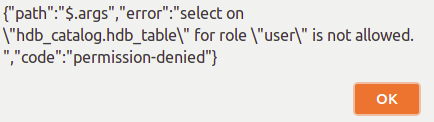
We face the following error message:
Questions
To my understanding of GraphQL engine internals, the role user does not have select permissions on an internal table (hdb_table). I am afraid that if I add the permission manually to the database using SQL, I will end up messing my setup.
So my questions are:
- Is there a way to do it through the console? The screenshots in here suggests so but I can not find it.
- If not, what would be the best way to give others access to the deployed console?
- And last, do you have any idea why this work in my normal browsing but not in private mode
Cheers,
 TAnas0
All 4 comments
@tanas0, when author webhook is set, console can only be opened in admin mode by entering the access key. Did you get the prompt to enter access key on Console?
 shahidhk
on 12 Sep 2018
shahidhk
on 12 Sep 2018
@TAnas0, For a temporary workaround, you can directly go to the /console/login page and enter the access key and you won’t get this error. Meanwhile we are releasing a fix to console soon.
 praveenweb
on 12 Sep 2018
praveenweb
on 12 Sep 2018
@TAnas0, The error you saw is due to a bug in the console where it try to detect if access key is set or not.
As @praveenweb mentioned, we are working on a fix (https://github.com/hasura/graphql-engine/issues/426) to handle access keys better.
In the meanwhile, as a workaround, you can visit /console/login page and enter the access key and everything should work as expected.
To answer your questions,
Is there a way to do it through the console? The screenshots in here suggests so but I can not find it.
You should not be adding permissions for user role to these tables.
If not, what would be the best way to give others access to the deployed console?
The best way to share access to console is to give them the access key you set. (due to the bug at this point, they have to manually visit /console/login)
And last, do you have any idea why this work in my normal browsing but not in private mode
You might have had the access key header added in your normal session and in private mode, the bug caused the prompt not to appear.
shahidhk
on 12 Sep 2018
Wow. Thank you guys for the quick responses.
The workaround you suggested works well. :thumbsup:
The endpoint /console/login gives the expected behavior and asks me for the access key, and we have normal access to the console.
Closed
TAnas0
on 12 Sep 2018
Related issues
 macalinao
·
3Comments
macalinao
·
3Comments
 Fortidude
·
3Comments
Fortidude
·
3Comments
 stereobooster
·
3Comments
shahidhk
·
3Comments
stereobooster
·
3Comments
shahidhk
·
3Comments
 hooopo
·
3Comments
hooopo
·
3Comments