Graphql-code-generator: ts1005 error with declarationKind: class
config:
  declarationKind:
    input: 'class'
Results in classes being generated with commas instead of semicolons at end of lines, resulting in TypeScript compilation errors: TS1005: ';' expected
As a concrete example:
export class SomeInput {
  code: Scalars['String'], // should be ;
};
 andreialecu
All 11 comments
It's actually more than that, we need to have declare class in some way (but then it limits the type of the file we can use), and have special care of scalars type. I'll take a look soon :)
Thanks @andreialecu
 dotansimha
on 16 Dec 2019
dotansimha
on 16 Dec 2019
In my case, simply replacing all commas with semicolons makes everything work properly, but I'm not using any custom scalar types, just the built in ones.
andreialecu
on 16 Dec 2019
@andreialecu can you please share the complete (fixed) output? so I'll be able to test that directly in TS Playground.
Thanks
dotansimha
on 16 Dec 2019
@dotansimha I'm not sure what you mean, the only problem with the output with this config
overwrite: true
schema: "http://localhost:1338/graphql"
documents: "./source/**/*.graphql"
config:
  declarationKind:
    input: 'class'
generates:
  source/generated/graphql.ts:
    plugins:
      - "typescript"
      - "typescript-operations"
      - "typescript-apollo-angular"
  ./graphql.schema.json:
    plugins:
      - "introspection"
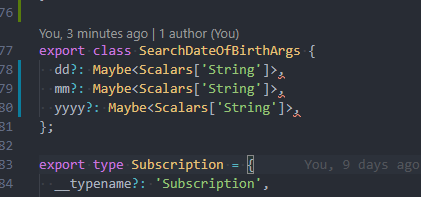
Is the comma at end of class declarations instead of a semicolon. Everything else is fine, and I have a pretty big graphql schema. The generated graphql.ts file is over 1000 lines long. Everything is fine except for those lines.
andreialecu
on 16 Dec 2019
Here's an example from the generated output.
andreialecu
on 16 Dec 2019
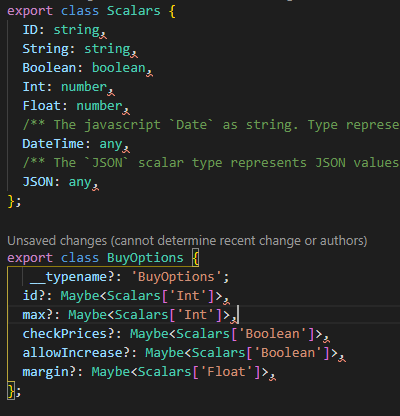
I see, but I suspect Scalars might cause issues with other TypeScript configurations, that's why I asked for the complete file, I want to verify that.
dotansimha
on 17 Dec 2019
I'm facing the same issue and here's the complete output with scalars class
 dinana
on 30 Dec 2019
dinana
on 30 Dec 2019
@dinana @andreialecu I think I managed to fix that issue in: https://github.com/dotansimha/graphql-code-generator/pull/3183
Can you please try 1.9.2-alpha-f125efa1.44?
dotansimha
on 31 Dec 2019
Fixed in v1.10.0.
dotansimha
on 2 Jan 2020
Helo, @dotansimha .
I think the issue is not solved yet, v1.10.0 and even later version still generates comma(,) instead of semicolon(;).
Would you please look at this issue?
 ggomma
on 14 Feb 2020
ggomma
on 14 Feb 2020
@ggomma I'm working on it, almost done.
 738
on 14 Feb 2020
738
on 14 Feb 2020
Related issues
 leonardfactory
·
3Comments
leonardfactory
·
3Comments
 mszczepanczyk
·
3Comments
mszczepanczyk
·
3Comments
 fvisticot
·
3Comments
fvisticot
·
3Comments
 SimenB
·
3Comments
SimenB
·
3Comments
 rogerg93
·
3Comments
rogerg93
·
3Comments