Graphql-code-generator: How to get autocomplete from response data?
Hello! Sorry for my poor English, getting into the question directly:
codegen.yml
plugins:
  - typescript
  - typescript-operations
  - typescript-react-apollo
config:
  withHooks: true
  withResultType: true
  withMutationFn: true
  withMutationOptionsType: true
  withHOC : false
  withComponent: false
  reactApolloVersion: 3
  reactApolloImportFrom: "@apollo/react-common"
  hooksImportFrom: "@apollo/react-hooks"
package.json
"@types/graphql": "^14.2.3",
"@apollo/react-hooks": "0.1.0-beta.11",
"@apollo/react-common": "0.1.0-beta.9",
"@graphql-codegen/typescript": "^1.4.1-alpha-0046bee3.76",
"@graphql-codegen/typescript-operations": "^1.4.1-alpha-0046bee3.76",
"@graphql-codegen/typescript-react-apollo": "^1.4.1-alpha-0046bee3.76",
TagFormComponent
const [saveTags, ...rest]: [SaveTagsMutationFn, any] = useSaveTagsMutation()

const onSubmit = async (payload: Tags_Insert_Input) => {
  const response = await saveTags({     // <- No type hints from `response`
    variables: { objects: [ payload ] }
  })
  console.log(response) // { data: { insert_tags: { affected_rows: 1, __typename: "tags_mutation_response" } } }
  console.log(rest) // [ { called: false, loading: false } ]
}
The data could be saved into database, but how to get type hintings or autocompletes all the old friends back?
Any help will be much appreciated, thanks!
 18601673727
All 4 comments
@18601673727
It should work, which IDE do you use? please make sure you have TypeScript support. What do you see when you hover (or cmd+hover) the saveTags type?
also, can you try to remove the explicit typings?
const [saveTags, ...rest] = useSaveTagsMutation()
 dotansimha
on 4 Aug 2019
dotansimha
on 4 Aug 2019
Hello @dotansimha,
I'm a VSCode user and here's hover results:
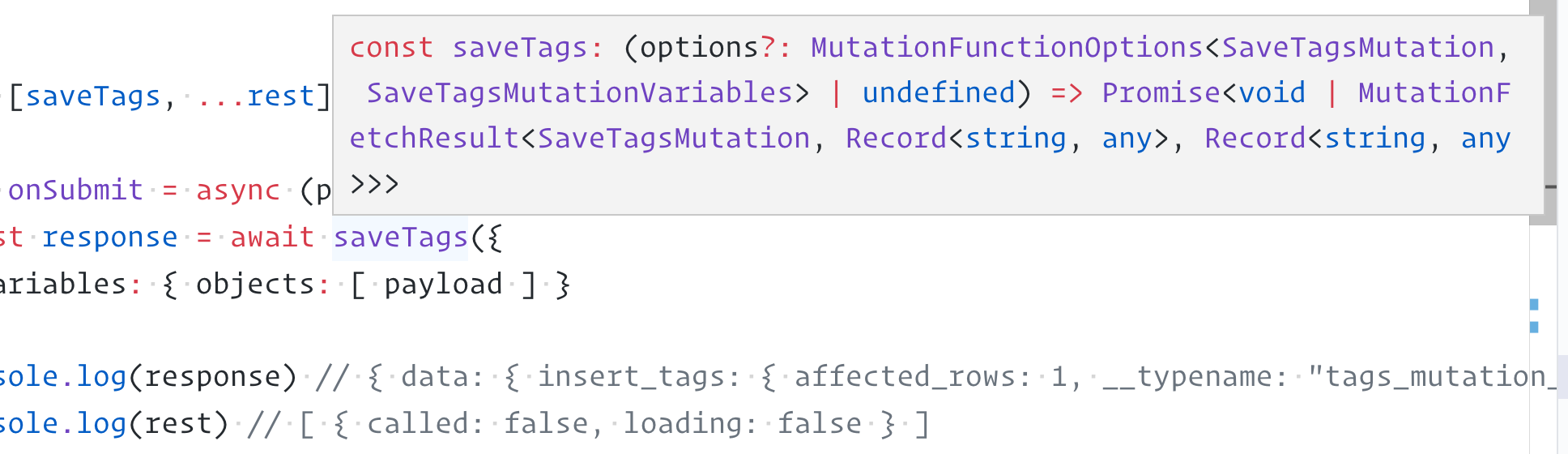
After remove the explicit typings, it becomes:

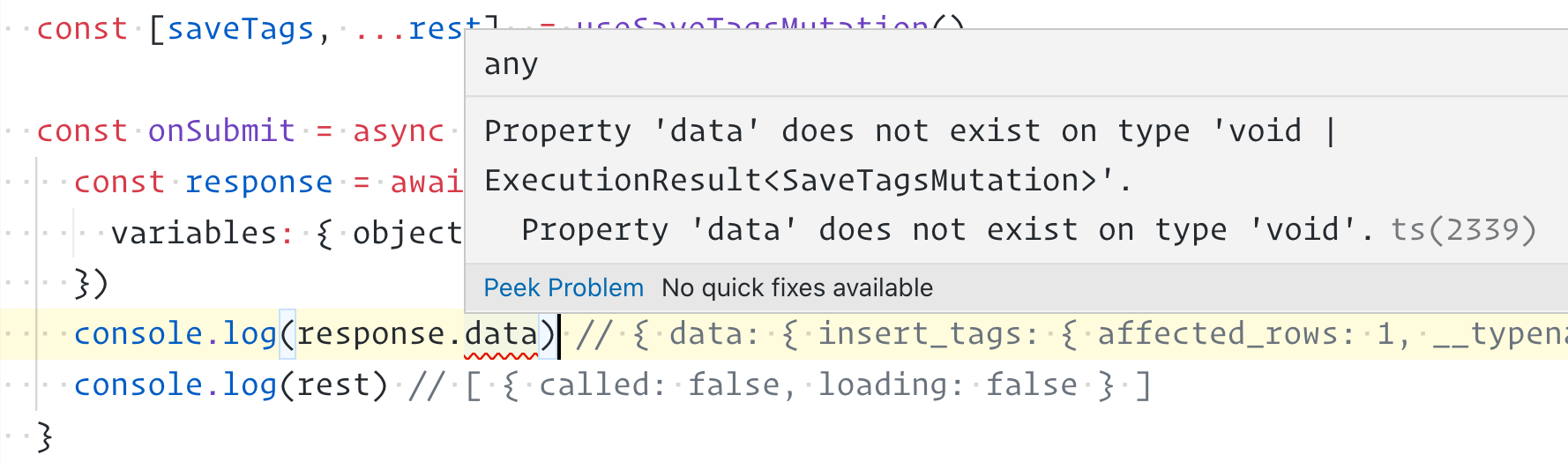
Then for response.data, it gives:
Thank you!
18601673727
on 4 Aug 2019
You have a conditional types there, so you must check for the value - because it can also be void.
Try to wrap it with:
if (data) { // this eliminates the option of `void` value
  // try here data.response
}
@18601673727
dotansimha
on 5 Aug 2019
@dotansimha You're right and it works as expected, THANK YOU!
18601673727
on 5 Aug 2019
Related issues
dotansimha
·
3Comments
 NickClark
·
3Comments
NickClark
·
3Comments
 mszczepanczyk
·
3Comments
mszczepanczyk
·
3Comments
 steebchen
·
3Comments
steebchen
·
3Comments
 jackhkmatthews
·
3Comments
jackhkmatthews
·
3Comments
Most helpful comment
You have a conditional types there, so you must check for the value - because it can also be
void.Try to wrap it with:
@18601673727