Graphhopper: Cant load map - CH profile error
Describe the bug
While implementing the same logic to load maps as the available android version
GraphHopper tmpHopp = new GraphHopper().forMobile();
tmpHopp.load(new File(mapsFolder, areaToLoad).getAbsolutePath() + "-gh");
hopper = tmpHopp;
return null;
It used to used to load the maps without any issue
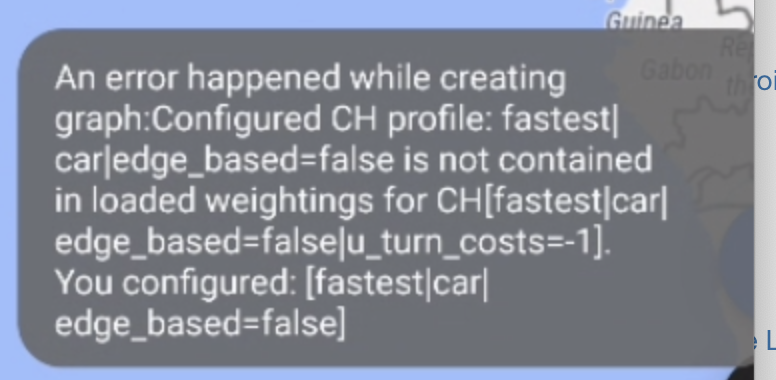
Today when testing the application i'm now receiving an error
To Reproduce
Steps to reproduce the behavior. For examples:
- checkout recent and stable version of GraphHopper
- download a certain.pbf
- generate map
- run the app
- load the maps
Expected behavior
Graph loads with no issues
System Information
group: 'com.graphhopper', name: 'graphhopper-core', version: '1.0-pre18'
Screenshots & Logs
Kind regards
Awesome library
 andreddosantos
All 8 comments
Hm, I cannot reproduce this. Can you be a bit more specific about what you did? How did you 'run the app'? Which configuration did you use? To me this looks similar to the problem we had here: https://github.com/graphhopper/graphhopper/pull/1876#discussion_r372088573, i.e. some DefaultTurnCostProvider is used with a node-based CH profile.
 easbar
on 29 Jan 2020
easbar
on 29 Jan 2020
@andreddosantos To save your time — you can grab data for 1.0-pre18 from https://graphhopper.develar.org/ Tested and proven to work with 1.0-pre18 :)
 develar
on 30 Jan 2020
develar
on 30 Jan 2020
@develar saying "for 1.0-pre18 and higher" is a bit risky as we might and will likely break the format before the 1.0 release. Also for next releases: we currently have the policy to allow us format changes to make development faster. I understand that this is ugly for the offline routing use case and maybe someone like you with mobile experience could have an eye on this aspect :) ?
 karussell
on 30 Jan 2020
karussell
on 30 Jan 2020
I understand that this is ugly for the offline routing use case and maybe someone like you with mobile experience could have an eye on this aspect
I don't see anything wrong with that. If some app recommends to use http://graphhopper.develar.org/ (or any other resource) as source of map, then author of such app simply ensures that there are compatible routing data for used version of graphhopper. As recently a new version of addon for Locus Map was released. Data for several graphhopper versions (i.e. different versions of some apps/addons) can be provided.
For end users it is not important to use recent version of graphhopper library. What's important — is data actual (generated using latest OSM) and is routing correct :)
I will remove "and higher".
BTW — I am in no way want to simplify maintaining of self-hosted graphhopper server, the only reason why I decided to share routing data — to simplify life of mobile app users (as here there is a simple reason — no online access to graphhopper server and not possible to use https://www.graphhopper.com/pricing/).
develar
on 30 Jan 2020
BTW — I am in no way want to simplify maintaining of self-hosted graphhopper server, the only reason why I decided to share routing data
This is really appreciated and I really hope mobile usage increases at some point in the future a bit more :)
And no worries: we have a robust business (model) ;D
karussell
on 30 Jan 2020
Hello guys thank you so much for your help, but i'm still having this issue.
I'm new to the technology and i don't understand some parts of what i was reading in the link suggested by @easbar.
My implementation for loading graphs has the same code of the android sample app (literally copy paste) as referred on the opening comment of this issue. It used to work until i tested yesterday.
I've generated the graphs as indicated in the sample app documentation (generated new graph yesterday)
I've tried to used the provided maps by @develar link, and I've also found an error while loading, anyway the ideia is that i can i generate my own maps as suggested on the documentation.
So i'm confused regarding what i should do, to have the previous behavior. Should i makes changes to the loadgraph procedure or to the graph generation?
Thanks for your help
andreddosantos
on 30 Jan 2020
Let's move discussion to our forum: https://discuss.graphhopper.com/c/graphhopper
karussell
on 30 Jan 2020
i don't understand some parts of what i was reading in the link suggested by @easbar
Yes sorry this link wasn't really meant to help you but more as a reminder for the devs that there was a similar issue. Feel free to open an issue in the forum as @karussell suggested, because this seems more usage related
easbar
on 30 Jan 2020
Related issues
karussell
·
7Comments
karussell
·
9Comments
easbar
·
7Comments
karussell
·
6Comments
 devemux86
·
5Comments
devemux86
·
5Comments