Graphene-django: 404 Not Found after upgrade to 2.3
Just upgraded to 2.3. Then cannot open graphql site anymore. It shows graphiql.js file not found.


683 looks similar to my issue, but I can't pull up the site with what @brandonmbanks did.
 danielcwj16
All 17 comments
Have you ran python manage.py collectstatic ?
 phalt
on 20 Jun 2019
phalt
on 20 Jun 2019
Could this be related to #508?
Our project pulled in 2.3.0 and we observed the same 404, both FF and Chrome render a blank page at the /graphql/ path, and observed the following printed to our service log:
WARNING:django.request:Not Found: /static/graphene_django/graphiql.js
We've rolled back and pinned to 2.2.0 for now.
 shoof1072
on 21 Jun 2019
shoof1072
on 21 Jun 2019
Have you ran
python manage.py collectstatic?
I tried this and it created a static folder with that graphene_django/graphiql.js in it. But still can not open the page, console gave the same error message.
danielcwj16
on 21 Jun 2019
We've just pushed out 2.3.2, can you check this is still occurring in that version? I am running 2.3 locally on my machine and I'm having no issues.
phalt
on 21 Jun 2019
We've just pushed out 2.3.2, can you check this is still occurring in that version? I am running 2.3 locally on my machine and I'm having no issues.
Still not works
danielcwj16
on 21 Jun 2019
@danielcwj16 have you added graphene_django to your INSTALLED_APPS list in settings.py? django.contrib.staticfiles also needs to be in that list.
 jkimbo
on 24 Jun 2019
jkimbo
on 24 Jun 2019
@jkimbo I have both of those in place, and have run collectstatic and am experiencing the same issue. Rollback to 2.2 solves it for now.
 evanheckert
on 26 Jun 2019
evanheckert
on 26 Jun 2019
@evanheckert can you share your static file settings in settings.py? Or even better if you could create a reproduction of the issue that would be very helpful.
jkimbo
on 26 Jun 2019
@jkimbo We're experiencing the same problem. Here's what our static settings look like
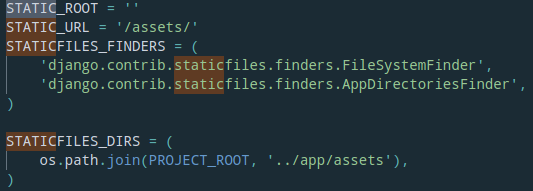
It works in the local development server but then fails after the app is deployed and served through wsgi
 dacevedo12
on 31 Jul 2019
dacevedo12
on 31 Jul 2019
@dacevedo12 can you create a full reproduction of the issue (as a github repo)? I can't reproduce the problem.
jkimbo
on 1 Aug 2019
Actually @dacevedo12 I think you need os.path.join(PROJECT_ROOT, "static"), in your STATICFILES_DIRS setting and you need to make sure you run manage.py collectstatic as part of your deployment process.
jkimbo
on 1 Aug 2019
This is still present in 2.5 :) You can reproduce it with https://gitlab.com/eclar/django_deploy but only with the production image.
 Ouradze
on 13 Sep 2019
Ouradze
on 13 Sep 2019
This issue has been automatically marked as stale because it has not had recent activity. It will be closed if no further activity occurs. Thank you for your contributions.
![stale[bot] picture](https://avatars3.githubusercontent.com/in/1724?v=4&s=40) stale[bot]
on 12 Dec 2019
stale[bot]
on 12 Dec 2019
This is still present in 2.5 :) You can reproduce it with https://gitlab.com/eclar/django_deploy but only with the production image.
Still an issue.
evanheckert
on 13 Dec 2019
Has anyone tried updating urls.py as per the Django docs on static files (Serving static files during development)? This seemed to resolve the issue for me.
 mmitsui
on 23 Jan 2020
mmitsui
on 23 Jan 2020
@mmitsui Yes, of course.
# urls.py
from django.conf import settings
from django.conf.urls.static import static
from django.contrib import admin
from django.urls import path
from django.views.decorators.csrf import csrf_exempt

from graphene_django.views import GraphQLView

urlpatterns = [
    path("__admin/", admin.site.urls),
    path("gqlendpoint/", csrf_exempt(GraphQLView.as_view(graphiql=True)))
] + static(settings.STATIC_URL, document_root=settings.STATIC_ROOT)
And..
# settings.py
import os
...
...
STATIC_URL = "/static/"
BASE_DIR = os.path.dirname(os.path.dirname(os.path.abspath(__file__)))
STATIC_ROOT = os.path.join(BASE_DIR, "static/")
@evanheckert @Ouradze @dacevedo12 when running Django with DEBUG=False it will not host static files for you (ref). You will need to run a server to host the static assets or use something like whitenoise to get the python process to host them. Once you have that setup it should work fine.
The reason this changed in v2.3 is that we moved the graphiql javascript bundle into a separate file: https://github.com/graphql-python/graphene-django/pull/508
jkimbo
on 30 Jan 2020
Related issues
 khankuan
·
4Comments
khankuan
·
4Comments
 amiyatulu
·
3Comments
amiyatulu
·
3Comments
 flame0
·
4Comments
flame0
·
4Comments
 MilanRgm
·
3Comments
MilanRgm
·
3Comments
 BrianChapman
·
3Comments
BrianChapman
·
3Comments
Most helpful comment
@evanheckert @Ouradze @dacevedo12 when running Django with
DEBUG=Falseit will not host static files for you (ref). You will need to run a server to host the static assets or use something like whitenoise to get the python process to host them. Once you have that setup it should work fine.The reason this changed in v2.3 is that we moved the graphiql javascript bundle into a separate file: https://github.com/graphql-python/graphene-django/pull/508