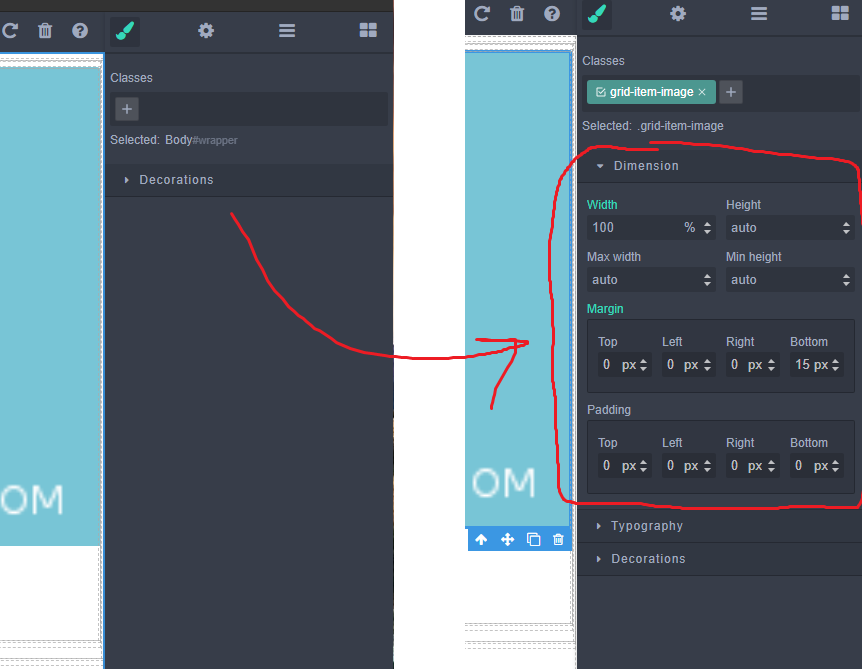
How to add the Dimension sector for the body?
 verloka
All 13 comments
@verloka here is the example
Cheers!
 pouyamiralayi
on 13 Mar 2020
pouyamiralayi
on 13 Mar 2020
@verloka here is the example
Cheers!
This is a plugin configuration that I do not use, any other suggestions?
verloka
on 13 Mar 2020
@verloka here is how to add sectors inside grapesjs init config:
styleManager: {
sectors: [{
name: 'Dimension',
open: false,
//,,,
use the code i posted for you as the complete example.
Cheers!
pouyamiralayi
on 13 Mar 2020
@verloka here is how to add sectors inside grapesjs init config:
styleManager: { sectors: [{ name: 'Dimension', open: false, //,,,use the code i posted for you as the complete example.
Cheers!
Do you know a way to add only the Dimension sector without overriding all other sectors?
I need to add the Dimension sector for Body element (wrapper) only and without affecting other sectors.
verloka
on 13 Mar 2020
@verloka please refer to the addSector api.
Cheers!
pouyamiralayi
on 13 Mar 2020
@verloka please refer to the addSector api.
Cheers!
What i do wrong? The body still dont have my new sector.
verloka
on 13 Mar 2020
Hi @verloka & @pouyamiralayi,
The sectors list seems to be common to all applications components.
However, components hold a list of attributes that can be edited through the style manager panel when they are selected, which is used to filter the application sectors.
From the Component API Reference, you can use the stylable, & unstylable properties to include and / or exclude editable attributes.
By default, the "Body" element (referred to as "Wrapper"), holds the following stylable property: ["background", "background-color", "background-image", "background-repeat", "background-attachment", "background-position", "background-size"] (from its default configuration), which is why even with default sectors, it only shows the "Decorations" one on the style manager.
You'd need to edit its stylable property in order to add the "Dimension" related ones, which could be achieved like so:
- Via initialization configuration:
// ...

grapesjs.init({
    // ...
    domComponents: {
        // ...
        wrapper: {
            stylable: [
                // Default attributes
                'background',
                'background-color',
                'background-image',
                'background-repeat',
                'background-attachment',
                'background-position',
                'background-size',

                // Add the "Dimension" sector attributes
                'width',
                'height',
                'max-width',
                'min-height',
                'margin',
                'margin-top',
                'margin-right',
                'margin-bottom',
                'margin-left',
                'padding',
                'padding-top',
                'padding-right',
                'padding-bottom',
                'padding-left'
            ]
        }
    }
});
- At runtime:
editor.getWrapper().set('stylable', editor.getWrapper().get('stylable').concat(['width', 'height', 'max-width', 'min-height', 'margin', 'margin-top', 'margin-right', 'margin-bottom', 'margin-left', 'padding', 'padding-top', 'padding-right', 'padding-bottom', 'padding-left']));
_EDITED: added missing top / right / bottom / left properties_
_EDITED2: added 2nd solution via initialization configuration_
 mcottret
on 13 Mar 2020
mcottret
on 13 Mar 2020
Hi @verloka & @pouyamiralayi,
The sectors list seems to be common to all applications components.
However, components hold a list of attributes that can be edited through the style manager panel when they are selected, which is used to filter the application sectors.
From the Component API Reference, you can use the
stylable, &unstylableproperties to include and / or exclude editable attributes.By default, the "Body" element (referred to as "Wrapper"), seems to hold the following
stylableproperty:["background", "background-color", "background-image", "background-repeat", "background-attachment", "background-position", "background-size"], which is why even with default sectors, it only shows the "Decorations" one on the style manager.You'd need to edit its
stylableproperty in order to add the "Dimension" related ones, which could be achieved like so:
editor.getWrapper().set('stylable', editor.getWrapper().get('stylable').concat(['width', 'height', 'max-width', 'min-height', 'margin', 'padding']));
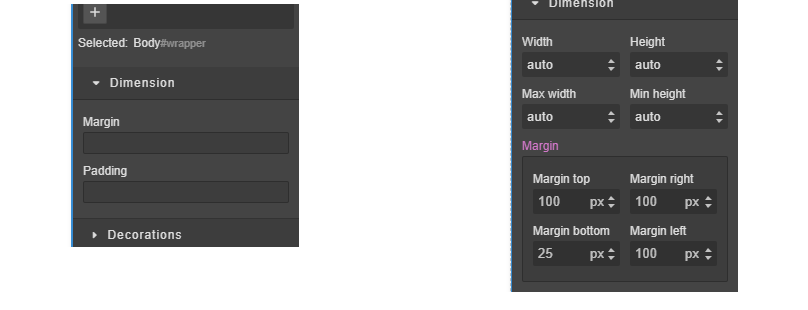
Ok, this is better BUT
https://codepen.io/verloka/pen/BaNrrzL
look at margins for the Body and other element in the Dimensions sector
verloka
on 13 Mar 2020
@mcottret you are totally correct, i was ignoring the fact that @verloka wants the sectors for a specific component!
pouyamiralayi
on 13 Mar 2020
@verloka based on @mcottret answer, you can bring back the whole styling options like this:
editor.on('load', function () {
            editor.getWrapper().set('stylable',true)
            //...
Cheers!
pouyamiralayi
on 14 Mar 2020
@verloka based on @mcottret answer, you can bring back the whole styling options like this:
editor.on('load', function () {
            editor.getWrapper().set('stylable',true)
            //...
Cheers!
yay, it works, cheers.
verloka
on 14 Mar 2020
Hi @verloka & @pouyamiralayi,
The sectors list seems to be common to all applications components.
However, components hold a list of attributes that can be edited through the style manager panel when they are selected, which is used to filter the application sectors.
From the Component API Reference, you can use thestylable, &unstylableproperties to include and / or exclude editable attributes.
By default, the "Body" element (referred to as "Wrapper"), seems to hold the followingstylableproperty:["background", "background-color", "background-image", "background-repeat", "background-attachment", "background-position", "background-size"], which is why even with default sectors, it only shows the "Decorations" one on the style manager.
You'd need to edit itsstylableproperty in order to add the "Dimension" related ones, which could be achieved like so:
editor.getWrapper().set('stylable', editor.getWrapper().get('stylable').concat(['width', 'height', 'max-width', 'min-height', 'margin', 'padding']));Ok, this is better BUT
https://codepen.io/verloka/pen/BaNrrzL
look at margins for the Body and other element in the Dimensions sector
My answer was indeed incomplete, sorry. Just adding margin or padding to the stylable array only adds the corresponding label & form group, you still have to specify which properties to add inside it (eg margin-top, margin-right etc ...). This can be useful in case you don't want the whole styling options like mentioned previously.
I also updated my answer with a working snippet, thank you :)
mcottret
on 16 Mar 2020
@pouyamiralayi @mcottret thanks for the support guys, really appreciated ❤️❤️❤️
 artf
on 18 Mar 2020
artf
on 18 Mar 2020
Related issues
 cmcintosh
·
29Comments
cmcintosh
·
29Comments
 bungambohlah
·
14Comments
bungambohlah
·
14Comments
 roytang
·
27Comments
roytang
·
27Comments
 duskhacker
·
17Comments
duskhacker
·
17Comments
 chrisedington
·
31Comments
chrisedington
·
31Comments
Most helpful comment
Hi @verloka & @pouyamiralayi,
The sectors list seems to be common to all applications components.
However, components hold a list of attributes that can be edited through the style manager panel when they are selected, which is used to filter the application sectors.
From the Component API Reference, you can use the
stylable, &unstylableproperties to include and / or exclude editable attributes.By default, the "Body" element (referred to as "Wrapper"), holds the following
stylableproperty:["background", "background-color", "background-image", "background-repeat", "background-attachment", "background-position", "background-size"](from its default configuration), which is why even with default sectors, it only shows the "Decorations" one on the style manager.You'd need to edit its
stylableproperty in order to add the "Dimension" related ones, which could be achieved like so:editor.getWrapper().set('stylable', editor.getWrapper().get('stylable').concat(['width', 'height', 'max-width', 'min-height', 'margin', 'margin-top', 'margin-right', 'margin-bottom', 'margin-left', 'padding', 'padding-top', 'padding-right', 'padding-bottom', 'padding-left']));_EDITED: added missing top / right / bottom / left properties_
_EDITED2: added 2nd solution via initialization configuration_