Hello,
I'm using Font Awesome 5 in my project, I was checked grapejs' previously asked questions Font Awesome is removed I guess.
So, I'm replaced some icons with panel/block options to font awesome 5 but I cant find some icon parameters in editor. When I click on element, drag and remove icons doesnt appears, how can I find that element selectors? Also Style manager show extra large plus icon over panel how can I remove it?
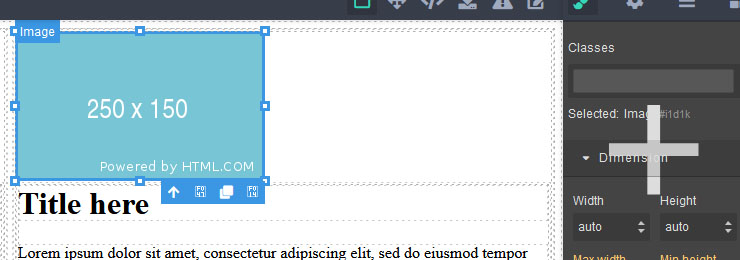
When I change my Font Awesome build to 4, everthings works fine (except style manager large icon) but my other site styles doesnt work, thats why I asked again that question, sorry about that.
Regards.
 darkcavalry
All 2 comments
Hi @darkcavalry have you seen this PR?
Cheers!
 pouyamiralayi
on 30 Jan 2020
pouyamiralayi
on 30 Jan 2020
For changing toolbar icons I'd recommend checking the following issue #1632
Also Style manager show extra large plus icon over panel how can I remove it?
Will be fixed in the next release, for now, use this temporary fix
 artf
on 3 Feb 2020
artf
on 3 Feb 2020
Related issues
 Geczy
·
3Comments
Geczy
·
3Comments
 krunal039
·
3Comments
krunal039
·
3Comments
 kosirm
·
3Comments
kosirm
·
3Comments
 faizansaiyed
·
3Comments
faizansaiyed
·
3Comments
 kawika-connell
·
3Comments
kawika-connell
·
3Comments
Most helpful comment
For changing toolbar icons I'd recommend checking the following issue #1632
Will be fixed in the next release, for now, use this temporary fix