Grapesjs: How to change the default selected panel?
I'm trying to use defaultCommand: 'open-blocks' but the style manager is the default selected one
Thanks!
 romariolopezc
All 11 comments
Hi @romariolopezc did you try this:
defaultCommand: 'select-comp',
cheers!
 pouyamiralayi
on 7 Nov 2019
pouyamiralayi
on 7 Nov 2019
Hello @pouyamiralayi
I just tried it and is not working
romariolopezc
on 10 Nov 2019
@romariolopezc are you on the latest version?
pouyamiralayi
on 10 Nov 2019
@pouyamiralayi I have this:
    "grapesjs": "^0.15.8",
    "grapesjs-mjml": "^0.1.15",
I'm using th MJML plugin, it may have something to do?
romariolopezc
on 10 Nov 2019
@romariolopezc please do not use defaultCommand and give this a try:
editor.on('load', () => {
        editor.runCommand('open-blocks')
})
for other panels, replace open-blocks with open-layers for layers and open-tm for traits.
the current problem is that style-manager will always be opened by default in all of above scenarios.
it seems that this is a bug, i just tried using defaultCommand: 'open-layers' and it is not working; the same goes for 'open-traits'. i also tried all the alternatives like 'OpenTraitManager' @artf
pouyamiralayi
on 11 Nov 2019
@pouyamiralayi it doesn't behave as expected.
If I use editor.runCommand('open-blocks') on load, the components icon is not selected. Is appended to the bottom of the style manager
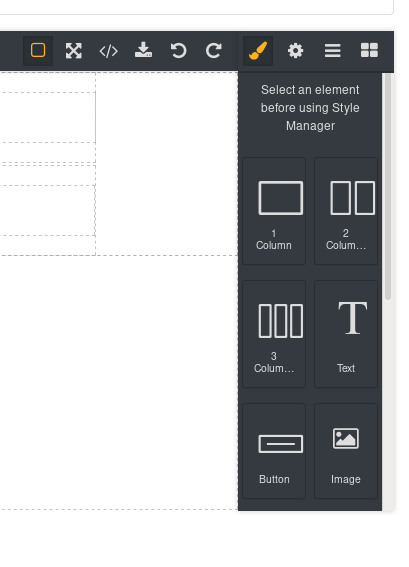

Here the screenshots
romariolopezc
on 11 Nov 2019
@romariolopezc unfortunately yes:
the current problem is that style-manager will always be opened by default in all of above scenarios.
pouyamiralayi
on 11 Nov 2019
i will investigate on this matter.
pouyamiralayi
on 11 Nov 2019
@pouyamiralayi it doesn't behave as expected.
If I use
editor.runCommand('open-blocks')on load, the components icon is not selected. Is appended to the bottom of the style manager
Here the screenshots
@romariolopezc ,
Instead for running the command. Try activating blocks button on load.
const blockBtn = editor.Panels.getButton('panel-id', 'block-button-name');
blockBtn.set('active', 1);
 naveen-15697
on 12 Nov 2019
naveen-15697
on 12 Nov 2019
thanks @naveen-15697 your solution works pretty awesome! well done.
@romariolopezc does this suit your situation? as suggested by @naveen-15697 you have to go like this:
editor.on('load', () => {
        const blockBtn = editor.Panels.getButton('views', 'open-layers');
        blockBtn.set('active', 1);
})
and the button ids for views panel are:
- open-sm
- open-tm
- open-layers
- open-blocks
cheers!
pouyamiralayi
on 12 Nov 2019
@pouyamiralayi @naveen-15697 it works!!
I use it outside of the load, after initializing grapesjs. If I use it on load then I see a small delay when changing from the style manager to open-blocks. If its after the .init({..}) then when it renders is selected
romariolopezc
on 12 Nov 2019
Related issues
 bungambohlah
·
14Comments
bungambohlah
·
14Comments
 Geczy
·
18Comments
Geczy
·
18Comments
 kamleshkatpara
·
17Comments
Geczy
·
22Comments
kamleshkatpara
·
17Comments
Geczy
·
22Comments
 josefph
·
60Comments
josefph
·
60Comments
Most helpful comment
@pouyamiralayi @naveen-15697 it works!!
I use it outside of the load, after initializing grapesjs. If I use it on load then I see a small delay when changing from the style manager to
open-blocks. If its after the.init({..})then when it renders is selected