Grapesjs: Dragging from toolbar can be off (dragMode)
Here is a working demo of the issue
Steps to reproduce:
- Select a component
- Try dragging it from the toolbar
You can see that immediately the component jumps to the left.
Although it works fine if you try dragging the component by itself (and not using toolbar)
This only happens if Grapesjs is loaded from a with margin and doesn't start from x:0
The reason it happens is this:
In both cases of dragging from toolbar or component itself, the tlb-move command is called.
tlb-move accepts an event argument and the positioning of the element is calculated using event.clientX.
When you drag the component, sine the component is inside the iframe, it's clientX is relevant to the document and all goes fine.
But the toolbar button doesn't live on the canvas/iframe. Therefore, an event originating from ToolbarButtonView is relevant to the page, not to the canvas.
Here is a visual description:
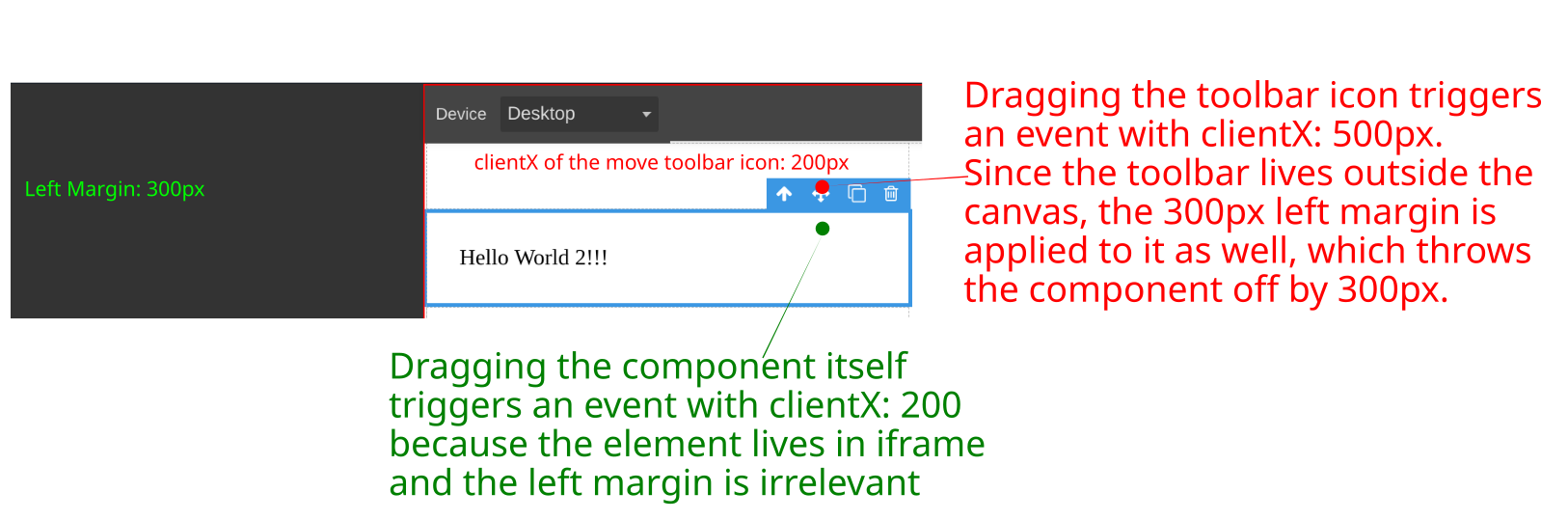
The ideal solution would be to calculate clientX and clientY of ToolbarIconView relative to the canvas before passing them to tlb-move command.
If you would accept such patch, I can get started on one.
 emilsedgh
All 3 comments
@emilsedgh there is an open discussion about this here
 pouyamiralayi
on 4 Nov 2019
pouyamiralayi
on 4 Nov 2019
Oh, I tried to find it before reporting but I couldn't. Thanks. I'll close this one then.
emilsedgh
on 4 Nov 2019
this's fixed in the last release right?
I need a solution when i drag outside of iframe in mobile devices
 alemenciones
on 21 Jan 2020
alemenciones
on 21 Jan 2020
Related issues
 Snarkly
·
3Comments
Snarkly
·
3Comments
 FlashPapa
·
3Comments
FlashPapa
·
3Comments
 tribulant
·
3Comments
tribulant
·
3Comments
 adam-gpc
·
3Comments
adam-gpc
·
3Comments
 kickbk
·
3Comments
kickbk
·
3Comments
Most helpful comment
Oh, I tried to find it before reporting but I couldn't. Thanks. I'll close this one then.