Grapesjs: Class on different states are not being applied to those states.
I'm trying to apply a class on hover of a component and the class is being applied but not on hover, it applies with normal state.
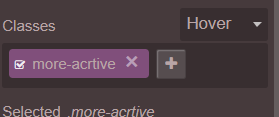
Please let me know if I'm looking into right feature or I misunderstood the feature.
PLNKR : https://plnkr.co/edit/Est6AnnGInBa3yvhzCvm?p=preview
I don't see anything in CSS or HTML itself that state that a particular class should be applied on hover or other states.
Please Help!
Thanks,
Taufeek
 coder-strange
All 5 comments
The class is applied regardless of the components state. Based on that, you can select a state, e.g. hover and style your class in that particular state. Effectively the following css will be created if you select the state hover and color your text red.
.text-red:hover {
color: red;
}
I hope that clears up the confusion.
 NicoEngler
on 28 Feb 2019
NicoEngler
on 28 Feb 2019
Sorry, I don't understand, do I need to write and add the CSS rule like .text-red:hover{} or it will be automatically created by selecting the hover state?
If automatically then in my plunkr it doesn't seems to be happening.
Thanks for your fast reply!
coder-strange
on 28 Feb 2019
I have just checked and can confirm that it also works in your example.
- First add a class to your component, e.g. .text-blue-on-hover
- Next, select the state you want to modify, e.g. hover
- Now for instance change the color of the text to blue
Result: Every time you hover over your component, the text is turned blue.
Side note: The following css (or similar) is created automatically:
.text-blue-on-hover:hover {
    color: blue;
}
Now I get that, it works perfectly fine, I just didn't know that how it works.
Thanks @NicoEngler for you this fast reply and clearing me out :)
coder-strange
on 28 Feb 2019
This thread has been automatically locked since there has not been any recent activity after it was closed. Please open a new issue for related bugs.
![lock[bot] picture](https://avatars1.githubusercontent.com/in/6672?v=4&s=40) lock[bot]
on 28 Feb 2020
lock[bot]
on 28 Feb 2020
Related issues
 Snarkly
·
3Comments
Snarkly
·
3Comments
 crazyxhz
·
3Comments
crazyxhz
·
3Comments
 alibouaziz
·
3Comments
alibouaziz
·
3Comments
 nojacko
·
3Comments
nojacko
·
3Comments
 Geczy
·
3Comments
Geczy
·
3Comments
Most helpful comment
I have just checked and can confirm that it also works in your example.
Result: Every time you hover over your component, the text is turned blue.
Side note: The following css (or similar) is created automatically: