I want to set href for link block as there is empty href by default.
 AnkitKachhadiya
All 4 comments
@AnkitKachhadiya you can change it by going to "Component settings" tab (gear icon). The same is for link block.
 maryia-kabash
on 13 Jul 2018
maryia-kabash
on 13 Jul 2018
@AnkitKachhadiya you can also update dynamically the default one
editor.BlockManager.get('id-of-the-block').set({
    content: {
        type: 'link',
        content:'Text for the link',
        attributes: { href: '...' }
    }
})
 artf
on 15 Jul 2018
artf
on 15 Jul 2018
Thank you for the help
Can you please re-open these issue
@maryia-kabash @artf I have made a custom block for my custom link see code:
editor.BlockManager.add("unsubscribe-block", {
label: "Unsubscribe",
content: {
type: "link",
content: "unsubscribe_link",
attributes: {href: "{unsubscribe_link}"}
},
attributes: {
title: "Insert Unsubscribe block",
class: "fa fa-ban"
}
});
Every thing works perfectly but the issue is whenever i remove href content using style manager it doesn't remove from my code editor .The code doesn't change (i think href is not editable). (refer image).
Check Fiddle FIDDLE
Do i need to add something or i am missing something
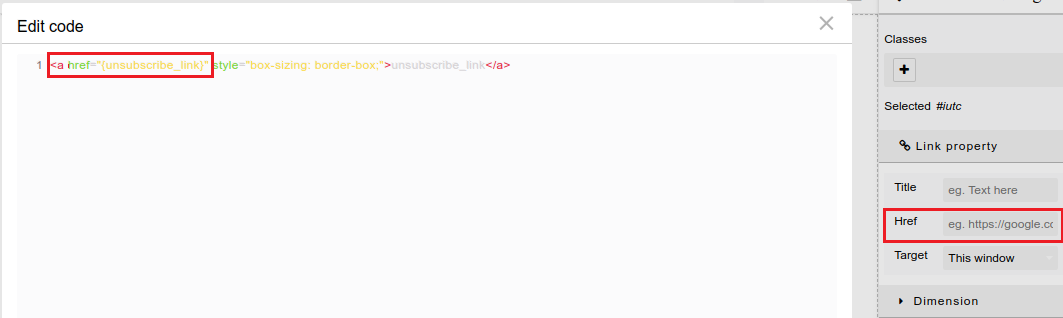
AnkitKachhadiya
on 16 Jul 2018
This thread has been automatically locked since there has not been any recent activity after it was closed. Please open a new issue for related bugs.
![lock[bot] picture](https://avatars1.githubusercontent.com/in/6672?v=4&s=40) lock[bot]
on 17 Sep 2019
lock[bot]
on 17 Sep 2019
Related issues
 FlashPapa
·
3Comments
FlashPapa
·
3Comments
 applibs
·
3Comments
applibs
·
3Comments
 krunal039
·
3Comments
krunal039
·
3Comments
 desilvaNSP
·
3Comments
desilvaNSP
·
3Comments
 kawika-connell
·
3Comments
kawika-connell
·
3Comments
Most helpful comment
@AnkitKachhadiya you can change it by going to "Component settings" tab (gear icon). The same is for link block.