Grapesjs: [BUG] Media query rules are overridden by class rules in canvas
Hi @artf ,
I've noticed an issue while testing one of my templates using different device configurations that supposed to trigger media queries. My template has styles generated as following:
[
   {
      "selectors":[
         {
            "name":"row",
            "label":"row",
            "type":1,
            "active":true,
            "private":false,
            "protected":false
         }
      ],
      "selectorsAdd":"",
      "style":{
         "display":"table",
         "padding-top":"10px",
         "padding-right":"10px",
         "padding-bottom":"10px",
         "padding-left":"10px",
         "width":"100%"
      },
      "mediaText":"",
      "state":"",
      "stylable":true,
      "atRuleType":"",
      "singleAtRule":0,
      "important":0
   },
   {
      "selectors":[
         {
            "name":"cell",
            "label":"cell",
            "type":1,
            "active":true,
            "private":false,
            "protected":false
         }
      ],
      "selectorsAdd":"",
      "style":{
         "width":"100%",
         "display":"block"
      },
      "mediaText":"(max-width: 768px)",
      "state":"",
      "stylable":true,
      "atRuleType":"media",
      "singleAtRule":0,
      "important":0
   },
   {
      "selectors":[
         {
            "name":"cell30",
            "label":"cell30",
            "type":1,
            "active":true,
            "private":false,
            "protected":false
         }
      ],
      "selectorsAdd":"",
      "style":{
         "width":"100%",
         "display":"block"
      },
      "mediaText":"(max-width: 768px)",
      "state":"",
      "stylable":true,
      "atRuleType":"media",
      "singleAtRule":0,
      "important":0
   },
   {
      "selectors":[
         {
            "name":"cell70",
            "label":"cell70",
            "type":1,
            "active":true,
            "private":false,
            "protected":false
         }
      ],
      "selectorsAdd":"",
      "style":{
         "width":"100%",
         "display":"block"
      },
      "mediaText":"(max-width: 768px)",
      "state":"",
      "stylable":true,
      "atRuleType":"media",
      "singleAtRule":0,
      "important":0
   },
   {
      "selectors":[
         {
            "name":"cell",
            "label":"cell",
            "type":1,
            "active":true,
            "private":false,
            "protected":false
         }
      ],
      "selectorsAdd":"",
      "style":{
         "width":"8%",
         "display":"table-cell",
         "height":"75px"
      },
      "mediaText":"",
      "state":"",
      "stylable":true,
      "atRuleType":"",
      "singleAtRule":0,
      "important":0
   }
]
It looks like this JSON is used to generate styles inside canvas as in this screenshot:
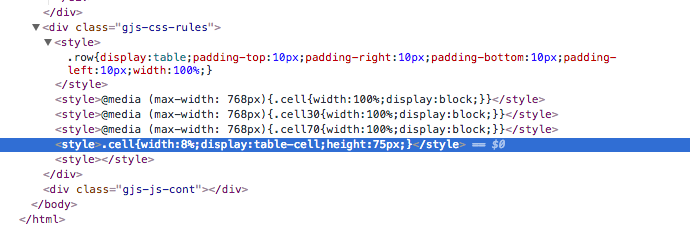
You can see here that the '.cell' style is added last and it overrides the corresponding media query style from above and as a result it is impossible to test responsive components.
So, It would be really nice if media query styles where included after their corresponding 'normal' styles to guarantee they are taken into consideration when using device configurations.
Also, it looks like the Code viewer generates CSS correctly as in this screenshot below:
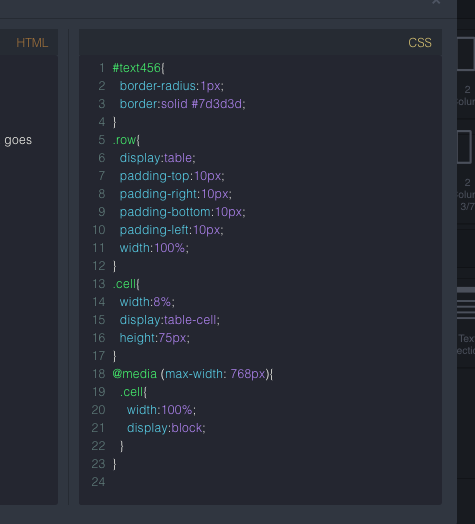
Thank you.
 maxtacco
All 10 comments
Hmmm! I think i have the same issue with the ordering of media queries styles
Here is the video which show how to easily reproduce the bug
Steps to reproduce on Grapes JS Demo:
1) Add 2 Columns from the right panel
2) Select left column and create a class for it on the Style Manager panel. For example - column-right
3) Current device is Laptop - change background color of the left column. For example choose red color
4) Select Tablet device and change background color of the left column. For example choose green
5) Select Mobile device and change background color of the left column. For example choose blue
6) Stay on Mobile device
6) Select right column and create a class for it on the Style Manager panel. For example - column-left
7) Change background color of the right column for the Mobile Device mode. For example choose blue
8) Select Tablet device and change background color of the right column. For example choose green
9) Select Laptop device and change background color of the right column. For example choose red color
10) Now just switch devices on Device panel
 vrudikov
on 5 Mar 2018
vrudikov
on 5 Mar 2018
Thanks for the catch guys and the great video @vrudikov, was really helpful. I'll investigate this
 artf
on 8 Mar 2018
artf
on 8 Mar 2018
@artf Can you point me to the right direction? I have a time to take a look
vrudikov
on 12 Mar 2018
Ok. It seems that we should tune the logic in CssRule.js.compare method. Right?
vrudikov
on 12 Mar 2018
I think the right pattern would be to create different style containers (ordered by the media width of rules) for each device and for any new rule append it to the relative container.
New rules are appended by CssRulesView
artf
on 17 Mar 2018
So now we have the following structure:
<div class="gjs-css-rules">
  <style>...</style>
  <style>...</style>
  <style>...</style>
  <style>...</style>
</div>
And you want something like this:
<div class="gjs-css-rules">
  <div id="common-styles">
    <style>...</style>
    <style>...</style>
    <style>...</style>
  </div>
  <div id="media-1000-styles">
    <style>...</style>
    <style>...</style>
    <style>...</style>
  </div>
  <div id="media-700-styles">
    <style>...</style>
    <style>...</style>
    <style>...</style>
  </div>
  <div id="media-400-styles">
    <style>...</style>
    <style>...</style>
    <style>...</style>
  </div>
</div>
@artf Can we discuss it and i want to help with this issue. I just need to be sure that we on the same page
vrudikov
on 21 Mar 2018
Hey thanks, Valentin, it's exactly what I meant
artf
on 22 Mar 2018
@artf Created the PR
vrudikov
on 29 Mar 2018
This thread has been automatically locked since there has not been any recent activity after it was closed. Please open a new issue for related bugs.
![lock[bot] picture](https://avatars1.githubusercontent.com/in/6672?v=4&s=40) lock[bot]
on 17 Sep 2019
lock[bot]
on 17 Sep 2019
Related issues
 YashPrince
·
3Comments
YashPrince
·
3Comments
 nojacko
·
3Comments
nojacko
·
3Comments
 adam-gpc
·
3Comments
adam-gpc
·
3Comments
 tribulant
·
3Comments
tribulant
·
3Comments
 kickbk
·
3Comments
kickbk
·
3Comments
Most helpful comment
@artf Created the PR