Grapesjs: editor.setComponents auto generate unwanted css
I'm used the html and css editor that mention in #324 .
After I edited the html and css it will generate a CSS where I suspect caused by editor.setComponents()
Not sure this is a bug or normal behavior.
grapesjs version - 0.12.8
grapesjs preset - gjs-preset-newsletter 0.2.15
 richieteh94
All 9 comments
First of all, update your grapesjs version, then be more specific about your changes. What did you change? What do you mean with unwanted css?
 artf
on 7 Nov 2017
artf
on 7 Nov 2017
Hi, I updated my grapesjs to v0.12.25
Scenario :
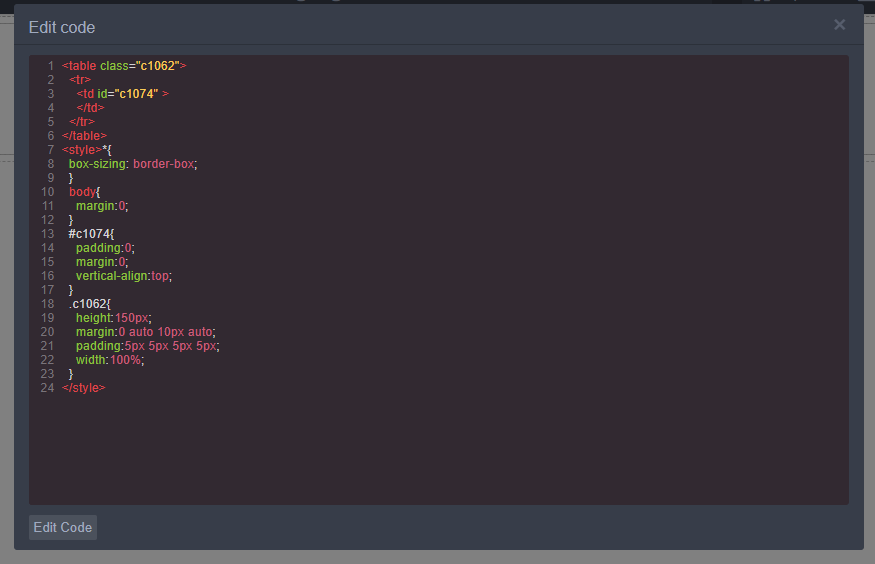
I pull a section into the drop area and the image below shows the code.
I did not change any code inside the area.
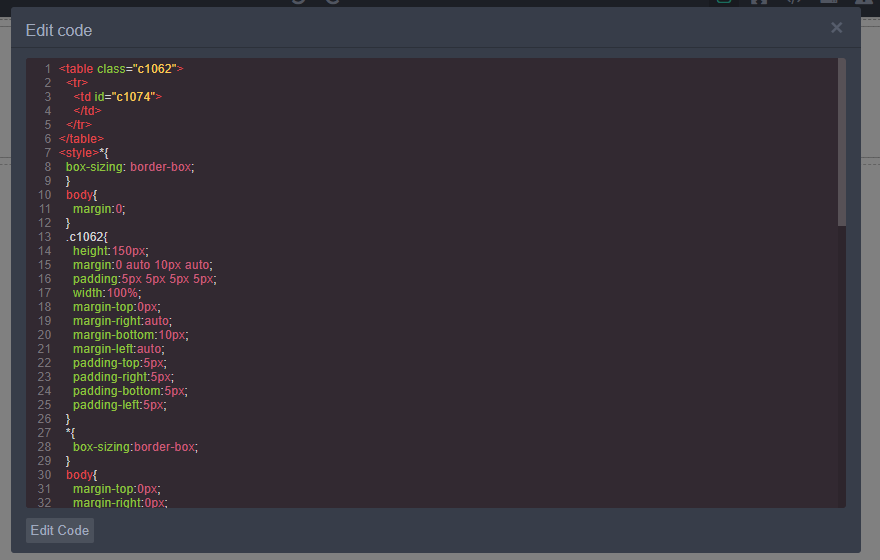
After I press the EditCode Button it will chop down the CSS from the original and add into the existing CSS (this makes duplicate of style that causes the normal change[not with edit code] of margin or padding unable take effect).
Before press Edit Code button:
After press Edit Code button:
richieteh94
on 8 Nov 2017
That explosion of style rules is due to the browser's CSS parser and I can't do much about until there will be a possibility to attach custom CSS parsers. Not sure if it's the duplicate of style you were talking about
artf
on 8 Nov 2017
thanks @artf I will try to find a solution for it and update here if any solution appears.
richieteh94
on 9 Nov 2017
In my use case I am constantly getting & setting the html/css inside the editor, and what I found is that it would end up duplicating the 'default' styles (see the * and body styles in the image above - they appear twice).
I managed to solve that by making sure to clear the css before I (re)set it - something like the following:
editor.CssComposer.getAll().reset();
editor.setComponents(components);
editor.setStyle(css);
 thecodefish
on 13 Nov 2017
thecodefish
on 13 Nov 2017
@thecodefish thank you for the solution.
you saved my day. :)
richieteh94
on 13 Nov 2017
@thecodefish , Exactly where should I add the code to fix the duplication of style?
 chiqui3d
on 27 Jan 2018
chiqui3d
on 27 Jan 2018
@chiqui3d I think whenever you need to modify the css from some external source, you'll probably want to reset the css composer first. So if you have something like editor.setStyle(css); in your code, you may need to call editor.CssComposer.getAll().reset(); first.
thecodefish
on 29 Jan 2018
This thread has been automatically locked since there has not been any recent activity after it was closed. Please open a new issue for related bugs.
![lock[bot] picture](https://avatars1.githubusercontent.com/in/6672?v=4&s=40) lock[bot]
on 17 Sep 2019
lock[bot]
on 17 Sep 2019
Related issues
 applibs
·
3Comments
applibs
·
3Comments
 alibouaziz
·
3Comments
alibouaziz
·
3Comments
 tribulant
·
3Comments
tribulant
·
3Comments
 kickbk
·
3Comments
kickbk
·
3Comments
 ryandeba
·
3Comments
ryandeba
·
3Comments
Most helpful comment
In my use case I am constantly getting & setting the html/css inside the editor, and what I found is that it would end up duplicating the 'default' styles (see the * and body styles in the image above - they appear twice).
I managed to solve that by making sure to clear the css before I (re)set it - something like the following: