Grapesjs: [Question] How to set options of 'SELECT' Traits type dynamically when its previous traits value is set?
Hello @artf again..!!
I'm working with your million dollar tool since last few weeks as I'm working on a project where this 'Drag 'n Drop' tool is very useful.
I'm frequently having many questions about 'How to' type!
Once again I'm having a question for now.
I have use component to create a dynamic block which get values of API URL, with authentications and receives product data from it. This data have many different product categories. So, after receiving data(check code below), I have to populate a new trait with type 'select' which will list all those categories.
So the question is how to set options list in 'select' trait dynamically after API call?

My code structure is like this:
comps.addType('productList', {
    model: defaultModel.extend({
      init() {
        this.listenTo(this, 'change:apiurl change:items change:callApi', this.doStuff);
      },
      doStuff() {
        // All stuff of API calls
        // Will receive data of categories in array[{ value:'val1',name:'name1' }, ....];
        // Will set HTML in the editor using editor.setComponents(<html-data></html-data>);

        How to set categories TRAITS now? I tried:
        MyDynamicDataArrayGoesHere = array[{ value:'val1',name:'name1' }, ....];
      },
      defaults: Object.assign({}, defaultModel.prototype.defaults, {
        editable: true,
        droppable: true,
        traits: [
          {
            label: 'API URL',
            name: 'apiurl',
            options: [
              {value: 'text', name: 'Text'}
            ]
          },
          {
            label: 'Username',
            name: 'username',
            type: 'text',
            changeProp: 1
          },
          {
            label: 'Password',
            name: 'password',
            type: 'password',
            changeProp: 1
          },
          {
            label: 'Items',
            name: 'items',
            type: 'text',
            changeProp: 1
          },
          {
            label: 'Categories',
            name: 'cats',
            type: 'select',
            options: MyDynamicDataArrayGoesHere         // Tried this but didn't worked!
            changeProp: 1
          }
        ],
    }),

},
{
  isComponent: function(el) {
    if(el.tagName == 'PRODUCTLIST'){
      return {type: 'productList'};
    }
  },
}),

view: defaultType.view,
});
I already tried custom traits, but in that I'll first have to call API and get the category list, which is called in doStuff(). So how to set select traits option in doStuff()...???
Thanks a lot :innocent:
 fzs1994
All 10 comments
You should get the trait from the model and then update its options:
doStuff(){
  var categsTrait = this.get('traits').where({name: 'cats'})[0];
  categsTrait.set('options', [{ value:'val1',name:'name1' }, ....])
}
 artf
on 13 Jul 2017
artf
on 13 Jul 2017
hey @artf working on same thing.
Your solution does set values but nothing in editor side.
var categsTrait = this.get('traits').where({name: 'cats'})[0];
console.log(categsTrait);
categsTrait.set('options', [{ value:'val1',name:'name12' }, { value:'val2',name:'name13' }]);
Here is the screenshot for reference:
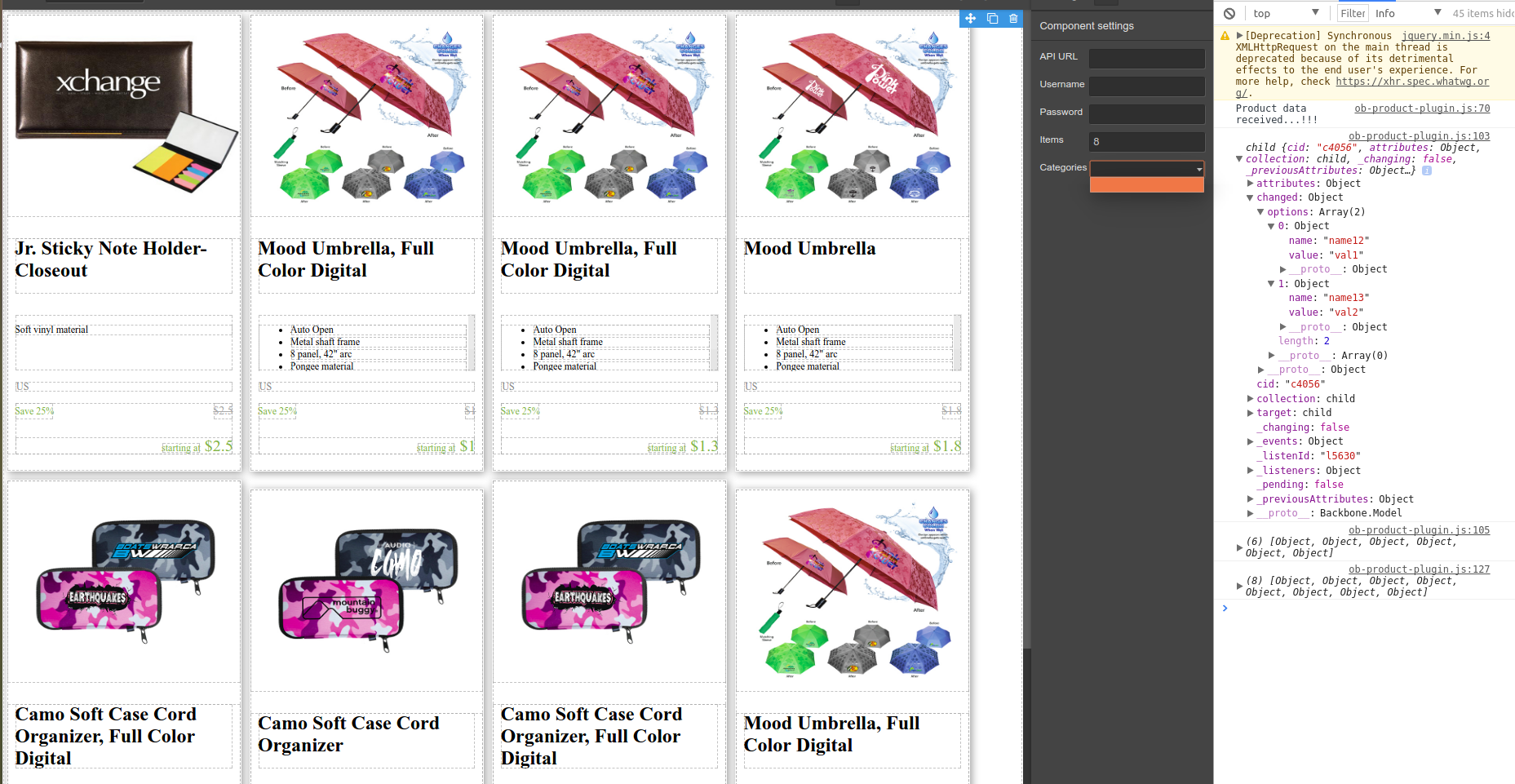
You can see in the console the data is set in the categsTrait.
Thanks.
EDIT:
{
            label: 'Categories',
            name: 'cats',
            type: 'select',
            options: [{value:'',name:''}]
 }
 ghost
on 14 Jul 2017
ghost
on 14 Jul 2017
Yes @artf , options are bounded in the traits, but I think the view is not updated:
var categsTrait = this.get('traits').where({name: 'cats'})[0];
categsTrait.set('options', catsVals)
console.log(this.get('traits').where({name: 'cats'})[0].get('options'));
This works and I get my array in console, but the traits panel view is not updated.
fzs1994
on 14 Jul 2017
@fzs1994 @gkumar77 does this rerender traits?
doStuff(){
  ...
  editor.trigger('change:selectedComponent');
}
doStuff(){
  ...
  editor.trigger('change:selectedComponent');
}
This does not render traits(YES, I got an array in console). Is there any other way to immediately reflect changes to traits based on previous select value?
 HarshOB
on 6 Oct 2017
HarshOB
on 6 Oct 2017
Any follow up on this?
 cmcintosh
on 19 Apr 2018
cmcintosh
on 19 Apr 2018
@artf Is this issue still being resolved? Was wanting to do the same implementation of the select menus... Thanks!
 blairpanek
on 4 Jun 2018
blairpanek
on 4 Jun 2018
editor.TraitManager.getTraitsViewer().render(); this is what you are looking for...
@HarshOB
@cmcintosh
blairpanek
on 6 Jun 2018
Hello,
Now I try to create dynamic component “Product collection”. The idea is user to search and select product from traits section and then update the editor with selected items. In this case I need suggestion input in traits section.
Can you suggest me how to do that?
 abozhinov
on 22 May 2019
abozhinov
on 22 May 2019
@abozhinov create a custom trait
artf
on 28 May 2019
Related issues
 duskhacker
·
17Comments
duskhacker
·
17Comments
 josefph
·
60Comments
josefph
·
60Comments
 altalker
·
48Comments
altalker
·
48Comments
 gabrigcl
·
25Comments
gabrigcl
·
25Comments
 chrisedington
·
31Comments
chrisedington
·
31Comments
Most helpful comment
editor.TraitManager.getTraitsViewer().render(); this is what you are looking for...
@HarshOB
@cmcintosh