Grapesjs: In Firefox, unable to drag components unto an empty canvas
Tried this in grapesjs.com/demo:
- click "Empty canvas" to empty the canvas
- try to drag any component from the blocks menu into the canvas, unable to drop them there
Above is working fine in IE/Chrome. My Firefox version is 54.0
 roytang
All 27 comments
Can't reproduce it (same versione). Do you have any error in console?
 artf
on 21 Jun 2017
artf
on 21 Jun 2017
No errors in the console.
You know how there's a green bar that shows you where you can drop the component? When this problem happens, there is no green bar at all no matter where I drag the component over the canvas. Releasing the mouse button loses the component icon on the cursor, but otherwise does nothing.
(There is also an "e is null" JS error in the console if I try to drag the component beyond the upper border of the browser window, but that doesnt seem relevant.)
roytang
on 21 Jun 2017
Ok, I got the same behavior now (don't know why didn't get it in the last check). Seems like it's due to how differently html and body threaten in different render engines. Will try to fix it
artf
on 21 Jun 2017
Got the same issue. Any fixes?
 pournami17
on 17 Jul 2017
pournami17
on 17 Jul 2017
At the moment is not possible as the fix I've tried (fill the height of html/body) breaks other stuff
artf
on 17 Jul 2017
Same problem in Safari as well but it is intermittent.
In most browsers, dropping blocks onto empty canvas doesn't work.
Ideally the Javascript could just check if the canvas is empty when dropping a block and then first put an empty DIV on the canvas to drop the block into maybe?
 tribulant
on 20 Jul 2017
tribulant
on 20 Jul 2017
Same Problem also in Chrome
Console alert (grapes.min.js:2 Invalid target position)
 Bsm-B
on 5 Aug 2017
Bsm-B
on 5 Aug 2017
@tribulant @bassouma21001 I can't reproduce in either of them. Do you use the last version? Are you able to reproduce it in the demo?
artf
on 8 Aug 2017
I can reproduce it in the demo, try to delete everything, then drag and drop any component and it breaks. The error message I got in the console is "Invalid target position: Target collection not found, Target is not droppable, accepts [undefined], Component not draggable, acceptable by [undefined]" The message also appears as an orange alert box at top right.
 davellanedam
on 10 Aug 2017
davellanedam
on 10 Aug 2017
Same. With empty canvas you can't drag in anything. Once you have a single element in canvas, everything else seems to placed inside of it and there isn't a way of placing them outside. Like as if it needs some kind of wrapper element first.
 danaketh
on 10 Aug 2017
danaketh
on 10 Aug 2017
@artf
Same here, I can duplicate it locally as well as on the online demo.
As they said above, clear the canvas and try to drag an element onto the blank canvas.
Then you'll see the Javascript error in the browser's console.
tribulant
on 10 Aug 2017
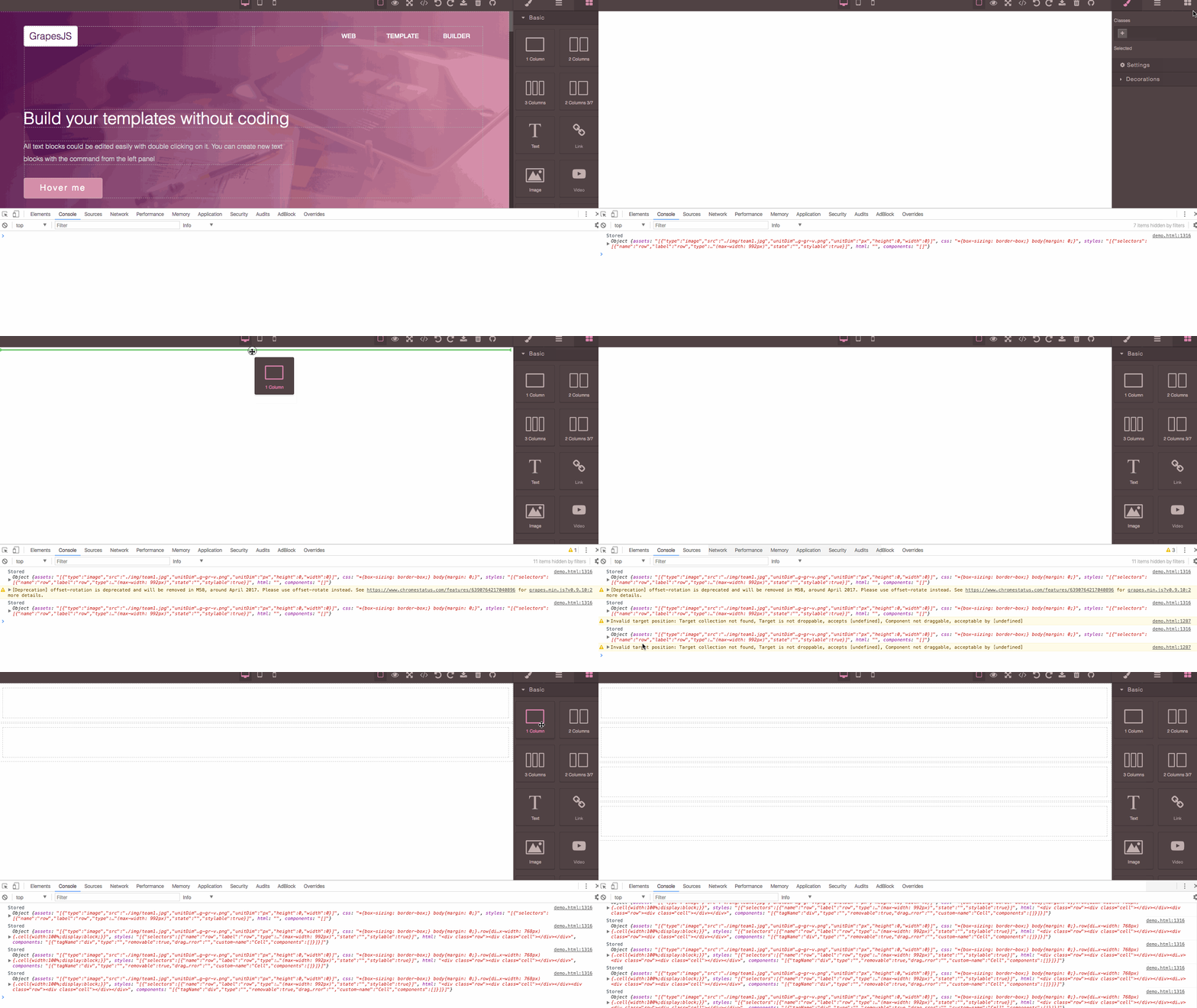
@davellanedam @danaketh @tribulant thanks guys, can you also provide the browser and OS? On my side (mac, chrome 59) I have a similar issue but the reason it's completely different with the on from the Firefox. The error is popping out when you drop the component near to the edge of the wrapper (fixable) but it works otherwise, here the screencast:
artf
on 10 Aug 2017
@artf That is the problem I believe, the block just doesn't add to the canvas. See this video: https://goo.gl/RhsReH
tribulant
on 10 Aug 2017
Btw, I'm in Safari on macOS, not Firefox although I could reproduce it on Firefox. The problem doesn't seem to occur in Chrome though.
tribulant
on 10 Aug 2017
thanks @tribulant
artf
on 10 Aug 2017
@artf You're welcome and thanks for everything you do. It will be nice to be able to start with a blank canvas and build a webpage from the blank canvas. At the moment, it just doesn't seem possible.
tribulant
on 10 Aug 2017
@tribulant will do my best to fix it soon
artf
on 10 Aug 2017
@artf Thanks to you! Using macOS, I usually test in all browsers, but it´s on Firefox 55 where the problem is.
davellanedam
on 10 Aug 2017
@artf It happens to me in Safari on macOS. Cannot drag a block to an empty canvas. Nothing happens.
tribulant
on 10 Aug 2017
Firefox 55.0 (64-bit) on Windows 10. I worked my way around it by adding styled <div> into #gjs element and having that one stripped away on saving the output into textarea in the page form.
danaketh
on 10 Aug 2017
Would be great to hear someone else with macOS and Safari because I can't reproduce it.
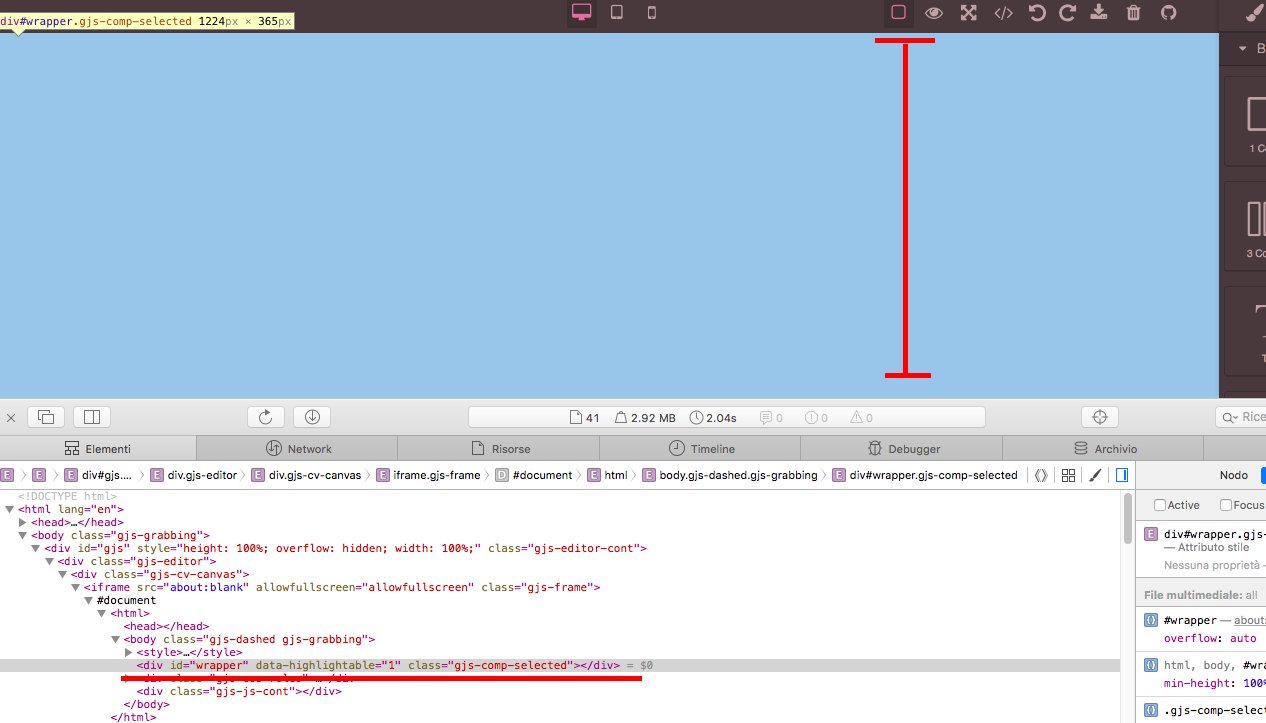
@tribulant in the inspector, does the empty wrapper fill all the canvas?
artf
on 10 Aug 2017
Hi guys, I made a little update on this (v0.9.13, demo updated), besides the issue with edge corners you should be able to drag stuff in empty canvas even with Firefox (at least on my side it works now). Let me know
artf
on 15 Aug 2017
Besides the issue with edge corners, it´s working now on Firefox.
davellanedam
on 16 Aug 2017
Hi @artf! As for me, the issue is not fixed. I have the same problem, but not only in the corners. I tried the demo using Google Chrome (Version 61.0.3163.100) and Firefox (Version 61.0.3163.100).
Here is a short video:
https://gfycat.com/OldRepentantBeaver
Thank you in advance, great work! I hope this issue will be fixed so I can use this editor with my students!
 oas
on 11 Oct 2017
oas
on 11 Oct 2017
Seems like there is an issue with input blocks, which also affect next drops. Should work properly with other blocks
artf
on 11 Oct 2017
The issue with edge corners should be fixed in the latest version https://github.com/artf/grapesjs/releases/tag/v0.12.15
artf
on 20 Oct 2017
This thread has been automatically locked since there has not been any recent activity after it was closed. Please open a new issue for related bugs.
![lock[bot] picture](https://avatars1.githubusercontent.com/in/6672?v=4&s=40) lock[bot]
on 18 Sep 2019
lock[bot]
on 18 Sep 2019
Related issues
 tomichal
·
15Comments
tomichal
·
15Comments
 kamleshkatpara
·
17Comments
kamleshkatpara
·
17Comments
 aliassad
·
14Comments
aliassad
·
14Comments
 Geczy
·
18Comments
Geczy
·
18Comments
 gabrigcl
·
25Comments
gabrigcl
·
25Comments
Most helpful comment
I can reproduce it in the demo, try to delete everything, then drag and drop any component and it breaks. The error message I got in the console is "Invalid target position: Target collection not found, Target is not droppable, accepts [undefined], Component not draggable, acceptable by [undefined]" The message also appears as an orange alert box at top right.