Gradle-play-publisher: Add upload of universal apk back as a config option
I'm building and uploading an universalApk with universalApk true as an fallback apk.
UniversalApk upload was removed in #393, please add it back as an configurable option.
 1110101
All 22 comments
What are you trying to do? It should all Just Work™️.
 SUPERCILEX
on 19 Jan 2019
SUPERCILEX
on 19 Jan 2019
I'm building 3 ABI splits and the universalApk:
    splits {
        abi {
            enable true
            reset()
            include 'x86', 'arm64-v8a', 'armeabi-v7a'
            universalApk true
        }
    }
With publiskApk all splits get uploaded, but not the universal-apk one.
I thought because of #393 that this is the desired behavior. But I need the universalApk uploaded too, because somehow the app have some users using the universal one.
1110101
on 19 Jan 2019
I'm sorry, but that's not a valid use case. The universal APK is a superset of your splits. If you want to ship the universal APK, then don't create splits. Otherwise, the Play Store should only receive the APKs it needs to deliver (the splits). See #380.
SUPERCILEX
on 19 Jan 2019
In my universal apk are native libs for mips and x86_64 included (realm.io stuff). I don't want to create a extra split for them.
1110101
on 19 Jan 2019
Hmmm, I'm confused now. I thought the Play Store didn't let you upload a universal APK with splits, but that's not true apparently:
In case Google Play Store is unable to identify the correct APK to install for a target device, you may want to also create a universal APK that includes resources for all the different device variations you want to support. If you do provide a universal APK, you should assign it the lowest versionCode. Because Google Play Store installs the version of your app that is both compatible with the target device and has the highest versionCode, assigning a lower versionCode to the universal APK ensures that Google Play Store tries to install one of your other APKs before falling back to the larger universal APK.
Just to confirm, you _can_ manually upload the APKs to the Play Store? If so, then why would this be an issue: https://github.com/Triple-T/gradle-play-publisher/issues/39#issuecomment-239446519?
SUPERCILEX
on 19 Jan 2019
Yes it's possible. I'm using gradle-play-publisher to create the new version and upload the split apks. After that i'm uploading the univeral apk manually.
Universal APK:
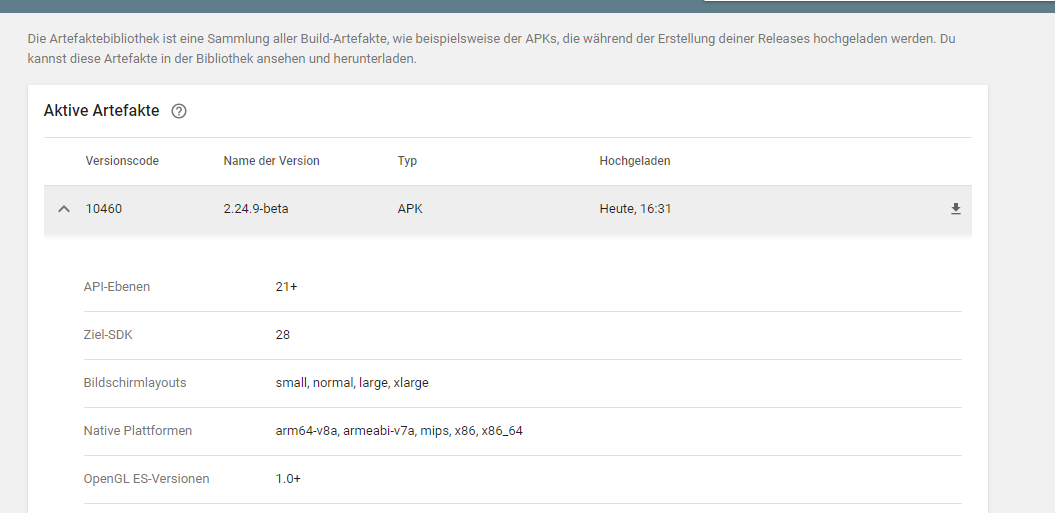
Splits:

Sorry for the german screenshot. I hope it's self explanatory.
Regarding #39, i remember vaguely that there where some issues with that in the past.
1110101
on 19 Jan 2019
Maybe it depends on what you declare in the splits include attribute. I assume that the upload of a universal APK will fail, if all possible abis are present. If there are abis that were not declared in that section, a universal APK will serve as a fallback.
Or maybe they just changed the play store to now also accept the universal APK because they noticed that there are devices that weren't covered before.
Anyway, let's bring back the option to upload the universal APK alongside the splits
 bhurling
on 19 Jan 2019
bhurling
on 19 Jan 2019
@1110101 Can you share your split config? I can't publish anything right now:
{
    "domain" : "androidpublisher",
    "message" : "Version 380018 of this app cannot be downloaded by any devices as they will all receive APKs with higher version codes.",
    "reason" : "fullyShadowed"
}
Here's what I've tried:
    applicationVariants.forEach { variant ->
        variant.outputs.filterIsInstance<ApkVariantOutput>().forEach { output ->
            val versionCodes = mapOf("universal" to 0,
                                     "armeabi-v7a" to 1,
                                     "mips" to 2,
                                     "arm64-v8a" to 3,
                                     "x86" to 4,
                                     "x86_64" to 5)
            val abiVersionCode =
                    versionCodes[output.getFilter(VariantOutput.FilterType.ABI) ?: "universal"]!!
            output.versionCodeOverride = abiVersionCode + android.defaultConfig.versionCode!! * 10
        }
    }
Sure:
ext.versionCodes = ['armeabi-v7a': 3, 'arm64-v8a': 5, 'x86': 8]

splits {
    abi {
        enable true
        reset()
        include 'x86', 'arm64-v8a', 'armeabi-v7a'
        universalApk true
    }
}

applicationVariants.all { variant ->
    variant.outputs.all { output ->
        output.versionCodeOverride = project.ext.versionCodes.get(output.getFilter(com.android.build.OutputFile.ABI), 1) * 10000 + android.defaultConfig.versionCode

        if (variant.name == "release") {
            def abi = output.getFilter(com.android.build.OutputFile.ABI)
            if (abi == null) abi = "universal"
            outputFileName = "release-${abi}-${variant.versionName}.apk"
        }
    }
}
Resulting in - universal 10x, arm64-v8a 30x, arm64-v8a 50x, x86 80x
1110101
on 21 Jan 2019
Nope:
{
    "code" : 403,
    "errors" : [ {
      "domain" : "androidpublisher",
      "message" : "Version 30000001 of this app cannot be downloaded by any devices as they will all receive APKs with higher version codes.",
      "reason" : "fullyShadowed"
    }, {
      "domain" : "androidpublisher",
      "message" : "Version 50000001 of this app cannot be downloaded by any devices as they will all receive APKs with higher version codes.",
      "reason" : "fullyShadowed"
    } ],
    "message" : "Version 30000001 of this app cannot be downloaded by any devices as they will all receive APKs with higher version codes."
  }
TBH, I've never been able to get splits working. Is there some trick I'm missing? I'd more than appreciate a sample.
SUPERCILEX
on 22 Jan 2019
Interesting. Maybe I'm using a trick without actually knowing it. I'll recheck my config later.
Maybe it's only possible with alpha/beta-testing?
1110101
on 22 Jan 2019
Hi, we use this in our project which performs a density-based split. In fact, we've been using this feature for quite some time already.
Unfortunately, lack of inclusion of the universal APK is blocking us from migrating to version 2.1.0.
Manual upload of the release APK is still a viable option, but then we are not able to use our CD system.
EDIT: we actually can't use 1.2.2 version anymore as it doesn't support Gradle 5.0
 scana
on 30 Jan 2019
scana
on 30 Jan 2019
@scana any chance you can whip up a quick sample?
SUPERCILEX
on 30 Jan 2019
@SUPERCILEX sure, let me know if this is what you need.
This is a part of our build.gradle config. I guess you could simply copy it to any of the starter projects.
int ver = 4
int major = 5
int minor = 6
int patch = 0

android {

    defaultConfig {
         //...
         applicationId 'me.scana.app'
         versionCode ver * 1000000 + major * 10000 + minor * 1000 + patch * 10
         //...
    }
    //...
    splits {
        density {
            enable project.hasProperty('splitApk')
            exclude "ldpi", "tvdpi", "xxxhdpi"
            compatibleScreens 'small', 'normal', 'large', 'xlarge'
        }
    }
    //...
}

def versionCodesDensity = [mdpi: 16, hdpi: 24, xhdpi: 32, xxhdpi: 48]

import com.android.build.OutputFile
android.applicationVariants.all { variant ->
    if (!project.hasProperty('splitApk')) {
        return
    }
    // assign different version code for each output
    println variant
    variant.outputs.each { output ->
        def density = output.getFilter(OutputFile.DENSITY)
        def densityValue = 0
        if (density != null) {
            densityValue = versionCodesDensity.get(density)
        }
        output.versionCodeOverride = densityValue + android.defaultConfig.versionCode * 100
        println "Assigning version code " + output.versionCodeOverride + " to density " + density
    }
}
This results in creating four 5 artifacts with 5 build codes, for current version as an example:
405600048 - xxhdpi
405600032 - xhdpi
405600024 - hdpi
405600016 - mdpi
405600000 - universal
When uploaded all at once, the universal one will never overshadow those splits, but at the same time it will support devices that do not match any specific density requirement.
It has been working like that for ages already and I was really glad when I found gradle-play-publisher plugin because it has simplified our release process a lot. Without universal app we automatically lose support for around 10+% of devices (using split). We have a big project and we can't really switch to Android App Bundle system "just like that" :(
scana
on 31 Jan 2019
For reference our current splits are:
splits {
        abi {
            enable true
            reset()
            include "armeabi-v7a", "arm64-v8a"
            universalApk true
        }
    }
which provides the optimal balance for our users and build time. Sadly the universal apk doesn't get uploaded anymore.
 KaiMaStarling
on 6 Feb 2019
KaiMaStarling
on 6 Feb 2019
I read comments here and in referenced tickets. I don't understand thought process that lead to removing option to upload universal apk.
Where did the assumption that you always need to produce artifacts for all possible configurations (thus you don't need universal fallback) was confirmed to be true?
Is that what initial change was about? Am I missing or misunderstanding something?
 dbarwacz
on 29 Apr 2019
dbarwacz
on 29 Apr 2019
I would suggest to lower the priority or close the issue. I'm switched entirely to using app bundles.
1110101
on 12 May 2019
Is it feasible for bigger apps? We are not migrated yet, I'm concerned it
might be not trivial to fix that.
On Sun, 12 May 2019, 16:58 1110101, notifications@github.com wrote:
I would suggest to lower the priority or close the issue. I'm switched
entirely to using app bundles.—
You are receiving this because you commented.
Reply to this email directly, view it on GitHub
https://github.com/Triple-T/gradle-play-publisher/issues/501#issuecomment-491603077,
or mute the thread
https://github.com/notifications/unsubscribe-auth/ABSXSGMDUGGVIUEWEBLDXEDPVAWCLANCNFSM4GRERZCA
.
dbarwacz
on 13 May 2019
Pretty sure you get 150MB of user download (what they get, not what you uploaded). I'm going to try and fix this though in the next release.
SUPERCILEX
on 13 May 2019
@SUPERCILEX Can you clarify? By mentioned 150MB you mean universal will be huge?
Right now we don't split, only because of issue reported here.
We don't want to stop supporting some users, so if I'm not mistaken, we need to use universal for everyone.
dbarwacz
on 14 May 2019
Holy freaking 💩 guys, I finally figured it out. If you don't have native code in your app, the play store always returns fullyShadowed. Uuuuuuggghhhhh, I've wasted so much time trying to figure out how to reproduce this. 😖
SUPERCILEX
on 17 Jun 2019
_Daaaaamn._ I finally understand everybody's frustration! Sorry for taking so long on this one. 😳 Here's what I've learned:
- Non-ABI filters always include a universal APK that _must_ be uploaded to support the possibility of future density/language changes to the platform.
- ABI filters are always shadows of each other if the app does not include native code.
- If a combination of ABI and density/language splits are used, the non-ABI universal APK is always valid and must be uploaded.
- The universal APK will only shadow ABI filters if all native targets map to a filter. That is, if the app contains
x86andx86_64code, but the ABI filters only specifyx86, the universal APK is valid and must be uploaded to support all devices. On the other hand, if the ABI filters include bothx86andx86_64, the universal APK is not valid because all possible splits are already being uploaded.
The original request was to support this latter case for local development, meaning the developer need not know what ABI their device is, but still wants to upload all possible ABI splits to the Play Store. This is an invalid request and we made a mistake by implementing a "fix" for it. For developers who only want the universal APK for local dev, they should conditionally enable the feature with a flag such as isUniversalApk = !hasProperty("relBuild"). Then, use ./gradlew publish -PrelBuild.
Again, huge apologies for the half-year wait!
SUPERCILEX
on 17 Jun 2019
Related issues
 ToxicBakery
·
4Comments
ToxicBakery
·
4Comments
 MaTriXy
·
4Comments
MaTriXy
·
4Comments
 dannyroa
·
5Comments
dannyroa
·
5Comments
 daniele-pecora
·
5Comments
SUPERCILEX
·
6Comments
daniele-pecora
·
5Comments
SUPERCILEX
·
6Comments
Most helpful comment
Maybe it depends on what you declare in the splits
includeattribute. I assume that the upload of a universal APK will fail, if all possible abis are present. If there are abis that were not declared in that section, a universal APK will serve as a fallback.Or maybe they just changed the play store to now also accept the universal APK because they noticed that there are devices that weren't covered before.
Anyway, let's bring back the option to upload the universal APK alongside the splits