Graal: 20.1.0 native-image-maven-plugin: Error: Unable to detect supported WINDOWS native software development toolchain.
With version 20.0.0 everything worked well with windows, but now:
Error: Unable to detect supported WINDOWS native software development toolchain.
com.oracle.svm.core.util.UserError$UserException: Unable to detect supported WINDOWS native software development toolchain.
        at com.oracle.svm.core.util.UserError.abort(UserError.java:68)
        at com.oracle.svm.hosted.c.codegen.CCompilerInvoker.<init>(CCompilerInvoker.java:72)
        at com.oracle.svm.hosted.c.codegen.CCompilerInvoker$WindowsCCompilerInvoker.<init>(CCompilerInvoker.java:93)
        at com.oracle.svm.hosted.c.codegen.CCompilerInvoker.create(CCompilerInvoker.java:84)
        at com.oracle.svm.hosted.NativeImageGenerator.setupNativeImage(NativeImageGenerator.java:851)
        at com.oracle.svm.hosted.NativeImageGenerator.doRun(NativeImageGenerator.java:536)
        at com.oracle.svm.hosted.NativeImageGenerator.lambda$run$0(NativeImageGenerator.java:451)
        at java.base/java.util.concurrent.ForkJoinTask$AdaptedRunnableAction.exec(ForkJoinTask.java:1407)
        at java.base/java.util.concurrent.ForkJoinTask.doExec(ForkJoinTask.java:290)
        at java.base/java.util.concurrent.ForkJoinPool$WorkQueue.topLevelExec(ForkJoinPool.java:1020)
        at java.base/java.util.concurrent.ForkJoinPool.scan(ForkJoinPool.java:1656)
        at java.base/java.util.concurrent.ForkJoinPool.runWorker(ForkJoinPool.java:1594)
        at java.base/java.util.concurrent.ForkJoinWorkerThread.run(ForkJoinWorkerThread.java:177)
Error: Image build request failed with exit status 1
And yes, i use "x64 Native Tools Command Prompt for VS 2017" ...
 mbbee
mbbee
All 33 comments
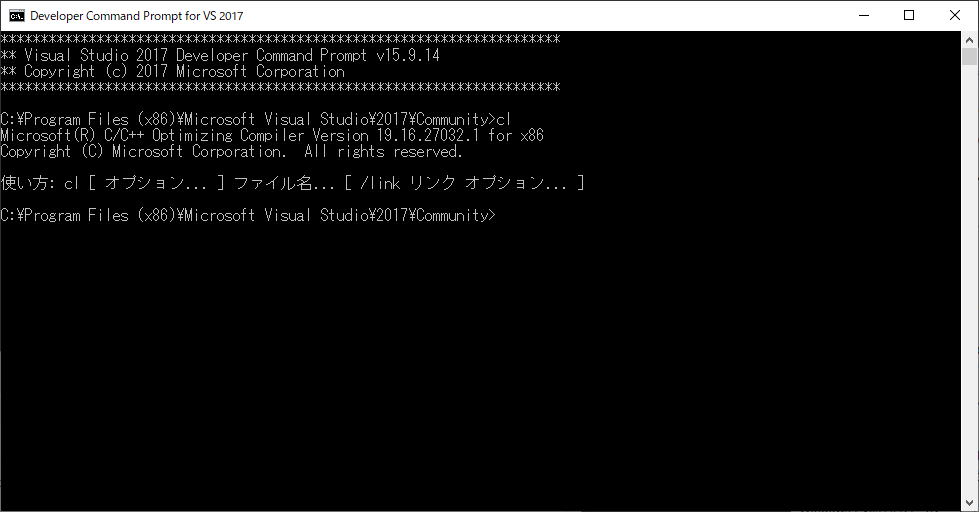
I had the same problem and tested CCompilerInvoker, it looks like it's failing to parse the first line of cl.exe.
The code is.
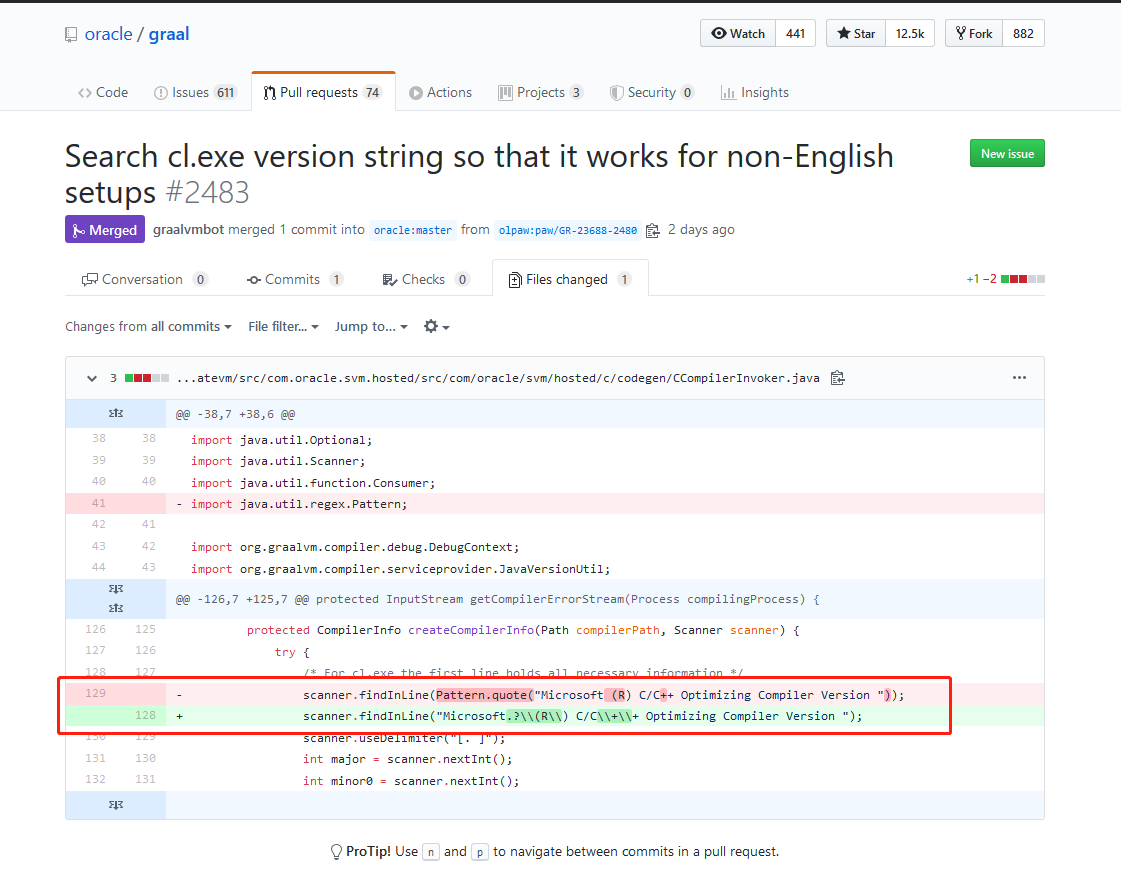
"Microsoft (R) C/C++ Optimizing Compiler Version "
but what cl.exe actually returns is
"Microsoft(R) C/C++ Optimizing Compiler Version "
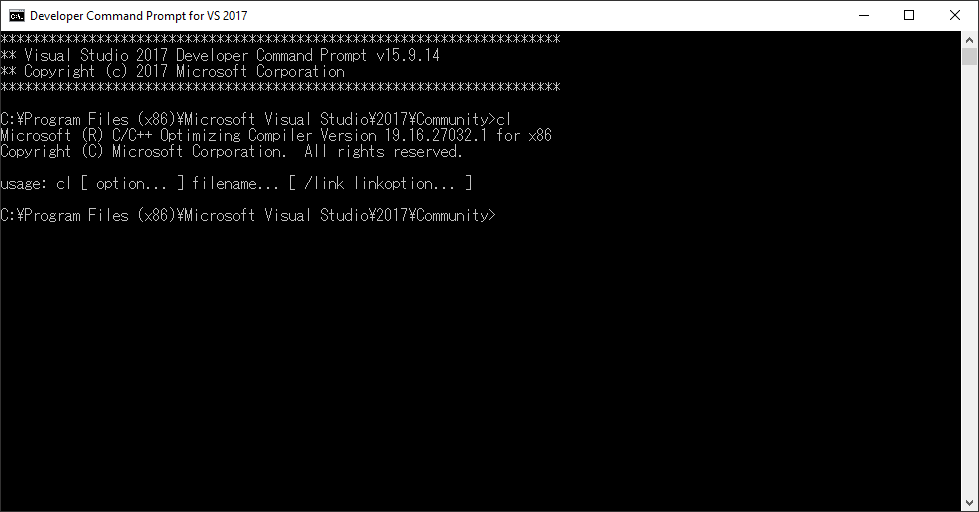
It's because of the extra space after "Microsoft".
 genarks
on 20 May 2020
genarks
on 20 May 2020
Interesting. Can you tell me what Language/Locale settings your Windows machine uses?
 olpaw
on 20 May 2020
olpaw
on 20 May 2020
My windows10"s display language is "Japanese", and output of cl.exe is belows.
genarks
on 20 May 2020
Then, when I changed the display language to English, the space appeared. Wow!
genarks
on 20 May 2020
Then, when I changed the display language to English, the space appeared. Wow!
I thought so. Thanks! That helps us to provide a proper fix.
olpaw
on 20 May 2020
In German this still occurs:
Microsoft (R) C/C++-Optimierungscompiler Version 19.16.27040 für x64
 yoktobit
on 22 May 2020
yoktobit
on 22 May 2020
I run into the same issue today on Windows 10 Simplified-Chinese Version.
I read the merged code and I guess it just cannot work on Simplified-Chinese VS 2017...
The cl.exe version information on my console looks like below:
用于 x64 的 Microsoft (R) C/C++ 优化编译器 19.16.27040 版
版权所有(C) Microsoft Corporation。保留所有权利。

用法: cl [ 选项... ] 文件名... [ /link 链接选项... ]
You can see there's no "Optimizing Compiler" but "优化编译器". The regular expression I guess cannot cover this. I think it cannot solve the issue on Japanese and Germany Visual Studio versions...
As it's an i18n issue, I think it can only be solved with regular expressions by country code...
May I know if it's possible to do that? Otherwise, it will still impact the non-English users...
 yystju
on 23 May 2020
yystju
on 23 May 2020
I did some further investigation:
After the locale in VS GUI has been changed to "English", the CLI information is still in Simplifed-Chinese on my laptop... I guess I can only change the OS Locale configuration to make the CLI information to be changed which is not a typical non-English speaker does...
May I know if it's possible to reopen this issue?
Thank you.
yystju
on 23 May 2020
In my case, there is no issue with a white space, instead: DE vs EN
Microsoft (R) C/C++-Optimierungscompiler Version
Microsoft (R) C/C++ Optimizing Compiler Version
I think, there is still an issue...
mbbee
on 23 May 2020
Same here, German version:
C:\Users\Brix\eclipse_workspace\jdk11_jlink_multiplatform_builds\target>"%JAVA_HOME%bin\native-image" -jar deploy-1.0.0-SNAPSHOT.jar
[deploy-1.0.0-SNAPSHOT:8628]    classlist:   1,400.84 ms,  0.96 GB
[deploy-1.0.0-SNAPSHOT:8628]        setup:     741.99 ms,  0.96 GB
Error: Unable to detect supported WINDOWS native software development toolchain.
Error: Use -H:+ReportExceptionStackTraces to print stacktrace of underlying exception
Error: Image build request failed with exit status 1

C:\Users\Brix\eclipse_workspace\jdk11_jlink_multiplatform_builds\target>cl
Microsoft (R) C/C++-Optimierungscompiler Version 19.26.28805 für x64
Copyright (C) Microsoft Corporation. Alle Rechte vorbehalten.

Syntax: cl [ Option... ] Dateiname... [ /link Linkeroption... ]
 Brixomatic
on 23 May 2020
Brixomatic
on 23 May 2020
May I know if it's possible to reopen this issue?
I agree. Unfortunately the refined regex is not enough. I will further refine the detection.
On Linux and OSX this is much much simpler. On those platforms executing the compiler with environment var LC_ALL=C ensures non-localized compiler output. I'm not aware of a similar solution for Windows.
olpaw
on 25 May 2020
@yystju wow ... in Simplified-Chinese the arch string comes before the version info ... annoying.
All other cases can be dealt with by relaxing the existing scanner logic. Thus I will encode the Simplified-Chinese as a special case for now.
olpaw
on 25 May 2020
@yystju wow ... in Simplified-Chinese the arch string comes before the version info ... annoying.
All other cases can be dealt with by relaxing the existing scanner logic. Thus I will encode the Simplified-Chinese as a special case for now.
Hi @olpaw,
Thank you for reopening this issue and help us.
I didn't notice the "x64" string in Simplified-Chinese is in front of the version before you mentioned it...
I think make the Simplified-Chinese version to be a special case is totally acceptable. I am not sure if there're other languages which will run into the same situation... You know that people say different languages and the same sentence can be translated into different ways... But for now this is a good way to go.
Thank you again.
-yystju
yystju
on 25 May 2020
This problem was harder than I had imagined...
@olpaw If you can use cl.exe as a preprocessor, you may be able to use the constant _MSC_VER.
I found it here.
https://stackoverflow.com/questions/1233312/finding-version-of-microsoft-c-compiler-from-command-line-for-makefiles#52089246
genarks
on 25 May 2020
@genarks thanks for looking that up. I have a generalized version now that also supports Simplified-Chinese (https://github.com/oracle/graal/pull/2499). If it turns out that even that will cause problems the preprocessor approach will be my next step.
olpaw
on 25 May 2020
@yystju I have merged https://github.com/oracle/graal/pull/2499
This should now work for all languages discussed in the above thread.
Can you verify that Simplified-Chinese cl.exe is now working for you?
olpaw
on 26 May 2020
@Brixomatic please verify that German version cl.exe is correctly detected on master.
olpaw
on 26 May 2020
@Brixomatic please verify that German version cl.exe is correctly detected on master.
Sorry, I am not set up for compiling the project.
If it's just the regex though, the quoted sample output should be enough to write a proper unit test.
Brixomatic
on 26 May 2020
Hello,
Thank you for this investigation and fixe. I can't compile project, but I've the same problem with French version and GRAAL 20.1.0 :
Compilateur d'optimisation Microsoft (R) C/C++ version 19.00.24245 pour x64
Thanks
 Ferhatos
on 28 May 2020
Ferhatos
on 28 May 2020
Ferhatos
on 28 May 2020
Ferhatos
on 28 May 2020
Hello @olpaw ,
I just created a PR for a fixe proposal :
#2513Can you check please ?
Thanks.
See https://github.com/oracle/graal/pull/2499#issuecomment-635246987
olpaw
on 28 May 2020
still got the same problem, when to release new bugfix version ?
> cl
用于 x64 的 Microsoft (R) C/C++ 优化编译器 19.27.29009.1 版
版权所有(C) Microsoft Corporation。保留所有权利。

用法: cl [ 选项... ] 文件名... [ /link 链接选项... ]
 netroby
on 30 Jun 2020
netroby
on 30 Jun 2020
still got the same problem, when to release new bugfix version ?
Have you tried with the latest graalvm-ce-dev-build?
https://github.com/graalvm/graalvm-ce-dev-builds/releases/
olpaw
on 30 Jun 2020
still got the same problem, when to release new bugfix version ?
Have you tried with the latest graalvm-ce-dev-build?
https://github.com/graalvm/graalvm-ce-dev-builds/releases/
I use the Windows 10 Simplified-Chinese Version,
and GraalVM CE 20.2.0-dev-20200701_0158
cl.exe
> cl
用于 x64 的 Microsoft (R) C/C++ 优化编译器 19.26.28806 版
版权所有(C) Microsoft Corporation。保留所有权利。

用法: cl [ 选项... ] 文件名... [ /link 链接选项... ]
java -version
 java -version
openjdk version "11.0.7" 2020-04-14
OpenJDK Runtime Environment GraalVM CE 20.2.0-dev (build 11.0.7+10-jvmci-20.2-b02)
OpenJDK 64-Bit Server VM GraalVM CE 20.2.0-dev (build 11.0.7+10-jvmci-20.2-b02, mixed mode, sharing)
not report this problem.The native-image build can correctly start.
 LilithBristol
on 2 Jul 2020
LilithBristol
on 2 Jul 2020
not report this problem.The native-image build can correctly start.
@LilithBristol thanks for verifying that it works as expected.
olpaw
on 2 Jul 2020
I got same issue when running on MacBook Air 2018, os Catalina version 10.15.6
Graalvm: java8-20.1.0
Error: Unable to detect supported DARWIN native software development toolchain.
com.oracle.svm.core.util.UserError$UserException: Unable to detect supported DARWIN native software development toolchain.
at com.oracle.svm.core.util.UserError.abort(UserError.java:68)
at com.oracle.svm.hosted.c.codegen.CCompilerInvoker.
at com.oracle.svm.hosted.c.codegen.CCompilerInvoker$DarwinCCompilerInvoker.
at com.oracle.svm.hosted.c.codegen.CCompilerInvoker.create(CCompilerInvoker.java:82)
at com.oracle.svm.hosted.NativeImageGenerator.setupNativeImage(NativeImageGenerator.java:851)
at com.oracle.svm.hosted.NativeImageGenerator.doRun(NativeImageGenerator.java:536)
at com.oracle.svm.hosted.NativeImageGenerator.lambda$run$0(NativeImageGenerator.java:451)
at java.util.concurrent.ForkJoinTask$AdaptedRunnableAction.exec(ForkJoinTask.java:1386)
 letrungtrung
on 24 Jul 2020
letrungtrung
on 24 Jul 2020
@letrungtrung if you can still reproduce the issue please open a new issue that contains the output of running
LC_ALL=C cc -v
on the console. Usually you should see something like:
Apple LLVM version 10.0.1 (clang-1001.0.46.4)
Target: x86_64-apple-darwin18.0.0
Thread model: posix
InstalledDir: /Library/Developer/CommandLineTools/usr/bin
has this been fixed for german localization in a version newer then GraalVM CE 20.1.0 (build 25.252-b09-jvmci-20.1-b02, mixed mode)? im getting this issue on that version
 LordMZTE
on 27 Jul 2020
LordMZTE
on 27 Jul 2020
@letrungtrung if you can still reproduce the issue please open a new issue that contains the output of running
LC_ALL=C cc -von the console. Usually you should see something like:
Apple LLVM version 10.0.1 (clang-1001.0.46.4)
Target: x86_64-apple-darwin18.0.0
Thread model: posix
InstalledDir: /Library/Developer/CommandLineTools/usr/bin
I found the reason for this issue: 'xcode-select still not install' . I suppose we need to change the output of fail when missing this lib
letrungtrung
on 28 Jul 2020
has this been fixed for german localization in a version newer then GraalVM CE 20.1.0 (build 25.252-b09-jvmci-20.1-b02, mixed mode)? im getting this issue on that version
@LordMZTE yes, that's fixed.
German localized native-compilers (i.e. cl.exe with german console output) should work fine in the upcoming 20.2 release.
To be extra sure please test with snaphot release
https://github.com/graalvm/graalvm-ce-dev-builds/releases/tag/20.2.0-dev-20200718_0205
If It does not work open a new ticket with all the details. Thanks
olpaw
on 28 Jul 2020
@olpaw
cl.exe use Console Code Page to detect the localization
When using cmd, we can use chcp to force cl.exe to produce English
chcp 437
 ArcticLampyrid
on 17 Aug 2020
ArcticLampyrid
on 17 Aug 2020
When using cmd, we can use
chcpto forcecl.exeto produce English
@1354092549 this is useful. Thanks for the info! If I have to touch the code again I will try with this approach.
olpaw
on 17 Aug 2020
I got the same error on a mac
Error: Unable to detect supported DARWIN native software development toolchain.
Doing some looking around I found these instructions indicating that I needed to run
xcode-select --install
which addresses the issue.
Hope this helps others!
 jimbethancourt
on 10 Dec 2020
jimbethancourt
on 10 Dec 2020
Related issues
 helloguo
·
3Comments
helloguo
·
3Comments
 sxend
·
3Comments
sxend
·
3Comments
 newk5
·
3Comments
newk5
·
3Comments
 borkdude
·
3Comments
borkdude
·
3Comments
 himanshumps
·
3Comments
himanshumps
·
3Comments
Most helpful comment
In German this still occurs:
Microsoft (R) C/C++-Optimierungscompiler Version 19.16.27040 für x64