Graal: segment fault when running exe after native image build successfully
I was trying to build a native image for a web api build with vertx framework, everything works great only when I build the jar to a native image.
I got segment fault on both MacOSX and Ubuntu 18.04, here is the stacktrace from linux:
➜ keeweb-native-image-demo git:(master) ✗ ./helloserver
09:54:13.282 [main] INFO com.keevol.keeweb.KeeHttpServer - start http server...
[ [ SubstrateSegfaultHandler caught signal 11 ] ]
General Purpose Register Set Values:
RAX 6636c2c86636b5d8
RBX 0000000000000000
RCX fffffffffffffff8
RDX 00007f1d6630b888
RBP 0000000000000000
RSI 6636c2c86636b5d8
RDI 00007f1d6630b840
RSP 00007f1d658fec30
R8 00005573072d6c20
R9 0000000000000006
R10 00007f1d658febd0
R11 0000000000000001
R12 0000000000001000
R13 000000000000000f
R14 0000000000000017
R15 00007f1d58000b20
EFL 0000000000010206
RIP 00005573061d40e9
JavaFrameAnchor dump:
No anchors
DeoptStubPointer address: 0000000000000000
TopFrame info:
Lookup TotalFrameSize in CodeInfoTable:
SourceTotalFrameSize 32
VMThreads info:
VMThread 00007f1d58000b20 STATUS_IN_JAVA (safepoints disabled) io.vertx.core.impl.VertxThread@0x7f1d6636b710
VMThread 00007f1d60000b20 STATUS_IN_NATIVE java.util.TimerThread@0x7f1d66301d90
VMThread 0000557308548260 STATUS_IN_NATIVE java.lang.Thread@0x5573072c9400
VM Thread State for current thread 00007f1d58000b20:
0 (32 bytes): com.oracle.svm.core.genscavenge.ThreadLocalAllocation.pinnedTLAB =
00007f1d58000b20: 0000000000000000 0000000000000000
00007f1d58000b30: 0000000000000000 0000000000000000
32 (32 bytes): com.oracle.svm.core.genscavenge.ThreadLocalAllocation.regularTLAB =
00007f1d58000b40: 00007f1d64f00000 00007f1d65000000
00007f1d58000b50: 00007f1d64f015d8 0000000000000000
64 (8 bytes): com.oracle.svm.core.genscavenge.PinnedAllocatorImpl.openPinnedAllocator = null
72 (8 bytes): com.oracle.svm.core.heap.NoAllocationVerifier.openVerifiers = null
80 (8 bytes): com.oracle.svm.core.jdk.IdentityHashCodeSupport.hashCodeGeneratorTL = null
88 (8 bytes): com.oracle.svm.core.snippets.SnippetRuntime.currentException = null
96 (8 bytes): com.oracle.svm.core.thread.JavaThreads.currentThread = io.vertx.core.impl.VertxThread 00007f1d6636b710
104 (8 bytes): com.oracle.svm.core.thread.ThreadingSupportImpl.activeTimer = null
112 (8 bytes): com.oracle.svm.core.genscavenge.ThreadLocalAllocation.freeList = 0 0000000000000000
120 (8 bytes): com.oracle.svm.core.posix.thread.PosixVMThreads.IsolateTL = 94598687557484880 0150150150150150
128 (8 bytes): com.oracle.svm.core.stack.JavaFrameAnchors.lastAnchor = 0 0000000000000000
136 (8 bytes): com.oracle.svm.core.thread.VMThreads.nextTL = 139764141394720 00007f1d60000b20
144 (4 bytes): com.oracle.svm.core.thread.Safepoint.safepointRequested = -8526 ffffdeb2
148 (4 bytes): com.oracle.svm.core.thread.Safepoint.safepointRequestedValueBeforeSafepoint = 0 00000000
152 (4 bytes): com.oracle.svm.core.thread.VMOperationControl.isLockOwner = 0 00000000
156 (4 bytes): com.oracle.svm.core.thread.VMThreads$StatusSupport.safepointsDisabledTL = 1 00000001
160 (4 bytes): com.oracle.svm.core.thread.VMThreads$StatusSupport.statusTL = 1 00000001
VMOperation dump:
No VMOperation in progress
RuntimeCodeCache dump:
== [Recent RuntimeCodeCache operations: ]
== [RuntimeCodeCache: 0 methods]
Deoptimizer dump:
== [Recent Deoptimizer Events:
]
Dump Counters:
Raw Stacktrace:
00007f1d658fec30: 00007f1d658fec70 0000000000001000
00007f1d658fec40: 00007f1d6630b840 0000557306028045
00007f1d658fec50: 00007f1d658fecb8 0000002d77342848
00007f1d658fec60: 00007f1d6630b668 00005573061d4541
00007f1d658fec70: 0000000064f012d0 0000000000000000
00007f1d658fec80: 0000000000000000 000055730634c905
00007f1d658fec90: 0000557306e30f28 00007f1d6630fb08
00007f1d658feca0: 00007f1d658fecb8 00005573060286bb
00007f1d658fecb0: 0000000100000008 0000000000000535
00007f1d658fecc0: 00007f1d6630b668 0000557306029861
00007f1d658fecd0: 0000000000000000 000055730634c905
00007f1d658fece0: 0000000000000535 0000000000000032
00007f1d658fecf0: 00007f1d00000032 0000000000000032
00007f1d658fed00: 0000026b8a5f48a2 8000000000000000
00007f1d658fed10: 00007f1d6630b668 00005573061cda73
00007f1d658fed20: c010070006c82df8 0000557306cd2fa8
00007f1d658fed30: 0000557306cd2fa8 00007f1d66e7b9df
00007f1d658fed40: 0000000164f01400 00005573072c98d0
00007f1d658fed50: 00007f1d64f01420 0000557305ef8a75
00007f1d658fed60: 00007f1d64f01080 c0029885a0fbe900
00007f1d658fed70: 00007f1d64f01420 0000557305ef8bee
00007f1d658fed80: 0000000000000000 0000000000000010
00007f1d658fed90: 0000557306dc0b70 0000557306dc0858
00007f1d658feda0: 0000557306d64240 0000557306dc0ed0
00007f1d658fedb0: 00005573072d69c8 0000557306d01e08
00007f1d658fedc0: 00007f1d6636b5f8 00005573061c6fff
00007f1d658fedd0: 0000000a0000006e 00007f1d64f01080
00007f1d658fede0: 00007f1d6636b7e8 000055730634f8bf
00007f1d658fedf0: 000000026636b6b0 00007f1d6636b710
00007f1d658fee00: 00007f1d6636b710 0000557305f3a763
00007f1d658fee10: 0000557307257648 0000557305f4ea29
00007f1d658fee20: 0000000000000000 0000000000000000
00007f1d658fee30: 0000000100000000 00007f1d6636b710
00007f1d658fee40: 0000557306cd0ab8 0000000000000002
00007f1d658fee50: 00005573085bd4e0 00007f1d658fee10
00007f1d658fee60: 0000000000000000 0000557305efa4c4
00007f1d658fee70: 0000000000000000 0000000000000000
00007f1d658fee80: 0000000000000000 0000000000000000
00007f1d658fee90: 00005573085bd4e0 0000000000000000
00007f1d658feea0: 00007ffc91504350 00005573085bd4e0
00007f1d658feeb0: 0000000000000000 00007f1d658fefc0
00007f1d658feec0: 0000000000000000 0000000000000000
00007f1d658feed0: 00007f1d658fefc0 0000000000000000
00007f1d658feee0: 00005573085bd4e0 00007ffc91504350
00007f1d658feef0: 0000000000000000 00007f1d66e6f6db
00007f1d658fef00: 0000000000000000 00007f1d658ff700
00007f1d658fef10: 00007f1d658ff700 7d470b842f87b92f
00007f1d658fef20: 00007f1d658fefc0 0000000000000000
00007f1d658fef30: 00005573085bd4e0 00007ffc91504350
00007f1d658fef40: 837dc09bf187b92f 837dc649c2c3b92f
00007f1d658fef50: 0000000000000000 0000000000000000
00007f1d658fef60: 0000000000000000 0000000000000000
00007f1d658fef70: 0000000000000000 0000000000000000
00007f1d658fef80: 0000000000000000 0000000000000000
00007f1d658fef90: 0000000000000000 c0029885a0fbe900
00007f1d658fefa0: 0000000000000000 00007f1d658ff700
00007f1d658fefb0: 00005573085bd4e0 00007f1d6656f88f
00007f1d658fefc0: 0000000000000000 0000000000000000
00007f1d658fefd0: 0000000000000000 0000000000000000
00007f1d658fefe0: 0000000000000000 0000000000000000
00007f1d658feff0: 0000000000000000 0000000000000000
00007f1d658ff000: 0000000000000000 0000000000000000
00007f1d658ff010: 0000000000000000 0000000000000000
00007f1d658ff020: 0000000000000000 0000000000000000
Stacktrace Stage0:
RSP 00007f1d658fec30 RIP 00005573061d40e9 FrameSize 32
RSP 00007f1d658fec50 RIP 0000557306028045 FrameSize 32
RSP 00007f1d658fec70 RIP 00005573061d4541 FrameSize 96
RSP 00007f1d658fecd0 RIP 0000557306029861 FrameSize 80
RSP 00007f1d658fed20 RIP 00005573061cda73 FrameSize 176
RSP 00007f1d658fedd0 RIP 00005573061c6fff FrameSize 32
RSP 00007f1d658fedf0 RIP 000055730634f8bf FrameSize 32
RSP 00007f1d658fee10 RIP 0000557305f3a763 FrameSize 96
RSP 00007f1d658fee70 RIP 0000557305efa4c4 FrameSize 144
Stacktrace Stage1:
RSP 00007f1d658fec30 RIP 00005573061d40e9 com.oracle.svm.core.code.ImageCodeInfo@0x557306cd3920 name = image code
RSP 00007f1d658fec50 RIP 0000557306028045 com.oracle.svm.core.code.ImageCodeInfo@0x557306cd3920 name = image code
RSP 00007f1d658fec70 RIP 00005573061d4541 com.oracle.svm.core.code.ImageCodeInfo@0x557306cd3920 name = image code
RSP 00007f1d658fecd0 RIP 0000557306029861 com.oracle.svm.core.code.ImageCodeInfo@0x557306cd3920 name = image code
RSP 00007f1d658fed20 RIP 00005573061cda73 com.oracle.svm.core.code.ImageCodeInfo@0x557306cd3920 name = image code
RSP 00007f1d658fedd0 RIP 00005573061c6fff com.oracle.svm.core.code.ImageCodeInfo@0x557306cd3920 name = image code
RSP 00007f1d658fedf0 RIP 000055730634f8bf com.oracle.svm.core.code.ImageCodeInfo@0x557306cd3920 name = image code
RSP 00007f1d658fee10 RIP 0000557305f3a763 com.oracle.svm.core.code.ImageCodeInfo@0x557306cd3920 name = image code
RSP 00007f1d658fee70 RIP 0000557305efa4c4 com.oracle.svm.core.code.ImageCodeInfo@0x557306cd3920 name = image code
Full Stacktrace:
RSP 00007f1d658fec50 RIP 0000557306028045 [image code] io.netty.util.concurrent.SingleThreadEventExecutor.pollTask(SingleThreadEventExecutor.java:204)
RSP 00007f1d658fec50 RIP 0000557306028045 [image code] io.netty.channel.nio.NioEventLoop.pollTask(NioEventLoop.java:523)
RSP 00007f1d658fec70 RIP 00005573061d4541 [image code] io.netty.util.concurrent.SingleThreadEventExecutor.runAllTasks(SingleThreadEventExecutor.java:394)
RSP 00007f1d658fecd0 RIP 0000557306029861 [image code] io.netty.channel.nio.NioEventLoop.run(NioEventLoop.java:463)
RSP 00007f1d658fed20 RIP 00005573061cda73 [image code] io.netty.util.concurrent.SingleThreadEventExecutor$5.run(SingleThreadEventExecutor.java:886)
RSP 00007f1d658fedd0 RIP 00005573061c6fff [image code] io.netty.util.concurrent.FastThreadLocalRunnable.run(FastThreadLocalRunnable.java:30)
RSP 00007f1d658fedf0 RIP 000055730634f8bf [image code] java.lang.Thread.run(Thread.java:748)
RSP 00007f1d658fee10 RIP 0000557305f3a763 [image code] com.oracle.svm.core.posix.thread.PosixJavaThreads.pthreadStartRoutine(PosixJavaThreads.java:238)
RSP 00007f1d658fee70 RIP 0000557305efa4c4 [image code] com.oracle.svm.core.code.CEntryPointCallStubs.com_002eoracle_002esvm_002ecore_002eposix_002ethread_002ePosixJavaThreads_002epthreadStartRoutine_0028com_002eoracle_002esvm_002ecore_002eposix_002ethread_002ePosixJavaThreads_0024ThreadStartData_0029(generated:0)
Use runtime option -R:-InstallSegfaultHandler if you don't want to use SubstrateSegfaultHandler.
Bye bye ...
 fujohnwang
All 6 comments
Can you please provide steps to reproduce this?
 cstancu
on 16 Aug 2018
cstancu
on 16 Aug 2018
I have a post here: https://afoo.me/posts/2018-08-15-know_graal_today.html, but written in Chinese.
The steps is just like:
- build a vertx http api server(bind port 1979 four times as vertx allows to);
java -jar xx.jaris ok by just running as normal java program on Graal VM;- build this xx.jar to native-image with command like:
$HOME/bin/graalvm-ce-1.0.0-rc5/Contents/Home/bin/native-image --no-server -Djava.net.preferIPv4Stack=true -Dvertx.disableDnsResolver=true -jar build/libs/hello-webapi-native-1.0.0-SNAPSHOT-all.jar -H:Name=helloserver -H:+ReportUnsupportedElementsAtRuntime -H:ReflectionConfigurationFiles=reflection.json - run native executable:
./helloserver, then I hit the segment fault.
I have thought the graal ce or macosx problem, so I turn to linux and run same program with graal ee rc5, still segment fault , as listed information above.
hope this can help to understand what 's going on :)
fujohnwang
on 17 Aug 2018
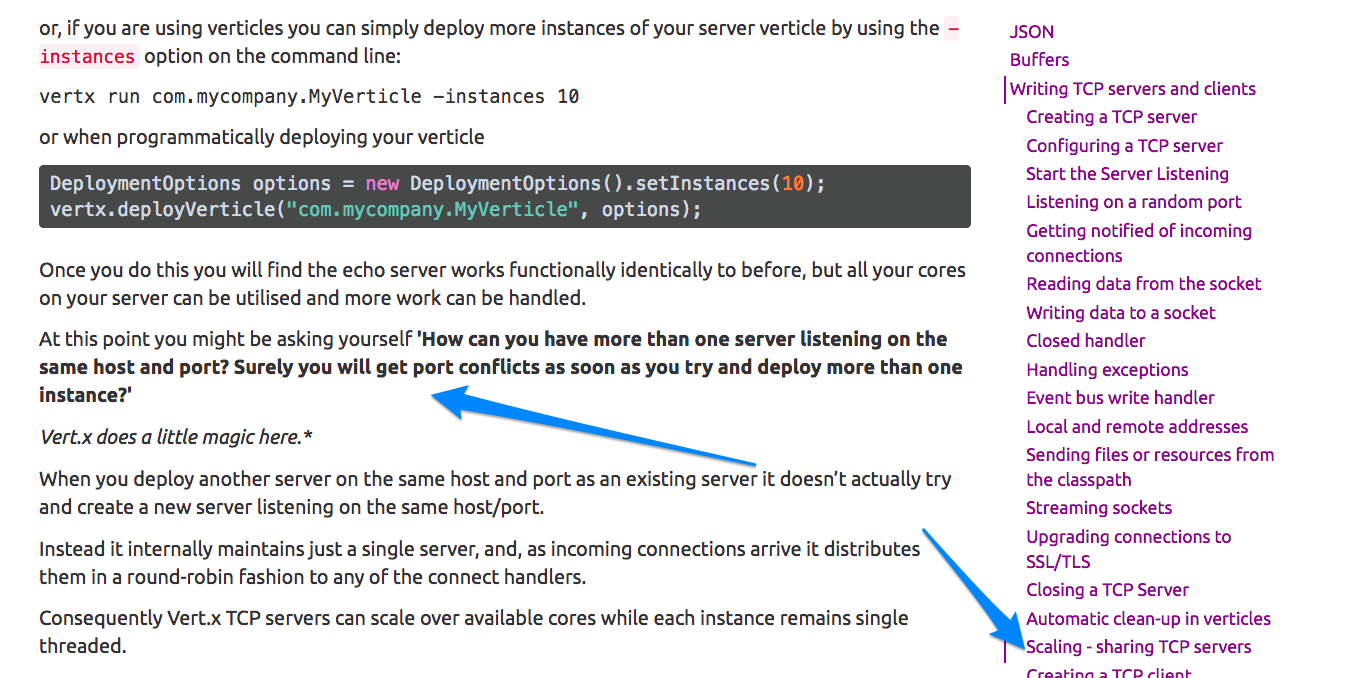
And I don't know whether this feature of vertx cause problem, because I use this feature to start 4 IO threads for listening incoming connections.
fujohnwang
on 17 Aug 2018
@fujohnwang when deploying verticles by it's classname or class file you will need to configure the SVM reflection json, as this is using reflection underneath. For example here's a minimal sample using for graal 1.0.0-rc6:
Main verticle:
package v;

public class Main extends AbstractVerticle {

  public static void main(String[] args) {
    Vertx.vertx().deployVerticle(Main.class, new DeploymentOptions().setInstances(4), deployment -> {
      if (deployment.succeeded()) {
        System.out.println("OK: " + deployment.result());
      } else {
        deployment.cause().printStackTrace();
      }
    });
  }

  @Override
  public void start() {
    System.out.println("I'm deployed!!!");
  }
}
you then build with:
```$GRAALVM_HOME/bin/native-image \
--no-server \
--delay-class-initialization-to-runtime=io.netty.handler.codec.http.HttpObjectEncoder,io.netty.handler.codec.http2.Http2CodecUtil,io.netty.handler.codec.http2.DefaultHttp2FrameWriter,io.netty.handler.codec.http.websocketx.WebSocket00FrameEncoder,io.netty.handler.ssl.JdkNpnApplicationProtocolNegotiator,io.netty.handler.ssl.ReferenceCountedOpenSslEngine \
-Dvertx.disableDnsResolver=true \
-H:+ReportUnsupportedElementsAtRuntime \
-H:ReflectionConfigurationFiles=reflection.json \
-jar fatjar.jar
And use the following `reflection.json`:

```json
[
  {
    "name": "v.Main",
    "methods": [
      { "name": "<init>", "parameterTypes": [] },
      { "name": "start", "parameterTypes": [] }
    ]
  }
]
You must declare that you want to keep the constructor and the start methods of the Main class otherwise SVM will tree shake it as there is no direct reference to them. With this example I can see the 4 prints:
I'm deployed!!!
I'm deployed!!!
I'm deployed!!!
I'm deployed!!!
 pmlopes
on 6 Sep 2018
pmlopes
on 6 Sep 2018
@fujohnwang also note that the segfault could be related to https://github.com/oracle/graal/issues/657
Just remove the prefer ipv4 system property and you might get a proper exception instead...
pmlopes
on 6 Sep 2018
@pmlopes thanks for your advice, as per your suggestions and read more docs, like this one: https://medium.com/graalvm/instant-netty-startup-using-graalvm-native-image-generation-ed6f14ff7692, I finally got my native-image run without any problem 👍
fujohnwang
on 7 Sep 2018
Related issues
 helloguo
·
3Comments
helloguo
·
3Comments
 sxend
·
3Comments
sxend
·
3Comments
 guaporocco
·
3Comments
guaporocco
·
3Comments
 sdeleuze
·
3Comments
sdeleuze
·
3Comments
 borkdude
·
3Comments
borkdude
·
3Comments