Gpytorch: ScaleKernel causes base kernel to act like a noise kernel.
Hi,
First, thanks for writing this package. I think it's awesome and I hope to contribute after I'm more familiar.
That said, I'm observing what I suspect is odd behavior. In a nutshell, I believe the ScaleKernel causes a kernel to be used like a noise kernel (only being applied to training data).
I'll try to demonstrate what I mean:
import numpy as np
import pandas as pd
import matplotlib.pyplot as plt
%matplotlib inline

import gpytorch
import torch

torch.set_default_tensor_type("torch.DoubleTensor")
Now I'll set up some fake training data:
```x = np.linspace(0,10,500)
beta = 10
offset = 2
sin_amplitutde = 20
sin_period = 2
noise_var = 10
y = xbeta + offset + np.sin(x2np.pi/sin_period)sin_amplitutde + np.random.normal(0,np.sqrt(noise_var),len(x))
def clean_ax(ax):
ax.grid(True)
for which in ['top','right']:
ax.spines[which].set_visible(False)
figsize=(10,6)
fig, ax = plt.subplots(figsize=figsize)
ax.plot(x,y,'*')
clean_ax(ax)
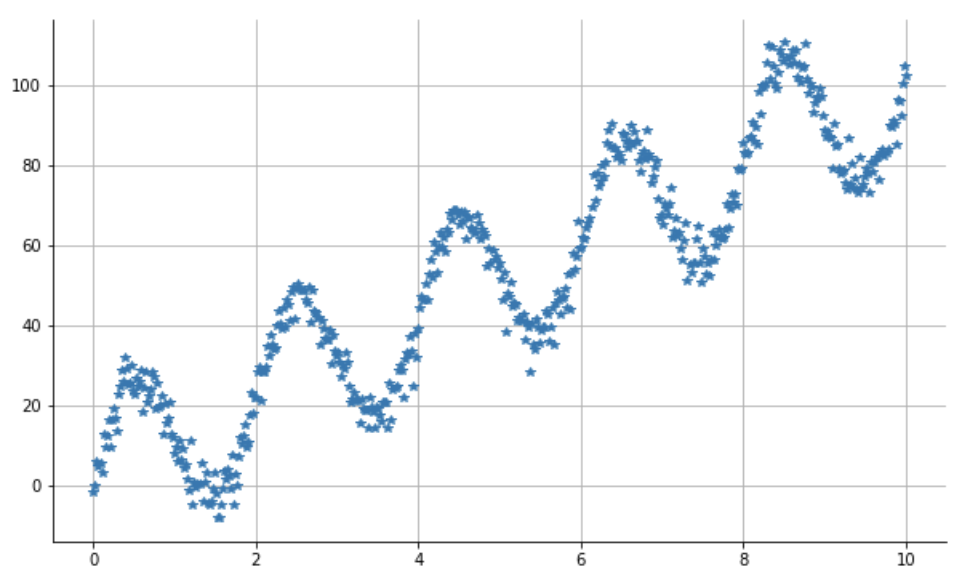
My goal will be to observe the left 70% of this and predict to the right.
I can do this with 2 features. One is the x axis and the other is the x axis mod the period length. We'll set up a GP to model the first feature with a linear kernel and the 2nd with an RBF.
split_point = int(len(x)*.7)
X = np.concatenate([x.reshape(-1,1),np.mod(x,sin_period).reshape(-1,1)],axis=1)
train_x = torch.from_numpy(X[:split_point,:]).to(torch.float64)
train_y = torch.from_numpy(y[:split_point]).to(torch.float64)
test_x = torch.from_numpy(X[split_point:,:]).to(torch.float64)
test_y = torch.from_numpy(y[split_point:]).to(torch.float64)
Now, this next function will accept a model and produce the predictions in a graph.
def prediction_graph_for_model(model):
model.train() # What does this do?
likelihood.train()

optimizer = torch.optim.Adam([
    {'params': model.parameters()},  # Includes GaussianLikelihood parameters
], lr=0.1)

# "Loss" for GPs - the marginal log likelihood
mll = gpytorch.mlls.ExactMarginalLogLikelihood(likelihood, model)

training_iter = 200
for i in range(training_iter):
    # Zero gradients from previous iteration
    optimizer.zero_grad()
    # Output from model
    output = model(train_x)
    # Calc loss and backprop gradients
    loss = -mll(output, train_y)
    loss.backward()
    if not i % 20:
        print('i: {0}, Loss: {1}'.format(i, loss.item()))
    optimizer.step()

# Get into evaluation (predictive posterior) mode
model.eval()
likelihood.eval()

# Test points are regularly spaced along [0,1]
# Make predictions by feeding model through likelihood
with torch.no_grad(), gpytorch.settings.fast_pred_var():
    y_test_pred = likelihood(model(test_x)).mean.numpy()
    y_train_pred = likelihood(model(train_x)).mean.numpy()

y_predicted = np.concatenate([y_train_pred,y_test_pred])

figsize = (10, 5)

fig, ax = plt.subplots(figsize=figsize)


ax.plot(train_x.numpy()[:,0],train_y.numpy(),'*',color='green',alpha=.5,label='training_data')
ax.plot(X[:,0],y_predicted,color='blue',alpha=.5,label='predicted')

ax.plot(test_x.numpy()[:,0],test_y.numpy(),'*',color='red',alpha=.5,label='actual')

clean_ax(ax)
ax.legend()

return fig, ax
Now we set up the model. The first way will work properly.
class ExactGPModel(gpytorch.models.ExactGP):
def __init__(self, train_x, train_y, likelihood):
super(ExactGPModel, self).__init__(train_x, train_y, likelihood)
self.mean_module = gpytorch.means.ConstantMean()
cov1 = gpytorch.kernels.LinearKernel(num_dimensions=1, active_dims=[0])
    #cov2 is the ONLY THING that will change between this model and the broken one.
    cov2 = gpytorch.kernels.RBFKernel(active_dims=[1])
    self.covar_module = cov1 + cov2

def forward(self, x):
    mean_x = self.mean_module(x)
    covar_x = self.covar_module(x)
    return gpytorch.distributions.MultivariateNormal(mean_x, covar_x)
likelihood = gpytorch.likelihoods.GaussianLikelihood()
model = ExactGPModel(train_x, train_y, likelihood)
prediction_graph_for_model(model)
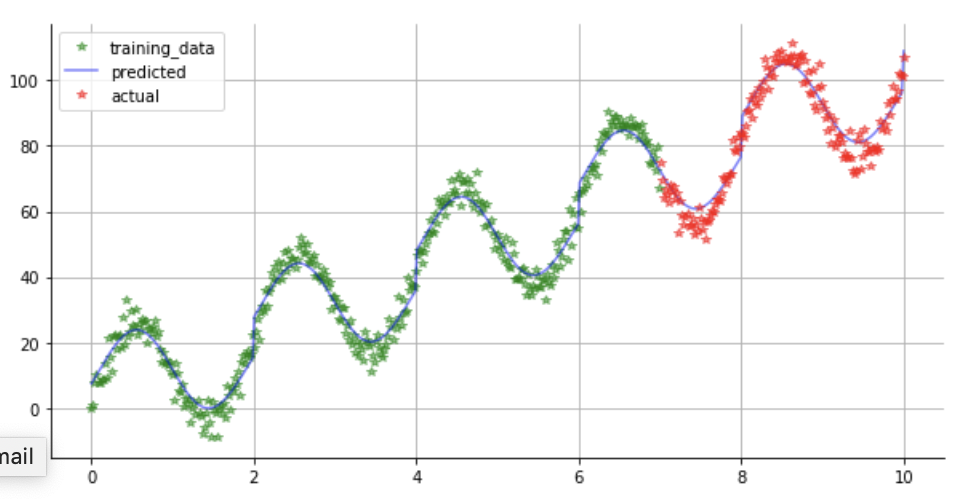
Now let's break it. We'll change just cov2 in the previous.
class ExactGPModel(gpytorch.models.ExactGP):
def __init__(self, train_x, train_y, likelihood):
super(ExactGPModel, self).__init__(train_x, train_y, likelihood)
self.mean_module = gpytorch.means.ConstantMean()
cov1 = gpytorch.kernels.LinearKernel(num_dimensions=1, active_dims=[0])
    #cov2 is now wrapped in a ScaleKernel
    cov2 = gpytorch.kernels.ScaleKernel(gpytorch.kernels.RBFKernel(active_dims=[1]))
    self.covar_module = cov1 + cov2

def forward(self, x):
    mean_x = self.mean_module(x)
    covar_x = self.covar_module(x)
    return gpytorch.distributions.MultivariateNormal(mean_x, covar_x)
likelihood = gpytorch.likelihoods.GaussianLikelihood()
model = ExactGPModel(train_x, train_y, likelihood)
prediction_graph_for_model(model)
```
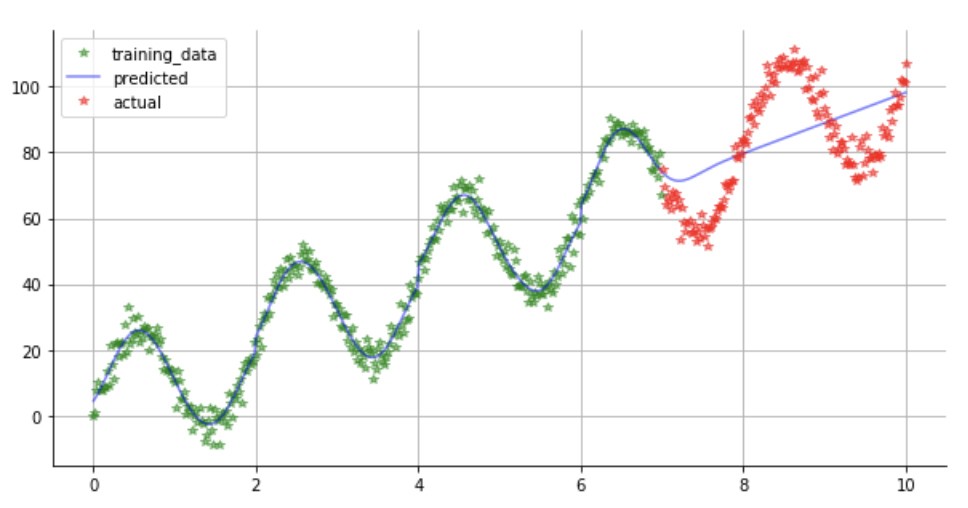
I've tried a few things to solve this, but I can't get it to work. I'd like ultimately to use the ScaleKernel, but it to extrapolate to the test data as well.
 Duane321
All 2 comments
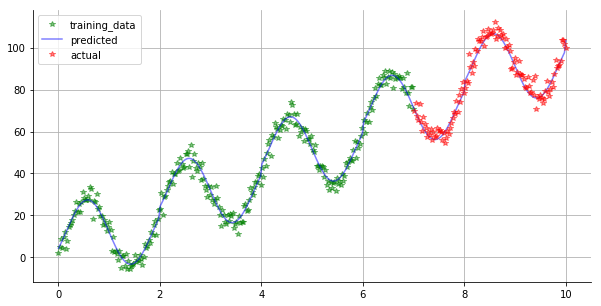
@Duane321 This ended up being a subtle bug in ScaleKernel effectively destroying the active_dims argument of its base kernel. The end result was that the RBF kernel ended up acting on the data in non modular arithmetic as well as the second feature, leading to the behavior you saw. I just pushed a fix to master, and now get this with your second model as expected:
Thanks for bringing this to our attention! We don't use the active_dims functionality often enough in house to have caught this :-).
 jacobrgardner
on 21 Feb 2019
jacobrgardner
on 21 Feb 2019
Closing because it looks like this was fixed (and tested)
 gpleiss
on 21 Feb 2019
gpleiss
on 21 Feb 2019
Related issues
 pinle-go
·
4Comments
pinle-go
·
4Comments
 rangerbottle
·
5Comments
rangerbottle
·
5Comments
 Floyx
·
4Comments
Floyx
·
4Comments
 Xiaodonghai
·
4Comments
Xiaodonghai
·
4Comments
 tzoiker
·
6Comments
tzoiker
·
6Comments
Most helpful comment
@Duane321 This ended up being a subtle bug in ScaleKernel effectively destroying the
active_dimsargument of its base kernel. The end result was that the RBF kernel ended up acting on the data in non modular arithmetic as well as the second feature, leading to the behavior you saw. I just pushed a fix to master, and now get this with your second model as expected:Thanks for bringing this to our attention! We don't use the
active_dimsfunctionality often enough in house to have caught this :-).